Deep Dive into OpenClaw's Source Code: Extreme Context, Local-First, and Intelligent Value-Add | AI Practitioners

At the heart of OpenClaw is extreme context. It's more of an AI control plane — its greatest strength isn't intelligence, but engineering innovation.
Local | Intelligence Augmentation | Operating System | Extreme Refinement | Industrialization
By Shen Yue
Intro
OpenClaw has taken the internet by storm, yet few have bothered to dissect how it actually operates under the hood.
In this installment of AI Practitioners, our featured practitioner is Shen Yue. He spent two weeks on a tedious, time-consuming, but valuable undertaking: downloading OpenClaw's source code from GitHub, tracing the execution chain from start to finish, and using AI to assist his analysis.
He was driven by one burning question: When we send OpenClaw a simple "hello," what exactly happens behind the screen? How does it transform this casual greeting into instructions a large language model can comprehend? How does it invoke tools, organize context, and return an answer?
Shen Yue is a former product manager from a major Chinese internet company — an "old-school" PM now focused on AI productization and Agent project implementation.
Through reading the source code, his understanding deepened considerably. Certain engineering details simply cannot be discovered through deployment guides and usage tutorials alone.
1. OpenClaw's Core Competence Is Context Engineering
From a systems perspective, OpenClaw's truly valuable asset is how it embeds user messages into a complete runtime: routing to which agent, associating which session history, loading which tools, assembling which skills, carrying which runtime metadata, attaching which workspace/context files, observing which channel rules.
This is precisely why it feels more attuned to you, more context-aware, more intent-comprehending — even proactively task-completing. This doesn't mean AI has achieved human consciousness, nor is it evidence that AGI has arrived ahead of schedule. Rather, it's "intelligence augmentation" achieved through exhaustive context assembly.
2. OpenClaw Is Actually a "Middleman"
Many assume OpenClaw implements complex model-calling logic internally. But examining the source code reveals that in the core attempt.ts, it simply passes the ball to an external SDK — Pi.
OpenClaw itself doesn't produce intelligence. It's more like an exceptionally capable general contractor. It handles all the dirty work (authentication, file I/O, tool invocation, context management), then feeds the SDK immaculately prepared data.
The core competitive advantage in future AI application development won't lie in how many model APIs you can call, but in how extreme you can make your information preprocessing and postprocessing.
3. OpenClaw Demonstrates "Writing Prompts Beautifully"
OpenClaw's system prompt explicitly translates tool capabilities, invocation style, safety boundaries, Workspace, Sandbox, Docs, Skills, Memory, Reply tags, Voice, and more into the prompt itself.
This approach is highly engineered and pragmatic. Large models don't naturally understand you; they're simply fed the most complete possible world state.
4. OpenClaw's Foundation Resembles a Local Message Operating System
Architecturally, it's more accurately a local-first message operating system: multiple channels in front, a unified control plane inside, with agent runtime, tools, nodes, session store, skills, web UI, CLI, and memory hanging below.
The project's README already makes this explicit: the Gateway is the control plane; the assistant is merely its product manifestation.
What should you actually understand it as? An AI operating system that unifies scheduling of messages, tools, context, and execution capabilities.
In conversations with AI bots, Shen Yue noted that from a product architecture perspective, OpenClaw's paradigm advancement equals that of Manus in 2025 — but with obvious drawbacks: excessive token consumption, severe hallucinations, long task execution times, and risks of system intrusion. "This architecture isn't for everyone. It better suits those with clear objectives who understand how to control AI outcomes."
Below is Shen Yue's source code dissection of OpenClaw. He analogizes this execution chain to a restaurant's customer service flow — from patron entry to dish delivery — breaking it down into 10 steps.
The following article contains minor edits and abridgments from Shen Yue's original text.
Step 1: Opening the Restaurant
OpenClaw positions itself as a local-first Gateway. Think of a "gateway" as a front door receiving customers — so the entire process begins not with any large model, but with Gateway startup.
OpenClaw is fundamentally not a chat box, but a local control platform. It first spins up its Gateway, establishing unified session, channel, tool, and event distribution capabilities, before messages from different channels can converge here.
The gateway startup process is shown below:
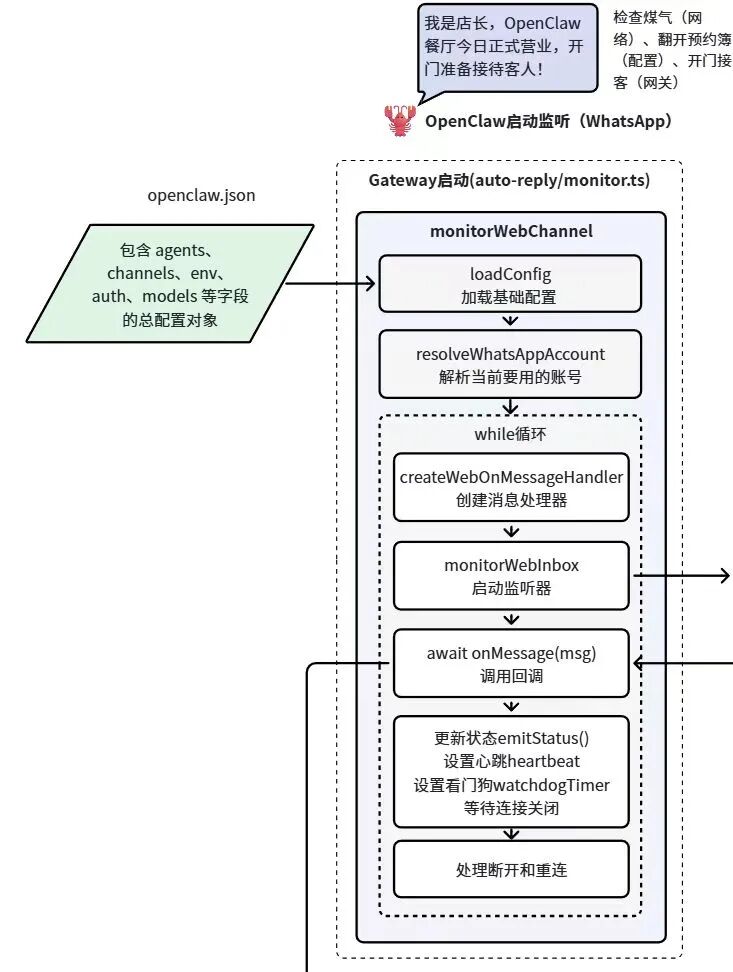
This code resides in: auto-reply/monitor.ts, executing the monitorWebChannel function.
It's like the restaurant manager opening the doors in the morning, checking that all equipment functions properly, connecting the front desk, kitchen, ordering system, and serving system, lighting the sign — putting OpenClaw in business, ready to receive guests at any moment. Without this layer, none of the subsequent intelligence can materialize.
Step 2: The Server Takes the Order
When a WhatsApp message arrives, the entry point isn't direct text forwarding to a large model. Instead, OpenClaw constructs a message listening and ingestion layer that first captures the platform's raw message.
In the source code, this layer is primarily handled by inbound/monitor.ts. The system first establishes a real-time WhatsApp connection and listens for message events. When a new message arrives, OpenClaw initiates a complete front-desk reception workflow. As shown below:
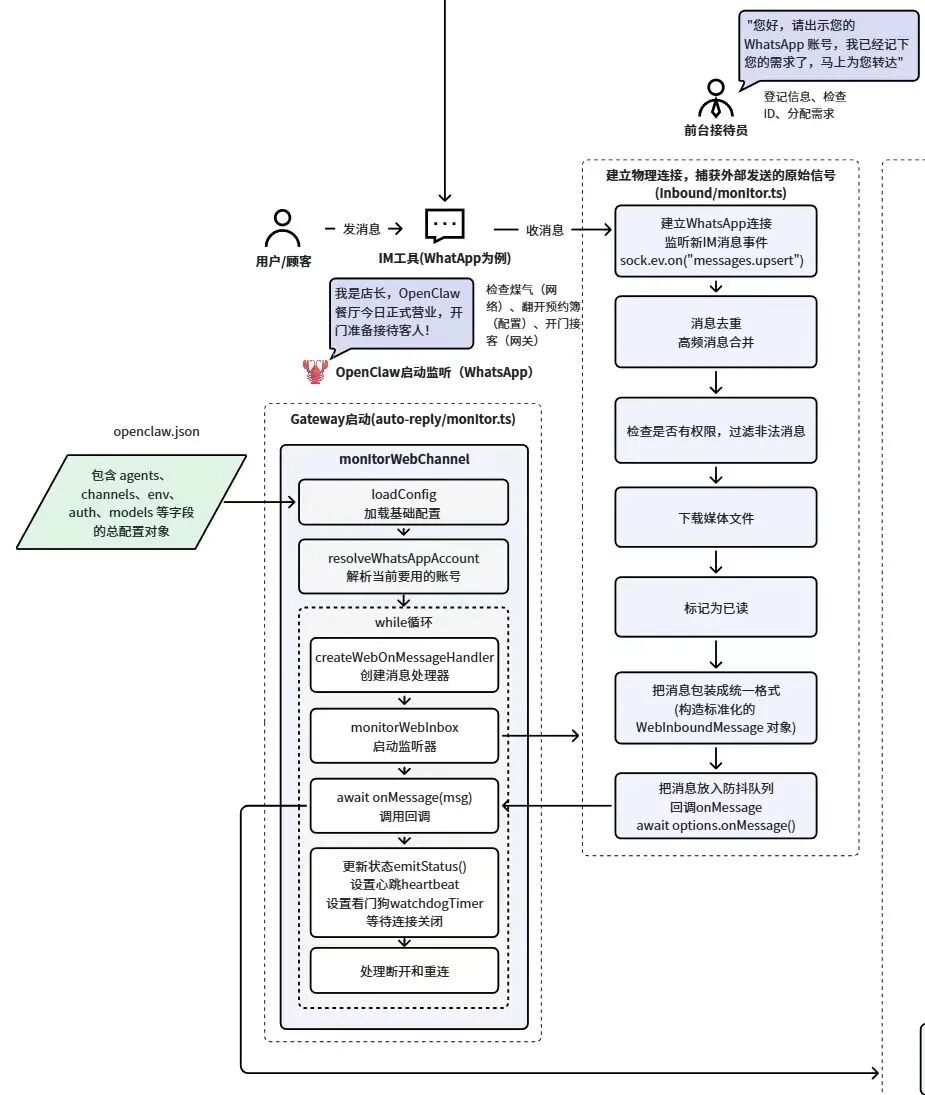
Specifically, this process involves several sequential steps:
First comes message deduplication and merging. In real-world environments, IM platforms frequently produce duplicate pushes or high-frequency message events. Processing these directly would easily cause the bot to reply redundantly. So OpenClaw first performs message deduplication and merges continuous messages within short time windows, preventing noise from disrupting downstream processes.
Next is permission and legitimacy verification. The system determines whether the message originates from permitted users or groups, and whether it satisfies trigger rules. Non-compliant messages are filtered out directly, never entering the Agent workflow.
This resembles the restaurant front desk first confirming whether a patron is someone the establishment is permitted to serve.
If the message contains attachments such as images or files, the system also downloads media files and saves them to the local working directory. This enables the Agent to access these files during reasoning — analyzing images, reading documents, and so forth.
Subsequently, the system marks the message as read, preventing the client from continuing to push the same message.
Once these foundational processes complete, OpenClaw uniformly encapsulates raw messages from different IM platforms into a standard structure.
Finally, this standardized message enters the system's debounce queue, preventing rapid-fire consecutive messages from the user, then triggers a callback. After the front-desk receptionist finishes registering the guest's information, they shout to the restaurant interior: "This table's guests are registered, ready for seating!" This shout is the callback.
In OpenClaw, this callback hands the prepared message to the Gateway, allowing the Agent system to continue processing.
The essence of this step: transforming a chaotic message from the external world into a standard event within the system.
Step 3: The Floor Manager Distributes Orders
If Step 2 represents the restaurant front desk completing patron registration, Step 3 resembles the floor manager beginning to distribute orders — the same guest ordering food, but some sent to the main hall, some to private rooms, some to the cold kitchen.
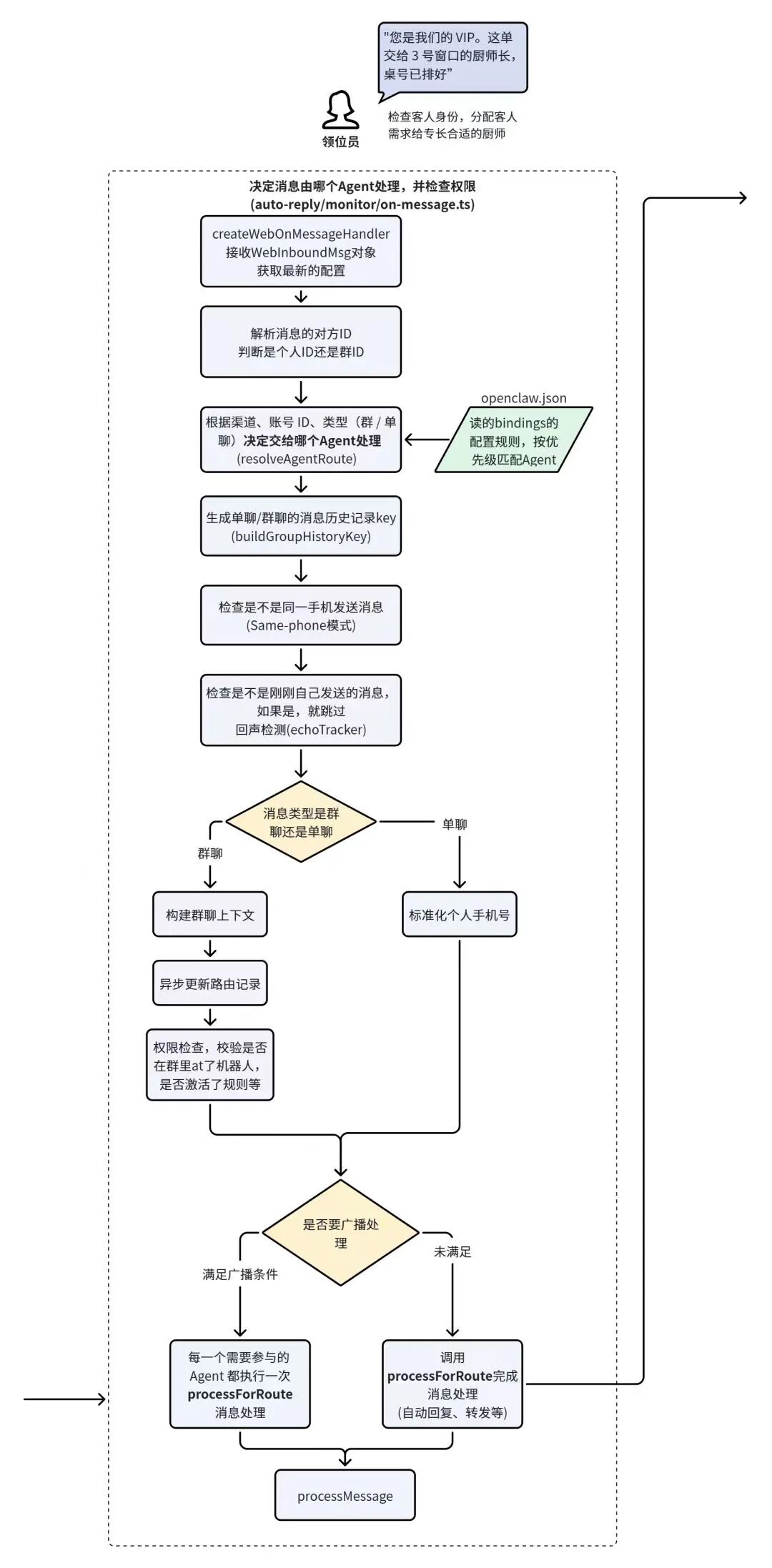
**After the message passes through the previous layer's processing, the system internally holds a standardized object: WebInboundMessage. Next, this message enters OpenClaw's routing module, primarily handled in the source code by auto-reply/monitor/on-message.ts.
This layer's task isn't processing message content, but rather routing messages to different agents' independent workspaces and independent sessions based on channel, account, session, and group rules. As shown below:
Many people's understanding of Agent systems assumes all messages go to the same AI, which then decides how to handle them. But OpenClaw's design more closely resembles a restaurant's dispatch system — different task types get assigned to different chefs.
At the code level, after entering this layer, the message first creates a message processing entry point through createWebOnMessageHandler. This entry receives the freshly generated WebInboundMessage object while re-reading the current system configuration. The re-read is necessary because OpenClaw's configuration is dynamically adjustable — Agent binding relationships, permission rules, etc. — and the system must ensure it's using the latest configuration.
Next, the system parses the message's directionality. It determines whether the message originates from a private user chat or a group chat, and further identifies the sender's ID. For example, in group chats, bots typically don't respond to all messages but must evaluate whether they've been @-mentioned, whether trigger rules are satisfied, etc.; in private chat scenarios, bots typically default to direct processing.
After confirming the message source, the system enters the real Agent routing decision phase. At this stage, it reads the bindings configuration in openclaw.json and uses the resolveAgentRoute function to determine which Agent should handle the current message. The logic here is a bit like a restaurant host assigning orders to different chefs. If a customer orders seafood, it goes to the seafood station; if it's barbecue, it goes to the grill cook. OpenClaw works the same way — different channels, different users, and different message types can all be bound to different Agents.
Once the Agent route is determined, the system also generates a history key for the current conversation: buildGroupHistoryKey. The purpose of this key is to associate the current chat with historical dialogue. Because in many cases, an Agent's response doesn't rely solely on the current message — it needs to incorporate previous context. For example, if a user just asked a question and their next message is simply a follow-up like "then what about the second option?", the system would have no way to understand this without the conversation history.
The system then performs some additional checks. In certain configuration modes, for instance, it determines whether the message comes from the "same device" (Same-phone mode) to prevent the bot from triggering itself and creating a loop of replies. It also conducts echo detection, filtering out messages it just sent through the echoTracker mechanism to avoid reprocessing these sync events.
After these basic checks, the system further distinguishes whether the current message is a group chat message or a private chat message. For group chats, the system first builds the group context, updates the corresponding routing record, and checks permission rules — whether the bot is allowed to reply in this group, whether it was @-mentioned, whether trigger conditions are met, and so on. For private chats, it standardizes the user's phone number into a unified format to identify the user.
Next, the system determines whether this message requires broadcast processing — that is, whether multiple Agents should participate simultaneously. Some systems, for example, might have both an information retrieval Agent and a summarization Agent work together. If broadcast conditions are met, the system has all participating Agents execute processForRoute separately. If broadcast isn't needed, the system only invokes the routing logic once.
Finally, when all routing decisions are complete, the message enters the actual processing function processMessage and is passed to the next layer.
Step 4: The Prep Cook
The chef officially takes the order and, before firing up the stove, gets all ingredients and tools ready.
In the source code, this layer mainly happens in get-reply.ts. You can imagine it as the chef, after receiving an order, first confirming a few things: who is this table of guests, have they been here before, any dietary restrictions, what ingredients are available in the kitchen today, which station to use.
As shown below:
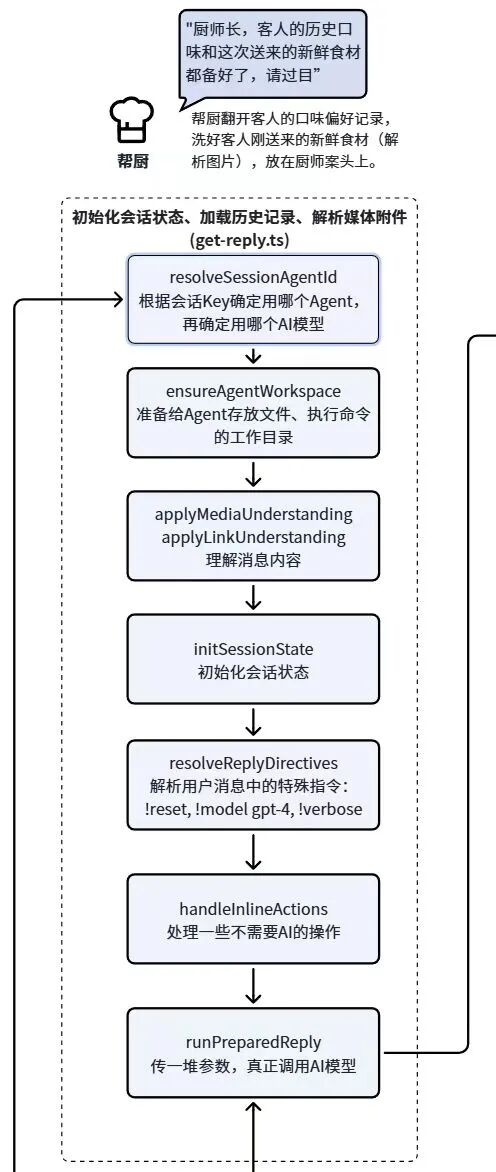
In OpenClaw, the first task is to determine the actual Agent for the current session through resolveSessionAgentId, while also deciding which AI model to use. Although routing was already done in Step 3, that step was more about determining who should take responsibility; here, the system reconfirms the current session's context state and selects the final model to use. For example, some Agents might default to Doubao seed-1.8, others might use a local model — these are all finalized here.
Next, the system executes ensureAgentWorkspace to prepare an independent working directory for the current Agent. OpenClaw's Agents frequently need to read and write files, download attachments, generate temporary results, and even execute tool commands during runtime. So the system maintains a dedicated workspace for each Agent to store these runtime files. It's like the prep cook laying out the cutting board, knives, and ingredients in front of the chef so they can operate at any moment.
If the user sends something other than plain text — images, links, or other media — the system also parses this information through applyMediaUnderstanding and applyLinkUnderstanding. This gives the Agent comprehensive understanding of the content before reasoning begins.
After media content parsing, the system initializes the current session state through initSessionState, loading in the historical conversation records. Many AI systems appear to remember what you said before; the principle behind this is that the system reloads the historical dialogue into context before each reasoning pass. OpenClaw completes this task at this layer, preparing a complete conversation environment for the actual reasoning to come.
Immediately after, the system executes resolveReplyDirectives, parsing special control commands in the user's message, such as !reset, !model gpt-4, !verbose, adjusting how the current session operates (skipping the session and directly executing built-in management commands).
The system then executes handleInlineActions to process operations that don't require AI reasoning. Certain simple commands, status queries, or system-level operations may be completed directly here without calling a large model.
When all this preparation work is finished, the system finally enters runPreparedReply, packaging all prepared parameters — including session context, model selection, tool environment, user message, and more — and handing them off to the subsequent process.
In other words, by the end of Step 4, OpenClaw still hasn't actually started "thinking." It has merely completed extensive behind-the-scenes preparation: confirming the Agent, preparing the workspace, understanding media content, loading historical dialogue, parsing control commands, and organizing the reasoning environment.
Step 5: The Head Chef Steps Up
This step is relatively straightforward, occurring in get-reply-run.ts. The core function is runPreparedReply, whose purpose is to convert the user message into a complete model runtime configuration. As shown below:
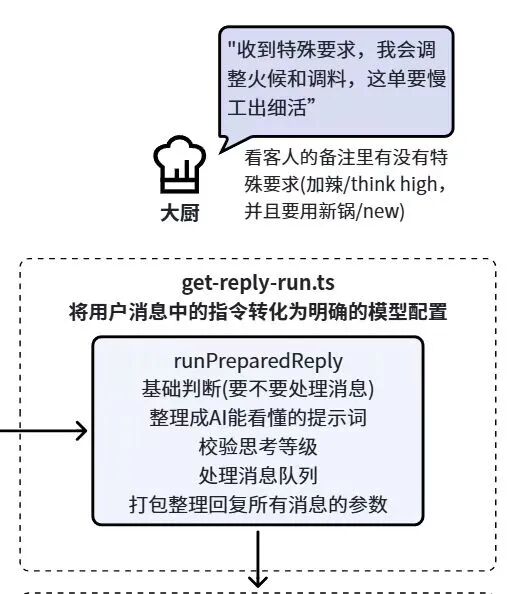
The system uses runPreparedReply to determine whether the current message truly needs to enter the AI reasoning flow. Certain system commands, status queries, or messages already handled by previous processes may simply terminate here.
Next, it organizes the current session information into a prompt structure that the model can understand, and also adjusts the model configuration based on special commands in the user's message. For example, the user might include a marker like /think high in their message, indicating they want the model to use higher reasoning intensity; or a /new marker, signaling they want to start a fresh session environment. The system parses these out at this layer and converts them into explicit model runtime parameters.
Beyond these explicit commands, the system also validates the current reasoning's thinking level and execution strategy. Different tasks may require different degrees of reasoning depth — simple Q&A versus complex task planning, for instance, may have different model configurations. These determinations are all completed at this stage.
At the same time, the system processes the message queue in the current session, ensuring these messages enter the reasoning flow in the correct order without interfering with each other.
When all this work is completed, runPreparedReply organizes all information into a complete parameter package and passes it to agent-runner.ts to queue for the next step.
Step 6: Kitchen Dispatch
In a restaurant, after an order is placed, cooking doesn't start immediately. Instead, the order goes into the kitchen's queue system, ensuring chefs handle orders one by one and don't get overwhelmed when many orders come in at once.
In OpenClaw, this layer is mainly handled by agent-runner.ts. It manages the complete lifecycle of Agent execution. When many people think about AI systems, they only focus on how the model answers questions. But in real systems, without a stable execution scheduling layer, AI can easily suffer from concurrency chaos, duplicate execution, or context confusion.
The specific execution flow is shown below:
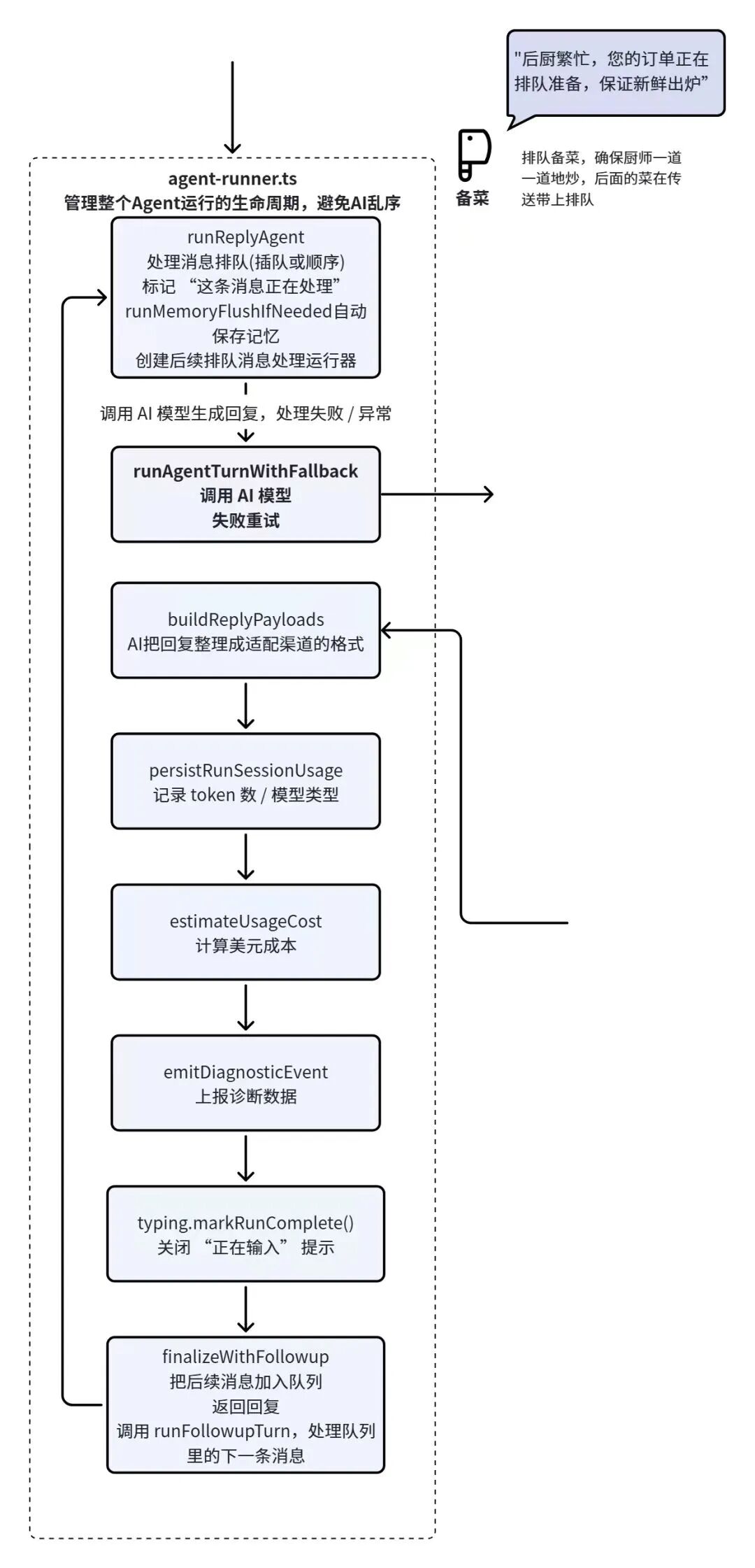
After a message enters this layer, the system calls runReplyAgent to place the message into the processing queue and marks the current message as "being processed."
At the same time, it executes an operation called runMemoryFlushIfNeeded, automatically saving the current session's memory state when necessary. During long conversations, the system needs to continuously accumulate historical session information. If the length isn't controlled in time, it will burst the context window. So when session information reaches the context window limit, it needs automatic compression and persistence to memory files. This corresponds to OpenClaw's memory mechanism.
When these preparations are complete, the system finally enters the actual AI call flow: runAgentTurnWithFallback. The name itself reveals that this layer not only handles model calls but also includes a failure retry mechanism. If a model call fails — due to network issues or service anomalies, for example — the system doesn't immediately terminate but attempts to re-execute. This is extremely important in production environments because AI services aren't always stable.
Once the model successfully generates a response, the system uses buildReplyPayloads to format the result for the current channel. It then logs the run's usage statistics through persistRunSessionUsage, saving details like token count and model type. The system also calculates the approximate cost of this inference via estimateUsageCost. For enterprise systems, this step is critical — because AI call costs are typically tied directly to token consumption, and without proper logging and tracking, cost management becomes nearly impossible.
After these records are complete, the system triggers emitDiagnosticEvent to report diagnostic information. This data is usually sent to a monitoring system to observe the current Agent's runtime status — whether any anomalies occurred, how long the run took, and so on. This way, operations staff can keep tabs on the health of the AI system at all times.
Next, typing.markRunComplete() dismisses the "typing..." indicator so the user knows the response is ready. Then finalizeWithFollowup returns the current reply to the user while checking whether any follow-up messages need processing. If there are new tasks in the queue, the system continues by calling runFollowupTurn to handle the next message. This creates a stable, looping mechanism for the entire system.
To extend the restaurant analogy: this step is like having a dedicated order management system in the back of house. Every ticket gets pinned to the kitchen board, and the chef works through them one by one. When a dish is finished, the system logs how much ingredient was used and what the cost was. If new orders come in, the kitchen simply moves on to the next ticket.
Step 7: The Head Chef Cooks
The preceding steps have completed queuing, status marking, memory persistence, and dispatch preparation. Now the layer actually responsible for executing the task takes over. But note: the model hasn't started inferring yet — this is still execution preparation and fault-tolerance setup.
The relevant source code lives primarily in auto-reply/reply/agent-runner-execution.ts, with the core entry point being runAgentTurnWithFallback from the previous step. As the function name suggests, this layer's central task is to wrap the entire AI execution into a retryable, switchable, recoverable runtime process before the model is actually called. Continuing the restaurant analogy, Step 7 is when the head chef finally steps up to the stove, spatula in one hand and fire extinguisher in the other, making sure nothing goes wrong when the cooking starts.
As shown in the middle section of the diagram below:
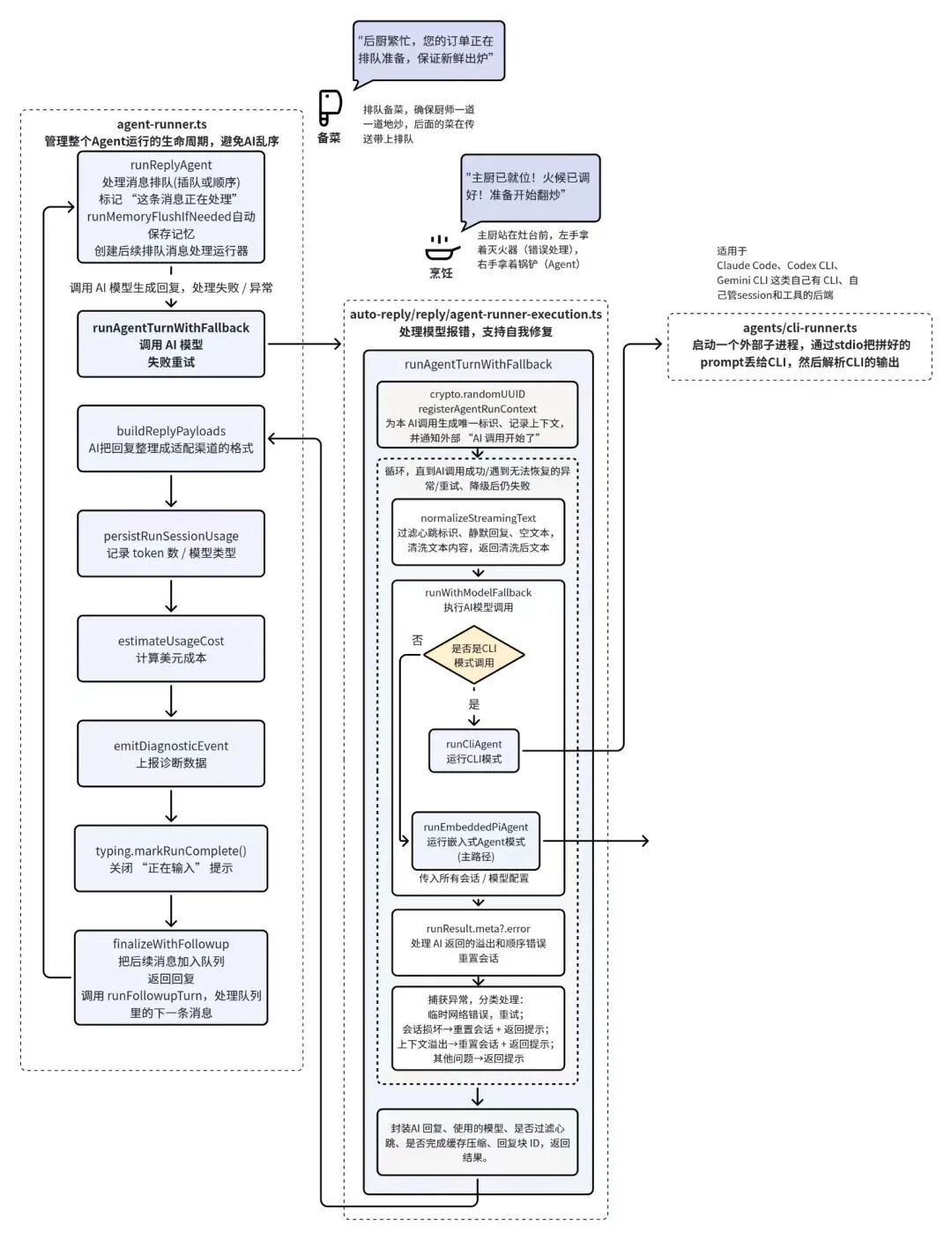
Specifically, the system first generates a unique run identifier via crypto.randomUUID, then registers this AI call's context through registerAgentRunContext. Think of this as the back of house assigning a ticket number and logging it on the management board before starting work: who is cooking this dish, when it started, and which processing pipeline it's on. The benefit is that if something goes wrong later, the system knows exactly which run to trace — rather than having a chaotic, unaccountable mess.
Next, the system enters a loop execution framework designed so that if a model call fails, it doesn't immediately give up. Instead, it follows preset policies to decide whether to retry, degrade, or switch backends.
Before selecting an execution path, the system performs normalizeStreamingText. This is essentially a cleanup pass on the input/output environment, filtering out meaningless jump markers, silent content, empty text, or anything else unsuitable for further processing. Like a chef wiping down the counter and clearing impurities from the pan before lighting the fire, it ensures the workspace is clean before execution begins.
Only then does the system enter runWithModelFallback. It first checks whether this is a CLI mode run. If so, it enters runCliAgent, handing the prepared prompt to an external CLI backend for execution — such as Claude Code, Codex CLI, or Gemini CLI, which have their own session and tooling ecosystems. In this case, OpenClaw functions more like a control tower, delegating the task to an external chef.
If not in CLI mode, the system proceeds to runEmbeddedPiAgent, entering embedded Agent mode. This is OpenClaw's default main path. Here, the session, model configuration, and runtime parameters prepared in earlier steps are passed along. Note: this is still setting up the chef, pan, fire, and recipe — not the actual moment of cooking.
Throughout this process, the system continuously checks the returned results for anomaly signals: whether the session is broken, whether context has overflowed, whether sequencing errors occurred. If problems are detected, the system decides here whether to reset the session, flag the anomaly, or terminate early. If these foundational conditions aren't right, it addresses the infrastructure first rather than forcing ahead blindly.
Finally, this layer uniformly catches various exceptions during execution and handles them by category. Temporary network errors may trigger retries; session corruption may lead to session reconstruction; context overflow may prompt cleanup before continuing; other issues are converted into returnable prompt messages.
Once all of this completes, the system packages a standardized result object indicating which model will be used after this preparation, whether filtering was triggered, what the current chunk ID is, and whether this preparation round is complete.
Step 8: Cooking to the Recipe
In the previous step, the head chef completed the final prep before firing up the stove: confirming the execution path, deciding whether to use CLI or embedded Agent, whether backup plans were in place, and how to retry on failure. In other words, the pan, fire, ingredients, recipe, and backup burner are all confirmed. What actually does the cooking now is runEmbeddedPiAgent in the agents/pi-embedded-runner/run.ts layer.
As shown in the diagram below:
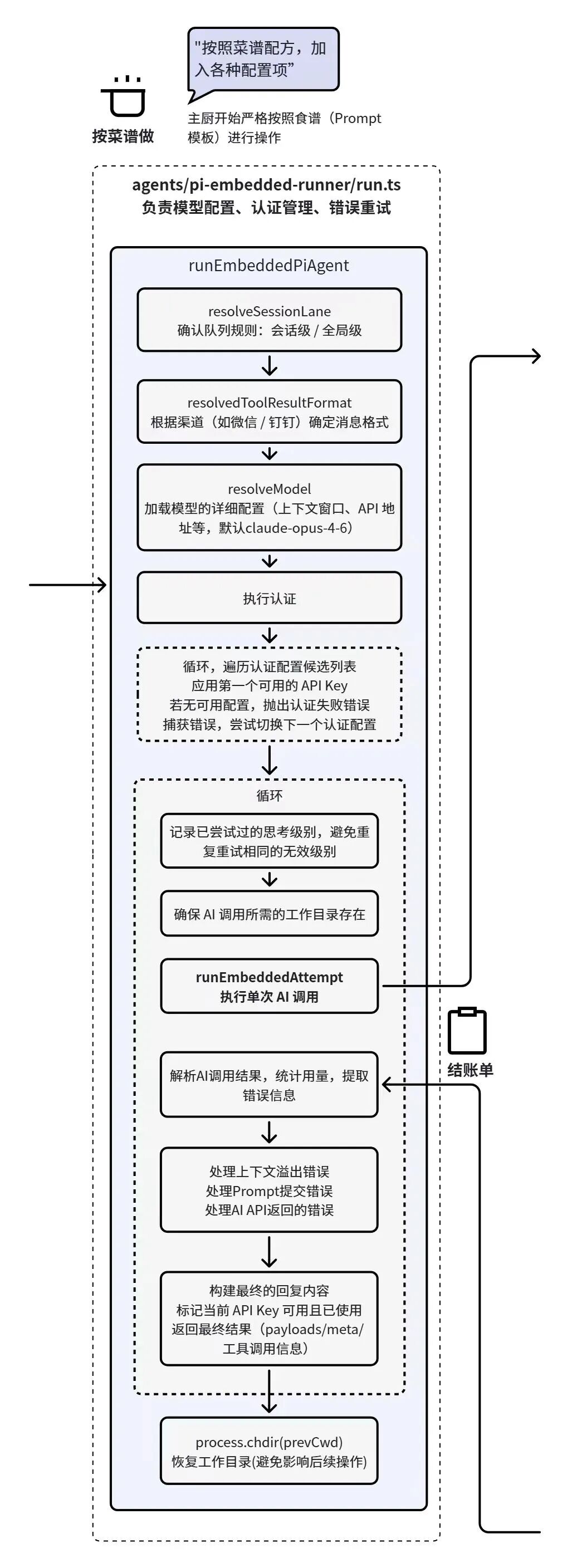
runEmbeddedPiAgent performs several operations:
First is resolveSessionLane, confirming which queuing rules this call should follow — session-level sequencing or a higher-level global sequence. Think of this as the back of house first confirming whether this dish belongs to this private room's dedicated queue or is part of a kitchen-wide unified dispatch. Different task types have different queuing and resource occupancy rules.
Next comes resolvedToolResultFormat, which determines how output content should be structured based on which channel the current message came from. Different platforms have different messaging capabilities — some suit plain text, others support block content, and still others have varying requirements for attachments, citations, and segmentation. Before actually calling the model, the system must already know: is this dish being plated for table service, packed for takeout, or split into small portions served sequentially?
Then the system enters resolveModel, filling in the details of the model to be used: model name, context window, API endpoint, calling method, default parameters, and so on. Like the chef confirming which stove setup, seasoning standard, and pan to use.
Going further down, the system locates the available credentials for this call. The source code doesn't just accept a single fixed key — it iterates through a set of authentication configuration candidates, prioritizing the first available API key. If the current authentication fails, it logs the error and attempts to switch to the next authentication configuration.
After authentication passes, the system enters an internal loop that performs a single AI call attempt via runEmbeddedAttempt. It hands the prompt, session history, tooling environment, model parameters, authentication info, and working directory to the underlying Agent runtime, formally initiating the request to the model.
Of course, this single call doesn't end when the request goes out. Immediately after the call completes, the system parses the result, tallying token usage, checking for anomalies, and verifying whether any tool calls errored. Like writing up the bill — logging today's ingredient usage, costs incurred, and any problems that arose, all in one go.
If issues are found — context overflow, prompt submission exceptions, AI API errors — these are identified and categorized here. Once handling is complete, the system begins constructing the final reply content, including payload, meta information, tool call results, and status such as whether the current API key has been verified as usable. What the upper layer receives is a standardized, already-organized result object ready for further flow.
The final step executes process.chdir(prevCwd), restoring the working directory to avoid affecting subsequent calls.
Step 9: Firing Up the Wok
The source code for this layer is in agents/pi-embedded-runner/run/attempt.ts, with the core function being runEmbeddedAttempt.
At this layer, OpenClaw is no longer just preparing the environment — it formally enters the Agent loop and actually initiates the request to the large model.
As shown in the diagram below:
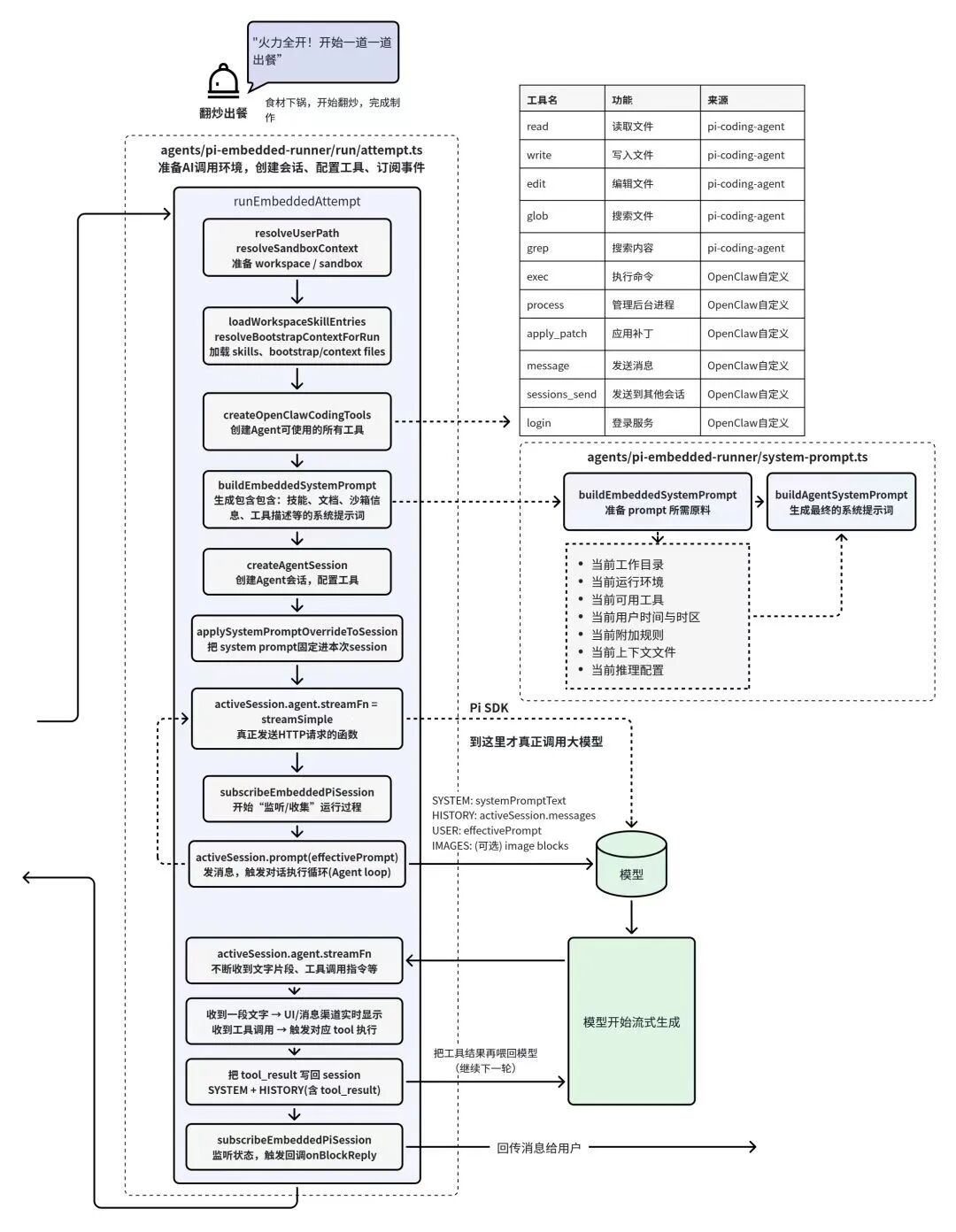
After entering this step, the system first prepares the complete runtime environment. At the start of the function, resolveUserPath and resolveSandboxContext determine the current Agent's working directory and sandbox environment, ensuring that subsequent file reads, command executions, or temporary file generations all happen within a controlled workspace.
Next, the system loads the skills and context files available to the current Agent, such as loadWorkspaceSkillEntries and resolveBootstrapContextForRun. These steps load various capabilities from the current project — skill files, context documentation, or initialization configs. For the Agent, this content is like a thick kitchen manual containing the restaurant's cooking rules, signature recipes, and operating procedures.
The system then executes createOpenClawCodingTools. This step creates all tools available to the Agent: reading files, writing files, searching code, executing commands, and so on. The tool list on the right side of the diagram is what gets prepared at this layer.
Notably, some of these tools are implemented by OpenClaw itself — exec, process, apply_patch, and others — while many come from third-party packages, such as Pi's pi-coding-agent providing read, write, edit, glob, grep, and similar tools. In other words, when we see the Agent reading code, modifying files, or executing commands, the capability is actually provided by multiple tool systems working together, not by OpenClaw alone.
Once the tool environment is ready, the system enters buildEmbeddedSystemPrompt, followed by buildAgentSystemPrompt to generate the system prompt. This layer reads substantial runtime information and assembles it into a very long system prompt. Current working directory, runtime environment, user time and timezone, available tools, system rules, context files, reasoning configuration — all of this gets written into the system prompt and sent to the model together.
This step is actually one of the core reasons OpenClaw can appear "quite smart." Before the model begins reasoning, it already has access to extremely complete contextual environment. It doesn't just know what the user just said; it also knows what files exist in the current project, what tools are available, what the system allows and forbids. What ultimately gets passed to the model is never as simple as "one user sentence + a role prompt" — it's an entire package of runtime environment. Like a head chef who doesn't just hear "stir-fry pork with green peppers" and start cooking, but simultaneously knows what ingredients are in the kitchen today, which burners are available, what dietary restrictions the guest has, what back-kitchen rules apply, whether this table is a VIP member, and where they are in the meal sequence.
But this is also a double-edged sword. In many cases, this system prompt becomes extremely long. The system not only injects skill documentation but may also directly load project explanatory files — README.md, ARCHITECTURE.md, SOUL.md, and even daily generated memory files memory/*.md. When all this content enters the context window together, the model gains more complete environmental information, but simultaneously consumes substantial tokens. And if the context grows too long, it can dilute the model's attention or even trigger context window overflow issues.
After building the system prompt, the system directly imports Pi's createAgentSession to create an Agent session, binding these tools, context, and rules to the current session. Then through applySystemPromptOverrideToSession, the freshly generated system prompt gets fixed to this session. Only at this point is the entire Agent runtime environment truly prepared.
There's a very important fact in this step that many people don't know: the code that actually calls the large model isn't in OpenClaw at all — it's in a third-party dependency, the Pi SDK (the packages depended upon here include pi-ai, pi-agent-core, pi-coding-agent, pi-tui).
OpenClaw here is more like the kitchen's dispatch system: it prepares the ingredients, environment, and recipes, then hands the entire package to an already-trained chef team for execution. That chef team is the Pi SDK. The green section you see in the diagram is the execution logic that Pi handles.
In the code, activeSession.agent.streamFn establishes a streaming request function, then calls activeSession.prompt(effectivePrompt) to actually send the request to the large model. During this process, the Pi SDK manages the entire Agent loop: model generating text, triggering tool calls, receiving tool results, then continuing to generate the next round of content.
In other words, OpenClaw doesn't directly write HTTP requests to call the model; instead it completes actual model calling and looped reasoning through Pi's provided Agent Runtime. This point is particularly important, because many people mistakenly assume OpenClaw's intelligent main loop is entirely hand-written. In reality, it's more like wrapping its own channel access, tool injection, system prompt assembly, session management, and delivery layer around the Pi runtime.
Finally, because it's streaming generation, the model doesn't return a complete answer all at once, but outputs content segment by segment. After the session is established, the system listens through subscribeEmbeddedPiSession for events like message_start, message_update, message_end, tool execution start and end, turn start and end, agent start and end, auto_compaction, and so on. Then during the streaming output process, it triggers callbacks like onPartialReply and onBlockReply, pushing each freshly generated segment of content to the frontend channel as quickly as possible.
The typewriter effect you see in the chat window, with text appearing character by character, is the event subscription and block-level streaming distribution mechanism already built on the backend. In the restaurant analogy: the chef hasn't finished all the dishes, but the server is already waiting by the stove — as soon as one dish is ready, it's carried out immediately, without waiting for the entire table to be complete.
And if the model triggers a tool call, the system executes the corresponding tool, then writes the tool return result back into the session history to continue the next round of reasoning. This looping process is the classic Agent Loop.
Step 10: Plating and Serving
If Step 9 is the back kitchen completing the entire cooking process, then Step 10 is bringing the finished dish to the guest's table.
This layer no longer involves model reasoning or the Agent's internal loop. It's responsible for organizing the previously generated results and sending them back to the user through the appropriate message channel.
In the source code, this step mainly happens in auto-reply/monitor/process-message.ts. The core logic here is dispatchReplyWithBufferedBlockDispatcher: receiving the AI's already-generated reply, then sending this content back to the chat platform in the appropriate manner.
As shown in the upper left of the diagram below:
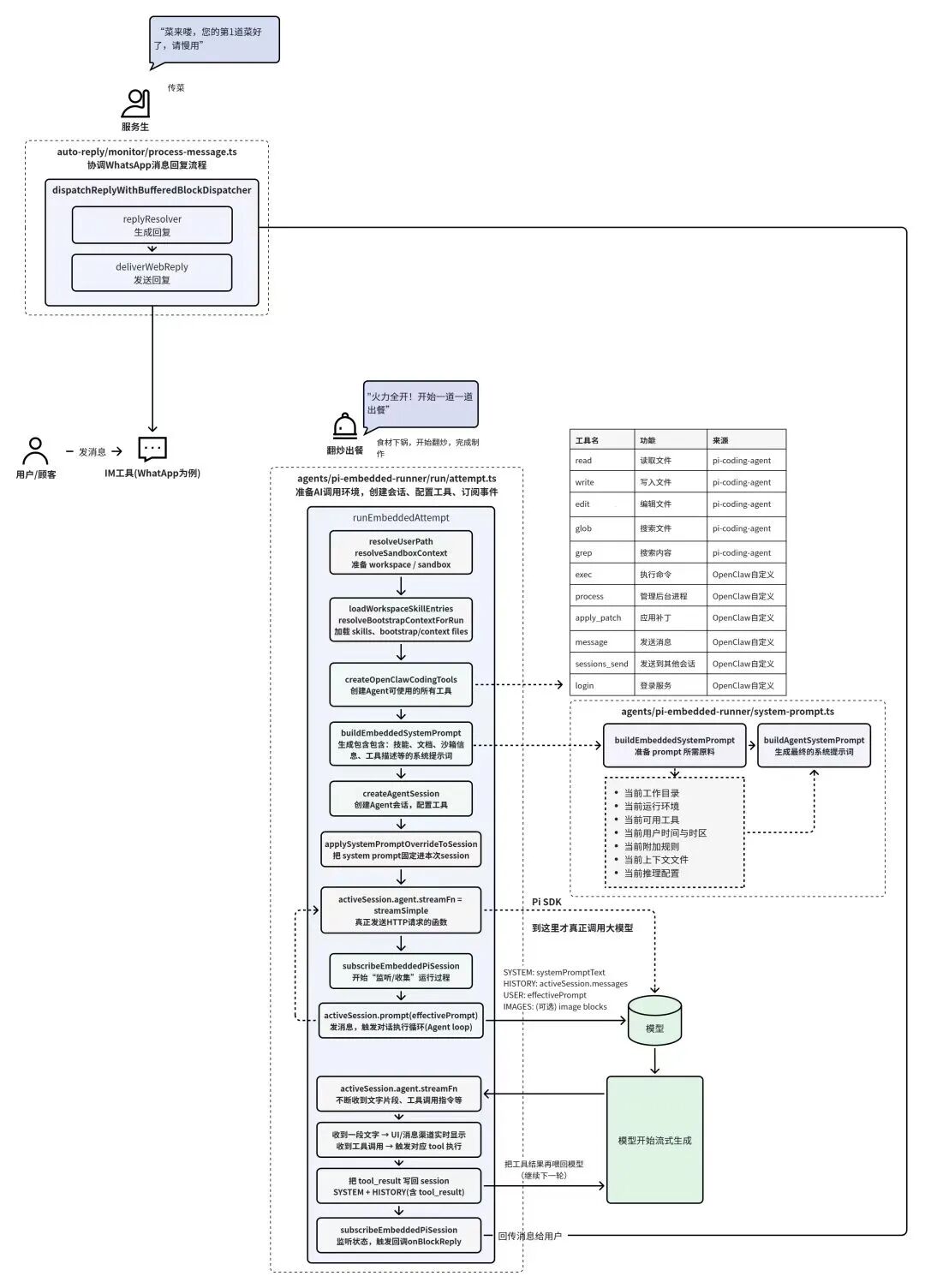
The reason this layer is needed: in Step 9, the model's output returns in streaming segments. The system constantly receives new text fragments or tool call results, then gradually assembles them into a complete reply. So before actually sending to the user, there needs to be a unified processing layer responsible for organizing these fragments, ensuring the final output conforms to the current platform's message format.
The entire process usually starts from replyResolver, receiving results from the Agent runtime layer, including text content, tool call information, block IDs, and other data. The system then converts this content into a final sendable reply structure — if the message needs to be sent in segments, or contains different types of content blocks, this step handles it all uniformly.
The system then calls deliverWebReply. Depending on the current channel — WhatsApp, Telegram, or other IM platforms — the system calls the corresponding API to push the organized reply content to the user. For the user, this step is simply that reply appearing in the chat window.
Using the restaurant analogy: this step is like the server bringing out the dish the back kitchen just finished. The guest doesn't see the queuing, prep, wok work, or seasoning — only a completed dish placed on the table. The server's job is ensuring this dish accurately reaches the correct table.
Meanwhile, in streaming reply scenarios, this "serving process" may also happen in batches. Like some restaurants serving appetizers first, then mains, then dessert. After receiving each segment of model-generated content, the system can immediately send it out through the message channel. So what users see in the chat window is typically a reply that appears segment by segment, rather than waiting a long time for a complete answer to display all at once.
When all content has been sent, this round of message processing officially concludes. The entire system returns to listening state, awaiting the next user message. From this point, a user message has completed its full operational loop: entering OpenClaw, through gateway listening, message ingestion, routing decision, session initialization, task queuing, execution preparation, Agent reasoning, and finally reply delivery.
The whole process is essentially like a well-organized kitchen: front desk takes orders, the lead distributes them, back kitchen preps, the head chef cooks, servers deliver dishes. Each layer has clear division of labor, and OpenClaw's code structure is fundamentally a software reimplementation of this workflow.