A Billion Workers Disrupted: With GPT-4 Integration, Can the New Office Suite Write Articles and Build Decks on Its Own? | BlueRun Ventures

Microsoft Drops a "Bombshell"
The day GPT-4 upends how ordinary people work is arriving fast.
Microsoft's Microsoft 365 Copilot, unveiled this morning, gives everyone their own Iron Man-style JARVIS — an AI that truly works alongside you, co-editing Word documents, turning paragraphs into PowerPoint decks, analyzing trends in Excel, visualizing data, and more...
One framing is about to change: AI is no longer just "empowering" humans, but genuinely "collaborating" and "co-creating" with them. Microsoft VP Jared Spataro said at the start of the launch event: "A hundred years from now, we will look back at this moment and say, that was the true beginning of the digital age." Today's article takes you back to this historic moment —

The war among Silicon Valley's tech giants has reached a fever pitch.
Barely had Google announced AI tools integrated into Workspace when Microsoft rushed out its own launch event, wasting no words before dropping its office software bombshell — Microsoft 365 Copilot, once again dazzling the world.
From now on, whether it's Word, PowerPoint, Excel, Outlook, Teams, Microsoft Viva, or Power Platform, all these office applications will receive GPT-4's boost!
In other words, through Copilot, we can effortlessly wield AI tools through the most universal interface of all: natural language.
Microsoft CEO Satya Nadella stated that today marks a milestone, meaning our interaction with computers has entered a new phase, our way of working will be forever changed, and a new wave of productivity explosion is about to begin.
Is Microsoft out to revolutionize the lives of workers worldwide?
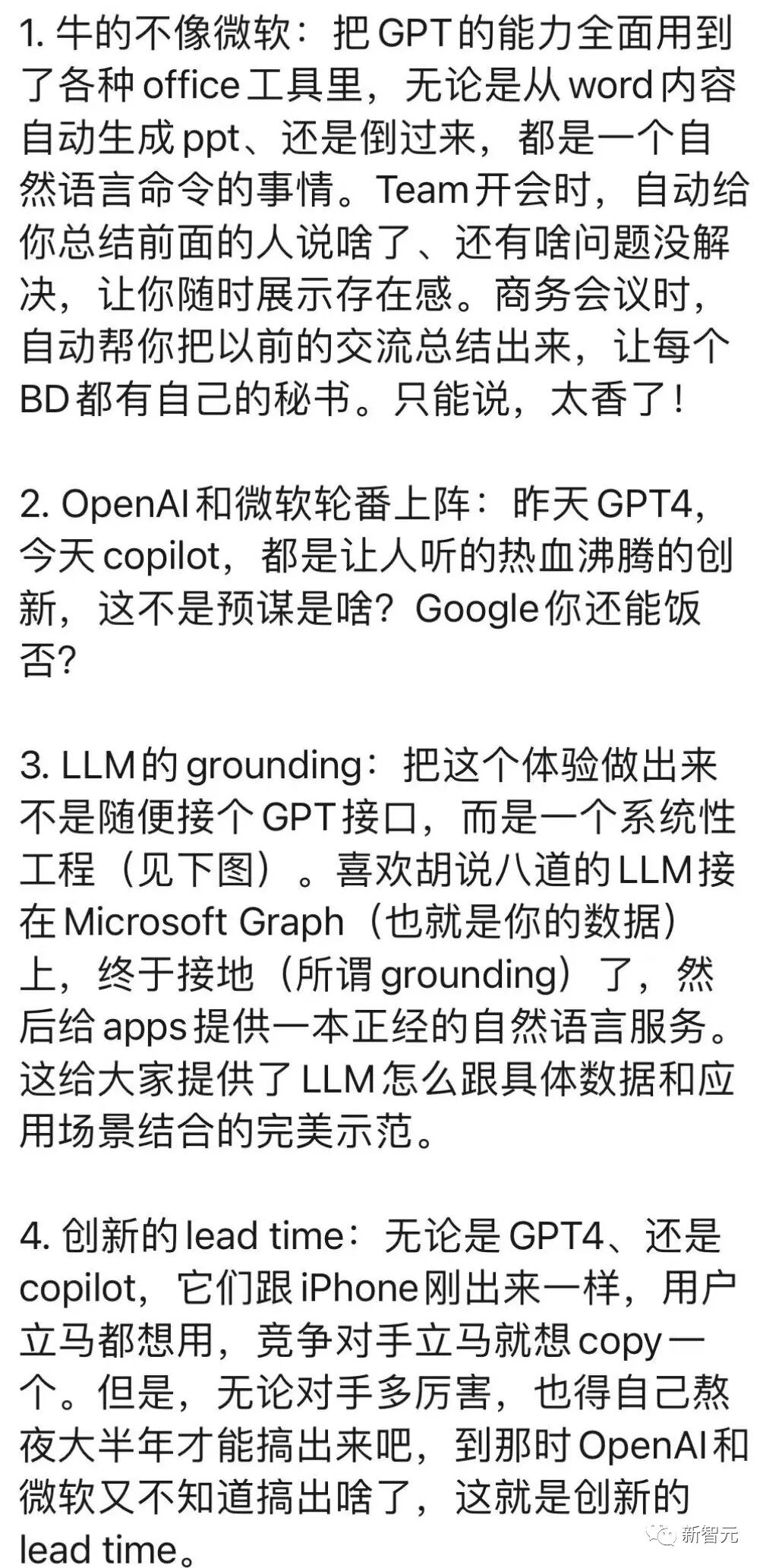
After watching the launch, Zhifei Li summarized his reaction: utterly mind-blowing, simply "too impressive to feel like Microsoft" — a 48-year-old company rejuvenated with youthful energy, truly unprecedented.
01
Everything you can think of, now powered by GPT-4!
Remember that little assistant Clippy? (That's a reference only older readers will get.) Now, GPT-4 appears right where Clippy used to be — everywhere across the full suite of office software.
And because Copilot can be called upon throughout Office, all your applications are essentially interconnected. Microsoft's Microsoft 365 Copilot system creates a powerful union of Word, Excel, PowerPoint and other office apps, Microsoft Graph, and GPT-4. All software connected, with GPT-4 moving through it all.

Word: Your thesis is sorted
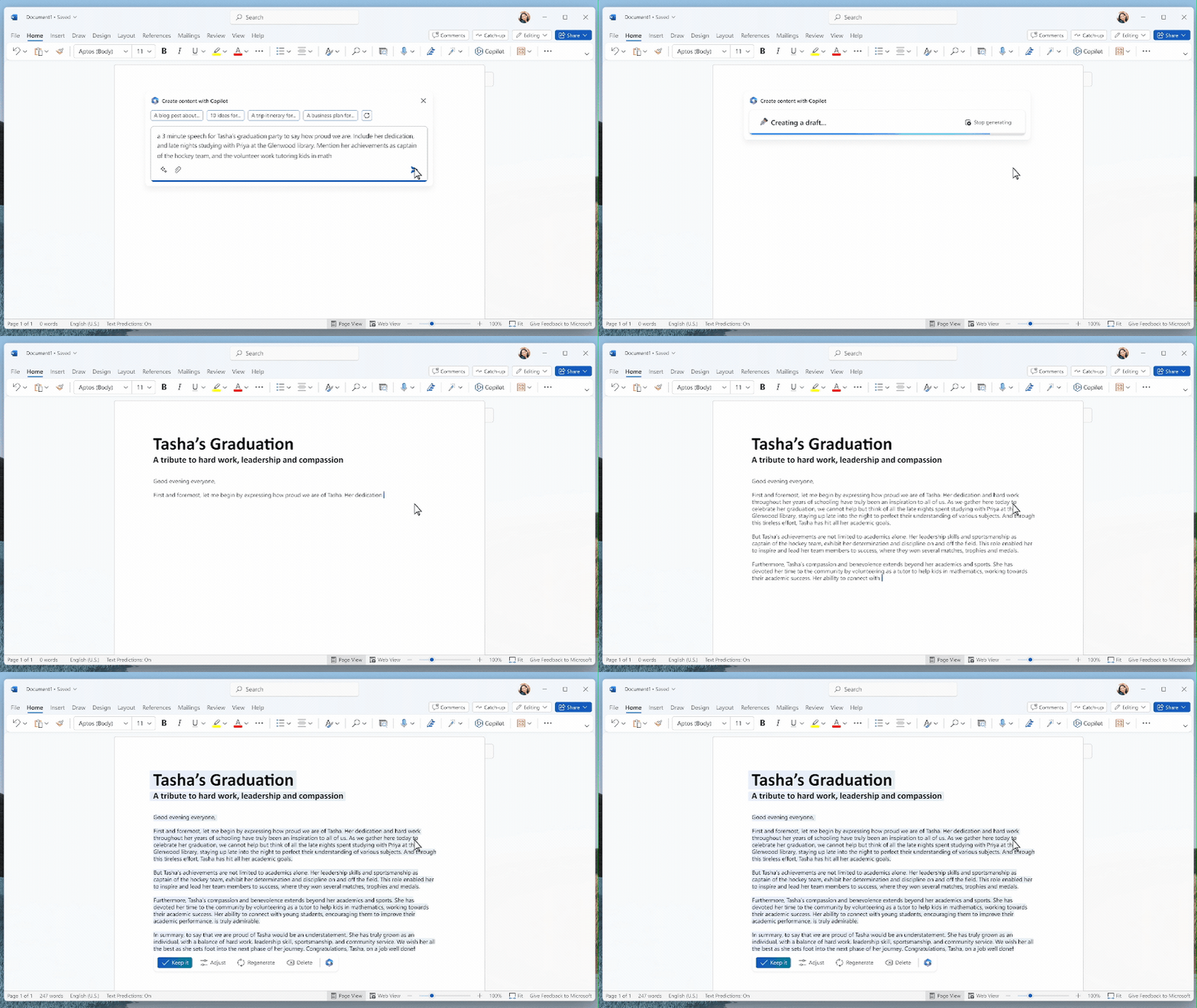
In Word, you can have Copilot write articles, revise text, and create summaries for you.
With just a brief prompt, Copilot can create a first draft, pulling in information from across your organization as needed.

It can even help you nail the right tone in your writing, offering suggestions whether you want it professional, enthusiastic, or casual.
Additionally, Copilot can improve your writing, suggest ways to strengthen arguments, or eliminate inconsistencies. With commands and prompts like these below, Copilot can multiply any worker's productivity:
- Draft a two-page project proposal based on data from "a certain document" and "a certain spreadsheet."
- Make the third paragraph more concise. Change the document's tone to be more casual.
- From this rough outline, draft a one-page draft.
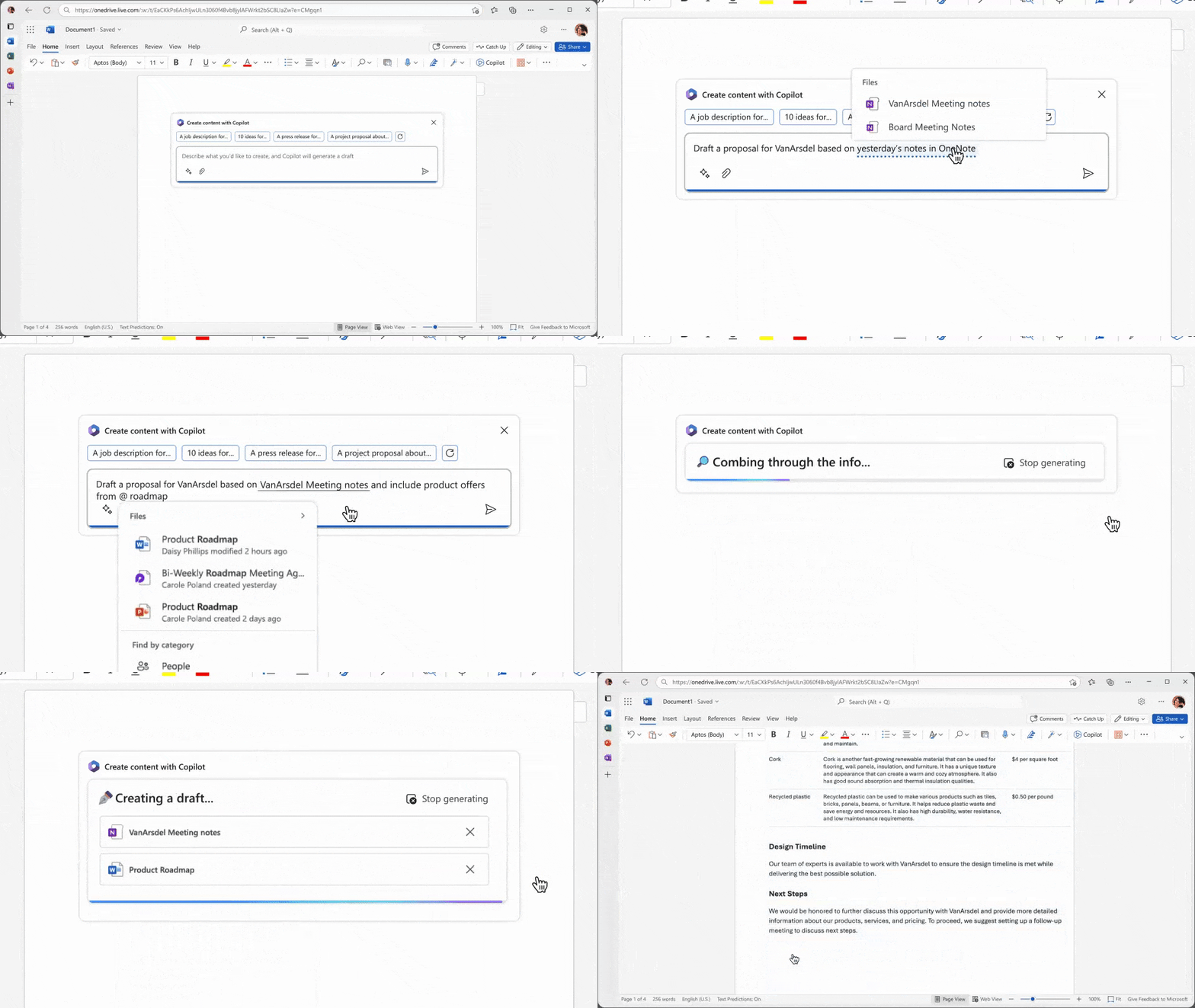
You can also call up other software from within Word, such as OneNote, and have it write content based on that material.
You can even have it generate an Excel spreadsheet from your Word content, with data analysis completed automatically.
PowerPoint: Word to slides in seconds
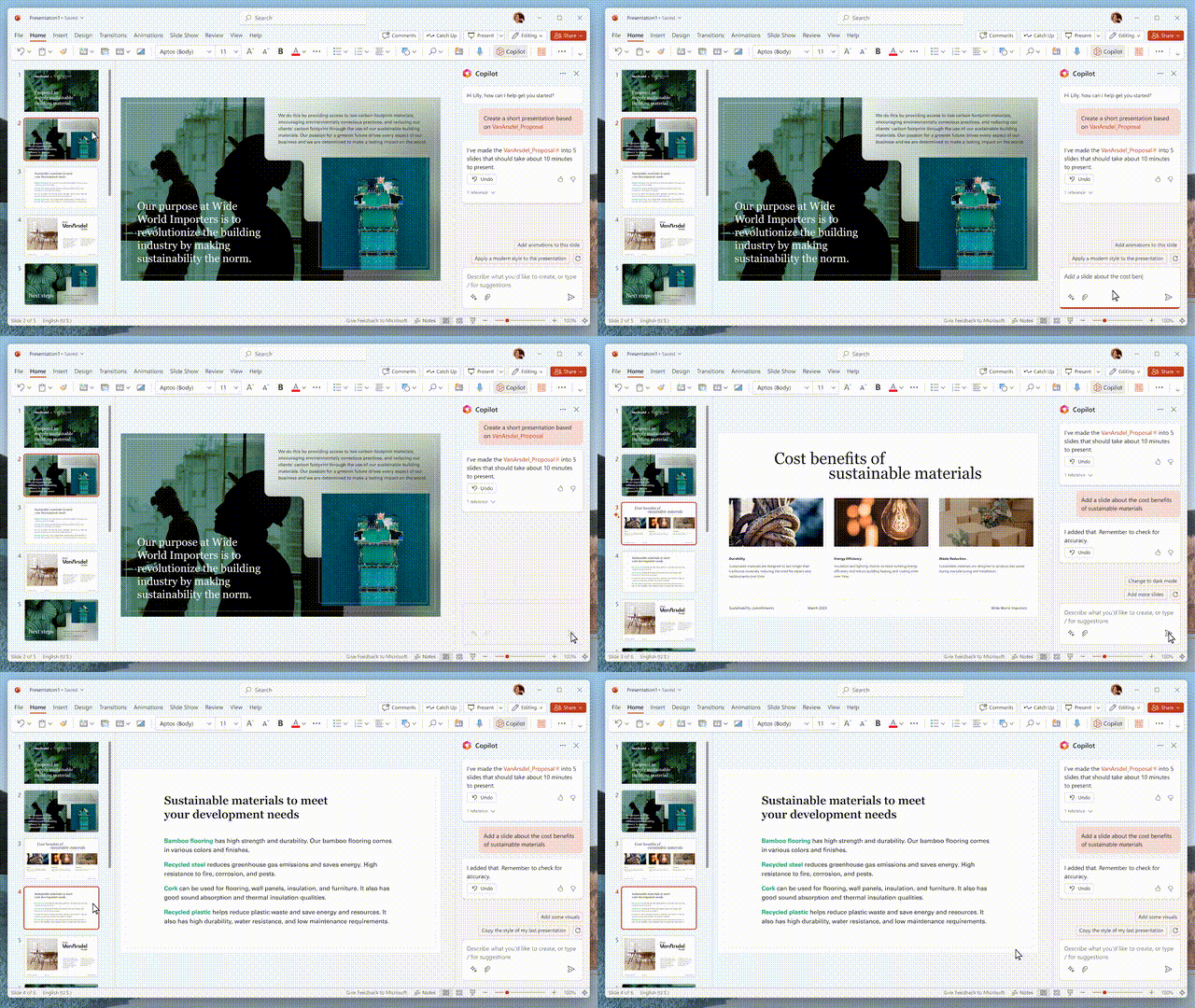
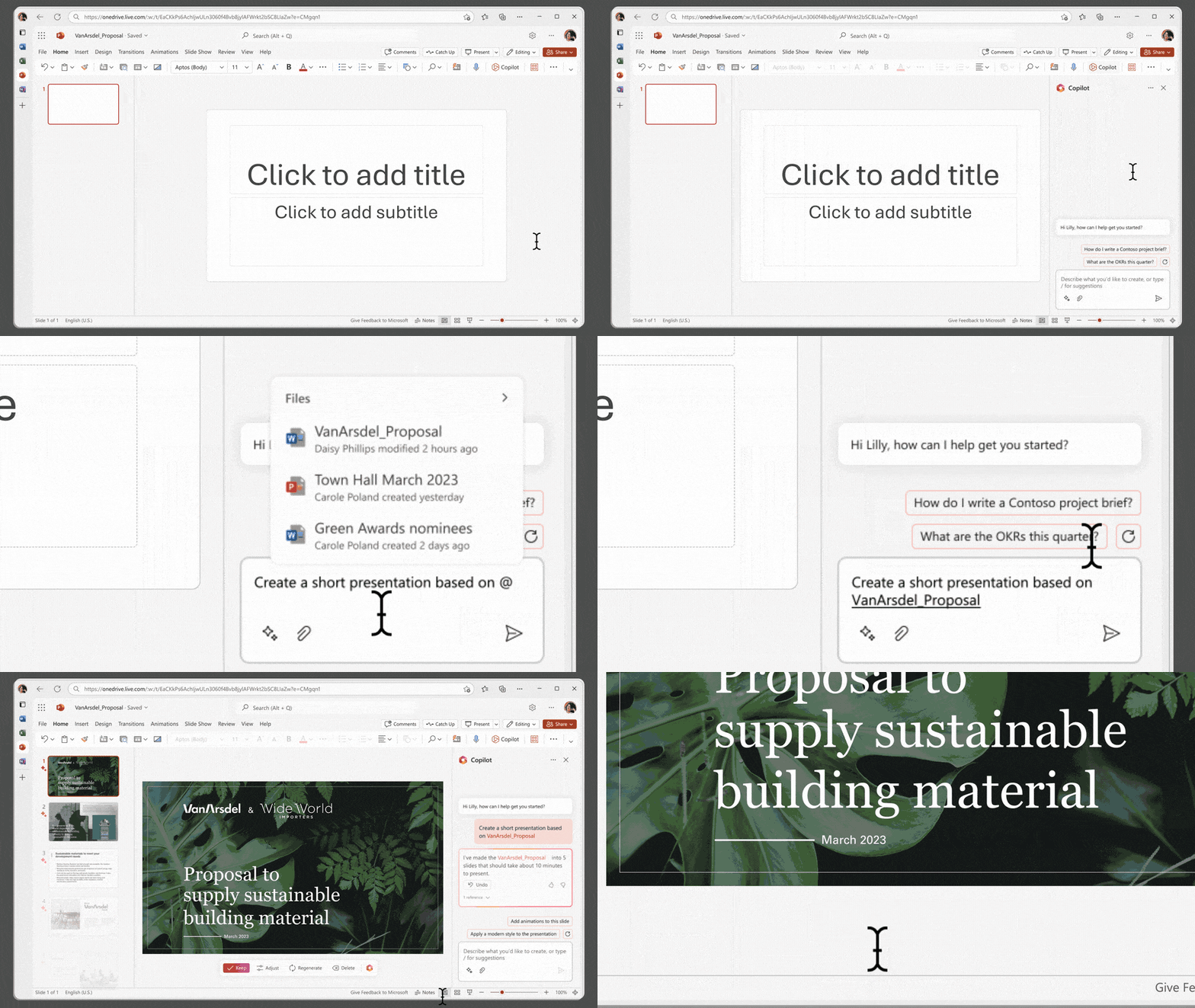
In PowerPoint, describe your ideas and it automatically generates an entire presentation, with beautifully designed slides laid out for you.
If you have existing material, simply click Copilot and it will generate a PowerPoint from your completed Word document — truly writing itself.
You can also condense lengthy presentations with one click, and use natural language commands to adjust layouts, restructure text, and even nail perfect animation timing.
Here are some prompt examples:
- Create a five-slide presentation based on this Word document, including relevant stock images.
- Condense this presentation into a three-slide summary.
- Restructure these three bullet points into three columns, each with one image.
Excel: Formulas no longer exist
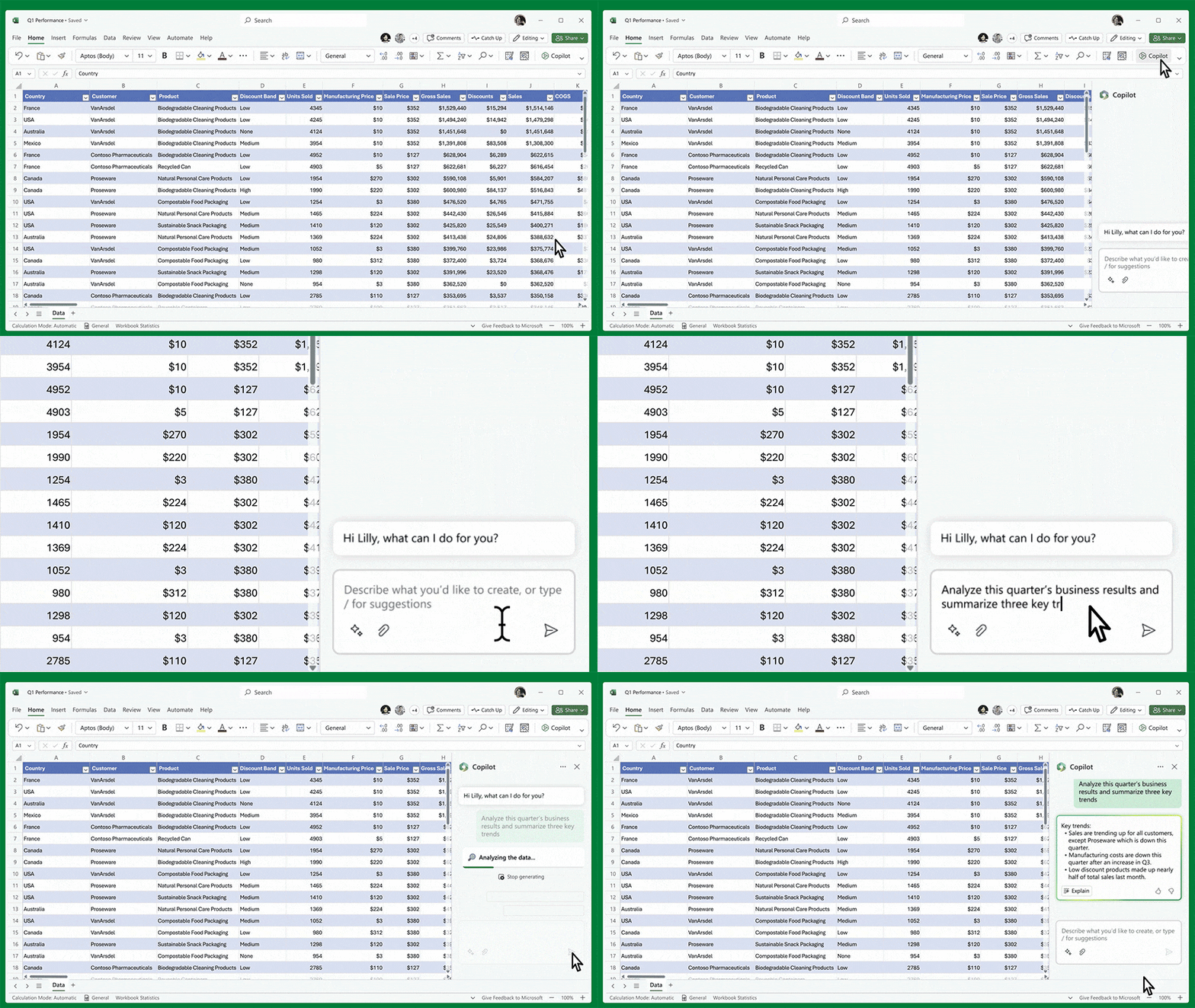
In Excel, Copilot generates clean tables in seconds and handles any data processing.
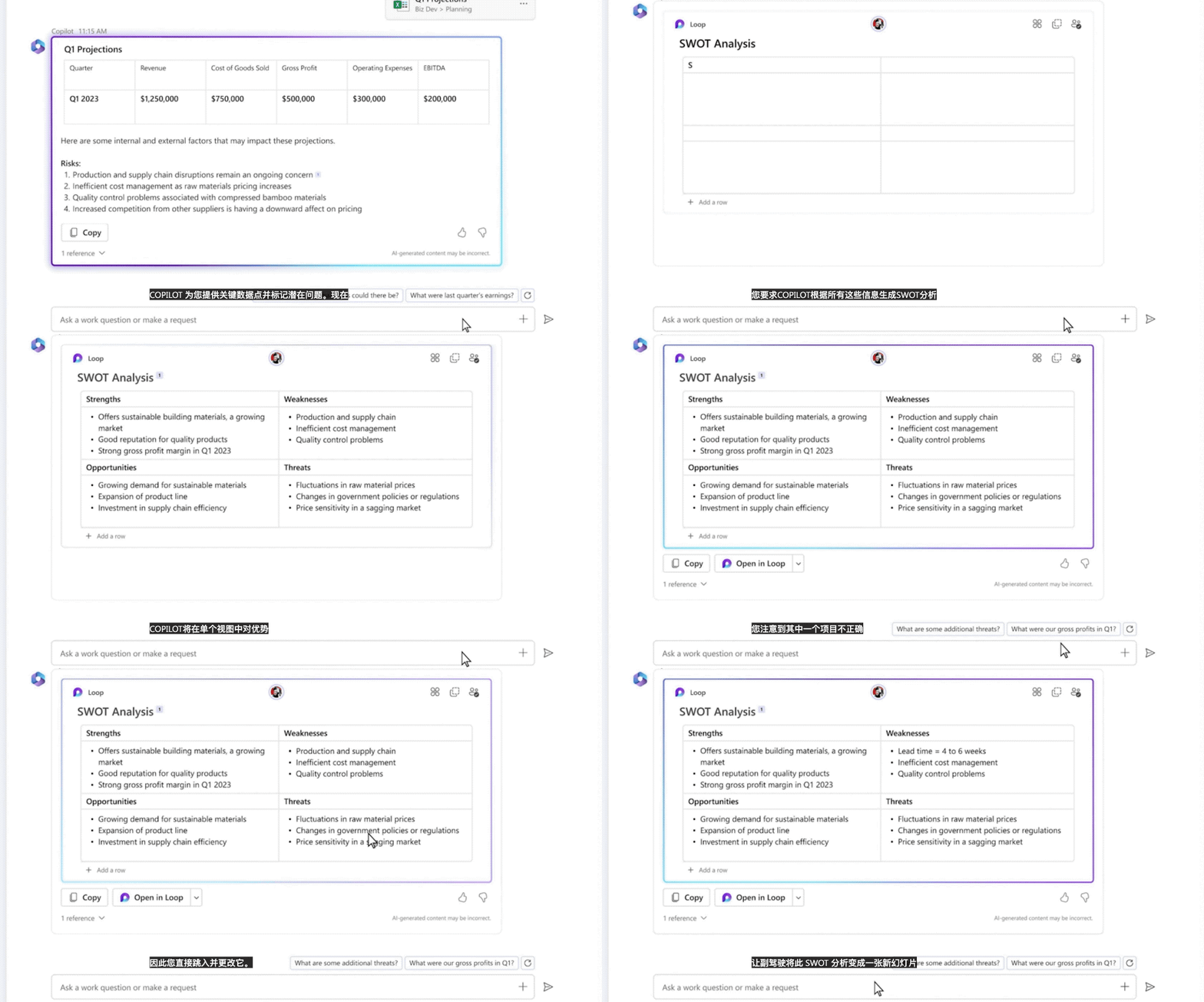
It instantly creates SWOT analyses or various pivot tables based on your data.
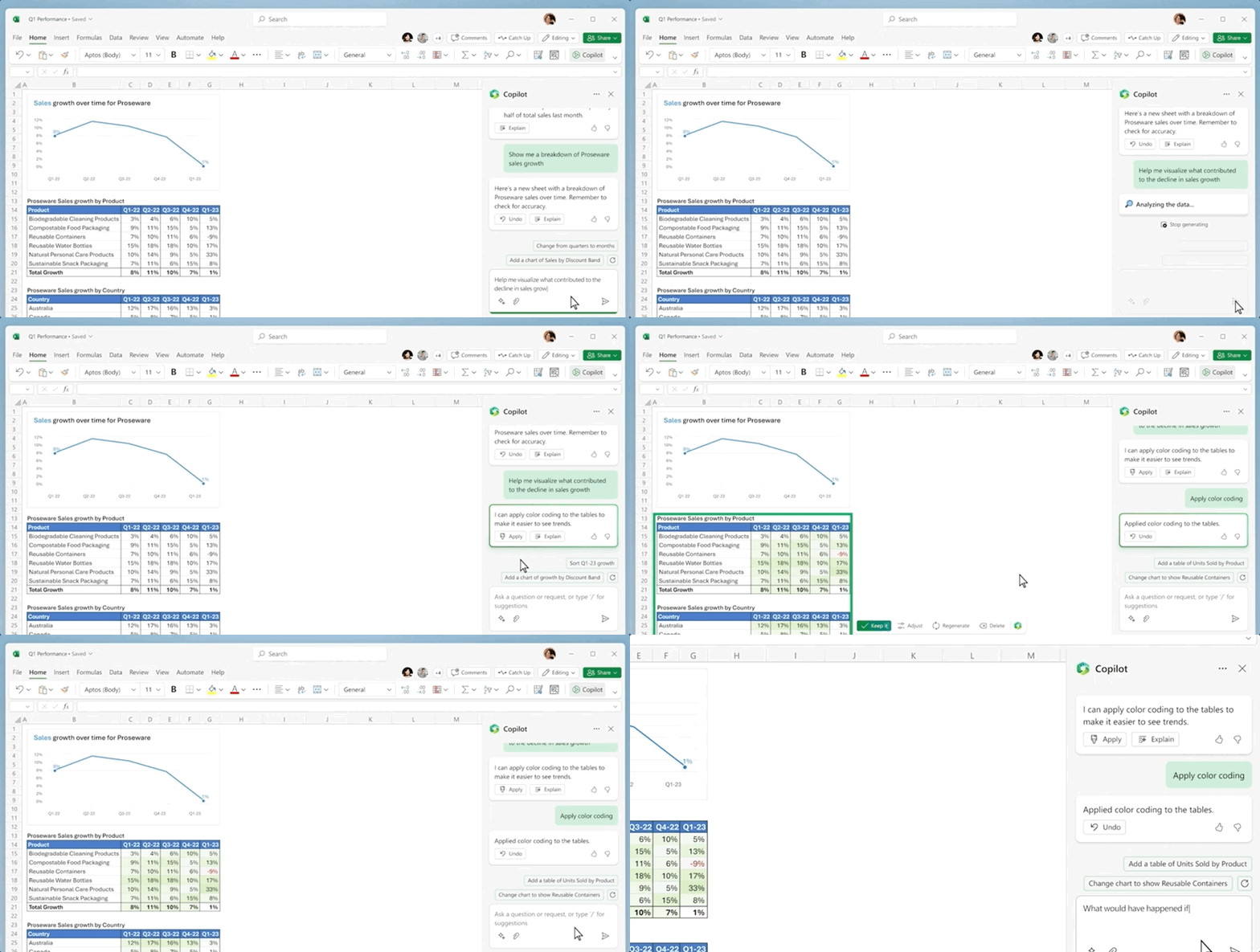
Copilot can also help discover data correlations, propose hypothetical scenarios, suggest formulas based on your questions, and even generate new models.
No more learning complex Excel functions — workers rejoice!
Here are a few examples of prompts to try:
- Give a breakdown of sales by type and channel. Insert a table.
- Project the impact of [a variable's change] and generate a chart to help visualize.
- Model how changes in [variable] growth rate would affect my gross margin.
Outlook: A boon for the bureaucratic class
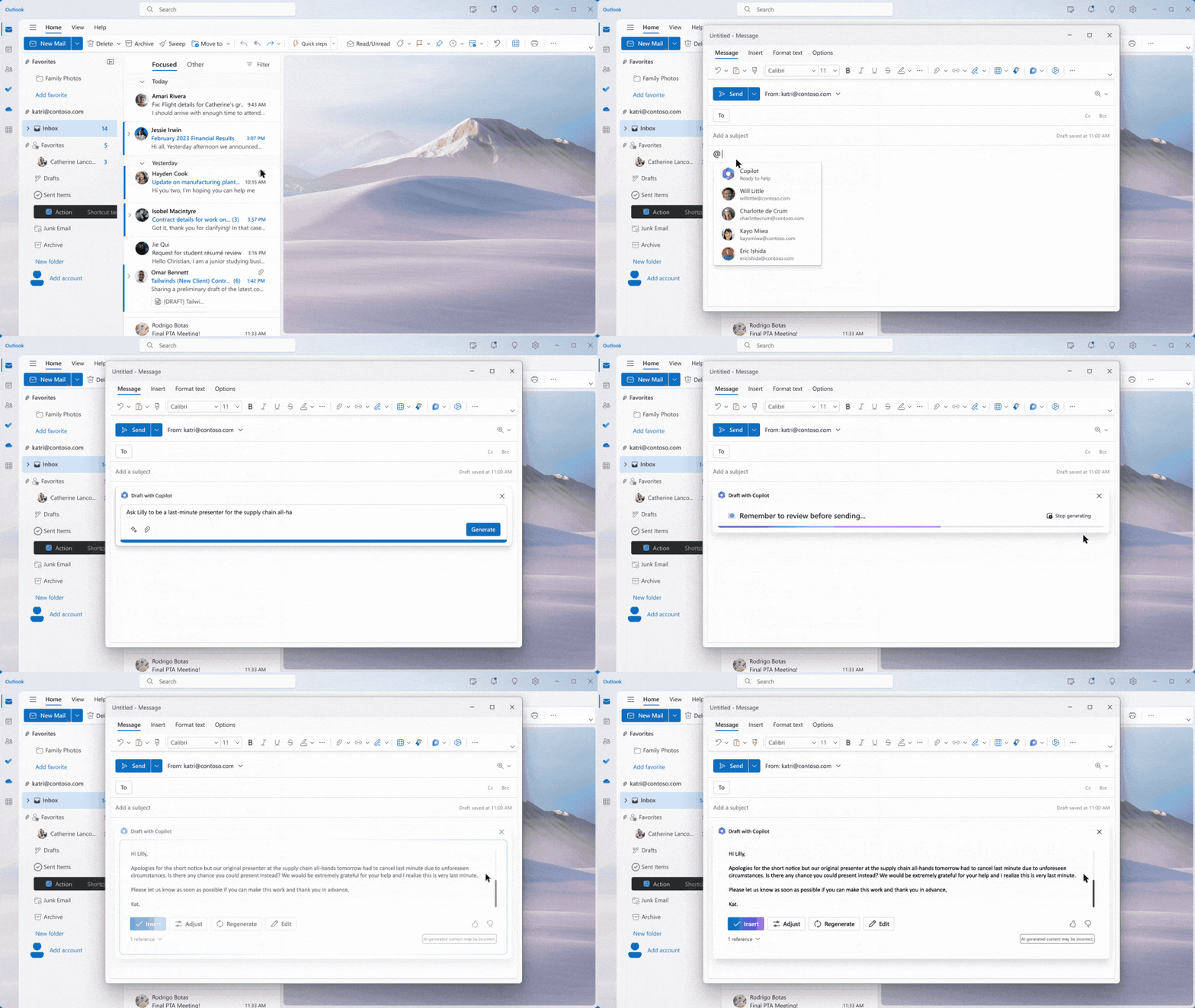
In Outlook, Copilot can draft emails for you — give it a start, a foundation, and it automatically completes and heavily polishes your text.

It also automatically summarizes your inbox. You can even specify what tone to use and how many words to write.
- Summarize the emails I missed while out last week, and flag any important items.
- Draft a reply thanking them and asking for more details on the second and third points; make this draft shorter and use more professional language.
- Invite everyone to a "lunch and learn" about the new product launch next Thursday at noon. Lunch will be provided.
Teams: No need to bring your brain to work
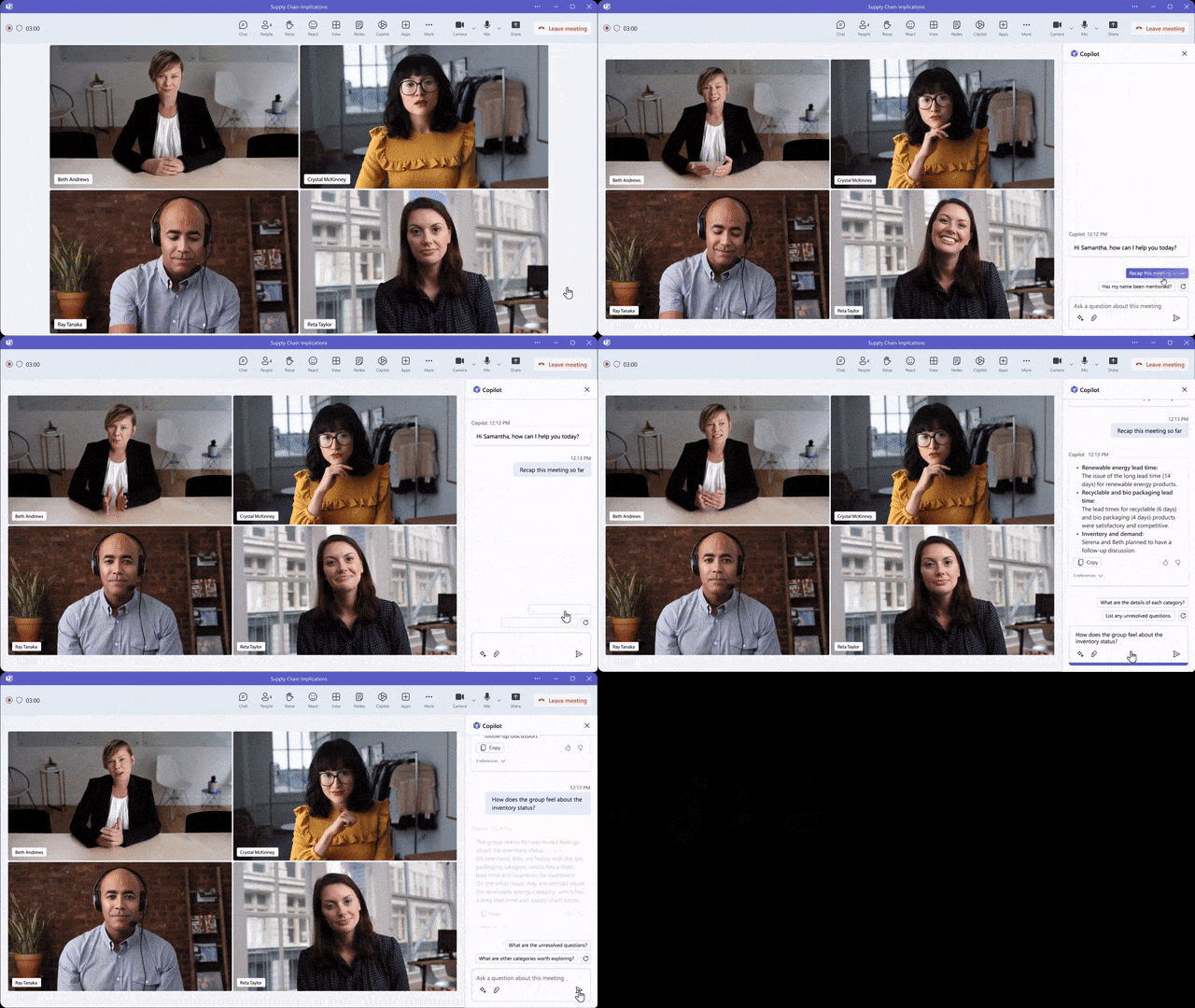
In Teams, Copilot helps you summarize projects in real time while executing tasks, dramatically improving meeting efficiency. During meetings, it automatically transcribes for you. If you forget something, it automatically reminds you.
Using Copilot, information on Teams stays synchronized at all times — whether it's project updates, company personnel changes, or even which colleague has returned from vacation, you can see it instantly.
- Summarize what I missed in the meeting. What points have been made so far? Where do we disagree on this topic?
- Create a pros and cons table for [the topic being discussed]. What else should we consider before making a decision?
- What decisions were made and what recommended next steps?
And more...
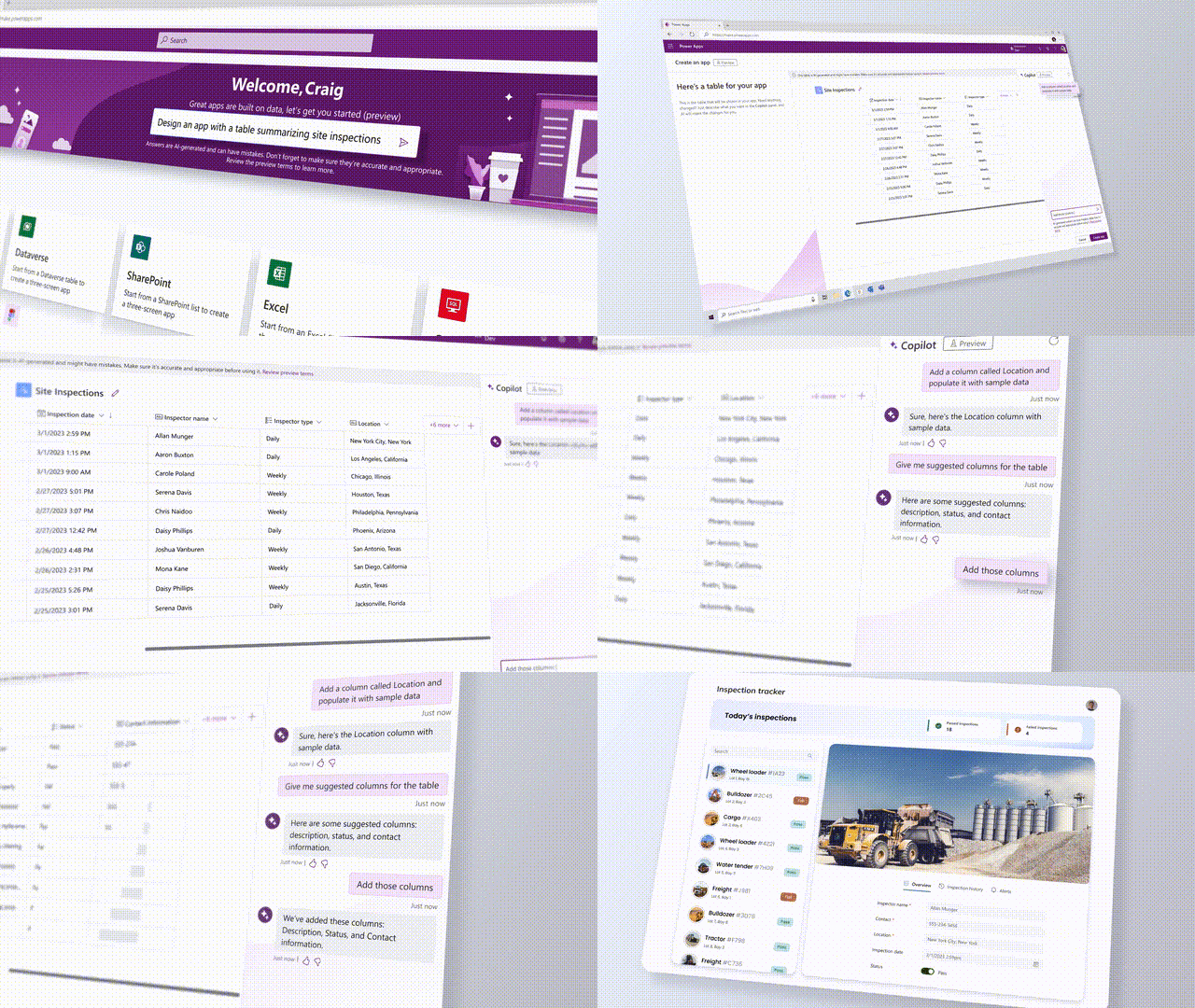
In Power Platform, Copilot enables even programming novices to become developers through low-code tools like Power Apps and Power Virtual Agents, smoothly building various applications.
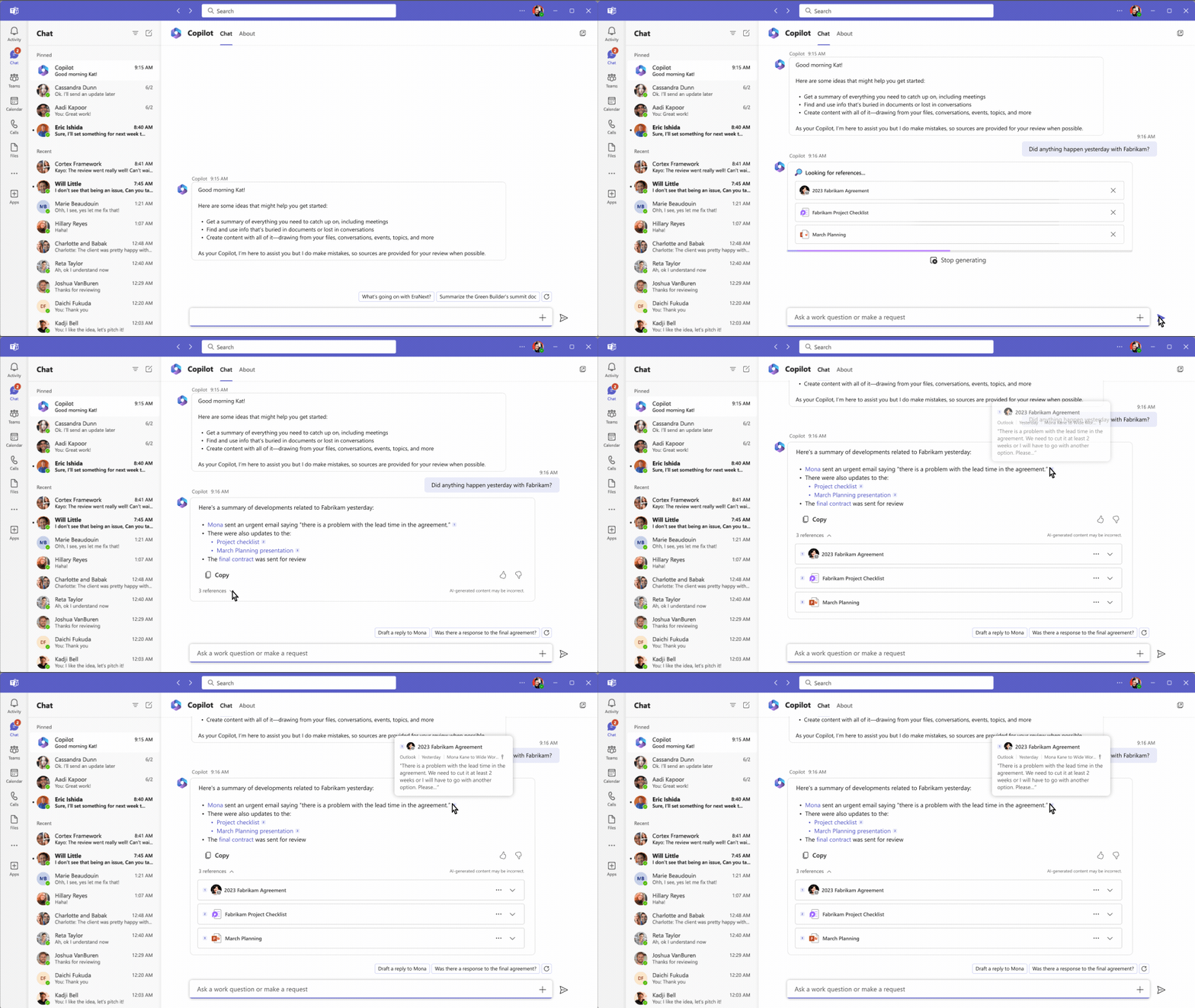
Meanwhile, Business Chat aggregates all data from Word, PowerPoint, emails, calendars, notes, and contacts — summarizing chat history for us, drafting emails and project plans.
- Summarize the chat, emails, and documents regarding the escalation about [customer] that happened last night.
- What is the next milestone for [project], and are there any risks identified? Help me brainstorm some potential mitigations.
- Write a new plan overview in the style of [Document A] that contains the planning timeline from [Document B] and incorporates the project list from [person]'s email.
The Mysterious Microsoft Graph
Additionally, this system contains a mysterious component — Microsoft Graph.
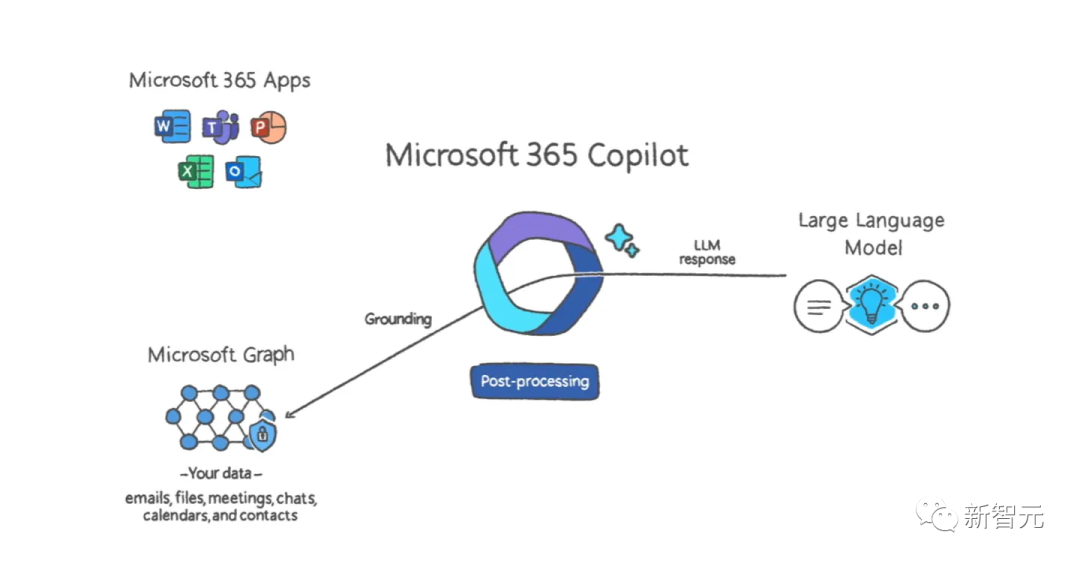
Technically speaking, Microsoft Graph is an API, and applications can use this Graph to "see" your emails, calendar, files, usage patterns, and other information stored in Microsoft's cloud — Outlook, OneDrive, Office 365, Teams, and more.
For AI generative tools, all of this is incredibly valuable contextual information.
In other words, when Copilot offers suggestions, it already knows the contents of files you've been creating, emails you've sent and received, your meeting schedule and summaries, and so on.
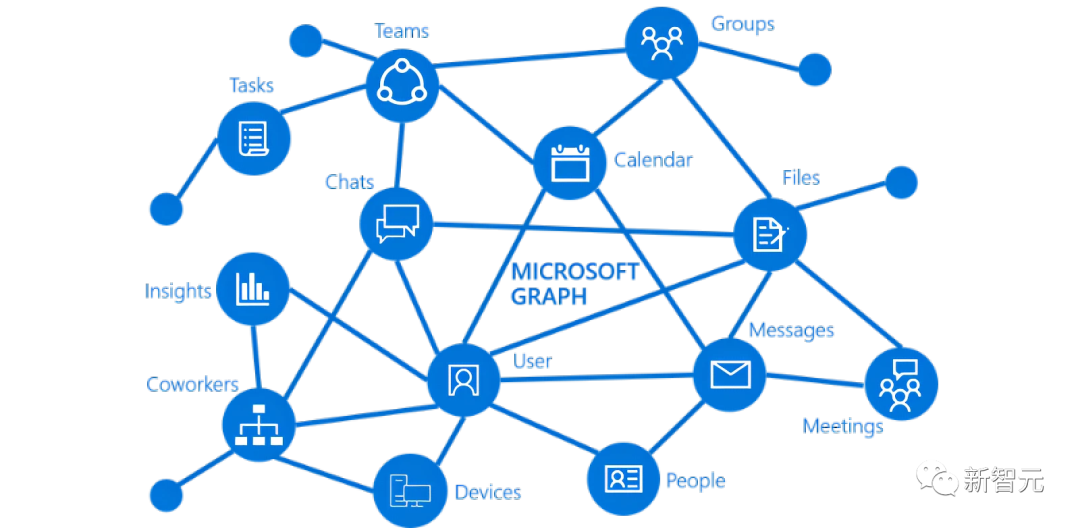
Based on this, Copilot naturally becomes an incredibly intelligent personal digital assistant and a highly practical content generation tool.
For example, Copilot can identify trends in Excel data, generate emails based on past information, and create PowerPoint designs based on other files you've worked on.
If you want Word to write something based on materials on your computer, Copilot sends this command to Microsoft Graph, retrieves all context and data, formulates a prompt, and automatically sends it to GPT-4.
The generated result is then passed back through Microsoft Graph for additional compliance checks, after which the result and command are sent back to Word.

Two Giants at War, One-Click Worker Obsolescence?
No doubt everyone here is already itching to get their hands on this.
However, like other AI content generators, Copilot can still produce factual errors and other strange mistakes (commonly known as "hallucinations").

Microsoft emphasizes that Copilot is most useful for first drafts and starting points. While Copilot cannot guarantee every fact in an email or PowerPoint is correct, users can adjust text, images, and formatting themselves to ensure accuracy.
But we've all witnessed ChatGPT's highlight reel of fabrications, and moreover, Microsoft was recently revealed to have laid off its AI ethics team — the very team responsible for identifying risks that OpenAI's language models might introduce to Microsoft's software.

Have Microsoft and OpenAI moved too fast?
Jared Spataro, head of Microsoft 365, is not concerned. He stated that to meet customer needs, Microsoft must move quickly and learn as it goes.
Regarding concerns about language models making things up, Spataro explained that prompts sent to Copilot are first filtered through Microsoft Graph to gather additional context.
These modified prompts are then sent to GPT-4, filtered again through Microsoft Graph, and then sent back to Microsoft 365 applications.
"We will be clear about how the system makes decisions by noting limitations, linking to sources, and prompting users to review, fact-check, and adjust content based on subject matter expertise," he said.
Microsoft Chief Scientist Jamie Teevan also stated: "We take appropriate mitigating measures when the system is wrong, biased, or misused. We are addressing long-term impacts and new risks like jailbreaks. We will certainly make mistakes, but that's okay — once we do, we'll correct them immediately."

Currently, Microsoft is testing Copilot with 20 customers, with a "preview version" rolling out to more customers in the coming months.
However, as for when individuals will be able to use these features, Microsoft has not yet revealed.
Microsoft says it "will share more information on pricing and licensing soon." What is clear is that Copilot will be a paid add-on beyond the Office 365 subscription fee.
As can be seen, Google and Microsoft have once again sparked a major battle over AI office software.
On the same day GPT-4 was released, Google immediately fired back, announcing it would integrate ChatGPT-like AI into its own office "suite," Workspace.
Currently, Google has over 3 billion Google Workspace users globally.
Data shows that Office 365 is used by over 1 million companies worldwide, with 145,844 customers using Office software in the United States alone.
Of course, like Microsoft, Google has not opened these features to the public, limiting them to a very small group for internal testing, with no pricing announced yet.
After Google announced AI tool integration into Workspace this week, Microsoft was likely pressured into temporarily accelerating Copilot's release.
After all, following its additional $10 billion investment in OpenAI in January, Microsoft clearly wants to see substantial returns as soon as possible.
It's not hard to see that both companies' moves have been hasty. The Silicon Valley tech giants are starting to get competitive.

And as the war between the two tech giants intensifies, Microsoft is also starting to feel the strain.
According to The Information, Microsoft is now facing a GPU shortage.
It was also just this past week that Microsoft revealed on its website that it has spent hundreds of millions of dollars building a supercomputer in Azure to develop ChatGPT and GPT-4 for OpenAI.
Looking back now, this supercomputer was aimed at far more than just AI chat tools — it was a long-planned office software empire.
To conclude, a quote from Microsoft's website:
Humans are born to dream, create, and innovate. But today, we spend too much time consumed by drudgery — on tasks that consume our time, creativity, and energy. To reconnect to the soul of our work, we don't just need a better way of doing the same things. We need an entirely new way to work. With Copilot, your words become the most powerful productivity tool on the planet.
After watching the Microsoft Copilot launch, one netizen offered a deeply felt reflection:
"Whether to become the obsolete or the commanding leader — this is a question every grassroots worker must confront."

References:
- https://blogs.microsoft.com/blog/2023/03/16/introducing-microsoft-365-copilot-your-copilot-for-work/
- https://www.theverge.com/2023/3/16/23642833/microsoft-365-ai-copilot-word-outlook-teams
BlueRun Ventures has always maintained its focus on and investment in AI
We have established the "BlueRun AGI Pioneer Club"
Exploring the path to Artificial General Intelligence (AGI)
Are you an AGI pioneer?
Scan the QR code to apply
👇👇👇

** ** ▶ More exciting content ◀**




Originating in Silicon Valley, BlueRun Ventures was established in 2005 and is a venture capital firm focused on early-stage startups.
Currently, BlueRun Ventures manages multiple USD and RMB dual-currency funds in China, with assets under management exceeding 15 billion RMB, making it one of the largest early-stage funds domestically. Its investment stage focuses on Pre-A and Series A rounds, covering hard tech and innovative interaction, enterprise technology, new consumption, healthcare, and more. It has cumulatively invested in over 150 startups, including Li Auto, Waterdrop, QingCloud, Guazi.com, Qudian, Songguo Mobility, Ganji.com, Monster Charging, Yuntu Semiconductor, Machenike, YunSheng Intelligence, Anxin Wangdun, BioMap, and others.
BlueRun Ventures has been ranked #1 on Zero2IPO's "China Early-Stage Investment Institutions Top 30," #1 on ChinaVenture's "China Best Early-Stage Venture Capital Institutions TOP30," and was named among Preqin's Top 10 Global Venture Capital Fund Managers for Sustained High Returns.
Additionally, BlueRun Ventures has consecutively received honors from Forbes China, 36Kr, Cyzone, Caixin Media, CBNweekly, Jiemian, and other media institutions, including "China's Best Early-Stage Institution of the Year," "China's Top Venture Capital Firm," "Most Entrepreneur-Friendly Early-Stage Institution of the Year," and "Most Influential Early-Stage Institution of the Year."