Claude Code Team Leads Look Back on a Wild Year | A Conversation with Boris & Cat

"I stopped talking to the agent — I wrote a loop and let it prompt Claude for me."
"I stopped talking to agents — I write a loop that prompts Claude for me."

🙍♀️ Author: Shirley
🥷 Editor: Koji
🧑🎨 Layout: NCon

A year after Claude Code's launch, Boris Cherny and Cat Wu — its lead creators — opened up about how their team actually works.
They're not talking about specific features. They're talking about how humans and agents should divide labor. Boris says he now "no longer prompts agents, but writes loops," and does half his engineering on his phone. Cat finds her bugs often get fixed by "someone else's Claude" before she can get to them.
You'll get a fresh perspective unlike mainstream Claude Code tutorials, and a preview of the most cutting-edge workflows.
About the Guests
**🧑💻 Boris Cherny|**Head of Claude Code. Previously a Principal Engineer at Meta and author of Programming TypeScript. He joined Anthropic in September 2024, started Claude Code as a personal project, then pushed for its productization. The tool now generates roughly 4% of all public commits on GitHub globally. Since November 2025, he has fully transitioned to AI-assisted programming.
**👩💻 Cat Wu|**Product lead for Claude Code and Cowork. With a cross-disciplinary background spanning both technical development and venture capital, she champions a "prototype over documentation" product philosophy. Alongside Boris, she shaped Claude Code's core form and drove Anthropic's company-wide adoption of the tool.
Key Takeaways
- Don't just repeat corrections — write them into CLAUDE.md. A correction only works once; documentation creates compounding returns, letting Claude keep running on its own.
- Validation isn't just unit tests — it's making it run things itself. Linting and type-checking were automated long ago. The real bar is whether an agent can execute and inspect results autonomously.
- Clicking "approve" one by one is less safe than full auto mode. When 99% of your answers are yes, your attention has already checked out. Routing safety decisions to another model is more reliable than human eyes.
- Your bugs often get fixed by someone else's Claude first. Let Claude monitor issues, auto-file PRs, and merge easily verifiable ones — that's what routines are for.
- The highest-leverage use is no longer writing prompts, but writing loops. Once models are strong enough, the human's job is designing a cycle that discovers tasks and repeatedly invokes agents on your behalf.
Write Mistakes into CLAUDE.md, Let It Validate Itself
🧑💻Boris
When we first launched Claude Code, it was just a short little video. I remember posting it to Slack — only two people hit the "excited" reaction.
👩💻Cat
I thought it was pretty cool, especially for simple engineering tasks. It did a decent job.
🧑💻Boris
That's generous. Honestly, it wasn't very good.
👩💻Cat
Hard to believe it's only been a year since our first release.
🧑💻Boris
I can barely remember what it was like, because it's completely different from what we're doing today.
Now I have an army of agents. I prompt one agent, or have one agent prompt another agent, which prompts another agent — like a tree of thousands of agents.
But the most important principle behind this:
Every time Claude makes a mistake, I don't ask it to try differently. I have it write that into CLAUDE.md, or turn it into a skill. If you can do that, Claude can just keep running.
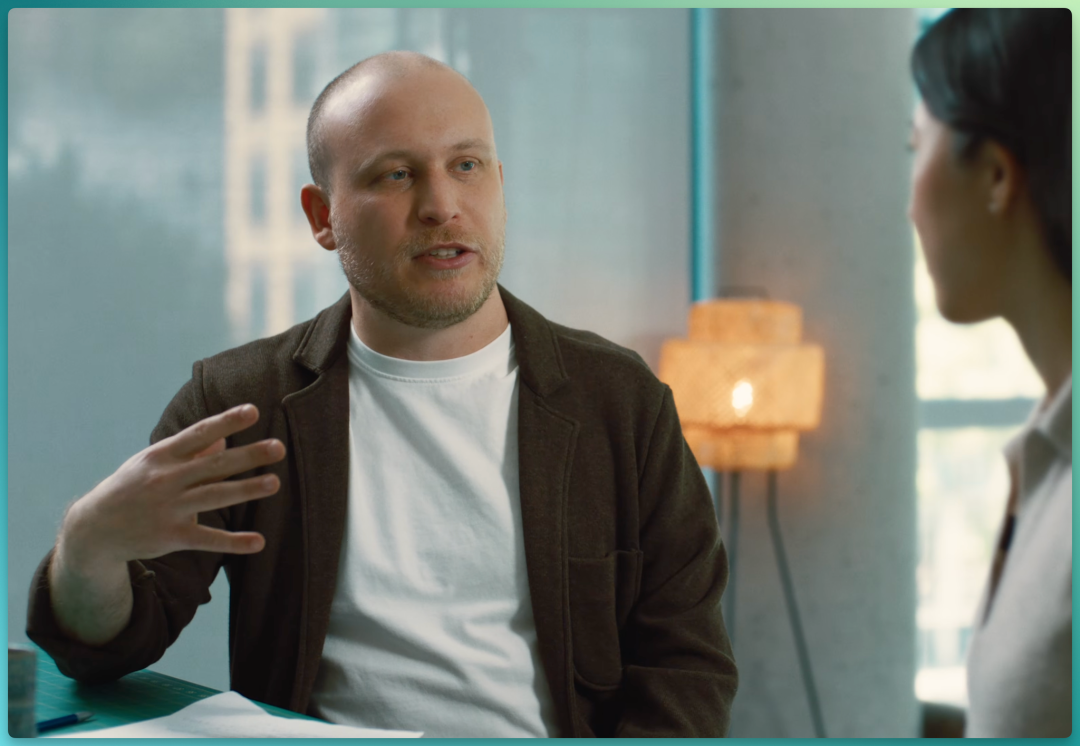
Another thing we realized later is how important validation is — we didn't appreciate it at first.
👩💻Cat
This comes up constantly with developers and enterprises we talk to. What advice do you have for getting Claude Code to do validation well?
🧑💻Boris
I think almost everyone misunderstands this. When people hear "validation," they think unit tests, lint, type-checking — but those are already easy to automate, and already automated.
What we mean by agent validation is different: can the agent run this thing itself? That actually takes some thought, because it's often not straightforward — and that's part of the challenge.
I remember with Opus 4, Claude would test itself. We hooked it up to Opus 4 and said, "Claude, develop a feature, then test yourself in bash." It spun up a little Claude CLI and tested its own feature. I was like, "Wow, that's so cool."
Now we're used to it — iOS simulators, Android simulators, desktop apps, all running in these loops. But at the time it felt incredible. How are you doing it now?
👩💻Cat
I've mostly been working on the desktop app lately. One engineer on the team added a desktop development skill that teaches Claude how to run local desktop apps, and I've been using it heavily.
It still hits bugs sometimes. When that happens, I have it read Slack to figure out whether staging is completely down, or if someone else already hit this pitfall. Once it figures out the issue, I have it write the new learning into that desktop development skill.
What this skill does is launch a local desktop app, then use the mouse like a human (Computer use) to click through the interface. So when I add new UI, Claude clicks through it itself, testing edge cases along the way — finds a bug, fixes it, clicks through again to verify.
Everyone Writes Code: From Engineers to Every Role
🧑💻Boris
Honestly, this is one of my favorite things about this team: everyone writes code.
I've never been on a team like this. My product manager writes code — and you write really good code.
Though I also think it's getting easier, because fundamentally Claude is writing the code. What matters more is whether you have ideas.
If you're someone with product or business context, thinking about design and user needs, you'll naturally come up with better ideas.
👩💻Cat
It's like all the roles are converging.
🧑💻Boris
I remember the first time I saw our designer Megan file a PR. I was terrified — "Oh my god, Megan is filing a PR." She said, "Yeah, I'm just fixing a button." Now it's completely normal.

👩💻Cat
Yeah, we're seeing the same pattern in enterprises we work with. Engineers adopt Claude Code first, other roles watch from the sidelines, then go "wow this is powerful, let me try."
So we find designers making changes directly in Claude Code more efficiently than routing through engineers; finance running forecast analyses directly in it; data scientists too. Everyone has Claude Code open on their screen. The cross-role versatility is surprisingly high.
Your Bugs Often Get Fixed by Someone Else's Claude First
🧑💻Boris
What use cases do you feel are pushing the limits now?
👩💻Cat
I'm particularly excited about routines.
One engineer on the team rolled out voice mode across all our products. He set up a routine that listens to every ticket, GitHub issue, and bug report about voice mode. His Claude proactively takes these on, files fix PRs, and notifies him through the PR.
After building that, he thought, "Okay, we have other feedback that hasn't been responded to yet," and set up another routine to monitor those.
Once I shipped a small feature with an edge case I missed. Someone filed a bug. I was planning to fix it that evening. Then my Claude said, "Wait, another Claude already fixed this."
I was like, "How is that possible? I never even talked to him about it." I asked how he fixed it so fast — he said he has another routine that watches for bug reports sitting unresponded for over 5 hours, auto-files fixes, and merges easily verifiable ones.
🧑💻Boris
Claude tells me this all the time now — someone else already fixed it.
👩💻Cat
There's always "someone else's Claude" working on it.
🧑💻Boris
Yeah, that's one of the big changes this year. I think routines are the first truly obvious application. They can do almost all code review, babysitting every PR like a nanny.
Remember when you actually had to respond to code review comments yourself, fix CI yourself, rebase yourself? I haven't done any of that in ages.
Auto Mode: Replacing Plan Mode, Safer Than Approving One by One
👩💻Cat
When you're collaborating with Claude in the CLI, what's your most-used feature?
🧑💻Boris
Used to be plan mode. Not anymore.
👩💻Cat
What do you use instead?
🧑💻Boris
Auto mode works best. Newer models don't really need a separate planning step anymore.
I think that step mattered from Opus 4 up to maybe 4.5, but from Opus 4.6 to 4.7 it's no longer needed.
Some people still use it — they like keeping that planning artifact around. I don't. I do everything in auto mode. I spin up a Claude, it starts working, then I switch to the next Claude. I'm not sitting there watching it.
Though from early on, Claude Code had an "Ask permissions" mode: Claude wants to run a tool, asks "can I run this tool," you say yes or no. A year and a half ago, that was the best we could do, because there were no classifiers, and model alignment wasn't where it is today.
So auto mode is a huge step forward, because you don't actually want to read most of these requests. Routing it to another model for safety checks works much better. If something seems suspicious, or a command you don't think should run, the model just rejects it — you can go back and approve later if needed.
👩💻Cat
It's human nature — when 99% of your requests are "yes," your eyes glaze over after a while.
So we actually believe auto mode is safer than reading permission prompts one by one, because it means you only focus on what actually matters, instead of getting flooded with stuff that's 99% yes.

🧑💻Boris
Safety is something you can talk about, but actually getting it right is completely different, because it's often not what you think it looks like.
And the key to all this is: it's built on continuous red-teaming, continuous penetration testing, always having a threat model, and using that to figure out how this thing could be attacked, how someone could inject prompts?
I think the team is obsessive about this, which is incredibly important. That's why I can trust an agent to run on its own, go do something else, and spin up a second agent. If I didn't trust it, I couldn't do that.
👩💻Cat
And to ship auto mode to users, we had to trust it enough internally first:
We collected thousands of traces — each a full agent trajectory plus permission request — and had auto mode judge whether it was safe. Brought in red teams to try prompt injection, to infiltrate the codebase, turned these into evaluation sets, and made sure all requests were blocked. Had our own internal team try to attack Claude Code's auto mode through prompt injection and hacking, then improved auto mode based on that, blocking everything.
So it doesn't just defend against known vulnerabilities today, but against the cleverest attacks we can construct.
🧑💻Boris
Honestly it's a pretty weird approach.
Over the past year there have been so many features where the first time someone proposed them, I thought "no no, that can't possibly work." But gradually I learned that I'm often wrong, because building on top of models is so counterintuitive. A lot of engineering experience I learned before, I just had to throw out.
That's part of this job now: we're building on something new, and we just have to relearn it.
Auto mode was definitely one of those. The first time I heard "route the prompt to a model," I thought "no way, that can't work." Empirical evidence proved it actually works.
No Longer Prompting, But Writing Loops
👩💻Cat
I heard you're also really into Loop.
🧑💻Boris
Yeah, I love Loop.
👩💻Cat
How do you use it?
🧑💻Boris
Speaking of Loop, about a year and a half ago we went through a shift: we had source code, but maybe what engineers should interact with isn't source code, but agents.
So we made a leap: I don't write source code, I talk to an agent, and the agent writes source code for me. And now, I think we're making the next leap:
I no longer talk to an agent. I talk to a loop, a routine, and it prompts Claude for me. That's insane — two huge leaps in just a year and a half.
Putting Claude at the Center, Role Boundaries Dissolving
👩💻Cat
Stepping back, what changes do you see happening across engineering organizations?
🧑💻Boris
Let me put on my business hat for a second.
I love this case study: in the 1990s, Harvard Business Review ran an article asking "Computers are everywhere, so why haven't we seen the productivity gains?"
Back then the shift from mainframes to PCs was new, and companies were figuring out how to use them — just like people figuring out AI today.
And it turned out, to actually capture computers' productivity gains, you don't keep your filing cabinets and pens for business processes, with a computer sitting nearby doing something. You throw out the filing cabinets and pens entirely, and make the computer the core of your business process.
For us, Claude is at the center of everything: new hires don't ask people questions, they ask Claude; write code with Claude; code review with Claude; security review with Claude; fill out a form, Cowork does it for me. I think companies that really get this — and there are already a bunch — are putting Claude right in the middle.
👩💻Cat
Though for computers, that transition took 10 to 15 years. For AI, because most of our work is already digitized, and Claude can use computers, write code, run code — this transition will be much faster.
🧑💻Boris
I feel like I interact with people now because it's fun, because we build things together — not because I need something from them, because Claude can do a lot of that too. As an engineer, I've never enjoyed engineering this much. The tedious parts are gone; I just come up with ideas and talk to customers.
So is the future product or engineering? Does everyone become a PM, or does everyone become an engineer?
👩💻Cat
Everyone does both. I think these roles are converging.
Take our own team: product writes code, design writes code; and engineers often deliver products end-to-end. They have their own ideas about what to build, build it themselves, then work with legal, marketing to figure out how to communicate it externally, how to ensure safety — often one person carries the whole process through.
AI especially rewards people who are curious, have product taste, and like end-to-end ownership.
Multi-Agent, Coding on Phone, Minimal Context — And Completely Different a Year From Now
👩💻Cat
As people move from "one agent" to "several, hundreds of agents," what products do you think they should be using?
🧑💻Boris
Until recently, I'd clone the same repo six times, open a terminal in each, and manually switch between them. Very different now — I use just 1 tab, with our newly released agent view, managing multiple parallel agents in one window instead of juggling terminals. The experience is fantastic.
I also use desktop Claude, so I don't have to mess with code checkouts — it automatically sets up worktrees for me.
And something I never would have predicted six months ago: about half my work now happens on my phone.
I'll start a task on my computer, then remote control from my phone, walk around, grab coffee, check on my agent, maybe start another agent. Sometimes I'm chatting with someone, an idea comes up, and I spin up an agent right there with voice mode, tell it to go do it — I don't even need to get back to my computer.
👩💻Cat
I remember when you first started doing this — you'd leave work, computer left on, plugged in, locked on your desk. I thought you'd come back for it later, but it got pretty late and you still hadn't. I figured maybe you just forgot your computer.
Then the next day, same thing. Third day, same thing. I was so confused — your PRs were merging, but your computer was right here. I remember you told me, "Yeah, I'm just lying on my couch writing code."

🧑💻Boris
Yeah, that was the week remote control got really good.
👩💻Cat
Another thing users often ask: in large enterprises, how do you do context engineering?
🧑💻Boris
People used to talk about prompt engineering, context engineering — this matched where models were at the time.
Back in Sonnet 3.5 days, you had to do prompt engineering. Opus 4 era, you had to do context engineering. With today's models, you don't need any of that.
You just give it the most minimal prompts and toolset possible, and let the model figure it out. Just give the model a way to get context itself — I think that's the most important thing.
👩💻Cat
I feel very similarly — I'm a context minimalist.
So my principle is: only tell the model what it needs to know, let it figure out the rest.
Giving a model too much context is a bit like micromanaging it, and sometimes the model knows a better way to get to the same result. I personally prefer to leave that freedom to it.
We're also making the harness framework more minimal, leaving more room for your own prompts so they align better with your intent.
🧑💻Boris
There are so many ways to use Claude now, but I think a year from now it'll be different again — if it's the same old stuff, that would be the surprise. We're witnessing some massive trends: agents running longer and longer, becoming more and more autonomous.
I rarely run just one agent now — usually several, dozens, hundreds, thousands. So the design patterns will be completely different from before. I can barely imagine what the future looks like.
That's why I'm especially glad to run the team this way: anyone can propose ideas, anyone can think about product, everyone stays in touch with users. I don't think these ideas come from us — they usually come from the team.
👩💻Cat
Completely agree, and from community members building with us too.
What Is Loop Engineering?
What you design is no longer a better prompt, but a循环系统 (cyclic system) that discovers tasks, dispatches execution, validates results, remembers progress, and knows when to deliver outcomes back to you — letting it prompt agents on your behalf. This is seen as the fourth level after prompt engineering → context engineering → harness engineering.
How It Took Off
In early June 2026, Boris Cherny first proposed "My job is to write loops" at a WorkOS[1] public event.
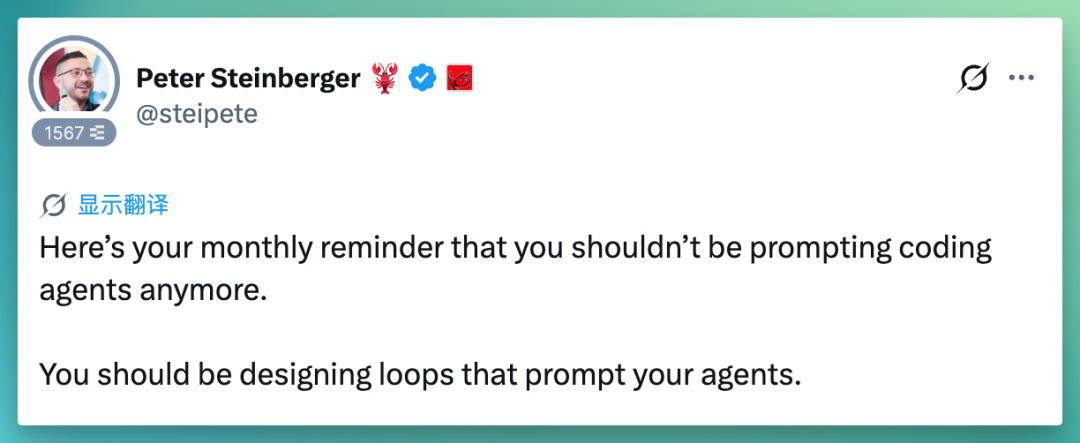
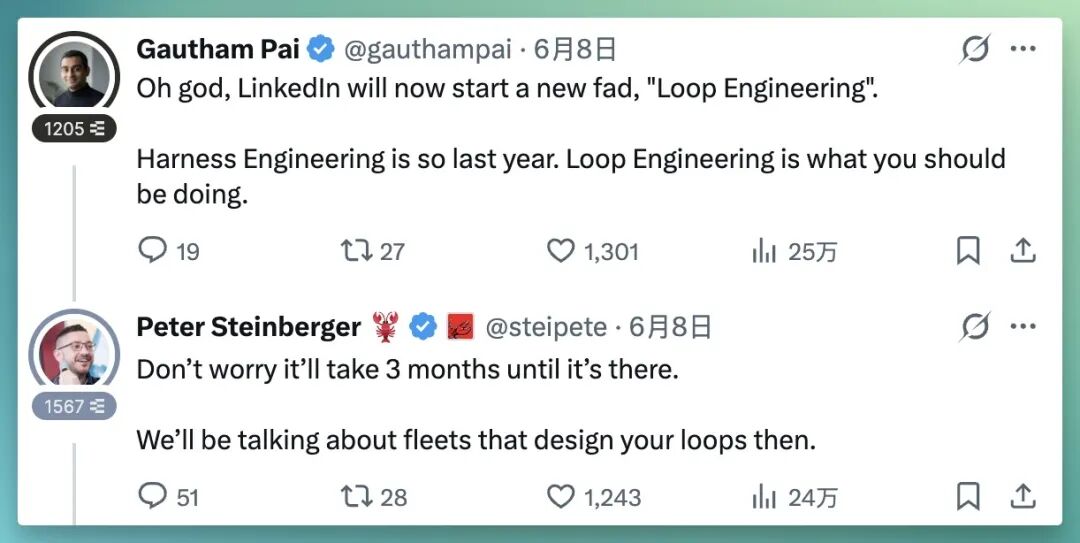
On June 7, Peter Steinberger, creator of OpenClaw, tweeted[2]: "You shouldn't prompt agents anymore. You should design loops that prompt agents for you." The tweet hit over a million views.
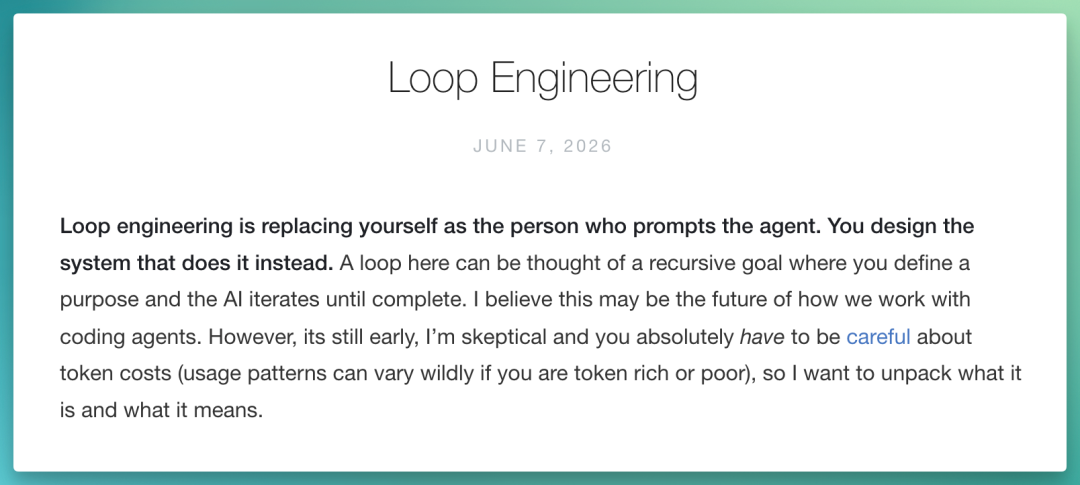
That same day, Google engineer Addy Osmani published an article[3], breaking down Loop Engineering into a "five components + memory layer" framework.
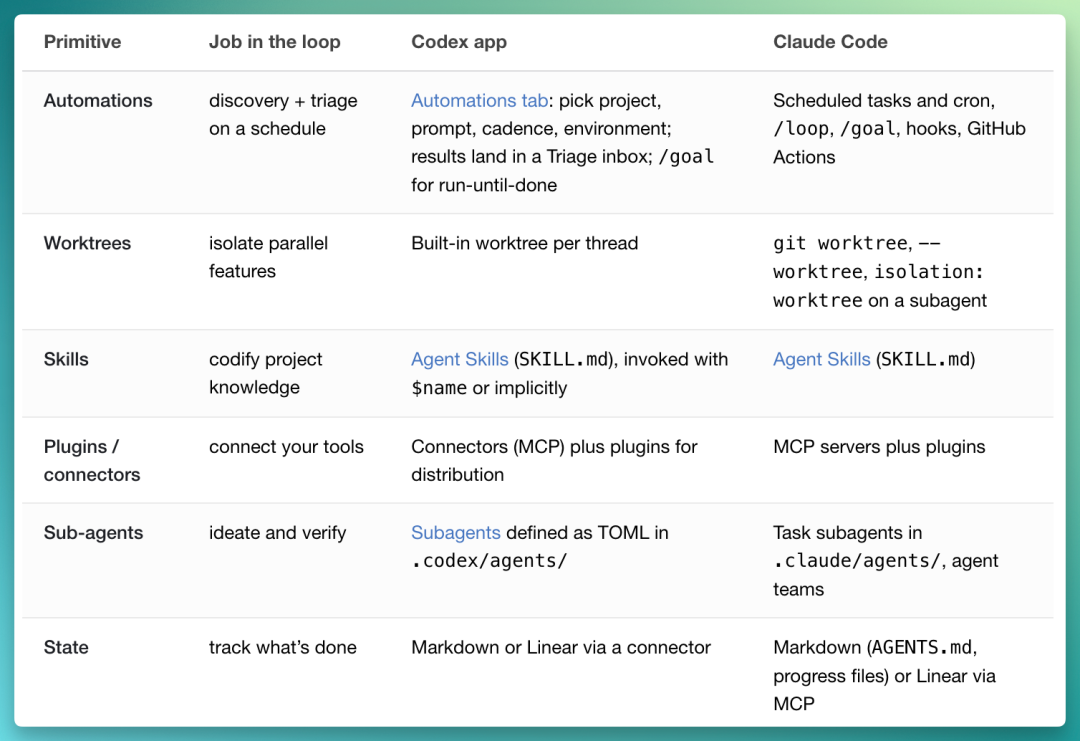
Five Components + One Memory Layer
Per Addy Osmani's breakdown, a loop needs five things, plus a place to keep notes:
-
Automations: Self-start on schedule to discover and classify tasks.
-
Worktrees: Parallel isolation so multiple agents work without stepping on each other.
-
Skills: Codified project knowledge so agents don't derive from scratch every time.
-
Plugins / Connectors: Plug agents into issue trackers, Slack, databases — tools you already use.
-
Sub-agents: Separate doers from checkers; models shouldn't grade their own work.
-
State (memory layer): A markdown file, or a Linear board — anything that lives beyond a single conversation, recording what's done and what's pending, so tomorrow's loop picks up where today's left off. Agents forget; repos don't.
What a Running Loop Looks Like
Put these together, and a chat window becomes a small console. Here's a structure Addy himself uses repeatedly:
Every morning, an automation runs automatically on the repo. A prompt invokes a skill to read yesterday's failed CI, open issues, recent commits — writes the triaged findings into a markdown file or Linear board.
For each discovery worth handling, the process spins up an isolated worktree and dispatches a sub-agent to draft a fix, then sends a second sub-agent to review the draft against project skills and existing tests.
Connectors let the loop file PRs and update tickets itself; anything the loop can't handle gets dropped into a triage inbox for humans.
The state file is the system's core — it records what's been tried, what's passed, what's still open, so tomorrow's cycle continues from today's progress.
Look back at what the human actually did: you designed it once, and never prompted any step in between.
Same loop whether in Codex or Claude Code, because the components are the same components.
Staying a Clear-Headed Engineer
As loop efficiency improves, Addy spends considerable space at the end on "what loops can't replace." He emphasizes:
Build the loop, stay the engineer. The cycle can go to the machine, but the engineer identity must not be lost.
He worries about two things: First, comprehension debt[4]: the more code a loop writes for you, the less you actually read and understand. A smooth loop only accelerates this debt accumulation — unless you insist on reading what it generates.
Second, cognitive surrender[5]: designing a loop with judgment lets you move faster; using it to avoid understanding the work itself, accepting results wholesale — the most comfortable posture is the most dangerous.
At root, this is precisely why loop engineering is harder than prompt engineering:
The loop doesn't make the work easier — the leverage point shifts.
Final Thoughts
Looking back at this conversation, Boris and Cat are really saying the same thing:
The stronger Claude gets, the higher up the stack human work moves — from writing code, to directing agents, to writing loops.
Boris says these patterns will probably be overturned in a year. Features evolve, routines become obsolete, but what truly endures is that "move up a level" perspective:
Hand the repeatable to loops. Keep judgment, taste, and direction for yourself.

Crossing is looking for independent contributors to write AI product and model reviews.
If you've written pieces like: "Hands-on with PixVerse C1[1]", "Hands-on with LibTV[2]", please contact zeo0811@gmail.com. Your email should include: ① personal introduction, ② AI review articles you've written.
We offer competitive compensation. Looking forward to observing and documenting the AI era together 🎪
References
[1] WorkOS: https://youtu.be/RkQQ7WEor7w?si=81OL42IvwN4J8T_u
[2] Tweet: https://x.com/steipete/status/2063697162748260627?s=20
[3] Article: https://addyosmani.com/blog/loop-engineering/
[4] comprehension debt: https://addyosmani.com/blog/comprehension-debt/
[5] cognitive surrender: https://addyosmani.com/blog/cognitive-surrender/