How Do LibTV's New Original Features Work? We Tested Them Hands-On

While AI model vendors battle it out on the front end, LibTV is using agents to capture long-tail creators from behind.
While AI model vendors battle it out on the front lines, LibTV is using Agent technology to capture long-tail creators in the rear.
👦🏻 Author: GaKi
🥷 Editor: Koji
🧑🎨 Layout: NCon

July 31 was a crowded day for AI video model vendors. ByteDance's Seedance 2.5 officially launched, and MiniMax's H3 debuted the same day. With these two announcements dropping back-to-back, the AI video timeline was essentially dominated by these two model names.
Once the model side heated up, pressure shifted to the application layer. AI video generation apps began scrambling to figure out how to best leverage Seedance 2.5.
In this round, LibTV moved relatively fast.
Alongside integrating Seedance 2.5 into its platform, it rolled out frame-by-frame scene breakdowns, smart referencing, clip reshoots, asset mixing, 5-minute ultra-long videos, and a Blender white-model plugin — nearly every feature tailored to a specific new capability in Seedance 2.5.
This kind of "involution" is already yielding real-world results. Recently, the AI short drama The Laid-Off Girl surpassed 200 million views across the internet, going viral for its realistic micro-expressions and coherent plot. The virtual protagonist "Fang Taozi" even landed commercial endorsements like a real celebrity. And the production tool behind it? LibTV.

🚥 Our team at Crossing put these new features to the test immediately. Here's what we found.
Hands-On Testing
First, the entry point:
Among LibTV's new features, several stand out: clip reshoots, frame-by-frame scene breakdowns, smart referencing, asset mixing, ultra-long videos, and 3D white models. These are all built around Seedance 2.5's reference, continuation, and editing capabilities.
We demonstrated the 3D white model feature in a previous video using Blender with Seedance 2.5 — the results were solid, so we'll skip that here.
For the remaining features, we'll examine them in sequence based on real-world film production needs.
The Real Workflow of AI Short Film Production
A few days ago, Nolan's new film The Odyssey held preview screenings, and many cinephiles rushed to theaters for this epic blockbuster.
The film's biggest selling point is its richly textured epic style. Shot on IMAX 65mm film, the footage retains very natural grain and color noise, without excessive digital sharpening or skin smoothing — striving for a practical, physical-effects-level authenticity.
So I tried using LibTV's film production workflow to replicate this distinctive lighting texture, and produced a solid-looking short film.
Overall, the cinematic and film-grain qualities come through fairly clearly. The physics of water colliding with characters, and the sequence where a character grapples with a cyclops, wraps around it, and gets carried flying out of the forest — it all feels fairly natural, with decent physics.
So how was this short made? Let me walk you through my process.
Breakdown of Hit Films
First, to make a good narrative short, you need to find reference material that's story-driven and relatively polished. Camera work, narrative structure, character positioning — all these angles need solid reference.
Here's the main approach.
This Odyssey film actually has a 2-minute clip on YouTube, a promotional snippet from a few months back:
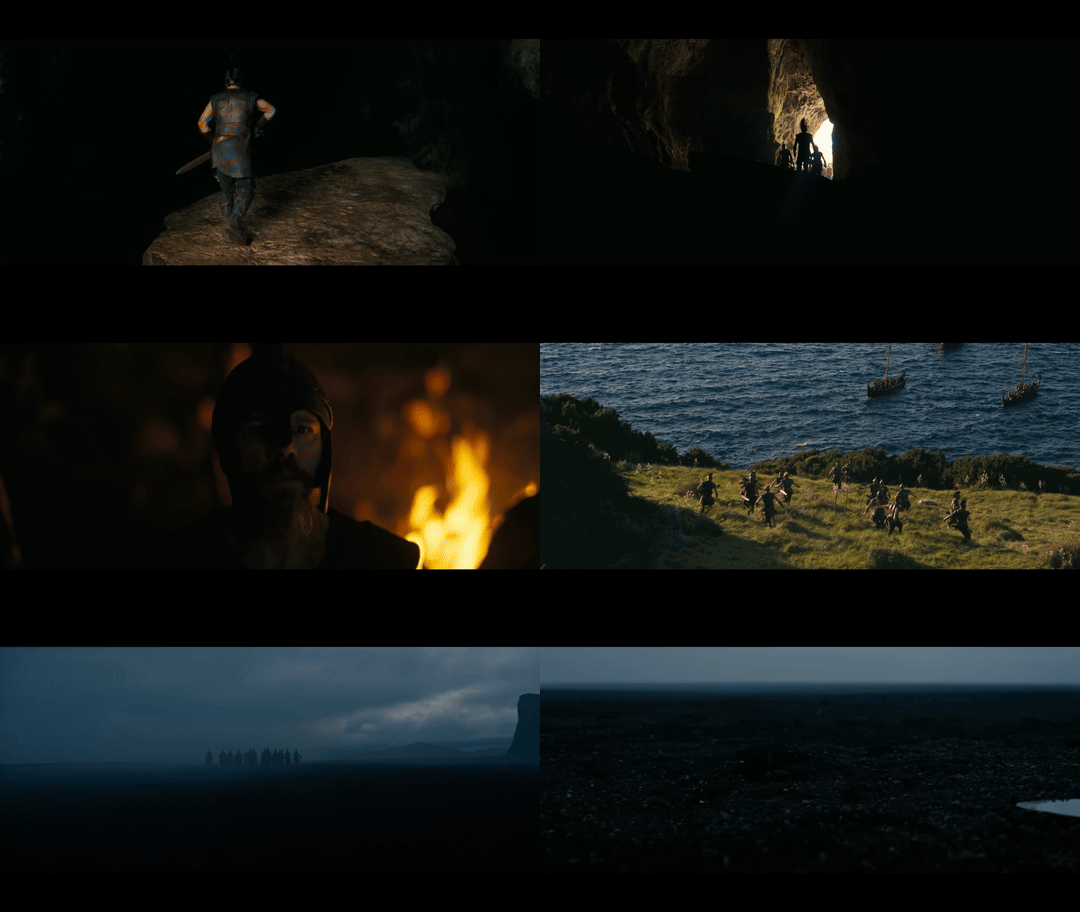
But as you can see, using this kind of clip as reference is hard to learn from through naked-eye observation alone. It involves too many details — shot composition, visual style, motion reference — that are genuinely difficult to master.
So I needed an AI Agent to extract the style, approach, cinematography, and audio from these reference videos and analyze them. This can now be done directly in LibTV.
First, download the short video, upload it to LibTV, then use the frame-by-frame scene breakdown feature to extract shots, motion, and music.
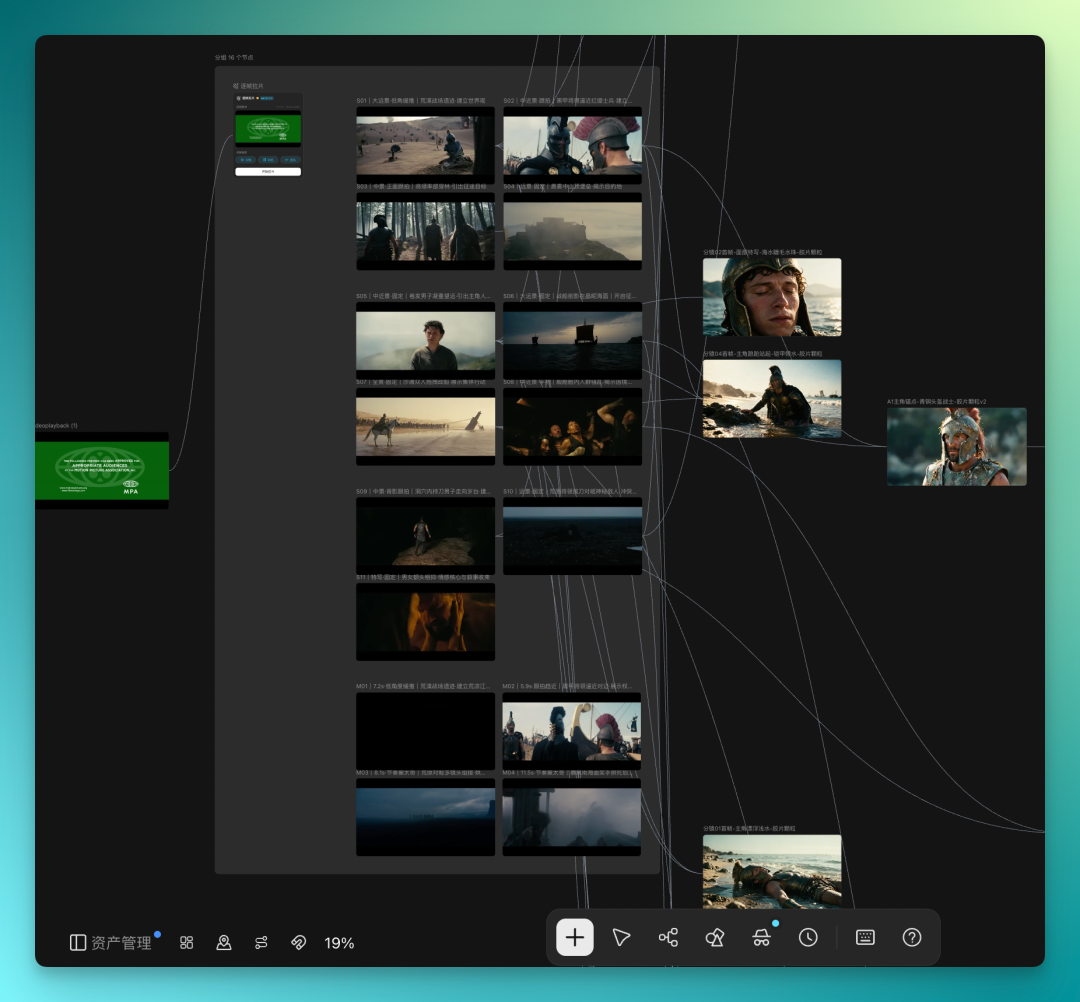
LibTV splits my uploaded video into several shots, and also provides overall motion reference and music reference segments — quite a lot of extracted content.
Some of these shots serve as keyframe references for the video.
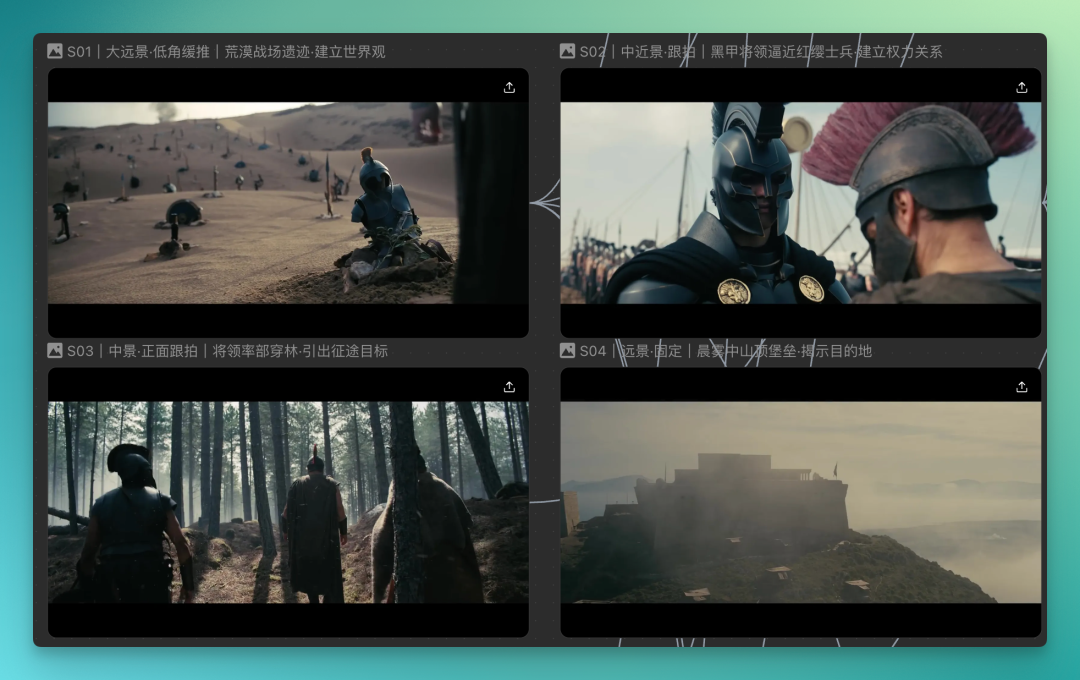
When making your own short, don't wholesale copy the original video's content. If you're just swapping out characters, that becomes simple character replacement.
What you want the LibTV Agent to reference is the overall breakdown structure — what kind of camera movement structure the reference uses, what shot sizes, whether it's extreme long shots, medium shots, close-ups. Reference these elements first, then build your own narrative short.
Smart Referencing
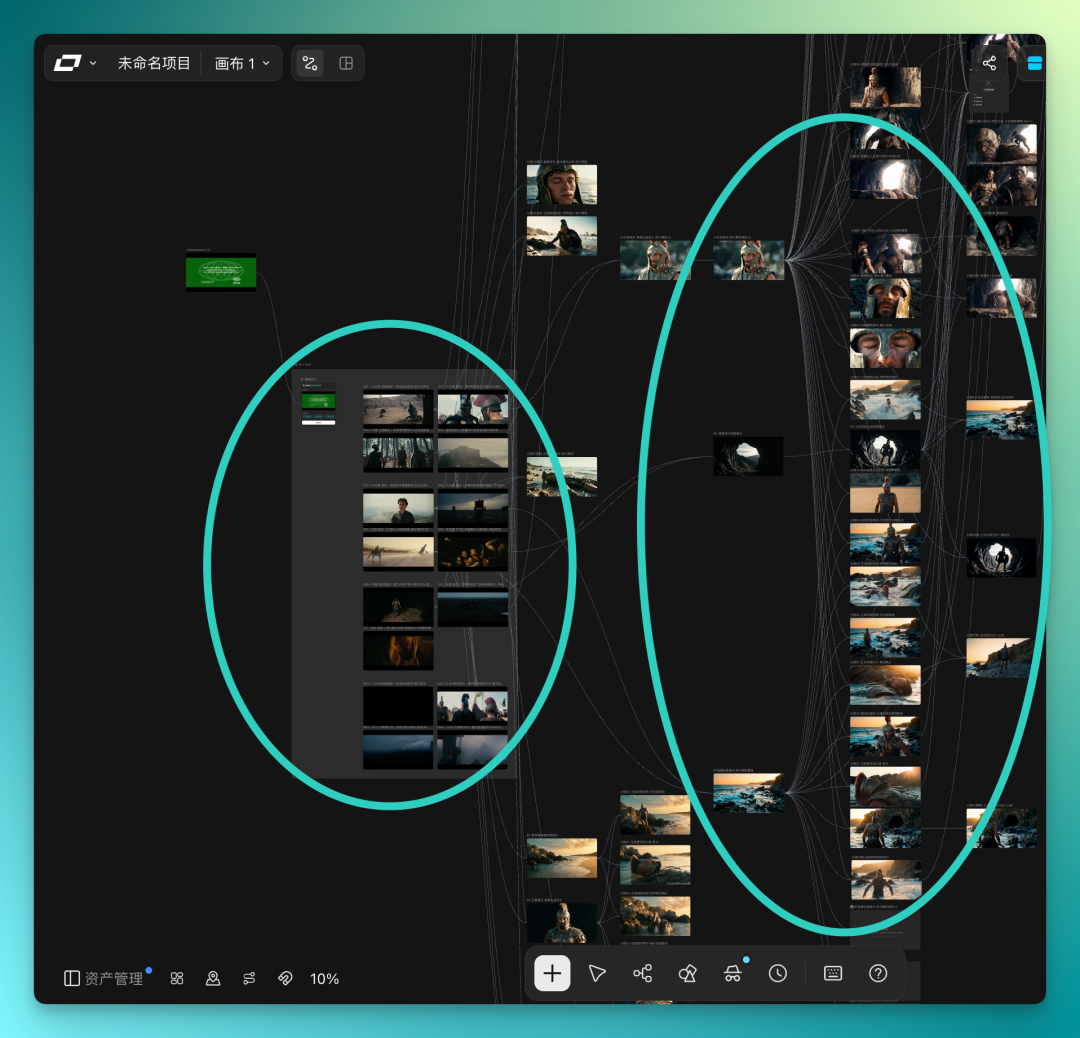
Once LibTV has extracted all the shot segments, motion references, and style references through frame-by-frame breakdown, I find the canvas has become piled high with assets. And since we still need to do secondary creation based on these extracted clips to form our own style, the entire canvas easily gets filled with materials.
At this point I discovered LibTV had launched a feature called "Smart Referencing." Its core function is: when generating video, you can directly input a video generation prompt, and the system intelligently recognizes your prompt and automatically finds corresponding assets from the current canvas to use as references.
For example, if I input "a soldier wearing a helmet," it automatically matches the corresponding image from the canvas and uses it as a generation reference. Or a character like "cyclops" can be automatically identified and referenced the same way.
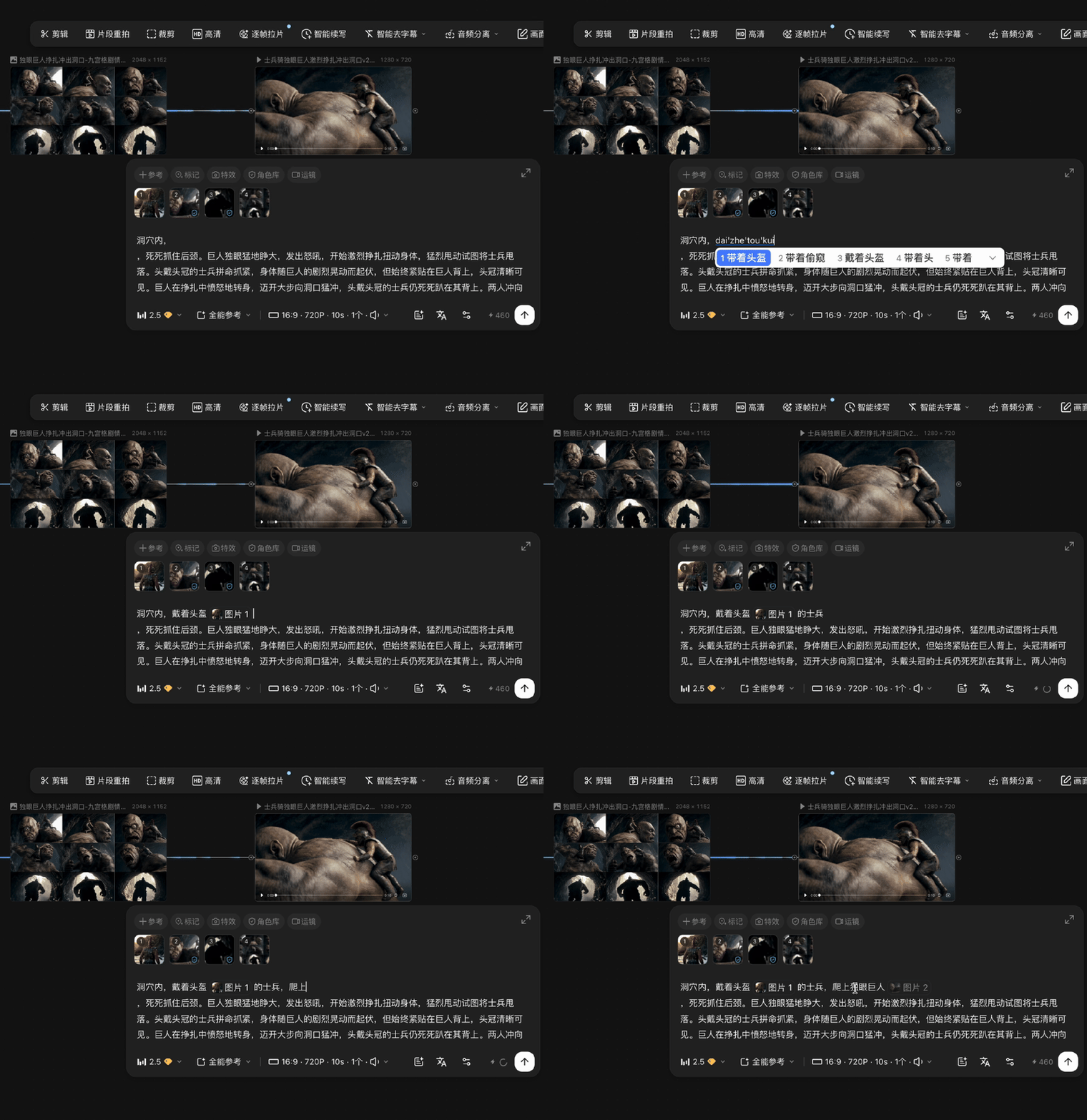
In LibTV's infinite canvas, you can have it generate all the anchor images and storyboards in one go. After generation, if you need to make changes — say, to modify a segment because some content isn't quite right, or a character has issues — you'd need to find the correct asset from the canvas. But there's so much content, possibly hundreds of assets, which becomes extremely tedious.
At this point, you can simply click on the video and use LibTV's "Smart Referencing" feature.
This way, your creative rhythm doesn't get disrupted — no need to scroll through hundreds of assets one by one just to find a single image.
This smart referencing capability lets us efficiently complete large volumes of similar segment creation.
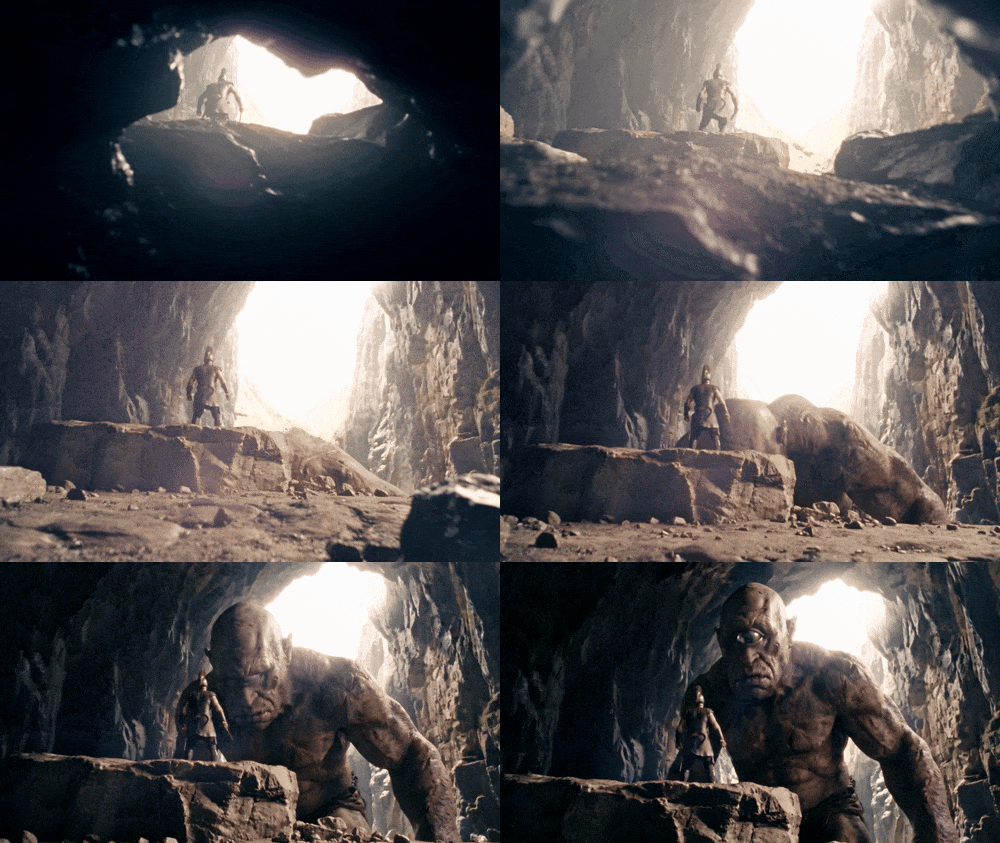
For example, after a soldier crawls out of a cave opening, the scene needs a lighting shift before cutting to a shot of the cyclops slowly rising. These kinds of scenes are relatively complex in actual production, involving camera movement, lens traversal, and transitions between different subjects.
In these moments, we can directly use smart referencing to quickly call up previously extracted characters, styles, and shot references, significantly boosting generation efficiency.
Of course, LibTV's AI Agent can't complete an entire short film with a single prompt without needing any segment revisions. When it first finished the overall video, the completeness was decent, but some segments weren't to my liking.
That's when we can use the clip reshoot feature.
Clip Reshoots
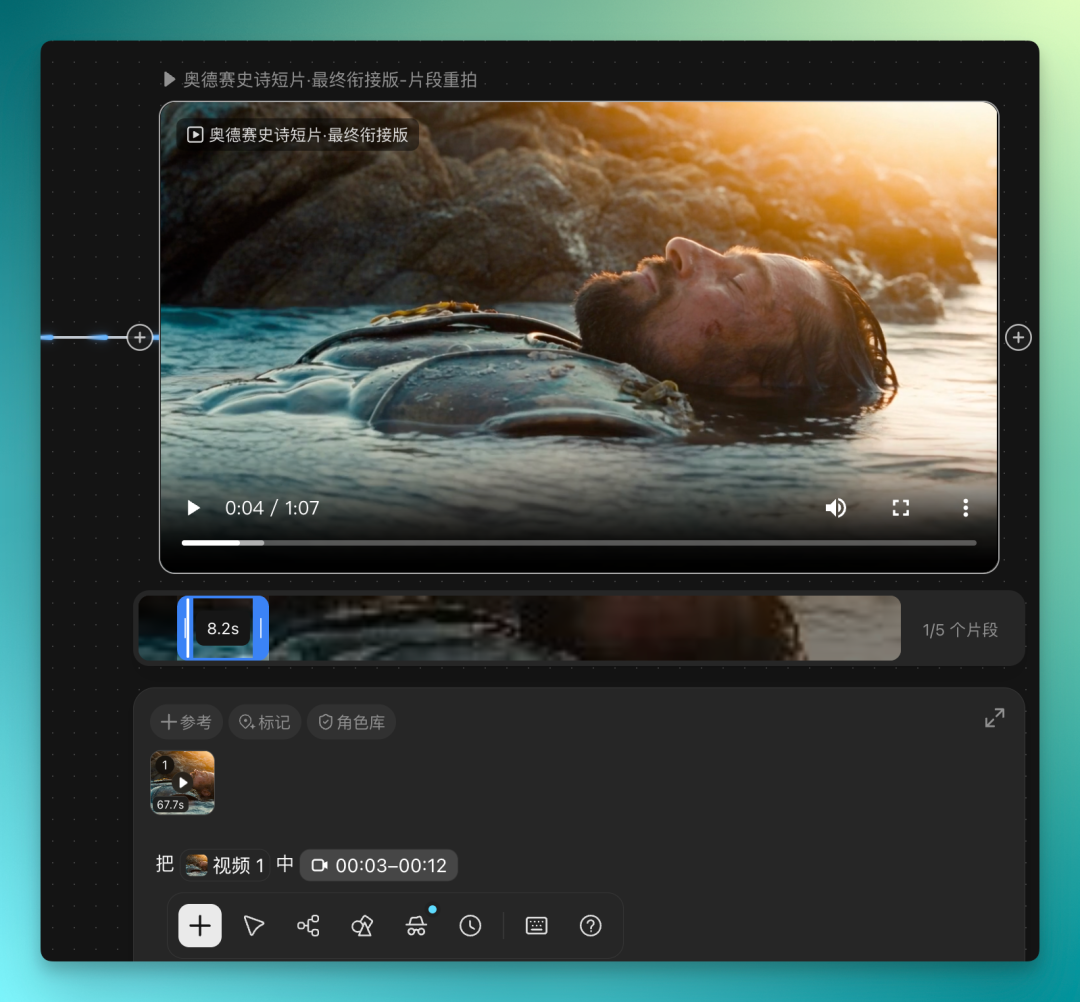
The specific way to use this feature is: click on a video in the canvas, and there's a "Clip Reshoot" function.
After clicking clip reshoot, it displays the complete video. You can preview it inside, directly check a specific segment, and edit it CapCut-style. Click on that segment, and you can precisely reshoot it.
When reshooting, it uses the previous clip's last frame and the next clip's first frame to maintain continuity.
Overall, this feature works pretty well. Mainly, Seedance 2.5's model capability is solid enough to support this kind of contextual continuity.
One segment I used this feature to regenerate was the opening portion of the film, where the original version had character design issues — for instance, the character wasn't wearing his bronze Corinthian helmet.
But the overall lighting effects and visual aesthetics were preserved, so I only needed to regenerate this small segment rather than remake the entire film.
The reshot results are decent:

Additionally, when editing the final complete video, sometimes you still need to use local editing tools. In these cases, you might split a complete video into several segments.
If you feel these segments don't connect well enough — the effects or plot don't flow — you can import them into LibTV's infinite canvas, reference these segments in the Agent's chat interface, and it will edit them together itself.
There's also a smart editing feature that can do asset mixing. As long as you upload video, images, audio, or scripts, it can mix assets. You don't need to give the Agent much instruction — it will analyze the content you upload itself.
5-Minute Long Films With all these features in place, we can now attempt to create longer-form video content. For instance, LibTV now supports extending video length to 300 seconds — a full 5-minute film.
This capability is well-suited for one-take, tightly plotted long-form content.
Here's a case example: using LibTV to generate a long video of a girl adventuring through various scenes.
Throughout the footage, the girl continuously traverses multiple different environments — pixel art style, photorealistic style, and even a scene where she summons a pixel sword from Minecraft to battle monsters.
These scene transitions are accomplished through highly effects-driven methods, with continuous transformation of the surrounding environment.
After seeing these two case examples, the轮廓 of this LibTV upgrade becomes fairly clear.
In actual testing, Seedance 2.5's "card draw" success rate is indeed much higher than 2.0's — most of the time you get usable results on the first try. Combined with a more creator-friendly interface and lower-barrier Harness features, creation becomes significantly simpler.
A quick note on LibTV's promotion: Seedance 2.5's 720P is currently limited-time 42% off, with reference-video-inclusive generation dropping from 46 credits per second to 27 credits per second, working out to as low as 0.4 RMB per second, with up to 60 free generations as a bonus.
This magnitude of price reduction represents a "battle" among AI video generation platforms in the wake of Seedance 2.5's launch.
So what we're seeing now is that around AI video models, models and platforms are essentially fighting two simultaneous wars.
On the model side, models like Seedance 2.5 have significantly advanced long-form narrative and multimodal reference capabilities.
On the platform side, it's another fight entirely — translating new model capabilities into operations that creators can actually use, lowering the barrier to entry, in order to capture this wave of users and successfully distribute the model.
This grand war around AI video models is getting more and more interesting.
Crossing is looking for independent writers to produce AI product and model reviews.
If you've written articles like: Hands-On: PixVerse C1, Hands-On: LibTV, please contact zeo0811@gmail.com. Your email should include: ① personal introduction, ② AI review articles you've written.
We offer competitive compensation. Looking forward to observing and documenting the AI era with you 🎪