OpenClaw Deep Dive: Why It Suddenly Blew Up, and What It Means for Us

Tools go out of style; understanding the essence of tools doesn't.
🚥 Koji's Note:
Next week, Crossing's podcast drops Episode 4 of our "20 Questions" series.
One month after OpenClaw went viral, we're using 20 questions to unpack the technical logic, use cases, entrepreneurial opportunities, and risk boundaries behind this agent wave.
One of this episode's guests is Yan Wang, the author of this piece. Subscribe to the "Crossing" podcast on Xiaoyuzhou and Apple Podcast to catch next week's show.

🚥 Author: Yan Wang
Applied scientist at Samsara, Columbia University PhD, previously at Pinterest and Microsoft, with nearly 40 papers published in top international conferences and journals. Personal website: Computing Life[1]
OpenClaw went viral in late January 2026.
WeChat public accounts were flooded with setup tutorials. Cloud providers rushed out one-click deployments, terrified of missing the wave. Meanwhile, performance art abounded: ClawdBot, MoltBot, OpenClaw — three name changes in one week; during one rebrand, their handle got sniped by a $CLAWD token scam that fleeced people for $16 million.
Security vulnerabilities proliferated too: 12% of third-party skills contained malicious code, and plenty of users left their admin consoles exposed on the public internet without passwords.
For a moment the entire field felt like nothing but contradictory noise, leaving people paralyzed: Should I install this thing or not? What do I miss if I don't? What risks if I do? Is this the next productivity revolution or another toy that'll fizzle in two weeks?
This article tries to cut through the noise from a higher vantage point:
What OpenClaw got right, why it was the one to blow up, and why any of this matters to us.
The Hot Take on Why It Went Viral
Here's my hot take: The reason OpenClaw blew up is remarkably similar to why DeepSeek blew up around this time last year.
When DeepSeek went viral, most AI usage in China was still pure chat — no search, frequent hallucinations.
ChatGPT and Claude had reasoning and search, far more capable, but inaccessible in China. DeepSeek introduced reasoning and search, giving people their first taste of an AI that could search and think, producing that jaw-drop moment: Wow, AI can actually be this useful. And it exploded.
In other words, the virality wasn't about technical superiority. DeepSeek didn't actually crush GPT-4o or Claude 3.5 on pure model capability.
It blew up because it took something a small group already enjoyed, and suddenly put it in front of a much larger audience.
OpenClaw is the same story. In early 2026, there was a chasm in the Agentic AI space: While ChatGPT was mainstream, it lagged at least a generation behind locally-empowered coding agents like Cursor, Claude Code, and Codex (why exactly, I'll explain later).
But Cursor was niche, basically programmers only. Everyone else was still on consumer-grade products like ChatGPT, feeling like AI hadn't really progressed in two years, that its capabilities were limited.
Then OpenClaw became the first to connect a locally-empowered coding agent like Cursor to popular messaging apps like WhatsApp, Slack, and Lark, letting non-technical users — a vastly larger audience — experience for the first time an Agentic AI that could read and write files, execute commands, remember context, and iterate continuously. And it exploded.
So again, the virality wasn't about OpenClaw doing something technically novel. It took something a small group already enjoyed, and suddenly put it in front of a much larger non-technical audience.
But I'm not saying this to conclude that OpenClaw and DeepSeek are all sizzle, no steak, not worth learning from. Quite the opposite. DeepSeek offered genuine historical lessons. For instance, who actually benefited from DeepSeek's rise? My observation: whether you jumped on the bandwagon in the first wave mattered far less than you'd think.
Many people tried it and moved on. The real beneficiaries were those who understood why DeepSeek worked — search and reasoning — and integrated those two critical factors into their own workflows.
Similarly, when OpenClaw blows up, sure, install it, kick the tires. But that alone won't transform your productivity overnight. These phenomenon-level products go viral precisely because they're designed for the broadest possible audience, which means design compromises everywhere — raw efficiency often isn't optimal. What matters more is understanding the design philosophy behind it, analyzing why it caught fire, extracting transferable lessons, and improving your own workflow.
After all, tools become obsolete; understanding what makes them tick doesn't. Extracting transferable insights and weaving them into your workflow — that's how insiders operate.
Chat Interface: Foundation of Popularity, Also Its Ceiling
Before analyzing what makes OpenClaw impressive, I want to walk through a concrete example to explain what "designed for the broadest possible audience" actually means and what trade-offs it entails.
A critical factor in OpenClaw's rise was its choice of everyday messaging apps as the interaction layer, rather than making you install yet another desktop app like Cursor.
This piggybacks on existing habits and channels, keeping the cognitive overhead minimal. You're already in Slack/Lark all day anyway, so you naturally reach for OpenClaw when you see it.
Familiarity also drives learning cost to near zero. No IDE to install, no programming jargon to learn, just pick up your phone and go. This is the foundation of its mainstream breakthrough.
But if you've used agentic programming tools like Cursor, you'll quickly notice how constrained a chat window is for AI work.
First, it forces linear conversation. Slack and WeChat stack messages in a straight line. But deep knowledge work is rarely linear. You need to reference another thread, merge two exploratory branches, fork off from a session. Desktop environments like Cursor and OpenCode have dedicated UI for this; in chat windows it's painfully awkward.
Second, information density. For toy-level research and tinkering, chat is fine. For anything more complex — mixed-media analysis reports, intricate tables, formatted long documents — it's excruciating. Markdown support also varies wildly across platforms, making for unstable experiences.
Third, observability of process. For multi-step tasks, once I delegate execution to the AI, I naturally want to know what it's doing. Is it making steady progress or going in circles? What tools did it call, what files did it modify? Cursor surfaces this naturally; in chat we get "typing..." or a processing emoji. For complex tasks, OpenClaw can leave you waiting a long time before a single message lands: done, or broke somewhere.
But I'm not saying OpenClaw is poorly designed. I'm pointing to an obvious trade-off. To make a tool accessible and target the largest audience, you must use tools people already have — messaging apps. This immediately introduces constraints on conversation form, information density, and more.
The reverse holds too. Along this continuum from "accessible but awkward" to "native but niche," OpenClaw chose extreme accessibility. This is the foundation of its virality. But we must stay clear-eyed about the limitations this design choice imposes. When integrating into our own workflows, we shouldn't blindly adopt all of OpenClaw's design decisions. Instead, find your own sweet spot along this trade-off axis based on your actual needs.
With this trade-off understood, the analysis that follows becomes clearer.
Beyond the Interface: What Actually Made It Stick
The chat interface was OpenClaw's entry point, but only the most superficial one. What actually makes users feel this AI is intelligent, useful, and gets them are three deeper design decisions.
The first is unified entry point and context. Contrast with Cursor: there, each project's context is siloed — open Project A, the AI only knows Project A; switch to Project B, your Project A conversation vanishes.
Claude Code, OpenCode — same pattern, each launch binds to a working directory. OpenClaw does the opposite. By default it pools all conversation context together. You ask it to organize emails on Telegram in the morning, write a report on Slack in the afternoon, schedule tomorrow on WhatsApp in the evening — it remembers everything. The feeling is of genuine intelligence, like it actually knows you.
But pooling context alone isn't enough; the context window fills fast. This brings us to its second key design: persistent memory. OpenClaw's memory handling is remarkably clever and worth studying. At the high level, it uses a file-based memory system, similar to Manus[2]. It maintains a SOUL.md defining core persona and behavioral principles; USER.md stores user profiles; MEMORY.md holds long-term memory; plus daily raw logs, and so on.
What's particularly clever is its self-maintenance mechanism: the AI automatically reviews recent raw logs at intervals (heartbeat), distilling valuable information into MEMORY.md while purging stale entries. The entire process requires no user intervention. This creates a memory hierarchy: raw logs as short-term, daily MEMORY.md as medium-term, distilled personality and preferences as long-term. The perceptual gap between "having to re-explain everything each session" and "it seems to be growing" is massive.
The third design is rich Skills. Their significance far exceeds mere time savings. The benefit of tool quantity isn't linear[3] — six tools versus four represents a far greater capability jump than four versus two. This is because tools can combine. Slack integration handles commands and status updates; image generation draws; PPT services produce slides; deep research investigates. Combined, they evolve into complete business capabilities and application scenarios.
These three designs don't simply add together — they reinforce each other.
Memory plus unified context pool creates data compounding. Because memory persists, conversations accumulate across sessions; because the entry is unified, all data sources feed into the same memory pool. Work discussions in Slack, scheduling in Telegram, personal chats in WhatsApp — all blend together, forming an increasingly complete understanding of you, making future tasks increasingly tailored.
Memory plus skills enables self-evolution. What it learns today persists tomorrow; capabilities accumulate. The AI can write new skills and remember their existence and usage, entering a positive feedback loop. Particularly notable here is coding capability. Because OpenClaw can write code, when no existing skill fits, it can forge one on the spot. This new skill gets saved and reused next time, forming a self-evolution loop.
These capabilities combined with interface accessibility drive usage frequency. The smoother the entry, the more frequent the calls; the faster the flywheel spins, the stronger the capabilities grow.
In sum, OpenClaw is a remarkably well-designed product. Its decisions — technical (entry, memory, tools) and non-technical (interface) alike — all serve the same flywheel: giving ordinary people their first taste of the complete form of Agentic AI.
Limitations and Trade-offs
Having covered why it's impressive, time for complaints. But first: the limitations below aren't oversights or bugs. They're direct consequences of that trade-off — the price of making something explosively accessible.
Interface limitations covered above: linearity, low information density, low observability. These quickly become bottlenecks in deep use, no need to rehash.
Deeper issues lie in memory. OpenClaw's memory system is friendly to beginners. You don't manage it; it maintains and evolves itself. But for those wanting to turn knowledge into assets, this becomes an obstacle.
Take this example: after completing research, you produce a 5,000-word article or a PRD. In Cursor/file systems, it's a file: docs/research.md. Reference with @, version with new files, diff for comparison. In OpenClaw, this artifact behaves like human memory — subject to automatic summarization, rewriting, even complete deletion (forgetting), entirely outside your control. It's hard to instruct: Going forward, treat this document as canonical; reference it for related questions; don't compress it to three lines. In short: knowledge cannot be explicitly managed.
More frustrating, the entire update process is a black box. What goes into MEMORY.md, how it's organized, when cleanup happens — mainly automated during heartbeat. You see results, rarely reasons: what changed this time, why delete this entry, why merge two unrelated things. When problems arise, root cause is hard to locate, hence hard to improve.
Another consequence of OpenClaw's memory design: cross-scenario information interference. Unified memory creates that "gets me" feeling, but also means information easily contaminates across projects: Project A's preferences, even temporary decisions, may inexplicably affect Project B. To beginners it seems to remember everything; to advanced users actually trying to get work done, it's more like "ugh, how did it go off track again."
Skills introduce yet another category of problems. Among thousands of skills on ClawHub, security audits found hundreds containing malicious code — crypto theft, reverse shell backdoors, credential harvesting. Simon Willison proposed the lethal trifecta[4]: when an AI system simultaneously has access to private data, exposure to untrusted environments, and ability to communicate externally, risk scales exponentially. OpenClaw hits all three 🤡.
This creates a peculiar paradox. To make it useful, you must grant extensive tools and permissions. But this brings security risks, so you tighten permissions. Tighten too much and it becomes a cloud agent service like Manus, losing the appeal of local agents.
Security and usability seem to have become opposing forces.
So What?
Naturally, after all this analysis, one asks: okay, and? What does this have to do with me?
The answer: Use these insights to build something more suited to your needs than OpenClaw, atop tools you already have. That's what I did, with much better results than using OpenClaw directly. Here are the key decisions.
Reuse the Agentic Loop, Don't Build Your Own
Our first and most important decision was not to implement an Agentic AI system from scratch, but to reuse open-source CLI programming tools like OpenCode as the foundation.
This reflects a deeper judgment. Building a functional Agentic Loop — calling APIs, parsing tool calls, executing tools, returning results to the AI, requesting the next response — sounds simple, but production-grade execution involves countless details: file system read/write, content insertion/deletion/replacement, sandbox environments, permission management... each a pitfall. These are tedious, trap-filled, and largely unrelated to the value we ultimately want to create.
I discussed this in detail in a previous article[5] — the core argument being that the Agentic Loop is grunt work, to be outsourced; what deserves your energy is Agentic Architecture, i.e., how to inject business logic into the AI system so it directly creates value.
OpenCode, Claude Code, and similar tools are ideal for this outsourcing. They've already matured the Agentic Loop — file read/write, command execution, continuous iteration — and are evolving rapidly. Using them as foundation is essentially free-riding the entire agentic programming toolchain, minimizing your own development cost. OpenCode specifically offers added benefits: fully open-source and hackable, parallel subagent support (which Cursor and Codex still lack), and multiple coding plans — I personally use GLM's coding plan, or can directly use OpenAI's Codex plan, without the burn rate of raw API calls.
Files as Memory: Inheriting and Extending OpenClaw's Philosophy
Our second decision concerns the memory system.
OpenCode/Claude Code inherently embody disk-as-memory — their fundamental unit of operation is files. With disk-based memory plus direct, transparent file manipulation, we solve OpenClaw's memory problems identified earlier. Want to preserve an asset? Write a file. Want to enforce rules? Write an AGENTS.md. Want to manage memory structure? Edit Markdown directly. The issues of non-explicit knowledge management and black-box updates are naturally resolved by OpenCode's granular control and file system.
But file systems alone aren't enough; we also ported OpenClaw's persona self-evolution mechanism. Specifically, we split memory into two layers: project-level memory (each project's context, decision records, technical solutions) and persona-level memory (user profile, behavioral preferences, communication style). We then added persona maintenance workflows to AGENTS.md, having the AI automatically review conversations and update MEMORY.md and USER.md at session end. Same self-evolution, but running on a fully controllable file system, with Git for version management.
For unified context, we used a brutally simple solution: Mono Repo. Different projects live as folders in the same repo; the AI naturally accesses all contexts across projects. Isolate when desired, share when desired, merge exploratory branches with @, fork by copying files — all native file system and OpenCode operations, vastly more natural than OpenClaw's awkward chat-window contortions.
Skills and Security
For skills, the OpenCode ecosystem offers abundant MCP servers and skills — calendar, email, browser, search, etc. — functional coverage roughly matching ClawHub.
On security, our approach is don't install third-party skills directly; have the AI review the source code, understand the logic, then rewrite a clean version. In today's AI-assisted programming environment this typically takes minutes, but dramatically reduces supply chain attack risk.
Last Mile: Mobile
The three decisions above solve foundation, memory, and tools. But one critical piece remains: entry point.
A major reason OpenClaw caught fire: you don't have to be at your computer. Existing programming tools are embarrassingly weak here. VS Code has Code Server for remote access, but it's iPad-hostile; OpenCode has a Web Client, but honestly it barely clears the "exists" bar, very painful to use; Cursor's Web Client is tightly bound to GitHub; Claude Code has no Web Client at all.
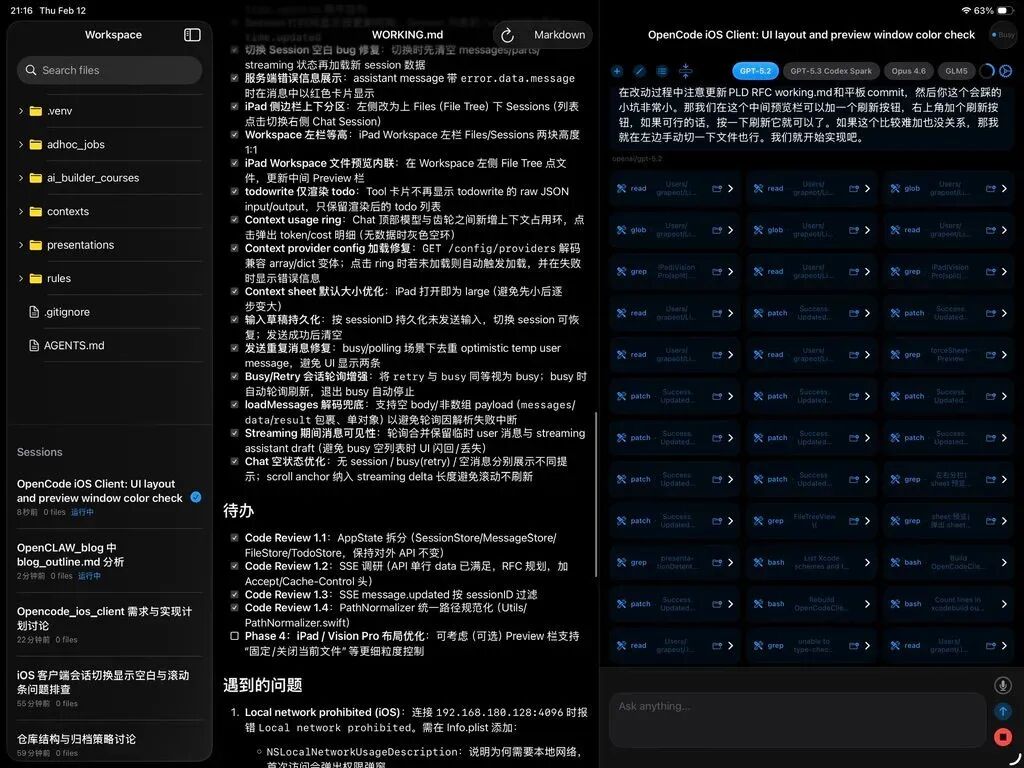
To solve this, we built a native iOS app as a remote client for OpenCode. Note: this isn't just moving chat to mobile — it's a genuinely mobile-designed workspace: real-time visibility into AI's working progress, every tool call, every file operation; model switching for A/B testing; Markdown file browsing and change review; voice input; public access via HTTPS or SSH tunnel; three-column split view on iPad.
This client is already open source[6] on GitHub. Welcome to try it out. TestFlight may come later. The result: my long-dusty iPad became productive again. Directing AI from the couch is far more satisfying than OpenClaw's chat window. Out for dinner and get paged? Dispatch tasks to your AI assistant right there, root cause identified on the spot. And you maintain full control throughout — no rogue behavior, no accidental posts to Moltbook.
Summary
Returning to the opening hot take. OpenClaw and DeepSeek went viral for essentially the same reason: they took capabilities a small group already enjoyed and pushed them to a broader audience for the first time. DeepSeek gave people their first AI that could search and reason; OpenClaw gave people their first Agentic AI that could read and write files, remember, and self-evolve.
But precisely because they target the broadest possible mainstream audience, such products necessarily make extensive design compromises. DeepSeek did; OpenClaw does too. Chat interfaces bring accessibility at the cost of expressiveness; unified memory creates intimacy at the cost of controllability; open skills ecosystems bring capability at the cost of security risk.
For those already using Cursor/Claude Code/OpenCode, the better move isn't blindly installing OpenClaw, but understanding why it caught fire — unified entry, persistent memory, tool ecosystem, and the flywheel between them — then weaving these insights into your existing toolchain, playing to strengths and mitigating weaknesses. That's what we did, with markedly better results than using OpenClaw directly.
After all, tools become obsolete; understanding what makes them tick doesn't.
🚥

References
[1] Computing Life: https://yage.ai/
[2] similar to Manus: https://manus.im/blog/Context-Engineering-for-AI-Agents-Lessons-from-Building-Manus
[3] isn't linear: https://yage.ai/manus.html
[4] lethal trifecta: https://simonwillison.net/2025/Jun/16/the-lethal-trifecta/
[5] previous article: https://yage.ai/ai-builder-space.html
[6] open source: https://github.com/grapeot/opencode_ios_client