We Took SkyReels' Major New Release for a Spin: Running a Full AI Content Production Pipeline

FamilyMart bucket meal, truly delicious!
The full suite — it just works.
 👦🏻 Author: Jingshan
🥷 Editor: Koji
🧑🎨 Layout: NCon
 Over the past year, AI video technology has evolved at what feels like rocket speed, pushing boundaries on a monthly cadence.
But looking back, the real barrier facing creators has long stopped being the "tools" themselves — it's the efficiency and completeness of the workflow.
Most creators today remain trapped in a clunky, fragmented "multi-tool patching flow": hunting for inspiration, refining prompts, AI image generation models, AI video generation models... every step risks getting stuck in a different pit — inconsistent model styles, incompatible resource formats, modules that just aren't capable enough.
For many creators, true "end-to-end creative freedom" remains out of reach.
The all-new SkyReels, launched by Kunlun Tech on November 4, is attempting to break this deadlock. Its entry point precisely targets this gap, focusing on "workflow aggregation." It chooses to aggregate every tool useful to the AI creative flow into one unified system, compressing a process that previously required four or five tools into a single, unified creative framework.
Since early 2025, SkyReels has been on fast-forward, releasing major version updates roughly every two months. V1, A1, A2, V2, followed by the Audio module — building out an "AI creative matrix."
Portrait animation, element control, ultra-long narratives, audio scenes — every use case is expanding. The logic behind it: AI creative platforms are no longer pouring all attention into a single SOTA model, but pivoting toward pragmatism and productivity.
🚥
Below, we'll put the all-new SkyReels through a complete e-commerce content pipeline test to see whether it can truly make "AI creation" a closed loop.
Full Closed-Loop Test of the All-New SkyReels
Here, we'll use "a complete e-commerce industry content pipeline" as our through-line, simulating an entire brand design workflow:
【1】New product hero image
【2】Product lifestyle image
【3】Product poster short
【4】Product motion short
【5】Product digital human explainer video
【6】Single-turn conversational digital human
【7】Multi-turn conversational digital human
【8】Agent
In this closed loop, I'll test SkyReels's image, video, digital human, template, Agent, stylization, and all other core functions.
1) New Product Hero Image
With Double 11 coming up, I was browsing Taobao yesterday to see what deals Tmall's Double 11 had worth snagging this year.
As usual, I clicked into a brand's Tmall flagship store and found a "cat belly pillow" sitting in the homepage C-position, marked as the store's #1 bestseller.
I clicked in — too cute! So I thought, why not take this chance to use this cat belly pillow for a full e-commerce content pipeline test.
Let's use it as our example to see how much the all-new SkyReels's interactive capabilities and feature integration can help a brand complete such a full content production workflow.
Here's the cat belly pillow:

First, the all-new SkyReels has already integrated today's hottest models. For AI image generation, it can directly call Seedream 4.0, Nanobonana, and multiple other SOTA models.
So let's start with the most basic product image. First, cut out this "cat belly pillow" hero shot to create a clean product visual.
In the all-new SkyReels, generating images with Seedream 4.0 is remarkably smooth, and it can output 4K resolution directly. Plus, its credit consumption is among the lowest I've seen across all AI image generation platforms:

When I started generating these images, I discovered the all-new SkyReels has upgraded its interaction to "infinite canvas" mode.
The entire interface becomes highly intuitive — freely drag, zoom, and splice materials. More importantly, every functional node is connected in sequence.
For example, in the left sidebar of the canvas, there's a module I use frequently and highly recommend: the Templates library.
It comes pre-loaded with a large number of popular templates, covering product posters, model styling, scene arrangements — essentially all core needs of e-commerce content creation.
No need to build from scratch; just pick a style, swap in your image, and you get a production-grade e-commerce visual:
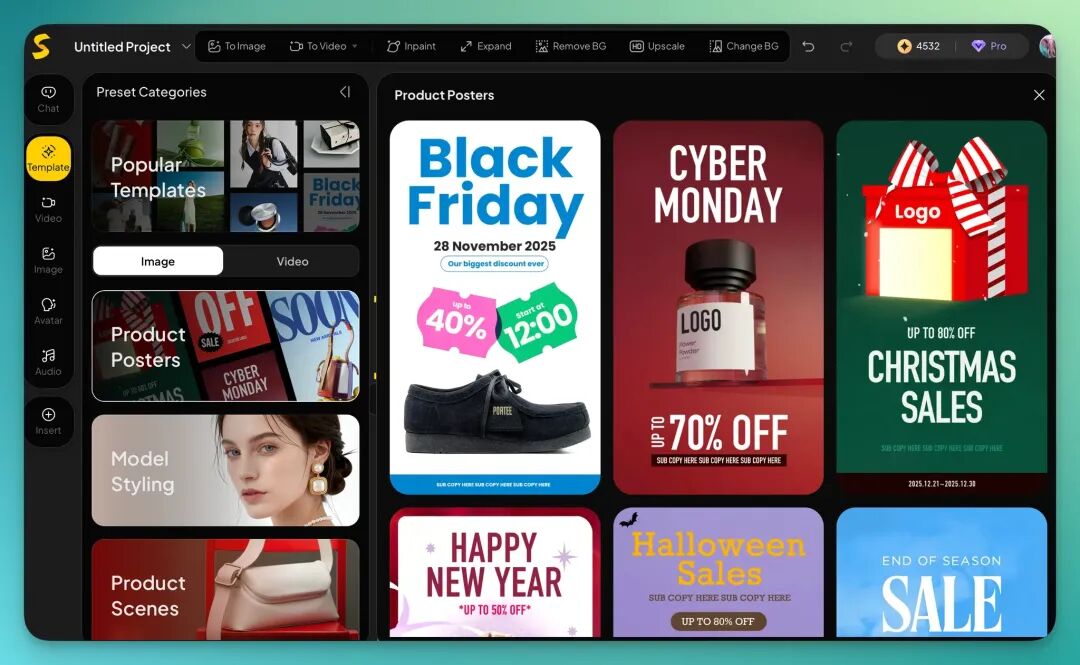
If you click into a product poster template, you'll find each template further subdivides into different scenes and product display methods, with various visual styles.
And all these templates can directly pull materials from your previously generated images. That means no more uploading, downloading, or switching interfaces — all assets can be called up within the same workflow:
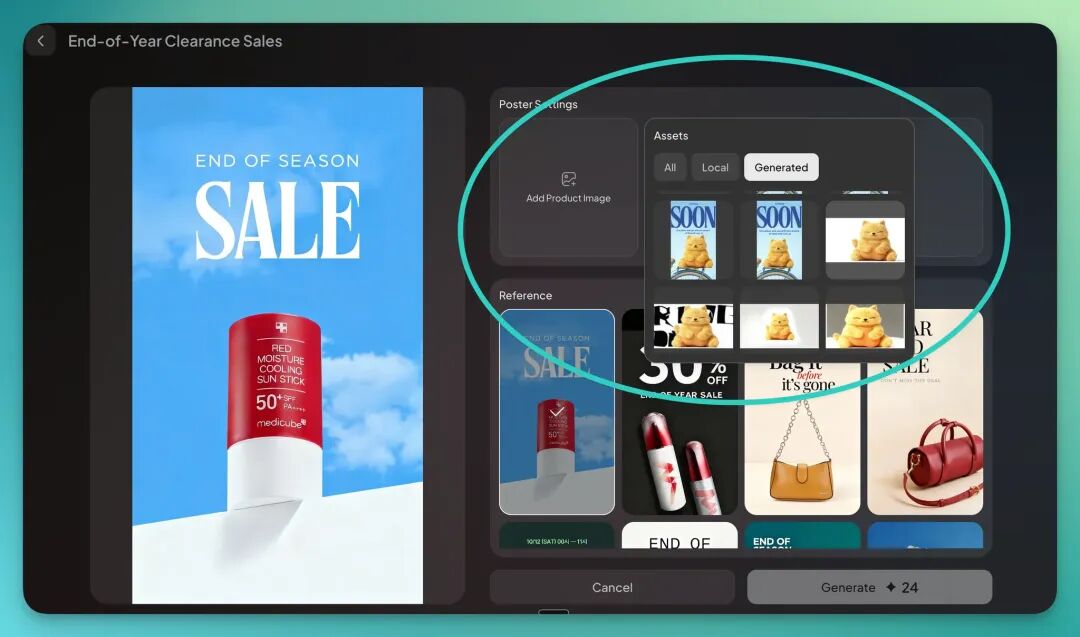
So next, let's actually operate this and generate a few posters for this cat belly pillow to see the results.
Prompt:
"Lean on its belly, and the world goes quiet." 💤
The all-new SkyReels has a particularly efficient design point: it not only provides rich product templates, but barely requires you to write complex prompts — just input some simple element text in its preset text boxes:
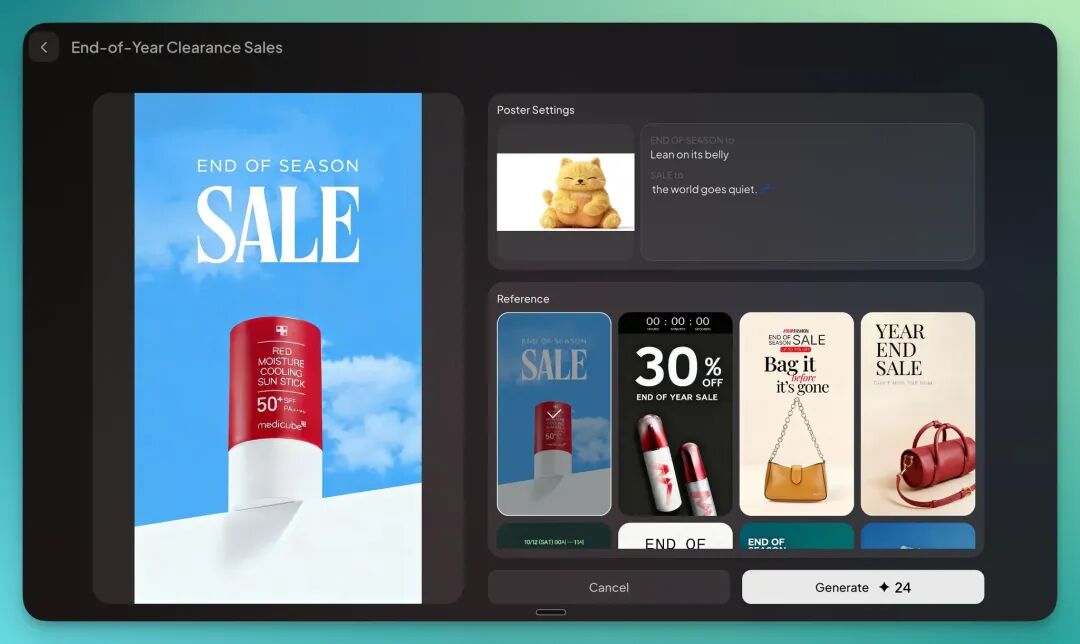
Then you'll discover the entire process is remarkably smooth — almost no parameter tuning, no repeated trial and error, and you can generate a batch of good-looking posters with extreme efficiency:





2) Product Lifestyle Image
Another very practical aspect: the all-new SkyReels's template function comes with dozens of built-in product lifestyle scenes. These scenes cover a wide range: bedroom, living room, study, and more.
I just need to pick a scene template I like and swap in my own product image:

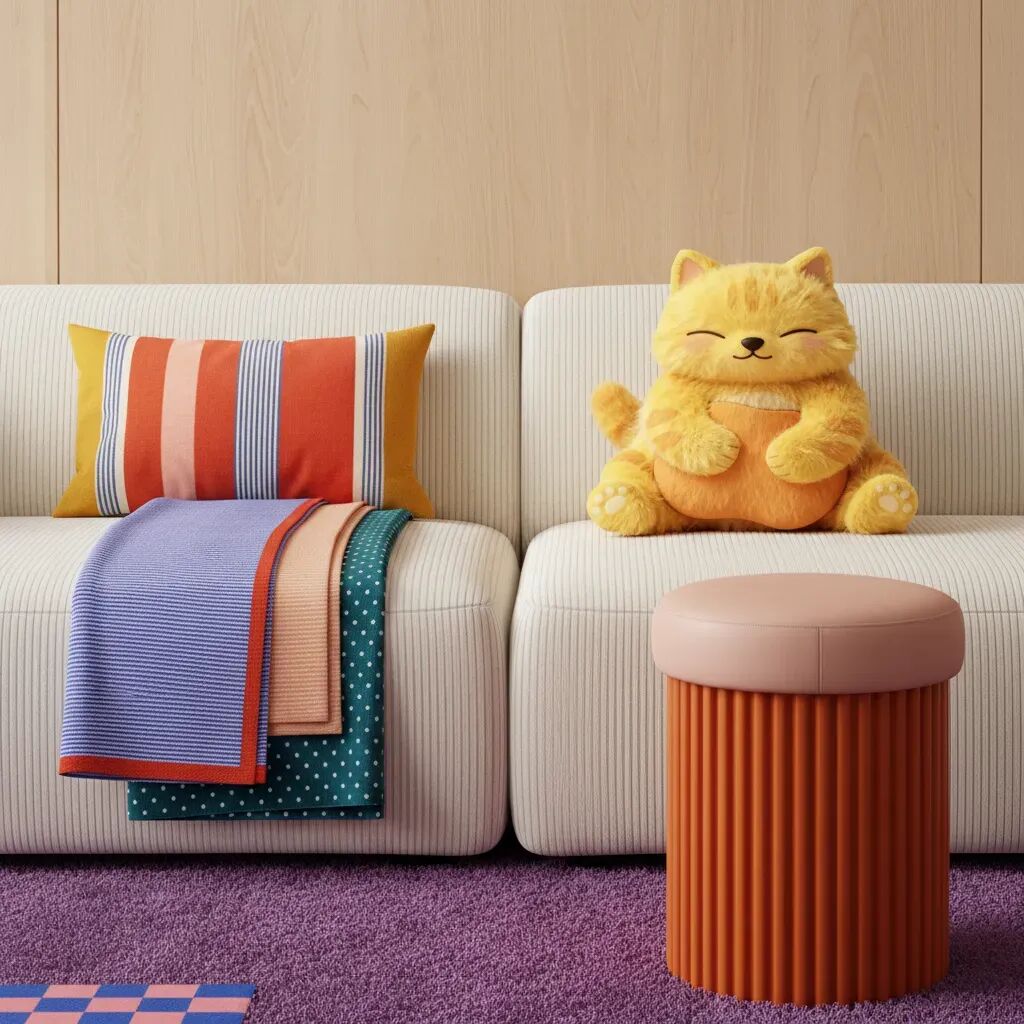



After generation, I found the lighting, materials, and color tones were already pre-calibrated — a completely "foolproof operation flow."
3) Product Poster Short
The all-new SkyReels's current "infinite canvas-style interaction" makes things much more convenient — directly drag images, splice elements, switch modules, everything is highly intuitive.
For example, I dragged a "cat belly pillow" Christmas poster directly into the Video module on the left, input a prompt to generate video, or simply right-click in the canvas to convert to video.
The model integrates Google Veo 3.1, Sora 2, PixVerse V5, and more:
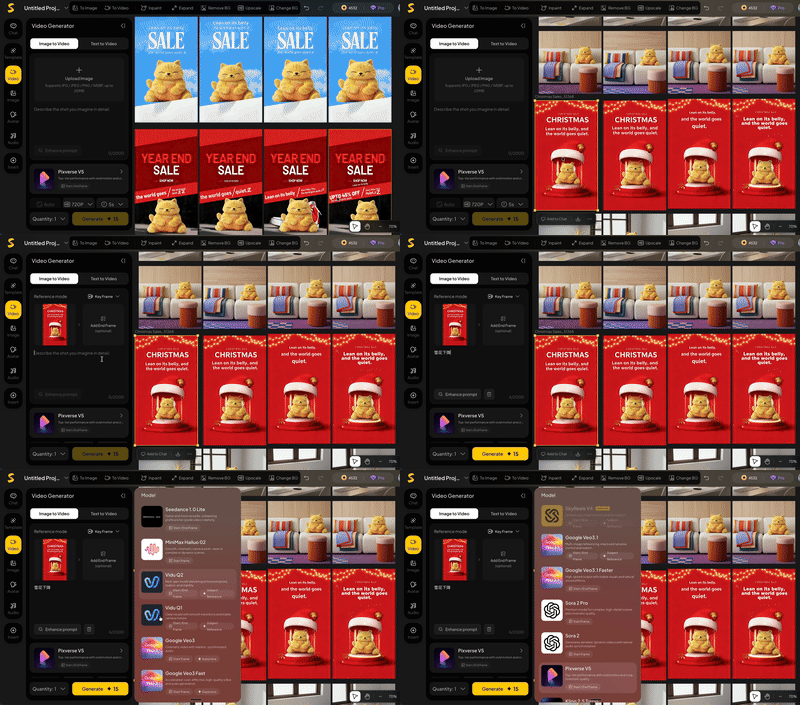
This way, you can very efficiently generate e-commerce promotional shorts for the cat belly pillow:
4) Product Motion Short
Additionally, the all-new SkyReels provides a large number of video templates ready to call up. Among the most practical features is its product motion video module.
This module covers nearly many scenarios:
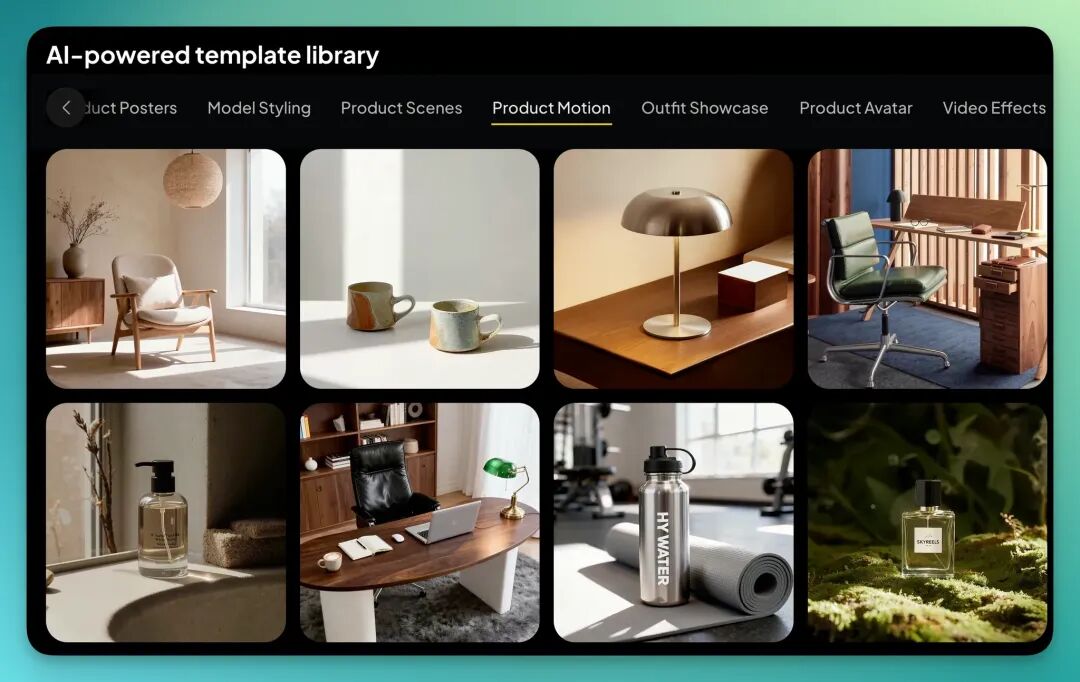
At this point, I can select suitable styles from these product scene templates. Each template comes with multiple combined motion effects, including camera push, pull, pan, rotate, and other dynamic perspectives.
I picked a few camera push effects and played around, creating a short for the cat belly pillow, plus a cat belly pillow phone case mockup image I generated with it:


5) Product Digital Human Explainer Video
Next, one of the all-new SkyReels's most advantageous functions is its digital human module. In the template center, it has a dedicated category called "Product Digital Human."
This comes pre-loaded with over a dozen different digital human models in various styles:
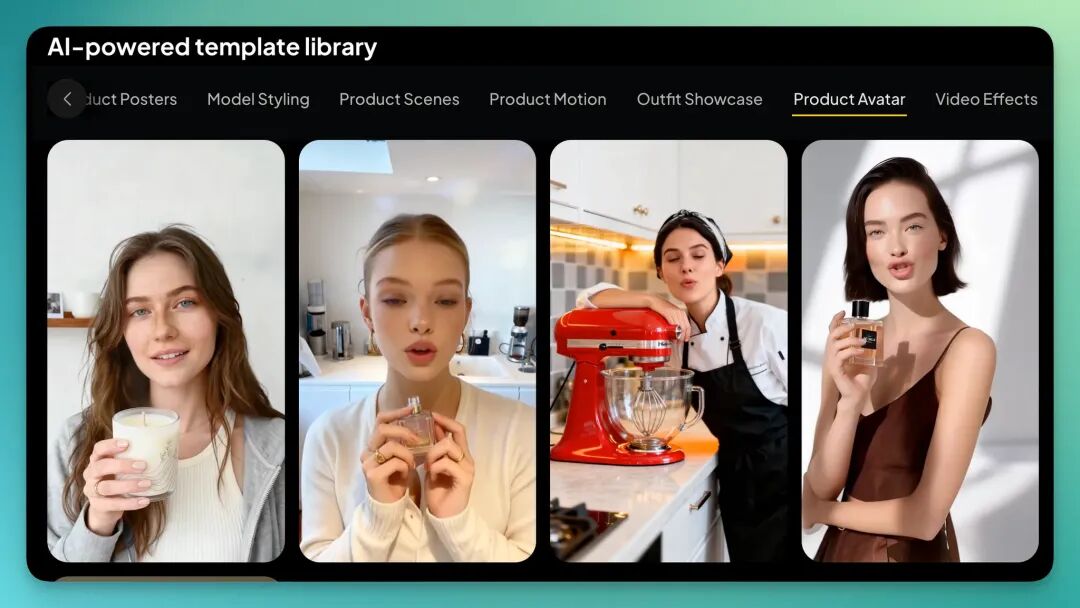
In the product digital human template, the all-new SkyReels's interaction continues its consistent "foolproof" logic.
The entire flow is highly intuitive: just pick a cat belly pillow product image from my infinite canvas, choose a digital human template, and finally input what I want the digital human to say — then generate the finished piece directly.
The whole process has almost zero learning curve:
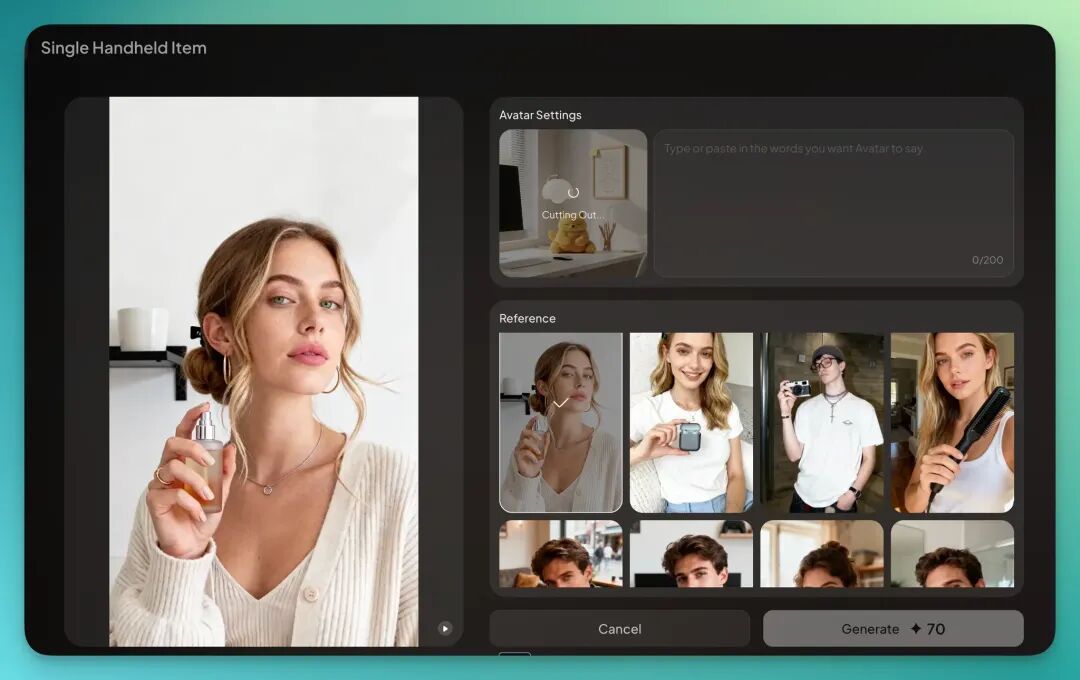
If you switch to English mode, everything becomes more natural — speech rhythm, lip sync, facial expression details all closer to real humans.
I've uploaded this video below so you can see the results directly:
Overall, the results are quite natural. The embedded cat belly pillow image blends smoothly, hallucination rate is low, and during the digital human's interaction with the product, there are almost no obvious deformations or jarring moments.
6) Single-Turn Conversational Digital Human
More conveniently, we can also directly drag the cat belly pillow lifestyle image into the digital human module within the infinite canvas to create more personalized digital human videos.
For example, we can have the "cat belly pillow speak for itself."
In the digital human function's audio settings, the all-new SkyReels also provides very rich voice options. I roughly counted — at least several dozen voices, covering different languages, genders, age groups, and vocal styles:
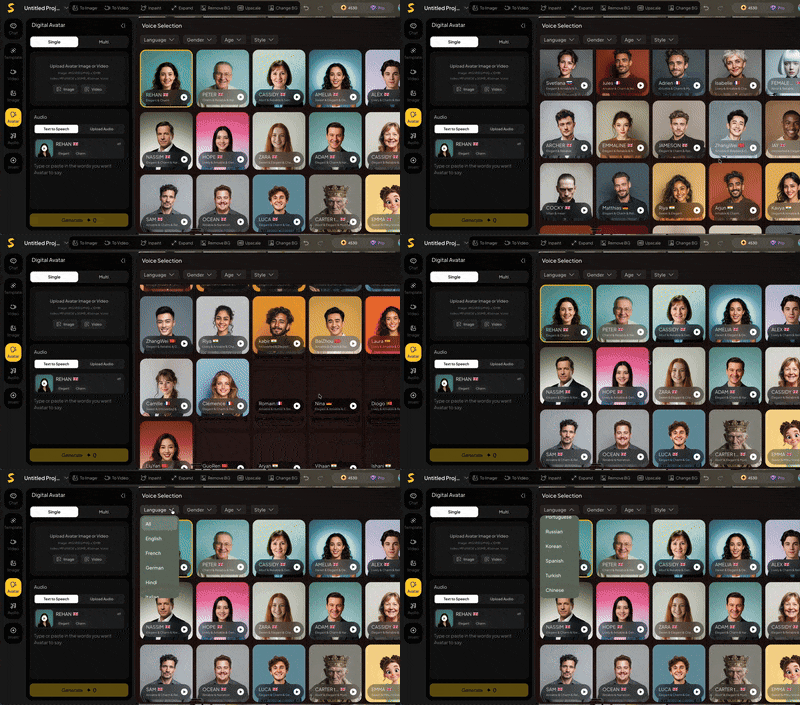
This digital human's interaction method also barely requires prompt engineering — the entire process remains typically foolproof.
Like other modules, I just need to input what I want the "cat belly pillow" to say in the text box at the lower left of the screen, and the system automatically generates speech and lip-synced video:
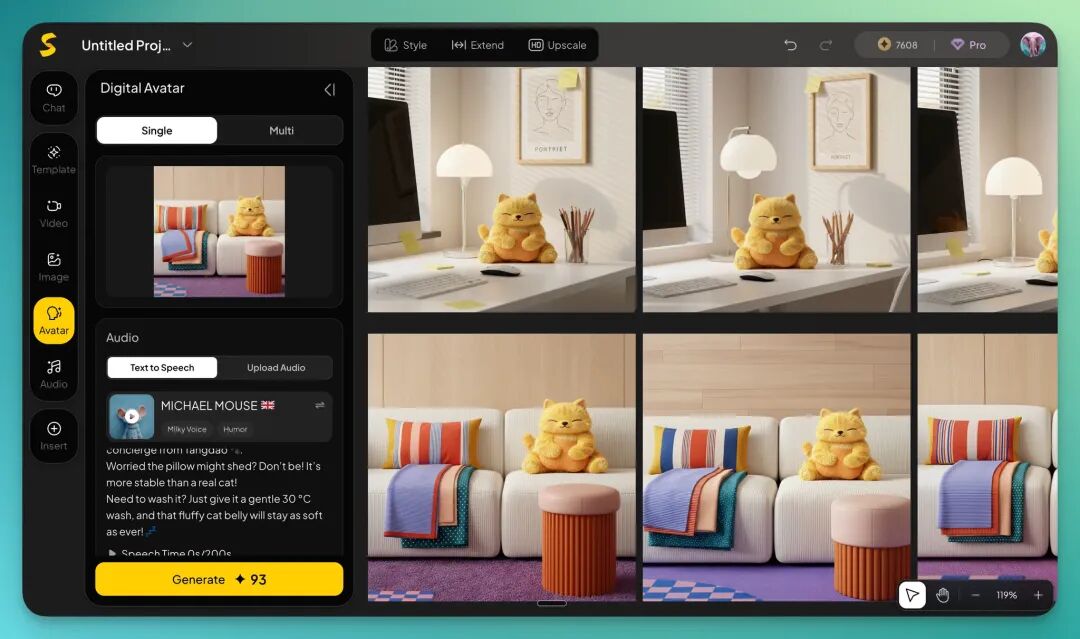
I finally chose a mouse's English voice and had the cat belly pillow speak for itself:
Of course, one of the all-new SkyReels's most core and impressive functions now is no longer just single digital human talking-head or monologue, but: multi-turn dialogue.
7) Multi-Turn Conversational Digital Human
The all-new SkyReels can simultaneously support multiple characters appearing in the same scene, and complete multi-turn dialogue through an equally foolproof interaction method.
I only need to set each character's language, tone, and dialogue content respectively, and the system automatically generates multi-turn interactive video.
Moreover, to further lower the barrier of functional interaction, I discovered the all-new SkyReels's "Chat" function also has a useful built-in Agent.
If I find a certain operation somewhat cumbersome — say, I want a model holding an iPhone 17 with a "cat belly pillow" phone case for a showcase image — I just need to drag that image directly into the Chat window and tell the Agent in natural language what effect I want:
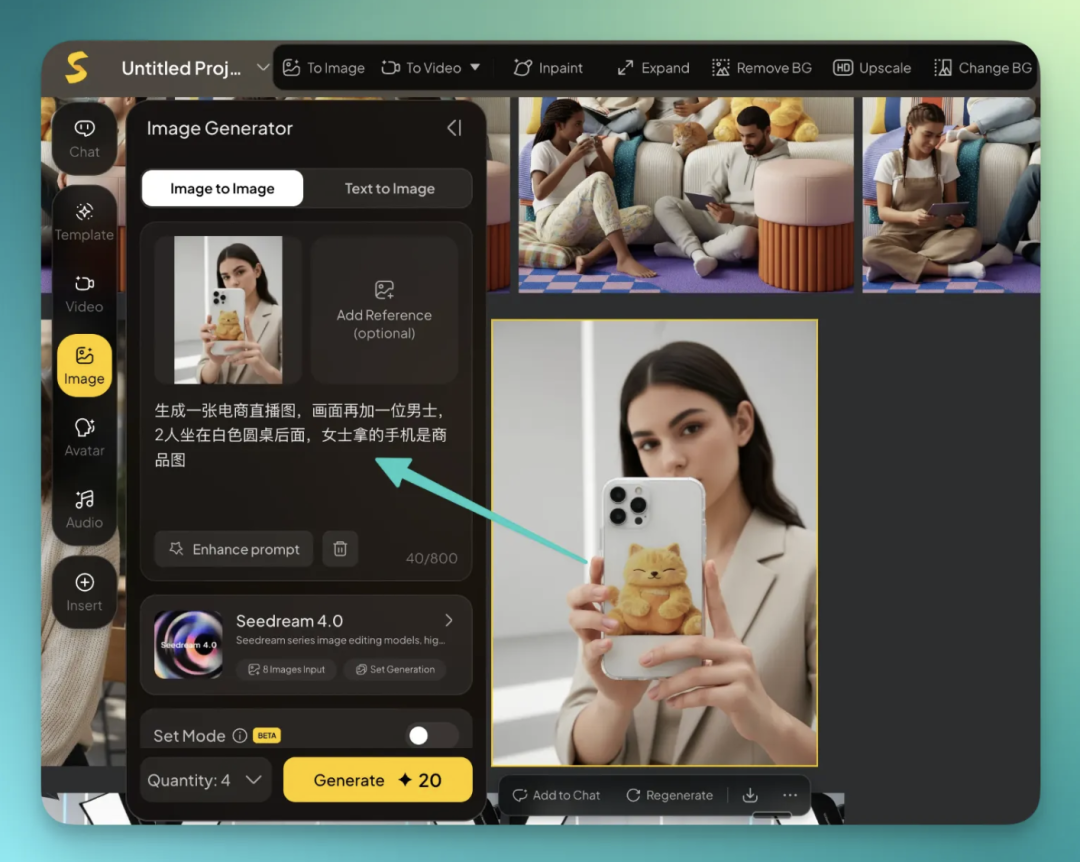
This way, I get an e-commerce livestream two-person scene with both the original model and the product image.

This step, you could say, pushes the entire creative flow into an "even more foolproof automation."
Next, we can experience the all-new SkyReels's multi-turn conversational digital human function.
I first drag the multi-person e-commerce livestream scene image generated by the Agent in the infinite canvas directly into the digital human module. The system automatically recognizes the human subjects in the image — in this case, it identified two models.
If you want 2 people to have a conversation, just check the corresponding characters. For now, I selected these 2 roles:
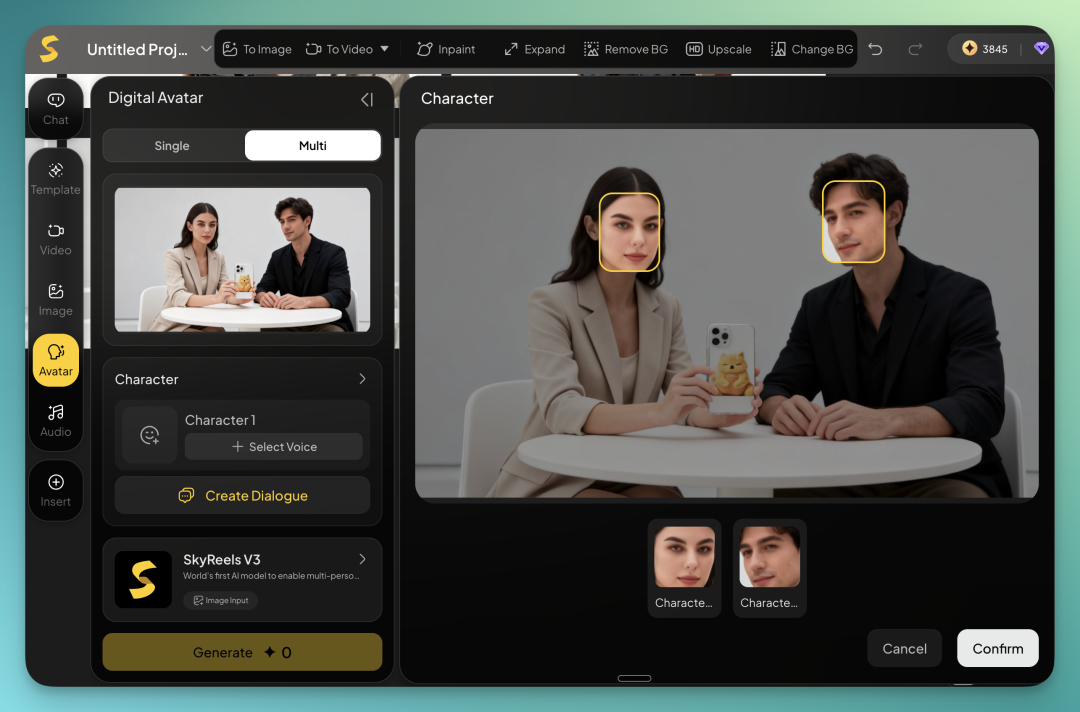
Similarly, in the multi-turn conversational digital human function, the all-new SkyReels also provides a very rich voice template library:
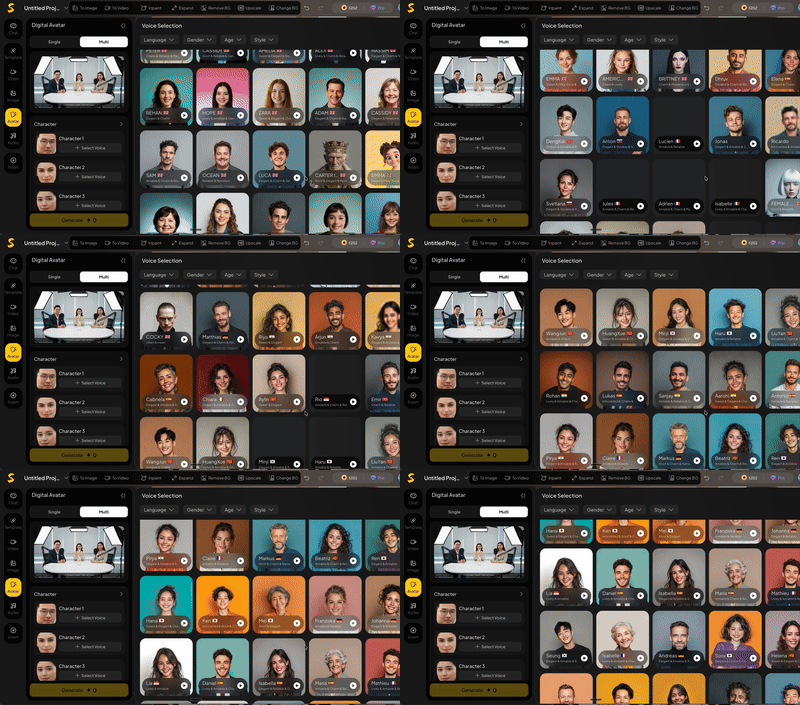
Next, you can set each character's voice style respectively — language, timbre, speech rate, or emotional tone.
Then, in the dialogue function interface, click the character's avatar to designate the speaker, and input that character's dialogue content in the right panel.
The system automatically generates multi-turn dialogue in sequence; you just add lines one by one:
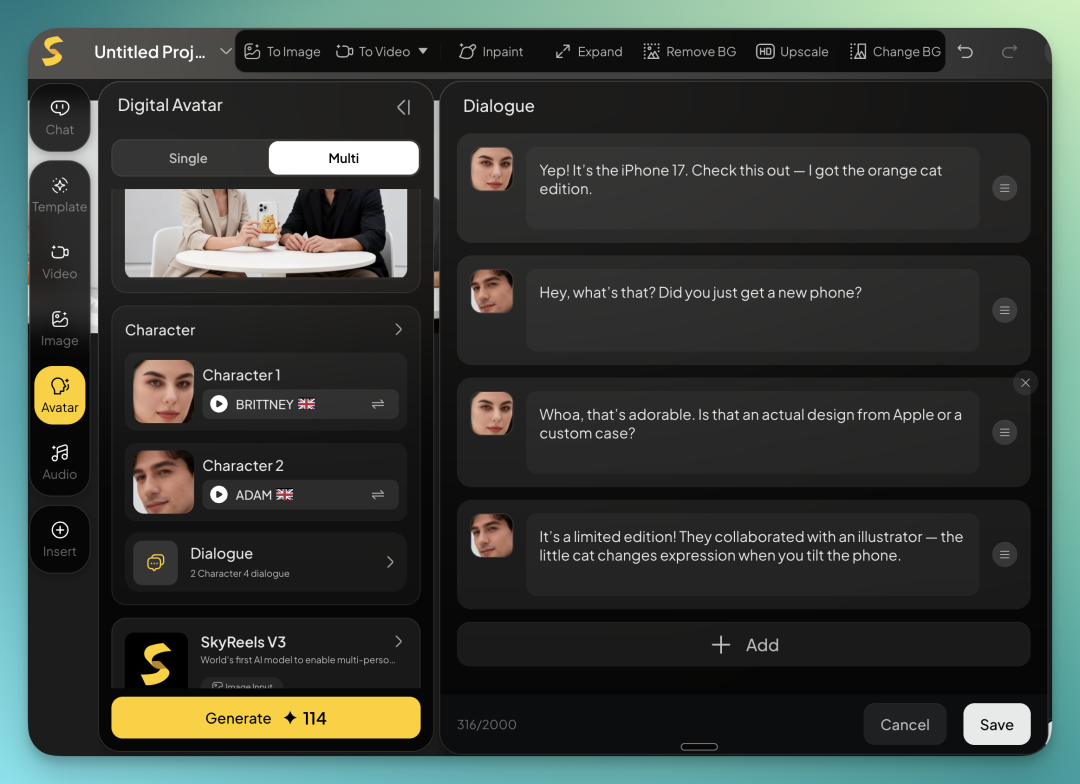
In this 2-turn, 2-person dialogue below, the overall effect is fairly natural, especially the voice switching:
8) Agent
Last but not least, although I already mentioned the handy Agent in the all-new SkyReels earlier, after running through all the above steps to close the loop, I went back to the Agent and discovered it can actually complete all 7 functions above.
Besides the most comprehensive Super Agent, I roughly counted — it integrates nearly 30 Agents:
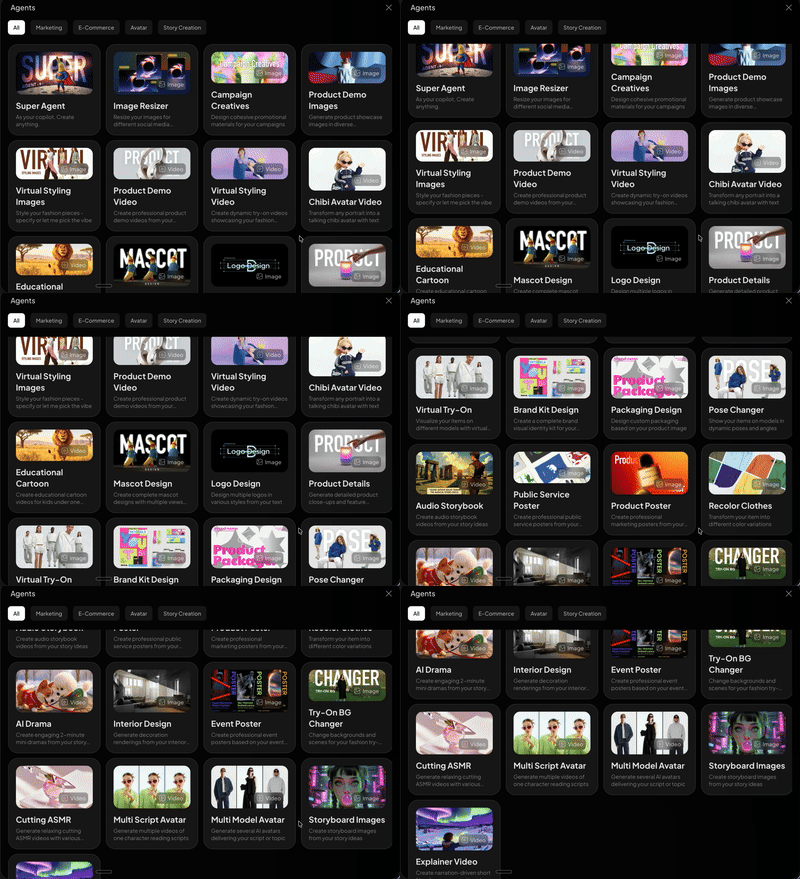
In actual testing, the all-new SkyReels's coherence is genuinely surprising.
Previously, to produce a complete e-commerce content pipeline, you'd need to open at least four or five AI tools and switch between different pages seven or eight times. Now, it directly integrates all these steps into one framework.
I can simultaneously handle text, images, video, and digital humans in the same interface — want to change something? Just click it. What you see is what you get.
The entire process barely requires fussing around, and no more jumping between software.
🚥
Over the past two years, AI has kept asking one question:
"Can the model get even stronger? Can it generate even more realistic frames?"
We've witnessed too many "SOTA model miracles," but what truly brings AI into daily life is rarely the strongest model — it's the system that best understands "human workflow."
Creators may increasingly feel that the future of AI video lies not in generating a prettier frame, but in saving ten steps, cutting ten software switches, and preserving ten bursts of inspiration.
When creative complexity is flattened by the system, what remains is something more pure, more primal — the desire to express.
Express because you're excited, get excited because you express.