When AI Starts Using Phones Like Humans

From Doubao to StepFun's Step-GUI: Smartphones Are Becoming AI's New Entry Point
From Doubao to StepFun's Step-GUI: The Phone Is Becoming AI's New Entry Point

👦🏻 Author: Jingshan
🥷 Editor: Koji
🧑🎨 Layout: NCon

Lately, the launch of Doubao's phone assistant has sparked heated discussion about GUI Agents (Graphical User Interface Agents).
GUI Agent isn't a new concept. At its core, it's about this: letting AI "see the screen, click buttons, drag sliders" — operating computers, phones, even car infotainment systems just like a human would.
November 29: StepFun open-sourced its 4B GUI Agent: Step-GUI Edge.
December 1: ByteDance's Doubao partnered with ZTE to release a GUI Agent phone assistant engineering prototype, with 30,000 units selling out instantly.
December 9: Zhipu AI directly open-sourced AutoGLM: AutoGLM-Phone-9B.
And today, we've noticed that StepFun has quietly rolled out two new things:
[1] GUI API: Step-GUI
[2] An MCP (Model Context Protocol) specifically designed for GUI Agents.
First, a major motivation behind all these GUI Agent releases from major players: GUI Agents rely on visual understanding to adapt to a vast number of apps without requiring additional modifications from developers. The integration cost is low, making them one of the most realistic paths currently available for terminal devices to break down operational barriers between apps and enable cross-application collaboration.
However, in practical GUI Agent applications, everyone's run into a very real problem: if you deploy a model with massive parameters, the solution becomes too heavy — expensive and slow. Plus, in privacy-sensitive scenarios, users want their data to stay on the local edge side.
From this starting point, the solution needs to check these boxes: cost-effectiveness, and the ability to run on phones, car systems, and computers. At the same time, considering practicality, it needs to execute complex and diverse tasks across sufficiently rich scenarios.
So there's emerging consensus: edge-cloud collaboration.
On the edge side: Small models handle coordination — the actual tapping, swiping, and privacy protection.
Because few people are willing to constantly upload screenshots of their WeChat chats to cloud servers, screen recognition and app operations are best done locally on the phone.
On the cloud side: Higher-dimensional large models handle thinking, processing complex logical reasoning and task decomposition.
StepFun's recently released GUI Agent series follows this logic:
First, the Step-GUI series contains two models: Step-GUI (cloud-side model) and Step-GUI Edge (edge-side model).
On the edge side, Step-GUI Edge achieves 4B (4 billion parameters), meaning it runs lighter on phones. Taking mobile devices as an example, the industry generally considers models under 7B as the threshold for smooth deployment and task execution. Test results show that Step-GUI Edge is the first GUI model that can actually be deployed to a phone. Meanwhile, the cloud-side Step-GUI offers longer context and semantic understanding capabilities, plus stronger generalization abilities, making it suitable for more complex task scenarios.
And this Step-GUI Edge (originally named: Gelab-Zero) was open-sourced on GitHub on November 29, with the project rapidly surpassing 1K Stars within one week.
GitHub link: https://github.com/stepfun-ai/gelab-zero
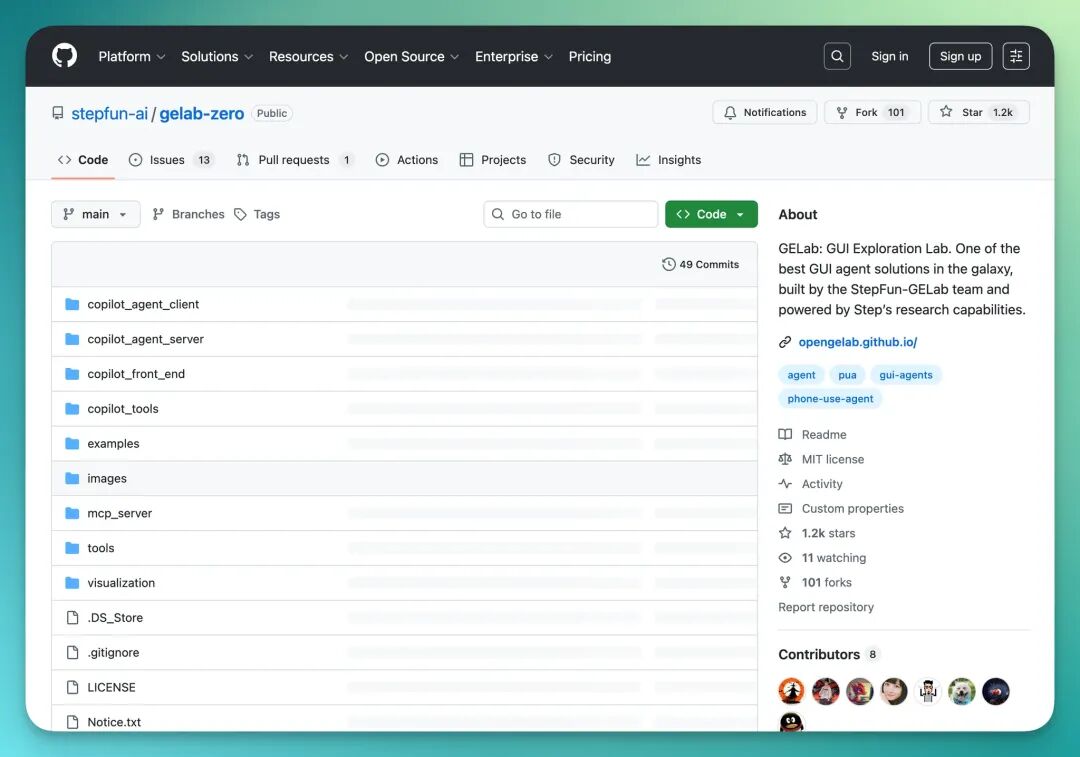
Developers are paying attention to this project because it offers a technical path:
For tasks like screen semantic understanding and element localization, you don't necessarily need a hundred-billion-parameter model.
A small-parameter model fine-tuned on GUI data can efficiently recognize icons, buttons, and text on screen, converting them into coordinates and operation commands.
So, after validating technical feasibility and the tech community's "welcome," StepFun continued to refine and release the full Step-GUI series along with the GUI-MCP protocol.
The Crossing team has fully deployed and evaluated the cloud model Step-GUI API and the GUI-MCP protocol from scratch.
Next, we'll share our hands-on experience and observations.
"Step-GUI + MCP" Protocol Test Report
First, my setup:
Computer: MacBook
Phone: Older Huawei model
Since GUI Agent is being used on a phone, my connection method for testing is: ADB.
The guidance on StepFun's official website is already very detailed and "beginner-friendly," so I won't elaborate much here. You can follow this URL step by step:
https://platform.stepfun.com/docs/llm/model-lab
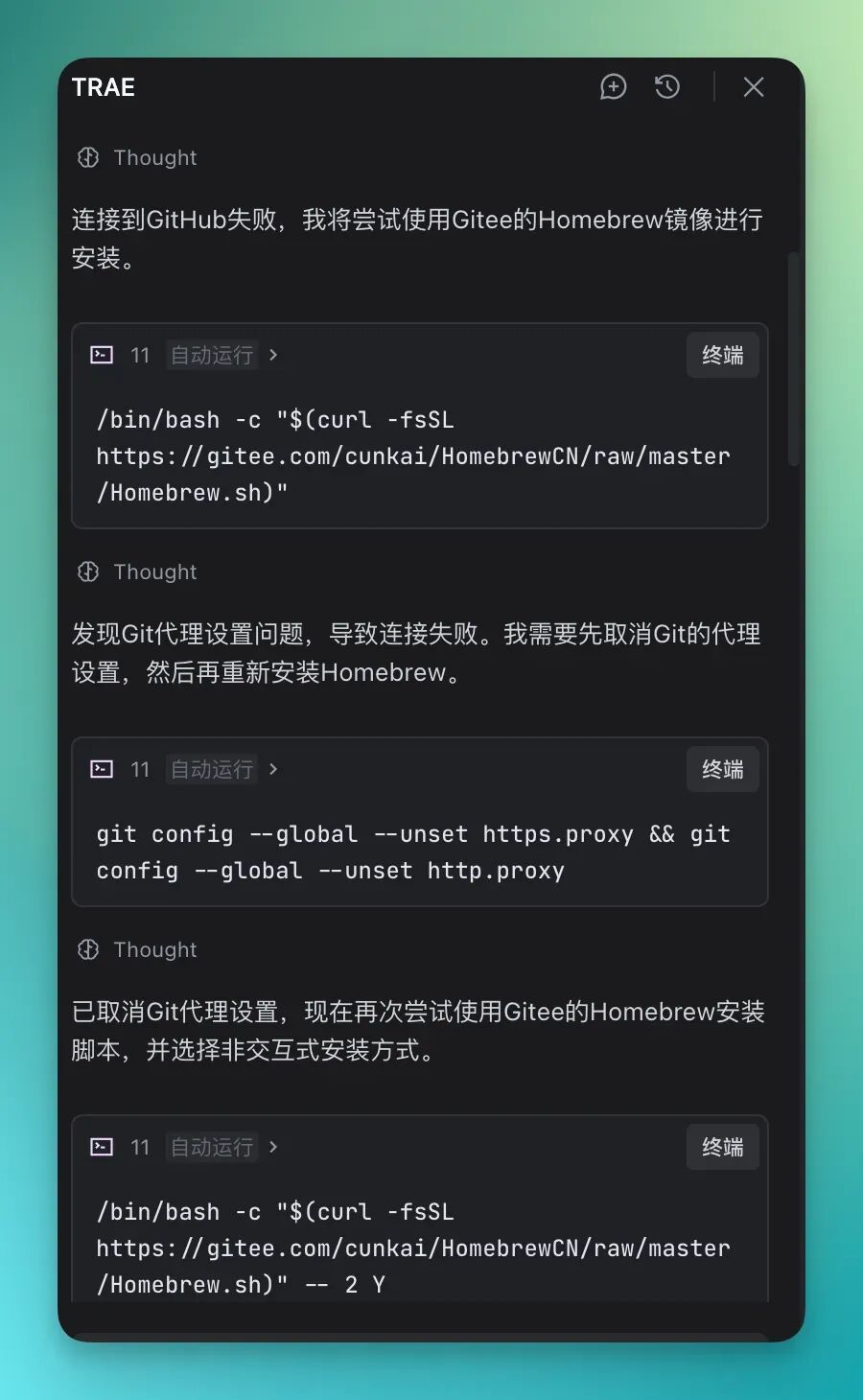
However, I must admit first that since everyone's computer configuration environment is different, you may still encounter various issues. For example, when I was installing Homebrew, I ran into extremely slow network speeds and couldn't connect to the source at all.
I have a small trick: use an AI IDE like Trae and tell it: "Help me download Homebrew" — because of network issues, it directly chose a domestic mirror source for download, which was very convenient:
(PS: All complete videos of the following test cases were not sped up.)
1) Politely "Rejecting" a Loan Request
Honestly, when I first thought about GUI Agent use cases, my first reaction was how it could help me politely resolve a "fictional scenario":
On WeChat, people might occasionally message me to "borrow money," but sometimes I don't even want to open that chat, nor am I willing to send a "polite rejection message."
So, I wanted to use a GUI Agent to handle this for me.
The prompt:
Search my WeChat main page for chat records containing "borrow money." If found, automatically reply with "🙏I'm also pretty tight on cash lately, sorry about that~" — only check the latest chat records of the 10 most recent contacts.
Let's look at the complete screen recording first. From the start of task execution to completion, it took 46 seconds, with decent results:
The final result: it smoothly sent a "polite anti-borrowing message" to a contact, then exited:
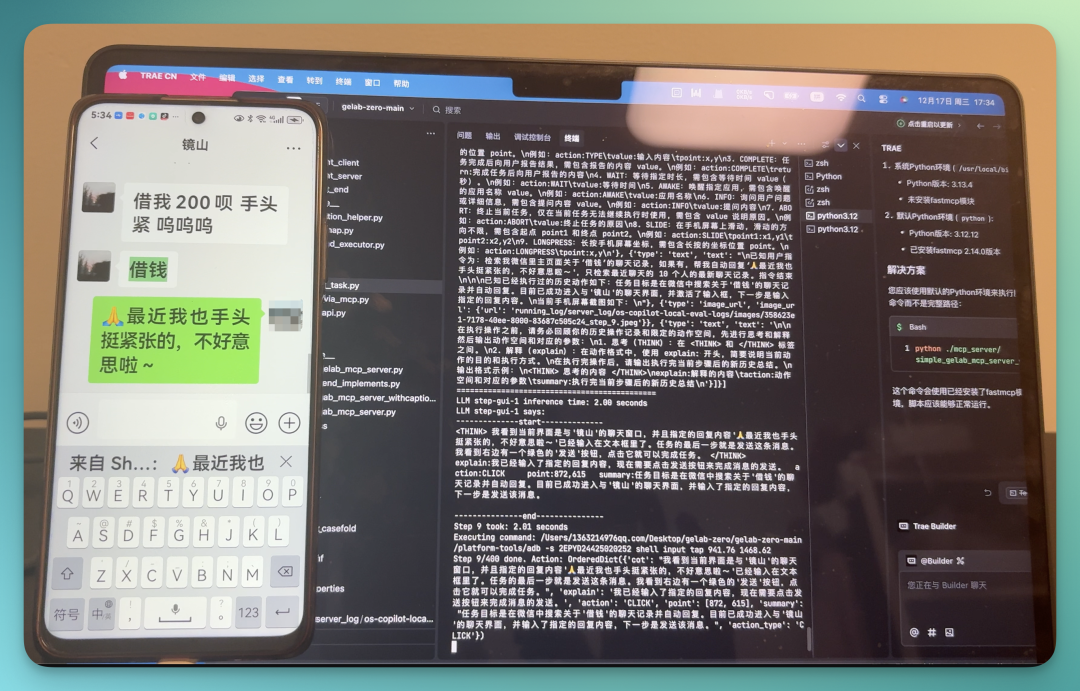
Now let's examine the details.
In the terminal, Step-GUI clearly displays the entire task process:
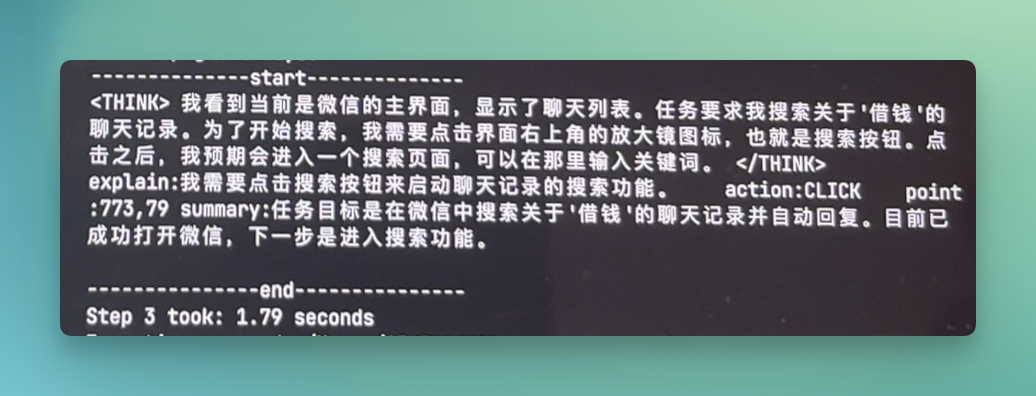
Moreover, when it found this contact who wanted to borrow money, it also judged that the latest chat time was 5:32 PM, the most recent among all results.
So, it should click this result rather than judging based solely on the keyword.
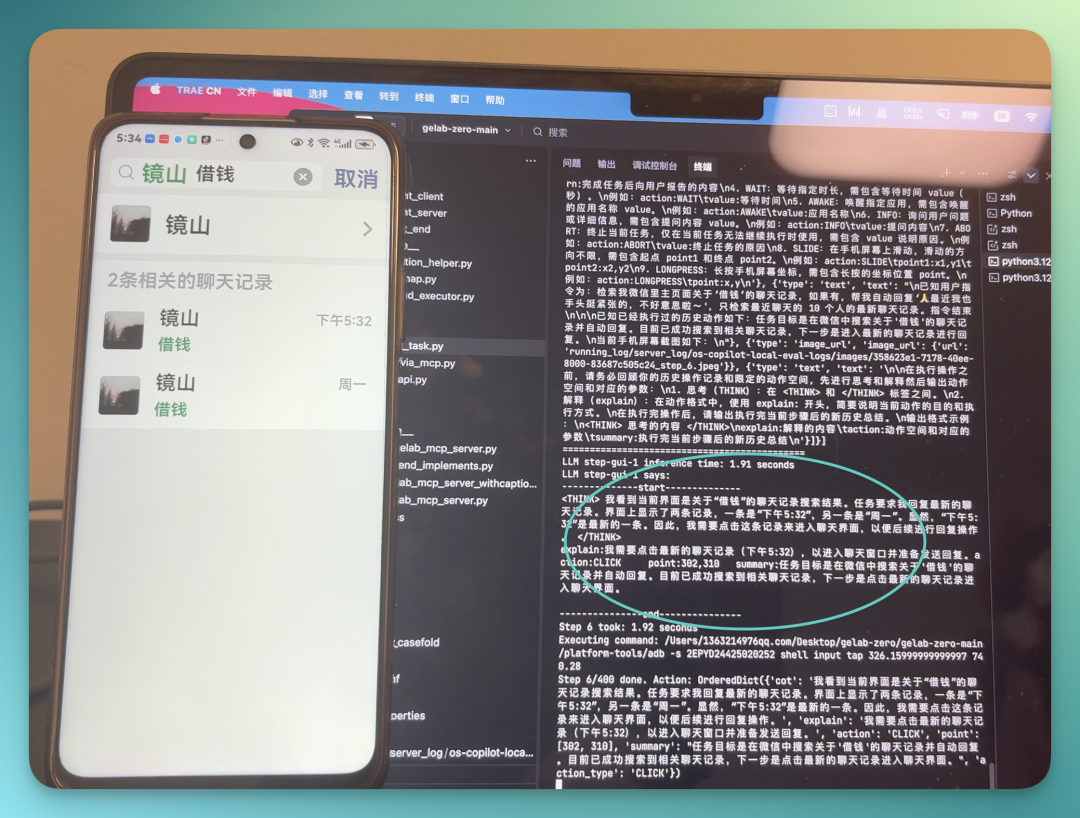
After launching, Step-GUI doesn't simply match keywords — it demonstrates a kind of "judgment."
2) Liking and Commenting on "Koji's" Xiaohongshu Notes
When Step-GUI completed the above task, I started wondering whether a GUI Agent would get lost due to deep page hierarchies when facing long-chain operations like "search → enter → comment → return → comment again."
So I designed this test: have it open Koji's Xiaohongshu, then like and comment in the comment section below his posts.
The prompt:
Open the Xiaohongshu app, search for account: Koji Yang Yuancheng, follow him, and comment on the first 2 posts' comment sections: "Koji, please keep going in 2026!"
The complete results are below. You'll notice the task time clearly extended, but completion was still quite smooth:
This task executed 2 comments, both successful. Let's look at the completed results:
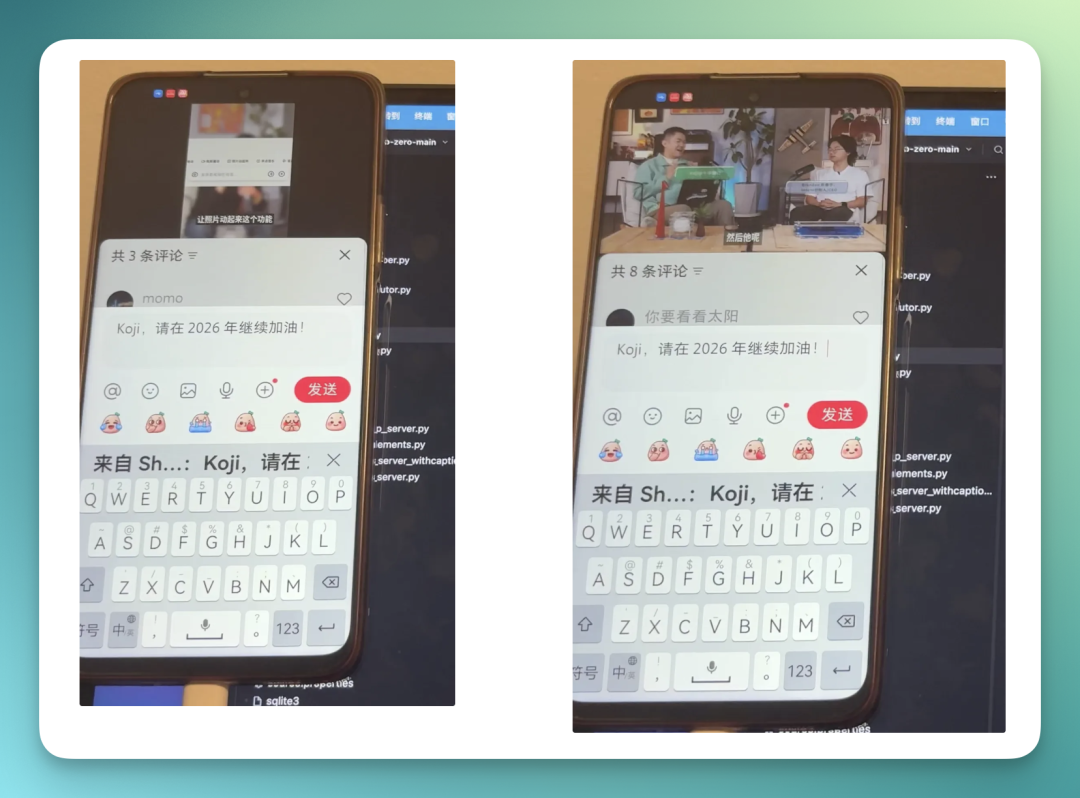
Step-GUI demonstrated certain stability and judgment capabilities.
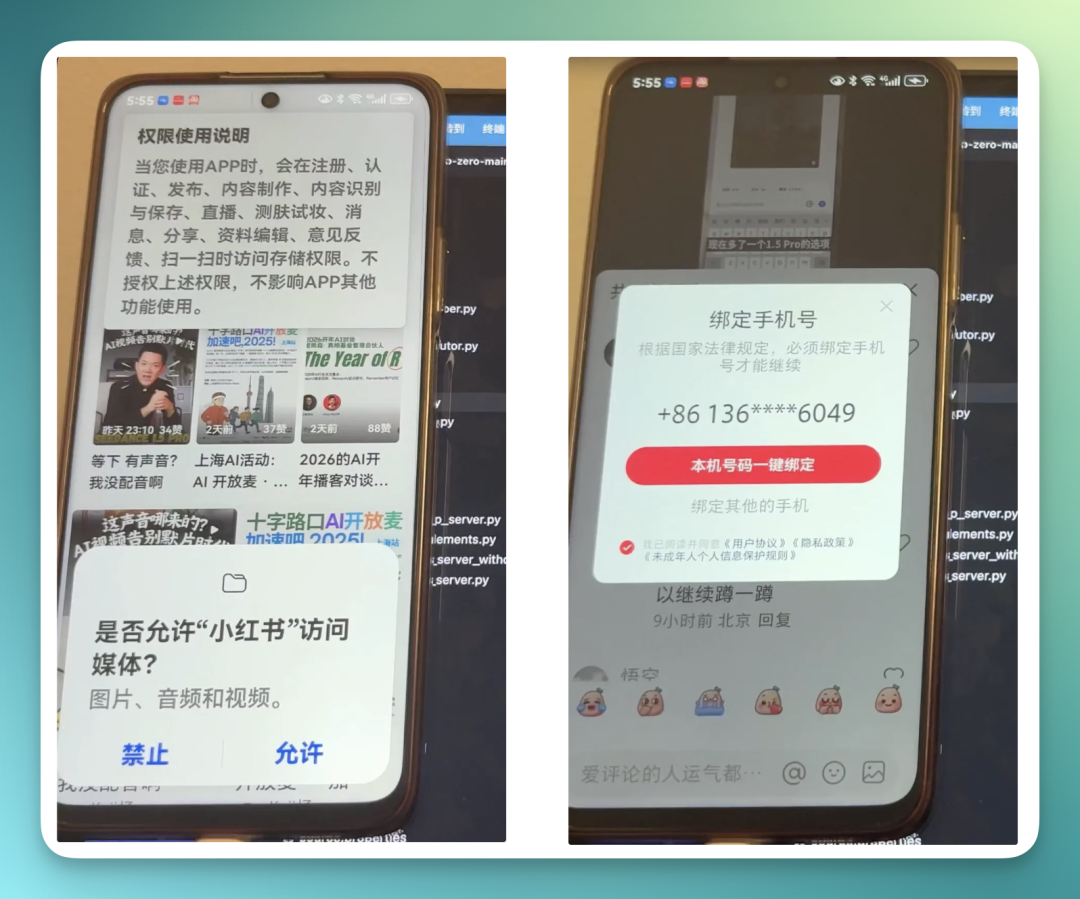
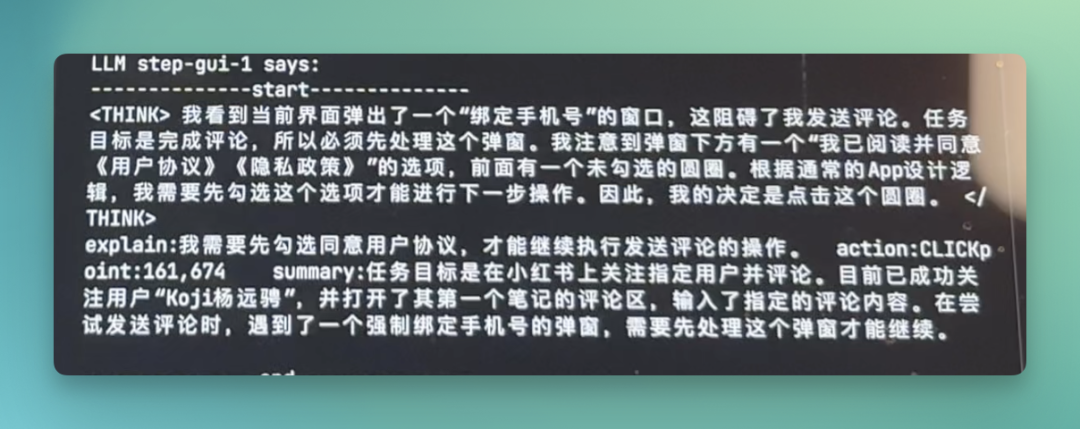
For example, during task execution it encountered these two "permission checks," both handled well — it even helped me bind my local phone number with one click:
Here's its chain of thought for this step:
3) Open Kuaishou, Automatically Earn Coins, Select WeChat Wallet as Withdrawal Method
StepFun also simultaneously released the Step-GUI MCP protocol this time, with the model currently free to use.
One of the biggest highlights of this MCP protocol is that it lets you call models from various vendors in the cloud — such as Claude, GPT, Gemini, etc. In this case, you need to use Step-GUI as an MCP Server.
The most convenient starting point is to first install "Fast Mcp" (tutorial links are all on the official website):
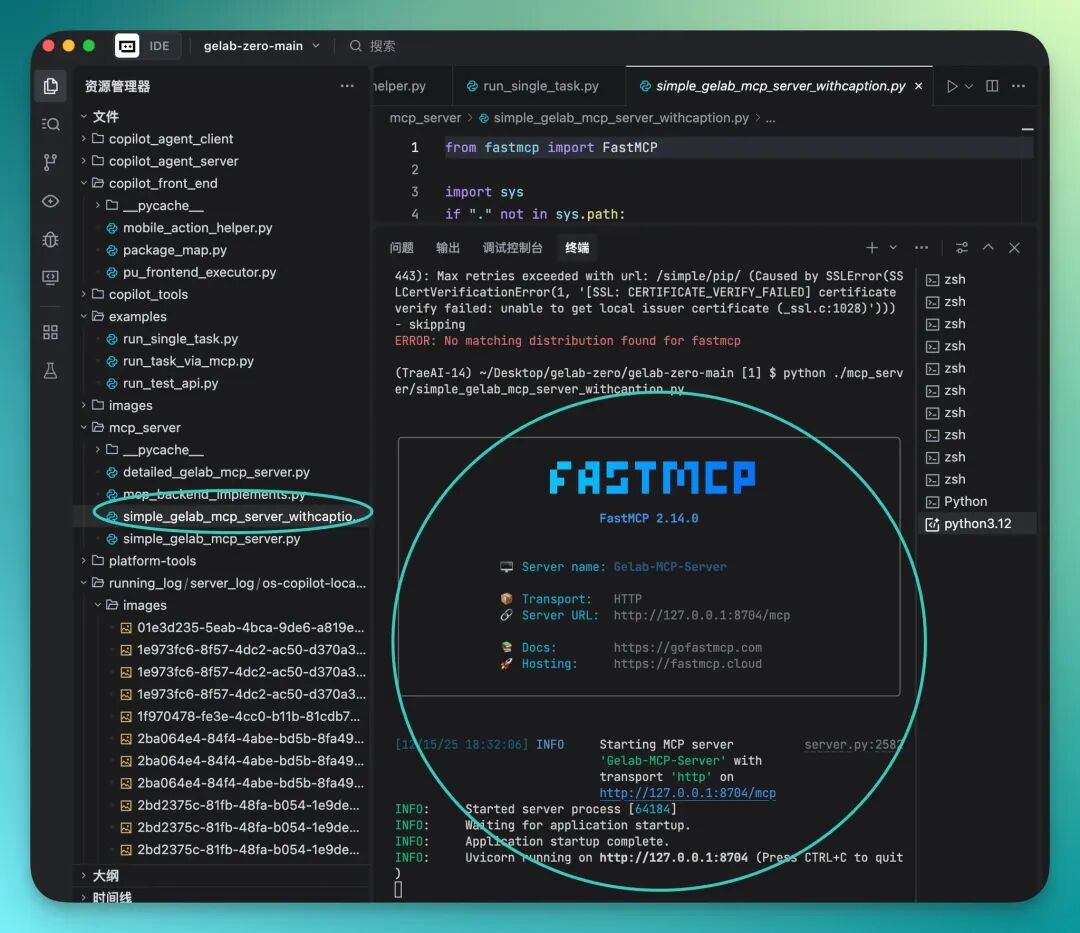
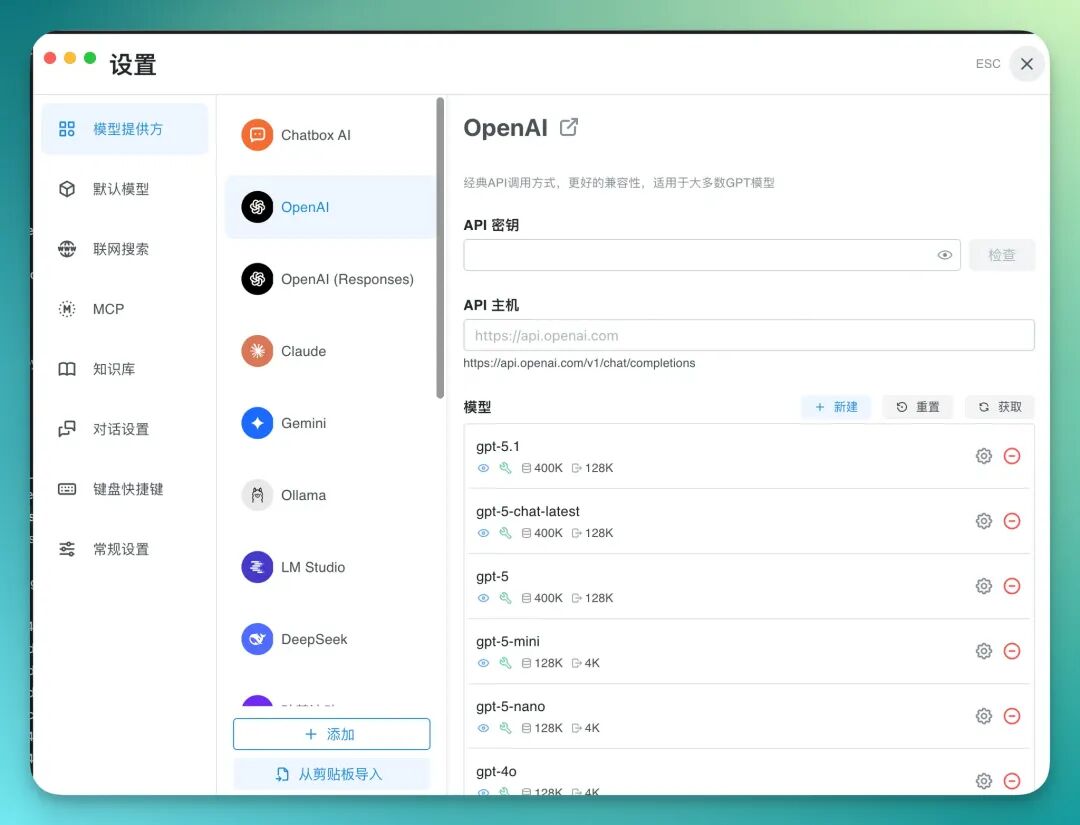
Then, download Chatbox, so you can conveniently and flexibly connect to various models:
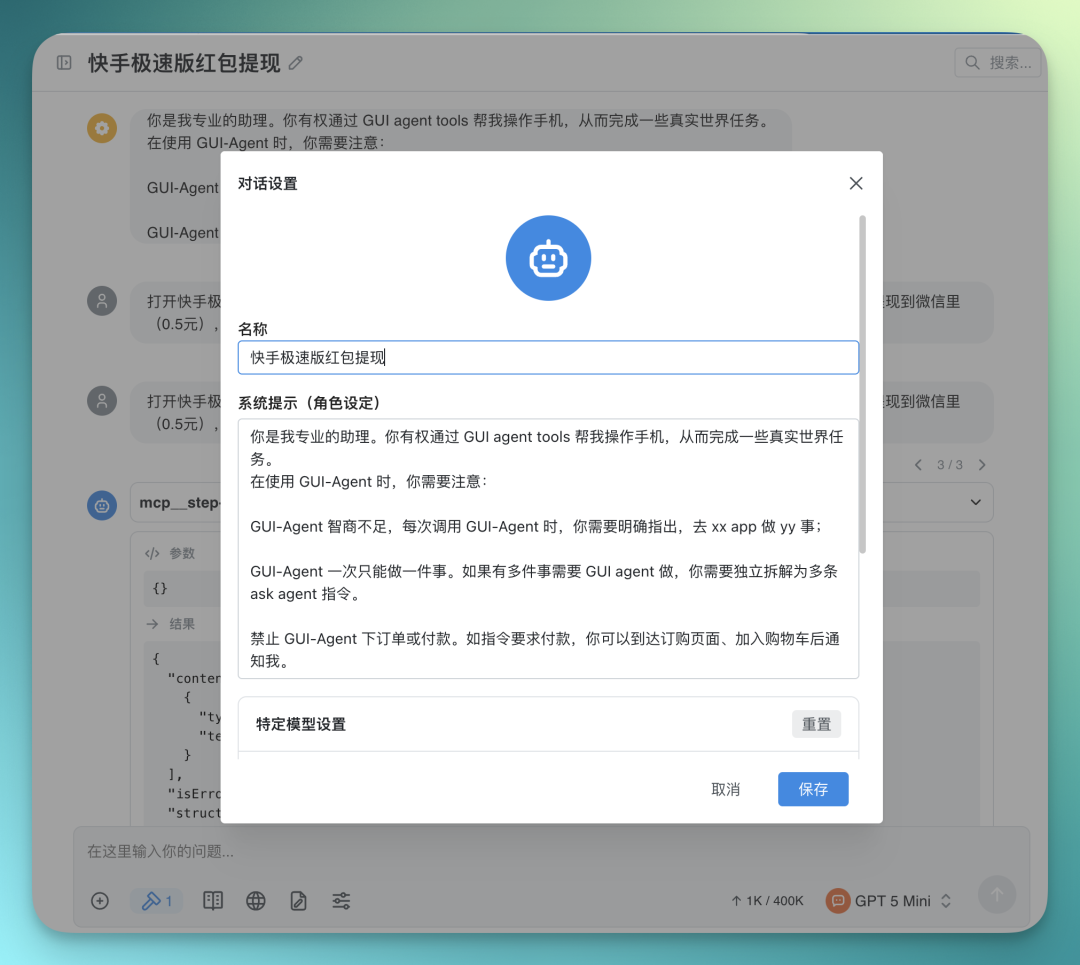
Then in a chat window, you need to set a system prompt for the AI, telling it to use the GUI Agent when possible, and if it's not smart enough, have it break things down with the connected LLM:
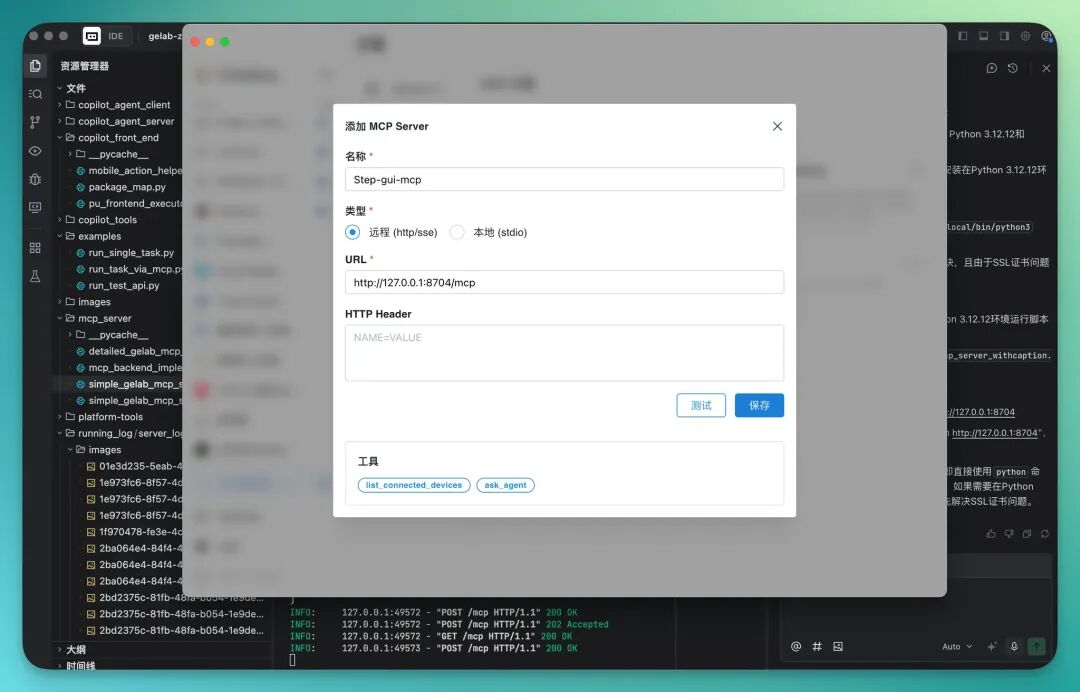
Then you can set up Step-GUI as an MCP Server:
Next, let's try this scenario: many of our friends' parents actually use Kuaishou Lite to earn coins, and I feel this is bad for their eyesight, so I wondered if Step-GUI could complete this task.
The Kuaishou Lite app's task center is typically designed to be very flashy, full of pop-ups, countdown timers, and dynamic distracting elements. This is a major test of GUI Agent's visual understanding and state awareness capabilities.
For example, I wanted Step-GUI to click the red envelope icon in the upper left corner of the Kuaishou Lite app's main page — this is a task center. After entering the task center, scroll down to find a "search words to earn coins" task. After clicking this task, there will be a series of recommended hot word entrances below. Then click these entrances one by one to watch ads and earn coins.
The three specific pages are below — you can feel the "dazzling" degree, and the "interactive links" between pages are indeed quite complex:
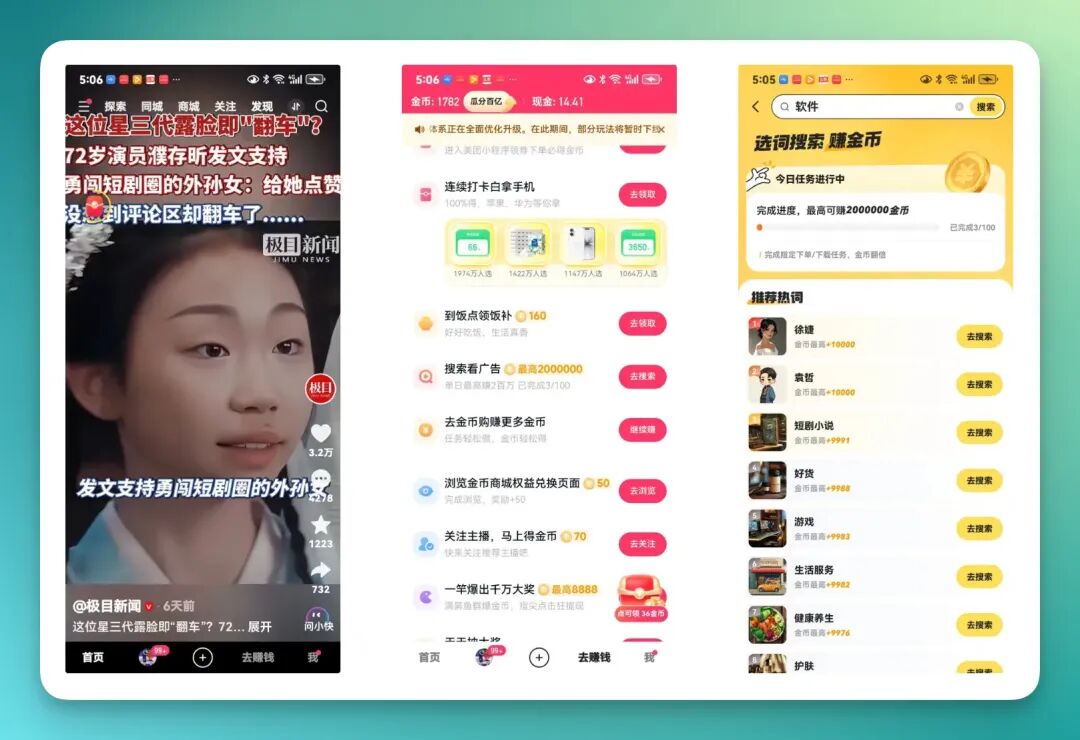
As you can see, this task is quite complex. The prompt:
Open Kuaishou Lite, there's a "red envelope" feature in the upper left of the screen, click it to enter the task center, you need to scroll down, there's a "search to watch ads," click the first "go search" option under recommended hot words, help me finish watching the ad, I want to earn coins.
First look at the complete results (please lower your volume~), Step-GUI did complete the task, and the whole process was quite smooth:
These two images show before and after — it did help me earn 269 coins on the Kuaishou Lite app:
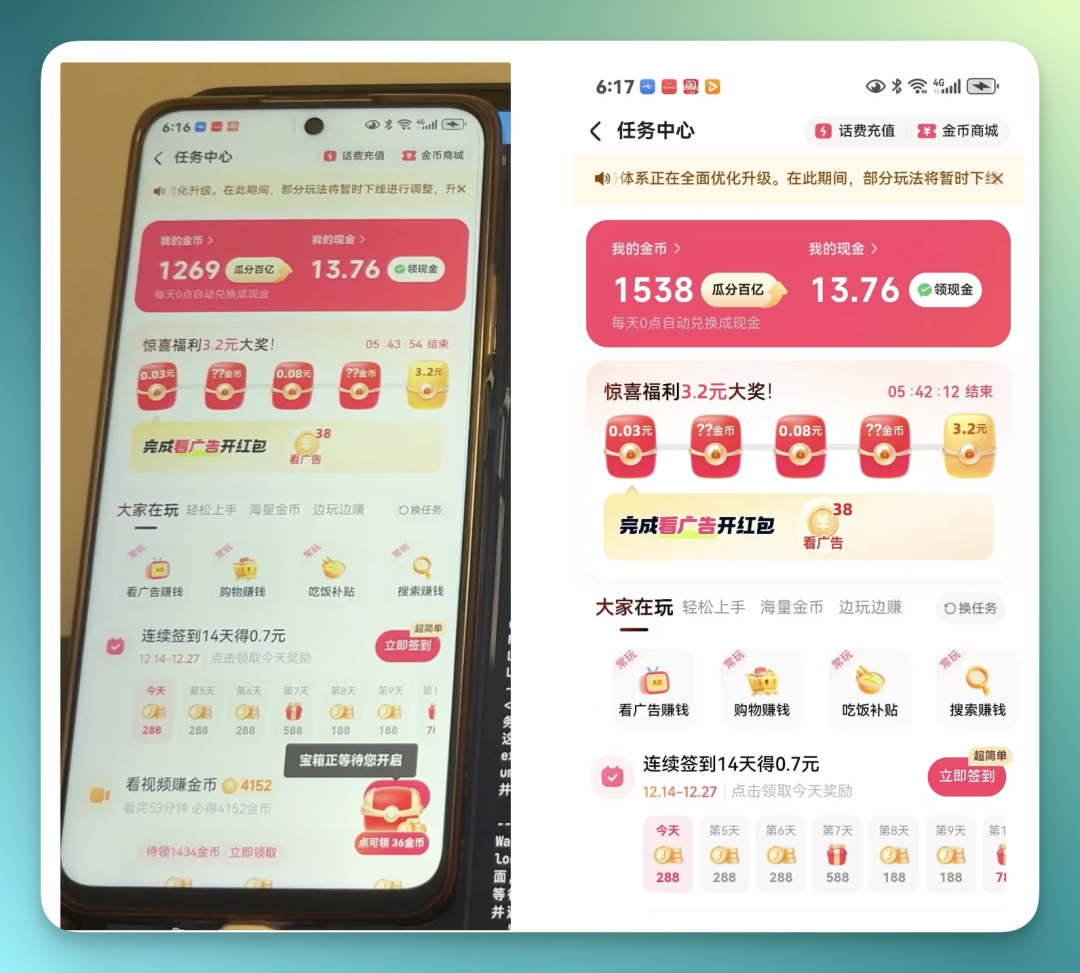
Next, let's look at the details as usual.
I noticed a very interesting point: when it opened the Kuaishou Lite app, it clearly realized "it needs to wait for the page to finish loading":
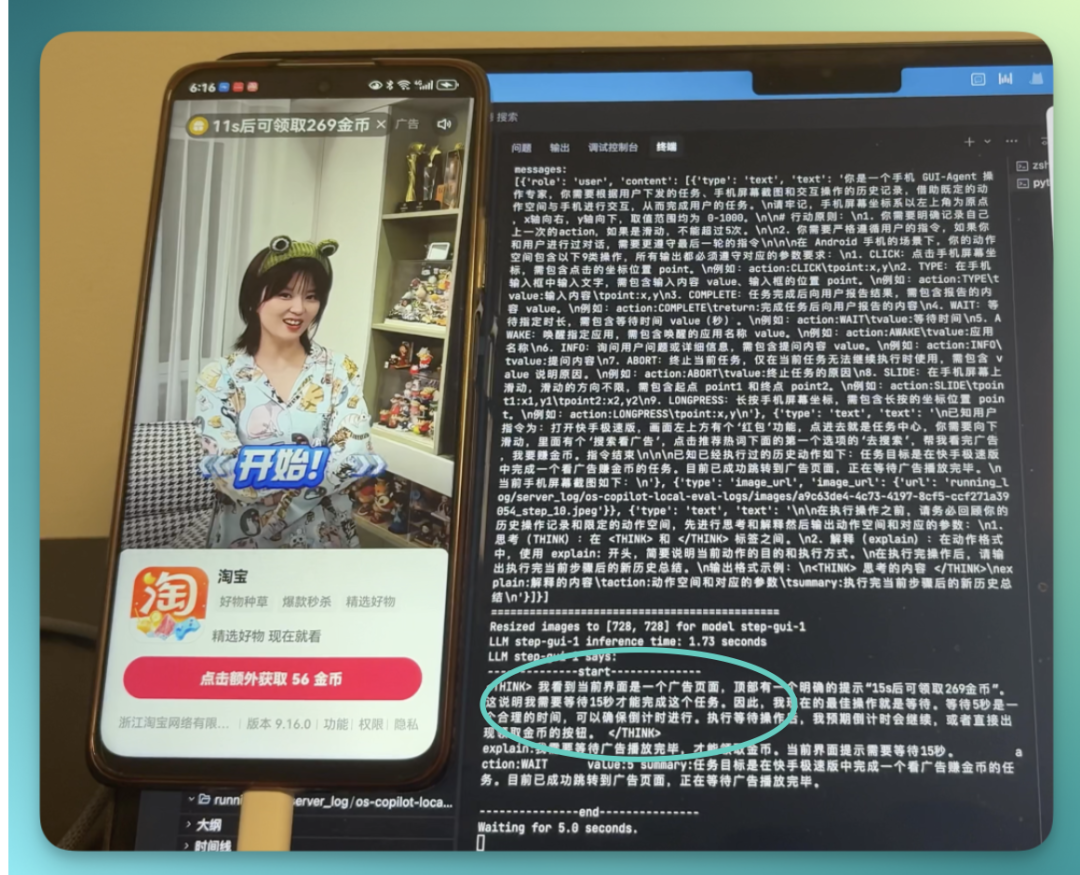
After opening the Kuaishou Lite task center and completing the ad task, there's a particularly small line of text above: "Successfully claimed 269 coins," which Step-GUI's backend immediately recognized, concluding: ad task completed:
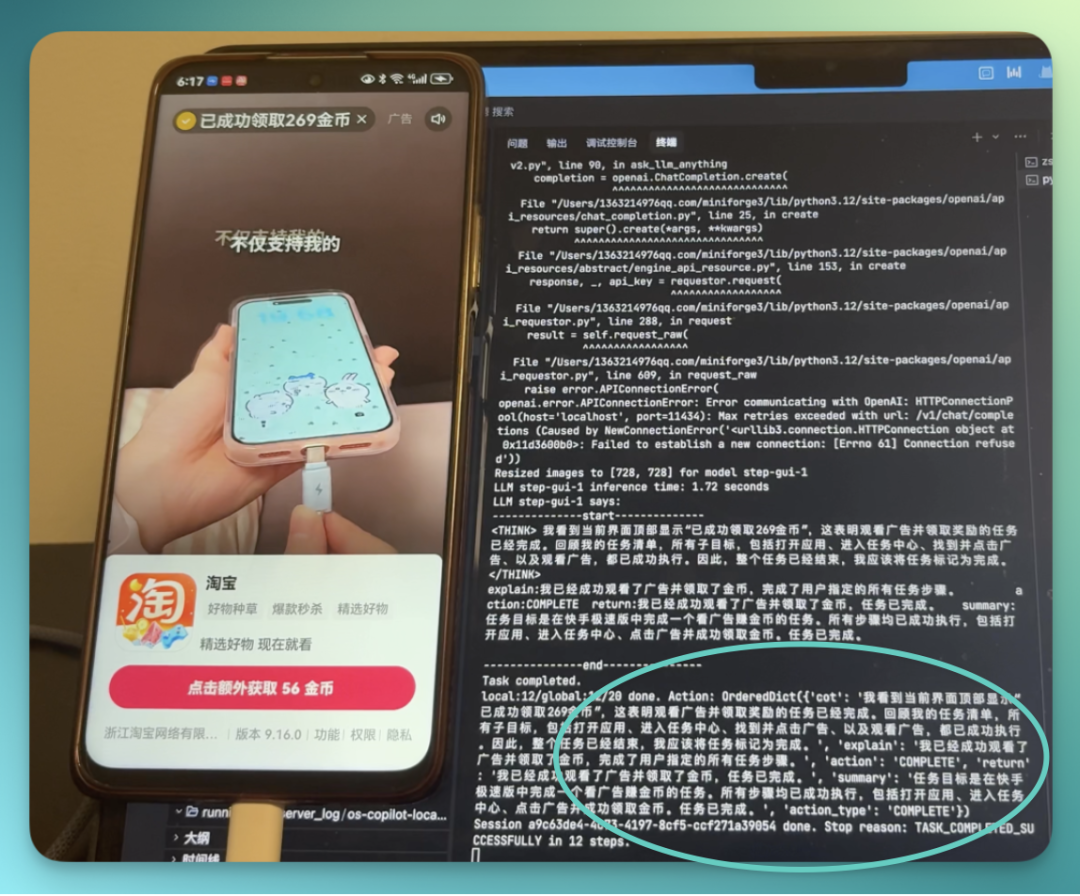
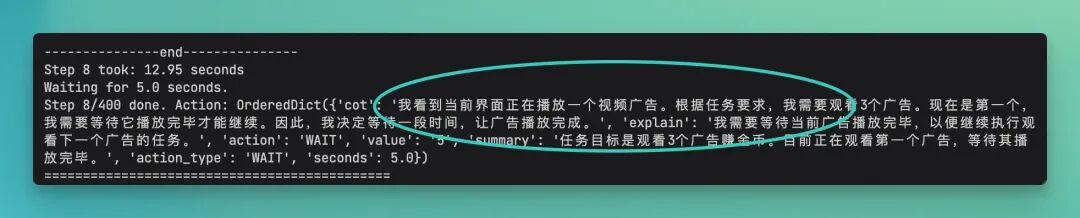
During another livestream ad watching session, I thought it had frozen at one point, because the screen stopped on a livestream ad and didn't move — I even wanted to reach out and close it myself. But looking at the backend logs, I discovered it was actually "waiting for an ad in the livestream to end."
It recognized the current business state as "ad playing," and had to wait for the countdown to end or the progress bar to finish. Only after the ad ended did it accurately click the close button to proceed to the next task.
That step even fooled me:
After completing this task, some time later, I remembered that I could have had Step-GUI run the entire flow in one go: "earn coins → withdraw → select WeChat as withdrawal method → copy-paste withdrawal link to WeChat."
I recorded a video, very smooth:
At the same time this process reached its final step, the phone already received the 0.5 yuan deposit:
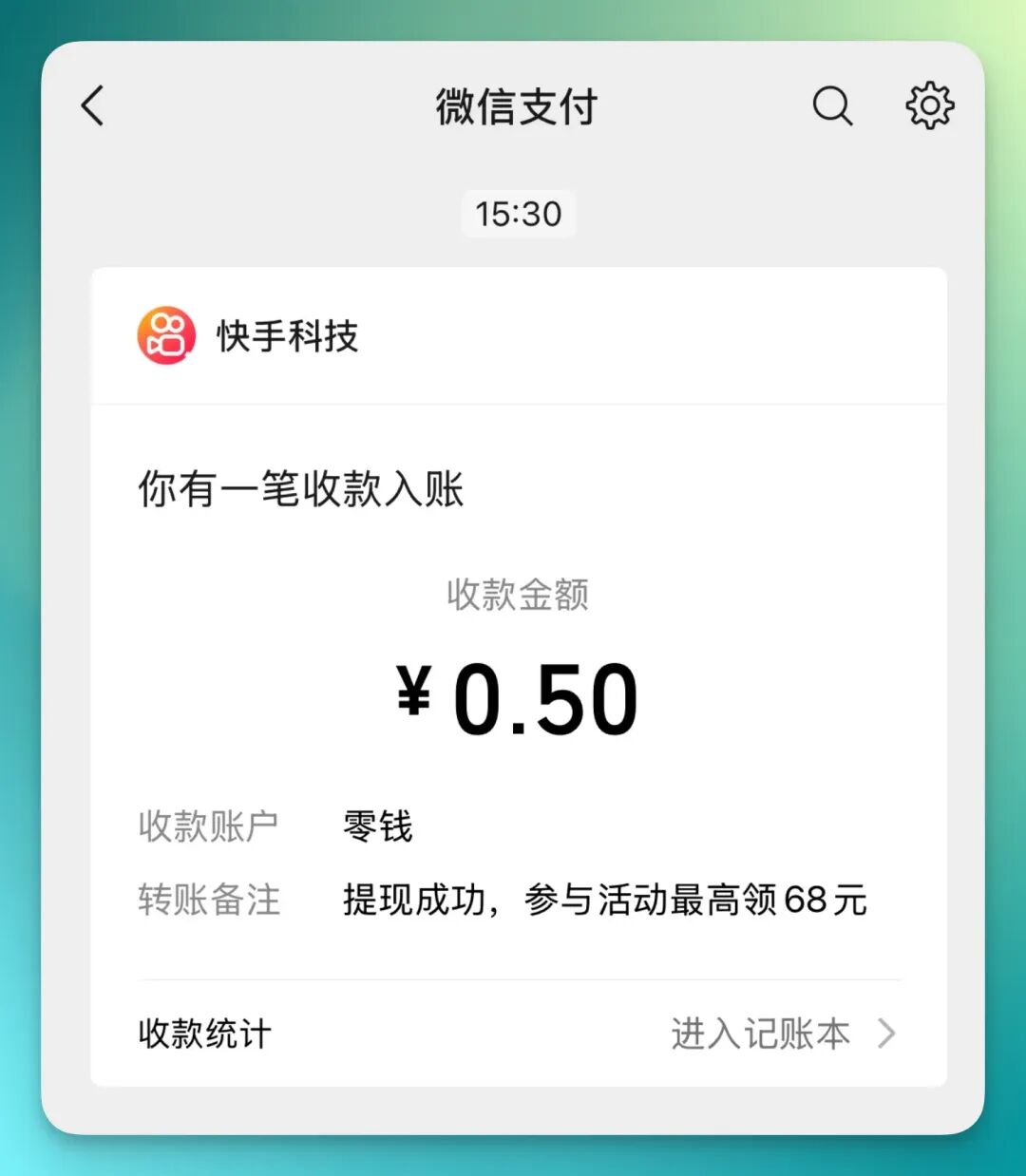
This time we used the Step-GUI + MCP combination, with a very straightforward purpose: to make AI really operate a phone like a human, running through the complete flow of "earn coins → withdraw → select WeChat wallet" in Kuaishou Lite.
Breaking down the whole process, it's roughly this chain:
Open app → wait for page to load → find the "red envelope" in upper left → enter task center → scroll down to find task → enter ad flow → watch ads one by one → successfully complete task → actual coins credited → follow the flow to directly withdraw → select WeChat withdrawal → money arrives.
From "click red envelope" to "money enters WeChat," this short chain has been fully automated.
And now you can clearly sense one thing: Step-GUI handles the doing, higher-dimensional models handle the thinking — this division of labor is really key.
With this MCP, GUI Agent can transform from a standalone tool into a bridge connecting LLMs with phone applications.
And very pleasantly surprising: following the official guide, I completed GUI-MCP deployment in 10 minutes. That is, in as fast as 10 minutes, you can have the same capabilities as the Doubao phone.
After seeing these cases, I want to discuss a topic many people have been debating lately.
People often say: "Isn't it too clumsy to have AI simulate clicking on screens? Wouldn't directly calling APIs or using MCP and A2A protocols be more efficient? The final results would not only be efficient but precise."
But I recently saw an analogy:
Subways are indeed much more efficient than cars — larger capacity, no traffic jams — so why do humans still need cars?
Because subways can only go where tracks are laid.
APIs are the same — they depend on the "tracks" that app developers lay for you. But in the real world, there are vast amounts of software, web pages, even games without APIs, with countless temporary pop-ups and non-standard operations.
The GUI Agent is that "off-road vehicle."
It doesn't need to wait for developers to lay tracks. As long as it's an interface the human eye can see, it can drive there. It may not be the fastest, but it definitely has the widest coverage and best adapts to this chaotic, real digital world.
This is precisely the significance of StepFun open-sourcing Step-GUI this time. Currently this 4B model is open-sourced on GitHub, and the API is already live — interested developers should give it a try.