What Can WorkBuddy Get Done While You Grab a Coffee?

You go grab coffee. Let AI handle the work.
Go grab coffee. Let AI handle the work.
👦🏻 Author: Yi Xiaojie
🥷 Editor: Koji
🧑🎨 Layout: NCon

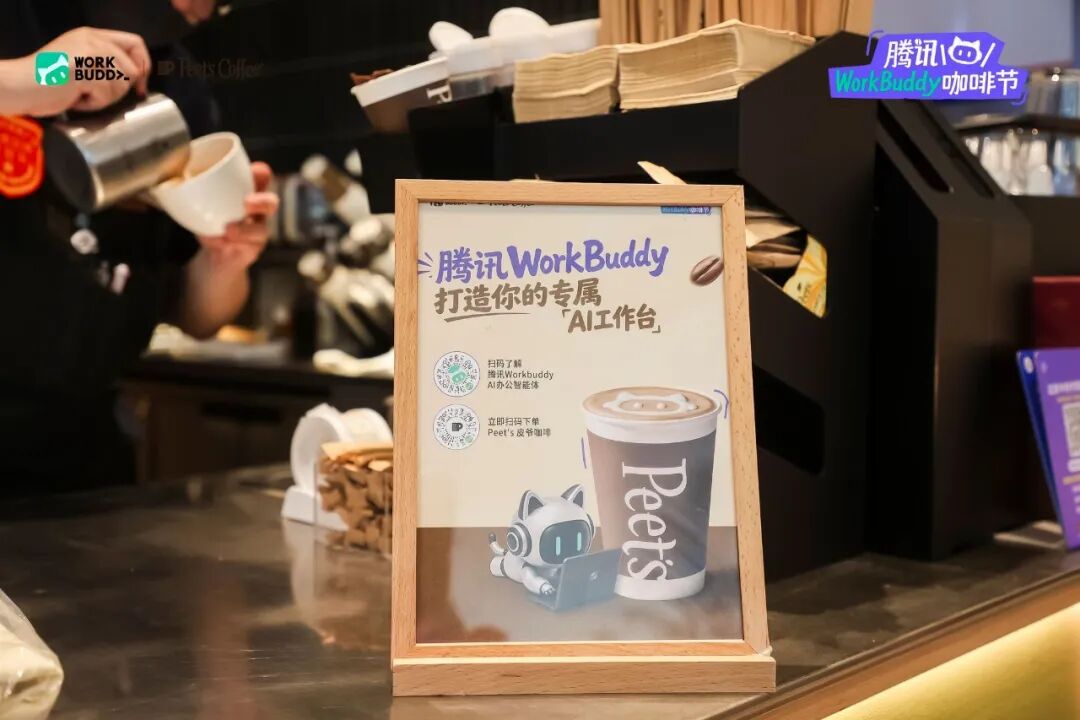
On August 13, Tencent WorkBuddy partnered with five premium coffee brands — Peet's, COSTA, Algebraist, Something For, and Sanchi — to launch a campaign for office workers: "Leave the work to WorkBuddy, keep the time and coffee for yourself."
During the event, you could participate through the WorkBuddy mini-program online to draw coffee vouchers and collect AI points, or simply walk into a physical store to sit down. Sanchi's pop-up at Shenzhen Shekou Nüwa Park, COSTA at Beijing Hual熙 Live, Something For at Shenzhen Xinghuo Bakery Concept Store, Algebraist at Hangzhou Fengshan Shui, and Peet's at Beijing Zhongguancun Lingzhan — the coffee was ready.

"You drink coffee, Buddy works." This line on the poster captures one of WorkBuddy's core product logics: stripping repetitive labor out of human working hours.
Since its launch in March this year, WorkBuddy's PC monthly visits climbed from 8.85 million to 20.97 million in just four months, ranking first in China's PC-native AI office agent market — surpassing the combined total of second and third place.
Those 20.97 million monthly visits span diverse use cases: writing proposals, building reports, revising contracts, organizing data, generating analyses. It's not another chatbot that "answers questions" for you. It's a "digital colleague" that helps you get things done, delivers reliably, and iterates fast.
In the future, the first AI a professional opens each day won't be a chatbot — it'll be an AI workbench like WorkBuddy. With this "Tencent WorkBuddy Coffee Festival," what WorkBuddy gave users was far more than coffee itself. It was a slice of time to enjoy that coffee in peace.
What this "coffee time" might bring you: the restoration of genuine human connection, the birth of creativity.
If you're wondering "what exactly can WorkBuddy help with in daily work?"
The six scenarios below are the best answer. They happen in real life every time you write a bid or reconcile accounts — but with AI, these tasks are no longer tedious or headache-inducing.
1. Let AI handle the bid — 3-5 days of work, done over one coffee
In the sensor industry, the most time-consuming part of sales isn't visiting clients. It's writing proposals.
A project tender document runs 30 pages; the technical proposal easily hits 60 to 100. Breaking down requirements, matching product models, drafting technical solutions, compiling commercial bids, organizing qualification documents — the full process takes three days minimum. Fanny is a sales rep at a sensor company. Her approach: drop the tender document and company product manual into WorkBuddy's authorized folder, then give the instruction: "Based on these two documents, write a complete technical bid proposal."
WorkBuddy automatically parses the tender document, extracts key technical requirements, matches models from the product manual, and generates the proposal chapter by chapter — project understanding, technical selection rationale, product parameter tables, implementation plans, quality assurance measures.
The entire process involves multi-step coordinated execution: parsing, matching, generating, proofreading — without requiring the user to intervene with step-by-step instructions. What gets delivered is a complete document ready for bidding — direct results.
The one-click generation of the technical deviation table, with zero errors, particularly surprised her. Previously this task meant manually checking the tender document line by line, ticking boxes one by one — a real headache.
Now, a 60-page technical proposal shrinks from 3-5 days to about 45 minutes — the time it takes to drink a coffee.
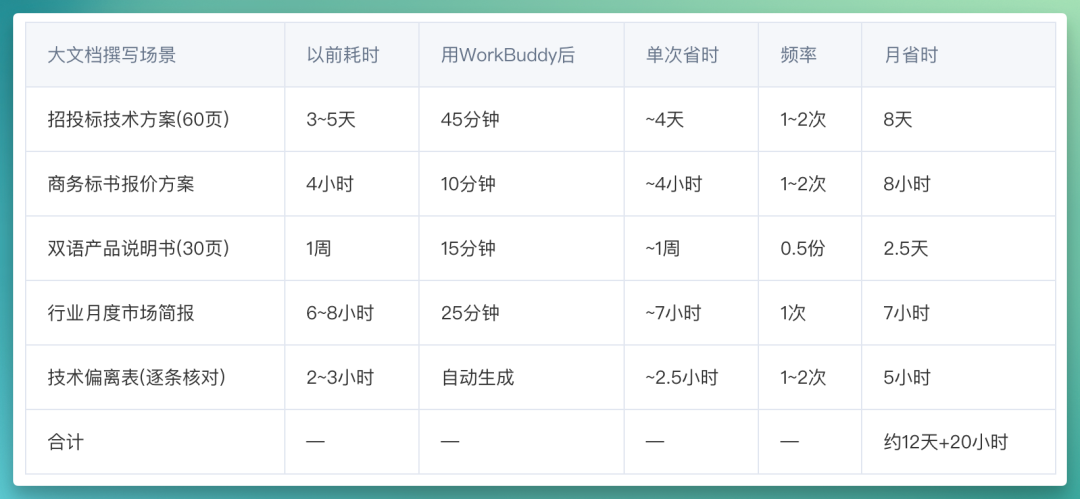
Along the way, Fanny developed some best practices. For instance, let AI build the skeleton, you add the flesh. On top of the AI-generated generic language, she supplements with operating condition data and experiential judgment she knows firsthand, transforming "AI-generated" into "expert proposal."
Writing bids works this way. Financial analysis does too.
2. An auditor built a financial pipeline — AI did 155 minutes of work
An auditor with over a decade of experience analyzes 5-10 financial statements each quarter.
The process is usually fixed: open Excel → copy-paste data → calculate current ratio, quick ratio → calculate debt-to-asset ratio, gross margin, net margin → compare year-over-year changes → flag anomalies → write up a Word report. Two to three hours per statement. One auditor, Sol, built an automated pipeline. His tools: WorkBuddy + Python.
WorkBuddy serves as the orchestration hub, understanding natural language instructions and automatically calling Python scripts to execute the full workflow.
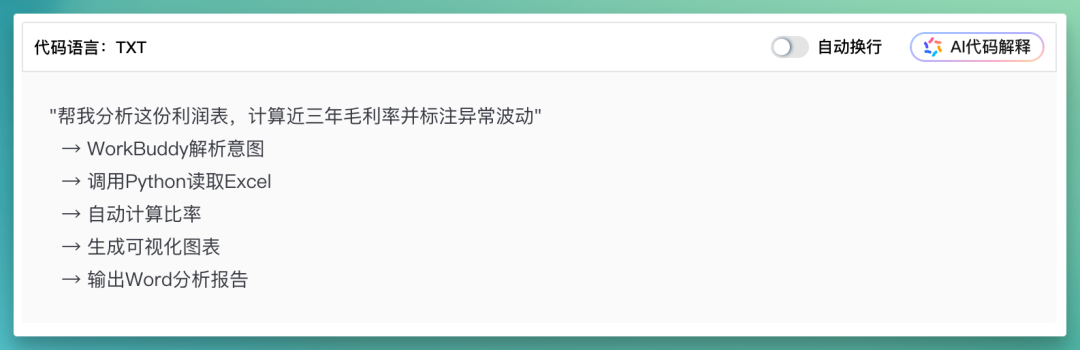
The logic behind this is WorkBuddy's expert team mechanism: users can crystallize mature professional methodologies into automated workflows, with AI executing tasks in the capacity of a domain-specific expert rather than generic conversation. In implementation, WorkBuddy first reads and cleans Excel data, automatically identifying multiple sheets and standardizing column names; then matches account names like operating revenue, main business revenue, sales revenue, calculating core financial ratios; finally applies three-tier anomaly detection — threshold alerts, fluctuation alerts, trend alerts — with automatic severity grading of "critical" or "watch."
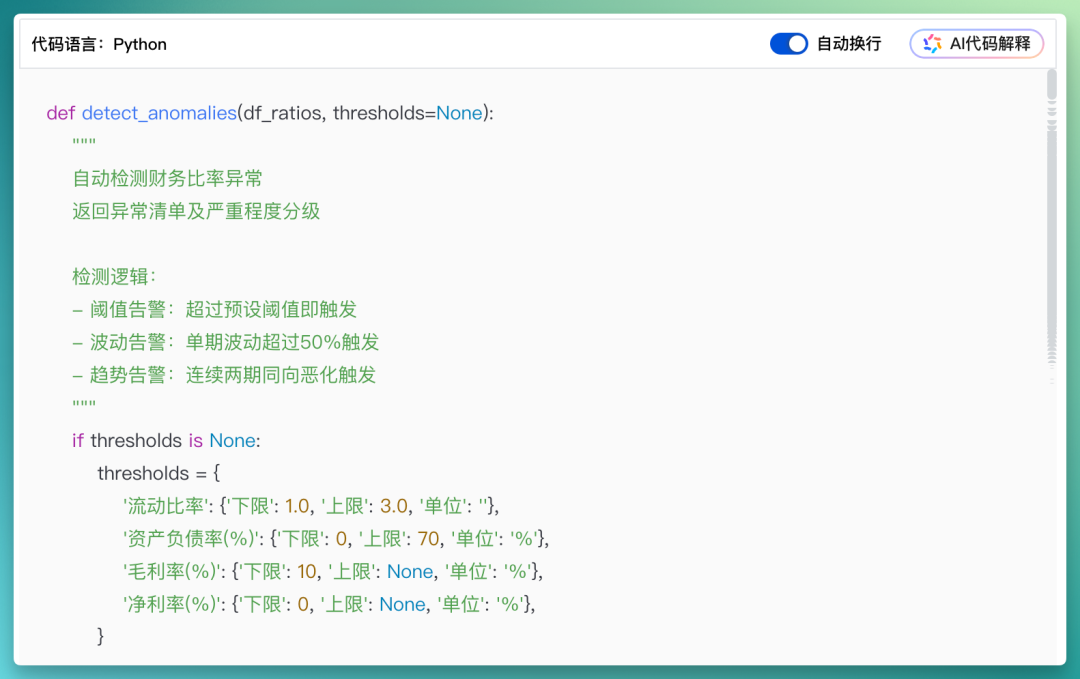
Through this automated pipeline, single-statement analysis drops from 155 minutes to 8 minutes — a 19x efficiency gain.
Report writing specifically shrinks from 45 minutes to 3 minutes. And WorkBuddy automatically handles formatting adjustments, table generation, and chart embedding.
A professional report with charts and anomaly lists — done in the time it takes to drink a coffee.

Of course, in actual use this pipeline still depends somewhat on data completeness — consistent account names, uniform data units, and so on.
What's important to note: the professional judgment of human auditors remains equally critical. AI auditing handles discovery and presentation; humans handle judgment and qualification. That's the optimal form of human-AI collaboration.
3. A procurement manager turned his inventory system into a team collaboration tool
What procurement managers face isn't documents — it's physical goods and systems.
Steven is a procurement manager at a Shenzhen-based Western restaurant chain. Receiving, warehousing, inventory checks, margin calculations — this workflow took at least 10 man-days to complete manually. He first used WorkBuddy to tackle the warehousing step. Supplier delivery notes came in both paper and various electronic formats, previously all entered by hand. He used WorkBuddy to develop an OCR recognition system: snap a photo, automatically convert to template.
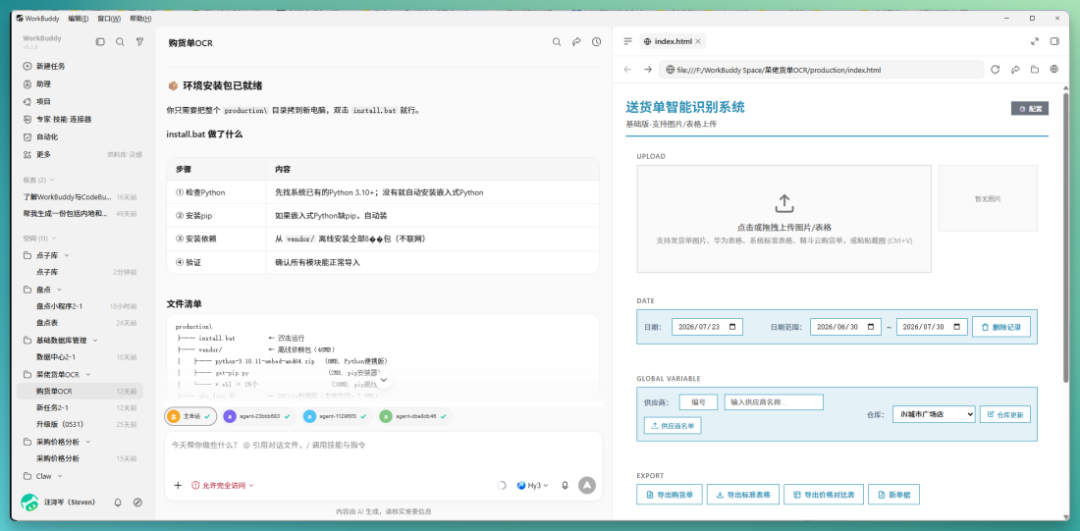
But he quickly hit a new problem: the supplier calls it "potato," the system calls it "potato tuber" — the characters match, but the system doesn't recognize it.
So he added a SKU matching layer to the recognition system. He had AI learn correspondences like "potato = potato tuber" — the more it was used, the more accurate it became. Electronic invoices got similar treatment. Different supplier spreadsheet formats were unified into standard templates the system could read.
By Steven's estimate, the warehousing step shrank from 10 days to about 5 days.
The most time-consuming part was physical inventory. The company's original inventory tool was slow to respond; colleagues would finish counting materials while the system was still loading. The alternative was recording on paper for batch entry later, but with multiple people collaborating, data errors became hard to trace.
So he used WorkBuddy to build an inventory mini-program with the same functions as the original system, but with noticeably faster response times.
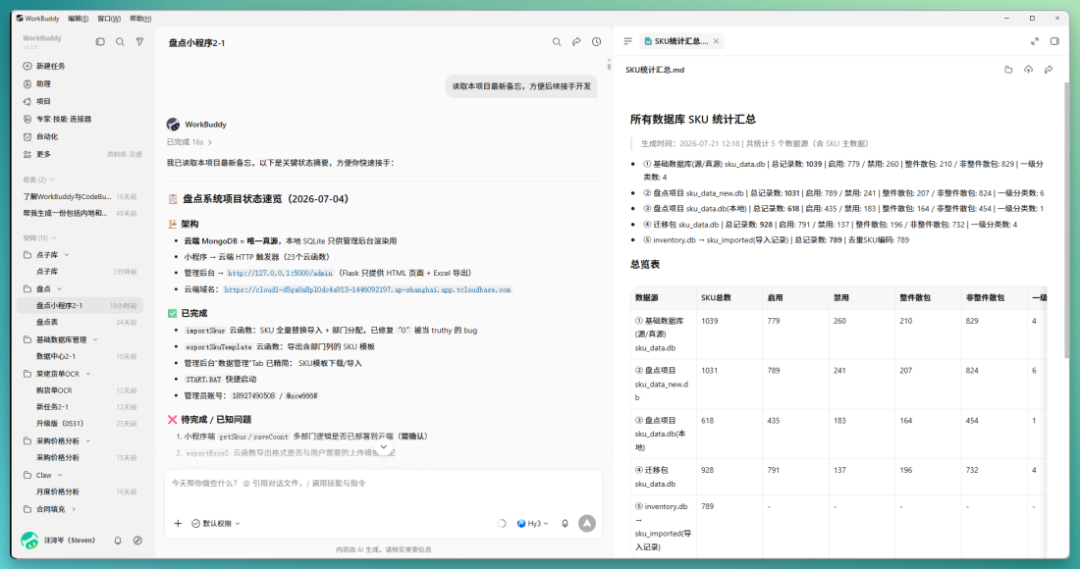
Behind this capability is WorkBuddy's adaptability to multiple tools and platforms — from image recognition to Excel manipulation to mini-program generation, covering different tools and file formats.
Later, Steven added multi-user collaboration features to the product: the bar and kitchen each enter their own department's data, with the system automatically merging it — upgrading from "personal tool" to "team collaboration" infrastructure.
Inventory data automatically collected, purchase orders batch-generated — all things WorkBuddy can handle while you're drinking coffee.
In the three scenarios above, inputs and outputs are relatively defined — bids have fixed structures, finance has fixed formulas, warehousing has fixed workflows. What WorkBuddy needs to do is execute efficiently within existing frameworks.
In the three scenarios below, WorkBuddy faces more open-ended task environments, requiring autonomous judgment and progression at every step.
4. A rural teacher used AI to grade 100 exams — and wrote a report for every student
AI won't make teachers unemployed. But teachers who know how to use WorkBuddy will be more competitive.
A seventh-grade math teacher at a rural middle school in Hebei province: each weekly exam, nearly 100 papers across two classes, 3-4 hours to grade manually, another 1-2 hours to calculate scores, tally wrong answers, and analyze weak points. Extremely tedious.
The bigger problem: data couldn't accumulate. When parents asked "where is my child weak," he could only answer from memory. Papers were handed back and gone; next lesson, he still taught by feel.
This is many teachers' daily reality.
This rural teacher, using WorkBuddy + Zhipu BigModel API, packaged the "read paper → check answers → score → write comments" workflow into a WorkBuddy Skill.
Next time, just say one sentence: "Help me grade this exam."
WorkBuddy automatically calls Zhipu's multimodal model to recognize handwritten answers, with over 95% accuracy on multiple-choice questions; automatically compares against standard answers question by question — partial credit for correct process but wrong answer, zero for blanks, and flags "requires manual review" when AI is uncertain. Finally, it generates an HTML learning report covering score overview, question-by-question diagnosis, knowledge point strength/weakness analysis, and study recommendations.
Grading time drops from 3-4 hours to 30-40 minutes.
And every student now has a detailed learning profile. It breaks down to specifics like "your one-variable linear equation word problems have only 40% accuracy, mainly failing at the equation-formulation step."
For the teacher, which knowledge points have high error rates across the class, what to focus on next lesson — all now has data support.
Skill is one of WorkBuddy's foundational mechanisms. WorkBuddy has already accumulated hundreds of such professional work methods, covering verticals like finance, law, education, and recruiting — and users can customize and reuse them.
5. A headhunter spent 10 minutes mapping out a tech company's overseas team
Mapping — talent mapping — is a headhunter's basic skill, and the most time-consuming.
You toggle between LinkedIn, Maimai, Tianyancha, and company websites, manually collecting names, titles, reporting lines, regions, then organizing into Excel and drawing org charts. One company takes anywhere from half a day to two or three days. One headhunter used WorkBuddy to map the overseas marketing department of a major smart hardware tech company.
He gave the requirement directly: "Target company xxx, focus on overseas marketing department, full coverage, need org chart."
WorkBuddy automatically executed 6 rounds of searches: from overall structure, C-Suite management, to English public information, LinkedIn executive profiles, gathering five regional heads and three brand line heads.
The key here isn't "can search" — it's WorkBuddy's autonomous judgment of search sequence and dimensions: macro before micro, public information before specialized platforms.
This also demonstrates WorkBuddy's multi-step coordination in complex tasks: AI autonomously plans the path, rather than waiting for step-by-step execution instructions.
After searching, WorkBuddy automatically generated an HTML file containing: an organizational tree diagram; detailed regional team cards; a complete list of 51 mapped individuals; and AI-generated headhunter insights (including leads worth pursuing).
Such as: new CMO just arrived, brand marketing team in transition; Europe region fastest-growing at 43.5% YoY, team still expanding, etc.
Yes, WorkBuddy produced a complete mapping covering 51 people, 5 regions, 3 brand lines, from C-Suite to regional head level. Total time: under 10 minutes.
6. A music creator's efficiency jumped 70% with AI
One music creator, also a frontline educator, divides his daily work into three categories: processing large volumes of audio files, reading and organizing enrollment documents, and generating notification letters for multiple students.
Previously these tasks were scattered across five or six tools; just switching between software burned considerable time. WorkBuddy consolidated all three.
This music creator simply says in natural language "help me convert this M4A to MP3," and AI directly calls local tools to execute — no need to remember command-line parameters.
Stem mixing, same thing — one sentence and done.
And it all runs locally, no cloud upload needed, privacy-secure. Because WorkBuddy supports cross-end work, AI can directly call local toolchains.
His daily long-document processing and batch file generation also became easier. Previously a 30-page PDF policy document required full reading plus handwritten summaries; now just tell WorkBuddy "summarize key points, bullet list" and it generates a one-page summary in minutes, with formatting done.
You can also work in reverse: organize scattered information into properly formatted Word documents.
For repetitive document tasks, you can package them as Skills, enabling one-time batch processing and making professional methods reusable.
For example: generating notification letters for 20 students with identical format but personalized content.
You set the template format, WorkBuddy automatically reads spreadsheet data and generates documents one by one according to the template, finally delivering them as a package.
20 documents, from 2 hours originally, down to five minutes.
All told, his daily office efficiency improved roughly 60-70%.
Previously, efficiency tools helped people work faster. Now, real efficiency tools give people more time to not do tool-like work.
You go drink coffee, the AI in your computer keeps working for you
On August 11, WorkBuddy launched multi-end sync. PC, App, and mini-program now synchronize tasks, conversation history, and outputs in real time.
You can remotely check your PC WorkBuddy's task progress from your phone, or directly authorize or terminate running tasks from mobile.
For example: you initiate a complex task requiring human confirmation on your computer, but need to step away — mid-journey the task stalls at a confirmation step. Pull out your phone, reply with confirmation, and the PC WorkBuddy continues running.
Cross-device collaboration becomes smoother too. Snap a photo of an invoice with your phone, send it directly to WorkBuddy mobile, and your PC receives and automatically completes recognition, organization, and filing. No more data cable transfers or WeChat File Transfer middleman.
Behind this feature is WorkBuddy's further extension of "cross-end work" capability: from operating different file formats to connecting different device forms.
And with PC, App, and mini-program fully connected, work scenarios are no longer locked to the desk. Even from a café, you can monitor AI's work status anytime and remotely intervene when needed.
"You drink coffee, Buddy works" — it's becoming a real scenario.
What can a coffee break birth?
What WorkBuddy Coffee Festival wants to convey may be exactly this: when AI takes on those repetitive, tedious tasks for you, what can you do with that reclaimed "coffee time"?
In 17th-century London, coffee houses were called "penny universities" — spend a few pence on coffee and join a discussion of ideas, where the Enlightenment fermented. Malaysian artist Elain Wong turned accidentally spilled coffee stains into a new art movement. And Balzac, reportedly drinking 50,000 cups of black coffee in his lifetime, grew La Comédie Humaine word by word across countless caffeine-fueled nights.
Coffee's most captivating quality is as an atmosphere-shaper — the space it provides for ideas to collide, for art to grow.
Today, WorkBuddy returns to you the time that belonged to repetitive labor.
One bid, one report, one inventory check, one hundred exams, one talent map, one batch of audio files — work once measured in "days" now completes in the time of a coffee. You can use this uninterrupted block for what only you can do: thinking, judging, creating, connecting. When AI compresses the unit of efficiency measurement from "days" to "cups." A more worth-asking question is: what do people do with the time they get back?
This may be the real change that AI office tools like WorkBuddy bring us.
Crossing is looking for independent writers to cover AI product and model reviews.
If you've written articles like: Hands-on with PixVerse C1, Hands-on with LibTV, please contact zeo0811@gmail.com. Your email should include: ① personal introduction, ② AI review articles you've written.
We offer competitive rates. Looking forward to observing and documenting the AI era with you 🎪