Cherry Studio is a great AI tool.

Wheat has ripened a thousand times, but the Enters' greatness is unprecedented.

"Entel Great for the First Time 🍒"
There's a humorous question on Zhihu: "Who is the greatest person in history?"
The top answers have gone through several iterations, and the latest version shows a kind of decentralized faith — sorry, I mean Zhihu users — declaring that they themselves are the greatest people in the world.
Wonderful. Truly worthy of the theoretical heights that invented Germanic win-ology. I particularly admire the confidence of my fellow Zhihu natives.
So, I think the greatest AI tools in the world are Cherry Studio and Toki.
Because these are the two I actually use every day.
Cherry Studio is a third-party chatbot — an open-source conversation management tool that lets you plug in LLM APIs.
No core technology, no data flywheel, no reinforcement learning, no context engineering. You can't even call it a wrapper. It is the shell — the API is something you input yourself.
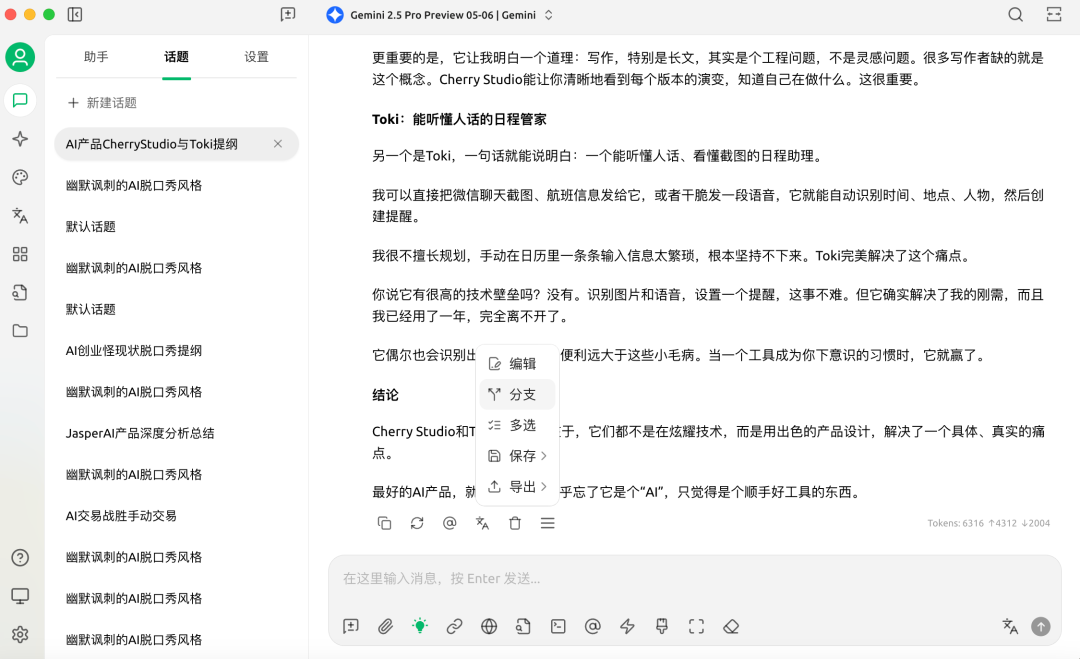
Cherry Studio's killer feature is branching.
I basically write all my articles with AI. My workflow is simple: chat for twenty minutes, then feed the transcript to Gemini 2.5 Pro. Outline first, full draft second.
The core is my spoken ideas, with only two rounds of prompt engineering in the whole process. Very simple. (See How to Write with AI? for details.)
But as soon as you're doing anything remotely serious, you run into version control problems.
Like, the full draft AI wrote today just doesn't meet my requirements. Or I want to try several versions, tweak the prompt slightly, and generate multiple variants to compare.
That's where Cherry Studio's branching becomes incredibly useful.
I can branch off at any step, generate several different versions, and continue the conversation — no need to start from scratch.
A lot of things sound simple when you describe them, but the big players just don't build them.
Previously, ChatGPT and Gemini's web interfaces had no branching. If you weren't satisfied with a generation and wanted to tweak the prompt, you had to regenerate, and the previous version was overwritten.
Google's AI Studio has branching, but its frontend is terrible. It's a pure developer site with too many models, too much complexity, and every time you switch between conversation windows there's some loading lag.
Cherry Studio is different. First, the UI actually looks good. Second, conversations are stored locally, so switching between sessions doesn't lag — which gives me real peace of mind.
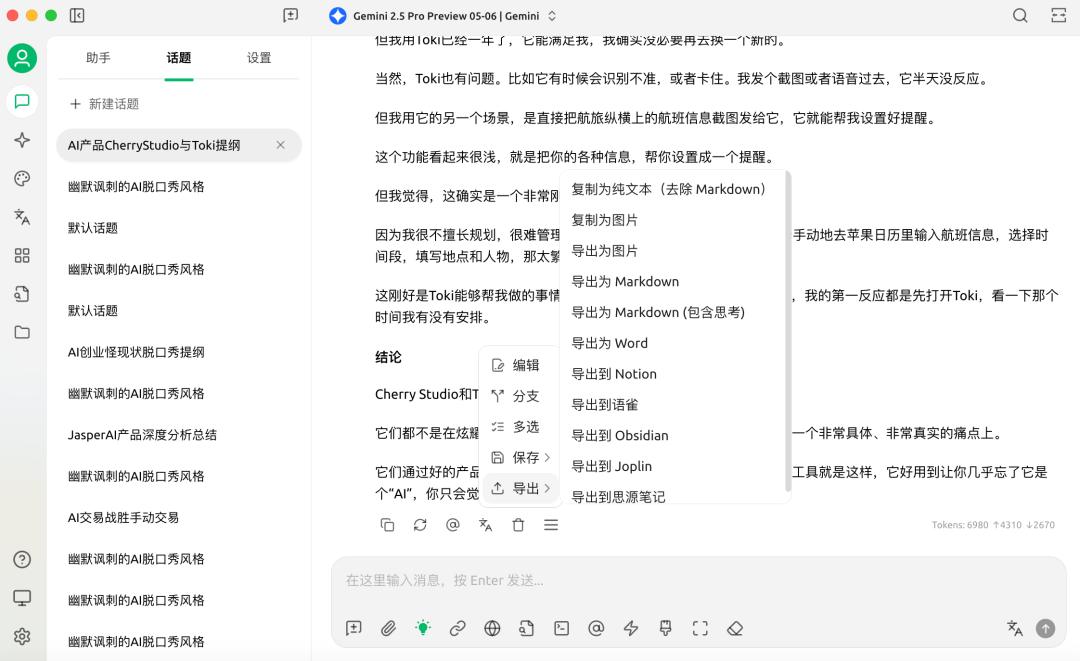
Plus, Cherry Studio has all kinds of useful little features. You can choose to copy plain text, stripping Markdown formatting. Individual AI responses or entire conversations can be exported as images, Word docs, whatever format you need.
These days, every bro doing AI startup has some unfalsifiable grand narrative, mouth full of reinforcement learning, some massive future they've glimpsed.
But people use something — whether you call it a tool, product, or platform — not because of some earth-shattering technology.
It's because the thing is simple, works well, has a nice frontend, doesn't lag, and got the useful little features right early.
ChatGPT only recently added branching, but I'm already habituated to Cherry Studio. All my conversation history lives there; the user stickiness has already formed.
There's another important point.
Writing, especially writing something slightly longer and more serious, is primarily an engineering problem. But the vast population of liberal-arts writers lacks engineering thinking.
John McPhee, the immortal of nonfiction writing, describes his method for ten-thousand-word pieces in Draft No. 4: On the Writing Process: break interview materials into individual notecards, assemble and combine them yourself, then thread them together.
That's writing as engineering. Complex work requires some modularity, some structural thinking.
For me, Cherry Studio is essentially a natural language IDE, a Cursor for writing.
I can clearly see how many versions I have, how they diverge from each other.
What changed in the context? Were there subtle tweaks to the prompts for outlining versus full drafting?
How did these changes lead to differences in the final version. The whole process is transparent. Knowing what you're doing, understanding your own process — that matters.
Though could the Cherry Studio developers please add voice input? I really need it. With voice input, I wouldn't have to separately transcribe audio 😭
The other AI product I use every day is Toki, a scheduling tool.
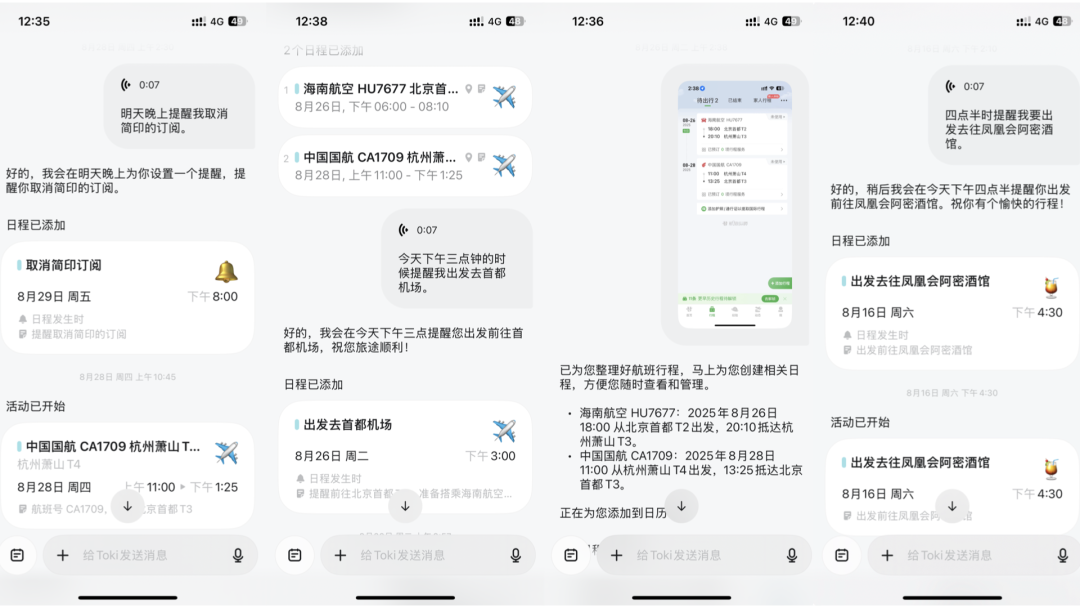
Toki's biggest advantage: I can send it WeChat chat screenshots, Umetrip screenshots, or just send a voice message saying "meet so-and-so tomorrow afternoon at such-and-such place."
It recognizes the content, sets reminders, and you can even have it call you to remind you.
Toki used to be called Dola. I started using it not long after launch, so it's been almost a year now.
This is genuinely a very hardcore pain point.
Because I'm terrible at planning schedules. Setting things up one by one manually in Apple Calendar is too tedious; I can't be bothered.
That's exactly what Toki does for me. So for the past half-year or so, whenever anyone makes plans with me, my first reflex is to open Toki, check if I'm free that time, then spend a few seconds sending a voice note to set a reminder.
Does this thing have any special technical moat? Not at all.
Recognizing chat screenshots, transcribing voice to text, then having AI set a calendar reminder — technically, this isn't very difficult.
Toki's biggest technical moat is probably that they actually purchased virtual numbers so they can call you with reminders.
I'm sure this space has plenty of competitors, and people have recommended other scheduling tools to me.
But I've been using Toki for a year now. Good enough is good enough; I don't need to switch to something new.
Of course, Toki has plenty of small issues too.
Sometimes it misrecognizes things, or gets stuck. I send a screenshot or voice note and get no response. A friend told me Toki doesn't support OPPO phone calendars — he spent an entire evening and still couldn't get it to sync.
Regardless, small tools like Cherry Studio and Toki are like CamScanner. They don't make for grand narratives, but they're genuinely useful.
On the usefulness dimension, Cherry Studio and Toki surpass every "world's first xx Agent."
The wheat has ripened thousands of times, but Entel is great for the first time 😭
That said, I actually can spin a grand narrative about Toki. Since none of them can be falsified anyway, bigger is better. Stay tuned for next week's grand narrative special on AI Funeral.
(Illustrations in this article generated by ChatGPT, with writing assistance from Gemini 2.5 Pro. Made a video version 👇)