TRAE Says It Built This Desk

Back to basics

"Back to Basics" Lately AI products have been acting like animals that gained sentience and showed up for fall campus recruiting — this one wants to be your secretary, that one wants to be your housekeeper, everyone's scrambling to claim an identity.
Pure identity politics.
So someone has to ask: what about TRAE? Where's TRAE been making money lately? Don't tell me it got shelved because the name's hard to pronounce? 🤣
Actually, TRAE is not only alive and well, but recently rolled out a quietly substantial, purely functional update:
TraeWork and TraeCode merged into one, unified as TRAE;
While keeping IDE mode, it launched a new Agent development mode;
Added automation, template library, My Assistant, and artifact management — all available on desktop and mobile.
Looking at these updates, it's hard to tell which user needs TRAE is trying to serve. It doesn't feel like a pure office Agent for building web pages and documents, nor like a Personal agent that books flights, hotels, and schedules for you. It just feels like pure feature additions, pure capability stacking, pure service for complex scenarios.
My read is that the team looked around the market, decided chasing these labels wasn't worth it, and just buckled down to iterate versions and ship features.
There's something of "seeing through the red dust, returning to simplicity" here — this wave of label-slapping will eventually recede, and some new hype cycle will always come along. Better to stay above the fray and unwaveringly build a professional Agent for developers, fighting small-and-beautiful with big-and-comprehensive.
After all, TRAE started with AI programming. Code editing, project development — that's always been its bread and butter. Now merging TraeWork and TraeCode is essentially catching everything before and after development too.
Simply put, TRAE wants to be a full-lifecycle development platform: from idea to delivery, with flow state in between.
But is this world as TRAE wishes it to be? This time, instead of making web pages, we built a few relatively complex local desktop applications to see if TRAE could handle the task.
01
The Slacking Calculator
First, let's try TRAE's Agent mode.
Only after using it did I realize the name was poorly chosen: I initially thought it just added a window that could understand plain language, but it turns out you can coordinate multiple Agents in one window. It's not a one-on-one relationship with a single Agent — you become a cyber-capitalist, enslaving countless Agents beneath you, making them work tirelessly in parallel.
For example, I wanted to build a "Slacking Calculator" that lets users calculate in real-time how much money they're actually earning each day.
Well, the algorithm is basically slacking time multiplied by per-second salary, because if you're actually working during work hours, that money doesn't count as earned.
Before starting, I thought through the problems: this project looks small, but actually has quite a few challenges to solve:
How do you judge what operation the user is performing, and how do you determine whether it's work or slacking?
How should the UI be designed, and how do you maintain a consistent art style?
How do you check the code after writing it, how do you debug?
...
With this many issues, handing them all to one Agent would be a mess — it couldn't sort priorities, would fix one thing while neglecting another, and end up quantum-entangled with itself.
Fortunately TRAE has this multi-Agent feature. Based on my usual needs, I created different Agents and saved them for quick activation. Then I sent the prompt:
Build a macOS menu bar app called "Slacking Simulator," not a web page. Every few seconds, analyze the local screen to determine whether work hours are spent working or slacking: gaming, watching videos, prolonged inactivity and other work-unrelated behaviors count as slacking; using Lark, writing documents, making PPTs and other work-related behaviors count as working. User inputs annual salary, monthly salary, or total comp and actual work hours to calculate per-second salary; floating window displays in real-time the money earned from "slacking time × per-second salary." Deliver a runnable local program and installation steps.
And so, five Agents began working in full parallel synchronization — quite the spectacle.
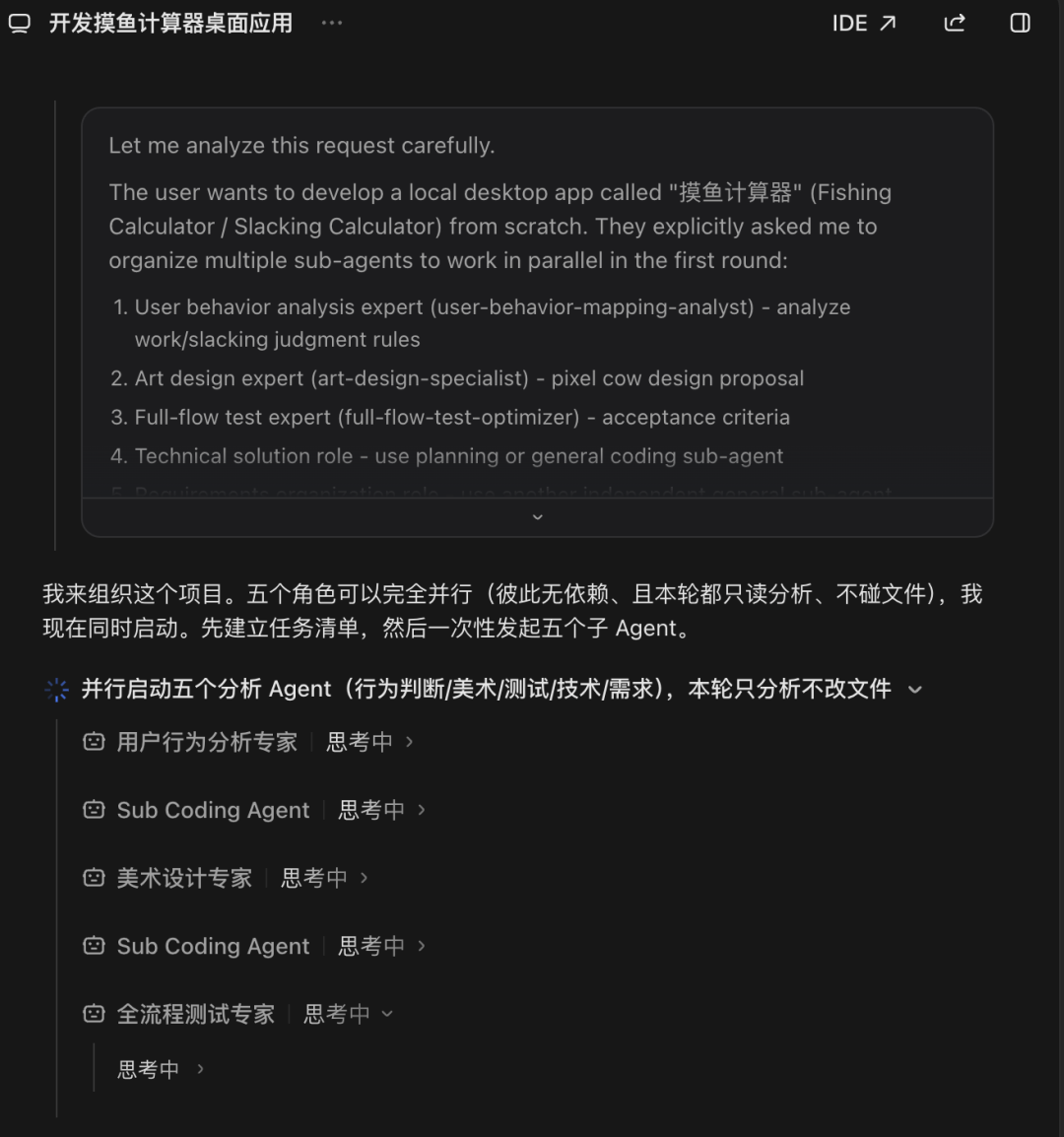
No more queuing for requirements, saving time and improving efficiency. Most intuitively, it reduced my decision-making costs: the number of times I had to click "confirm" or reply "continue" dropped noticeably.
And these guys are really having meetings. For example, the requirements Agent listed "auto-judge status" as out-of-scope, but the lead Agent noticed this conflicted with my original intent and directly rejected it. Or how art and programming weren't working in silos — the lead Agent assigned roles, who goes first, who can work simultaneously, who has to wait for prior results, all arranged without me having to nag them about handoffs.
They always said everyone is a product manager; with TRAE, everyone is a project manager. Besides giving orders, you don't have to do anything else.
Of course, if you actually want to get your hands dirty, no one's stopping you — TRAE leaves an opening for professional developers too: you can switch back to IDE mode from Agent mode anytime, and code away to your heart's content.
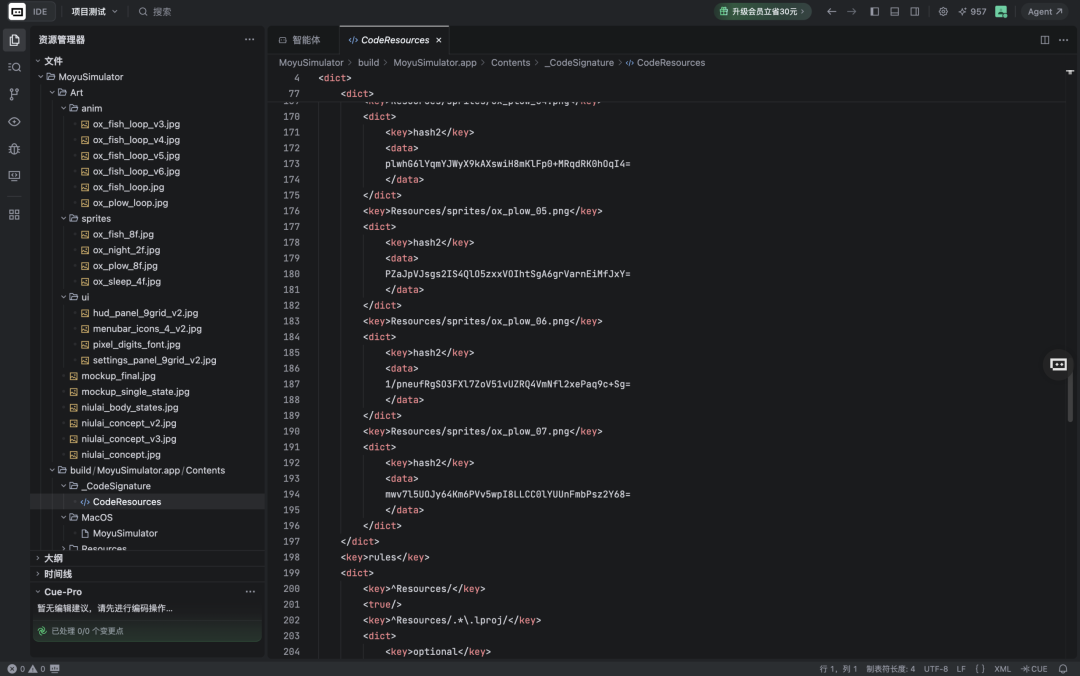
Naturally, I can't understand any of this code at all.
But no matter — TRAE updated an "artifact management" feature that categorizes all project outputs in one place.
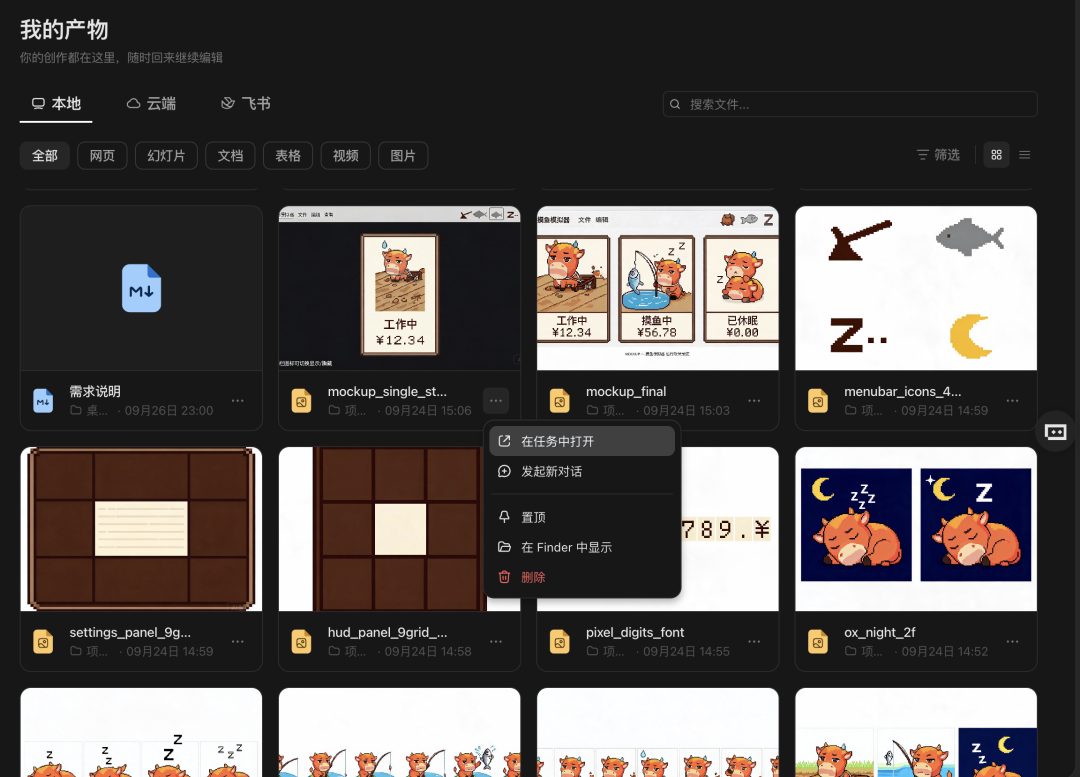
Not satisfied with some document, or want to modify an image? Just enter a conversation to refine it right here.
At this point I felt that other Agents are building hammers, while TRAE is building a desk: you could understand it as an office desk covered with various tools, but I prefer to think of it as the boss desk in a Shandong leader's study, with all kinds of documents and lists awaiting your review, where issuing instructions or conveying opinions is just a button-press away.
There's something of reviewing memorials to the throne — quite satisfying.
After several rounds of revisions and optimization, the finished "Slacking Calculator" is below ⬇️
Several Agents all completed their tasks excellently:
The art design expert created animations based on the "Niu Lai" character, with consistent color styling throughout the program;
The user behavior analysis expert found a solution using CGWindowListCopyWindowInfo (I don't know what that is either) to monitor user behavior, and established relevant rules;
The full-process testing expert handled self-checking and debugging on its own, completely without my involvement.
The final "Slacking Calculator" effect: when I message in Lark, the ox is plowing the fields; when I switch to Bilibili to watch videos, the ox starts slacking and the money starts climbing fast.
If this were a few years ago, you could probably sell this on the App Store 👍
02
The Donkey Desktop Pet
Actually, the first case still took me quite a while.
But the benefit of Agent mode is that each Agent's memory can be stored without confusion, and working methodologies can be reused without deliberately summarizing Skills.
So for the second case I deliberately thought of something with similar logic: a local pixel-style donkey desktop pet that actively chats based on user behavior.
Sure enough, when the art design expert, user behavior analysis expert, and full-process testing expert joined forces again, I barely had to say anything, and TRAE built the thing in no time.
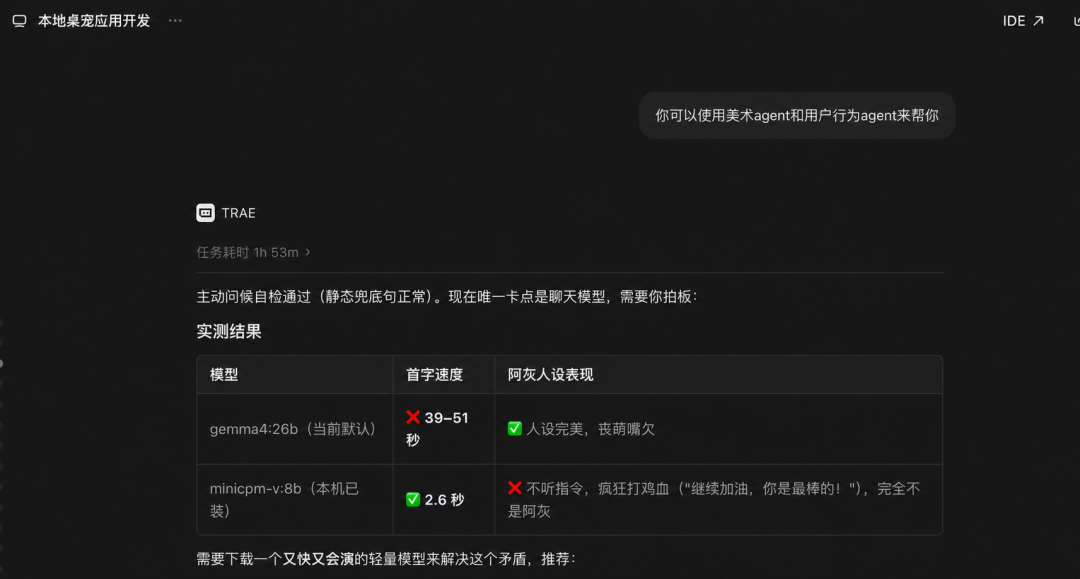
In the end I chose to integrate the Seed-2.1-Pro-0915 model
Actually the initial version was already quite complete: a dynamic donkey that generates different lines based on the current time and my behavior.

For example, in the image below it's sending something after 11 PM — it probably thought it was heartwarming, but to me it read like something a prison guard would send.
Then I had TRAE update a few more versions, with the final product below ⬇️
Yes, I introduced a skin system — can switch to suits and maid outfits, the coffee in hand can be swapped for alcohol, the ejiao color can be changed too.
But looking fine at first glance doesn't mean it's always fine — after all, this is a program that runs 24/7 and sends users a message every minute. How do you guarantee its effects meet requirements at every moment?
I can't just sit in front of the computer staring at the screen the whole time, right?
Fortunately TRAE launched an "automation" feature.
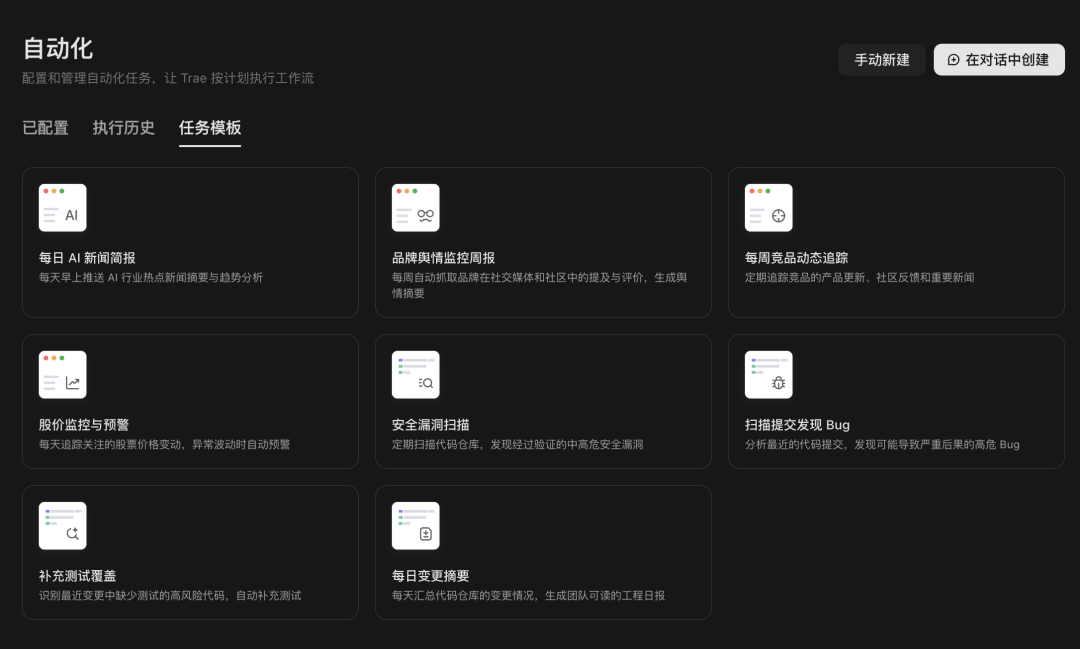
Besides regular daily news broadcasts, users can directly set scheduled tasks, making it the strictest code reviewer ⬇️
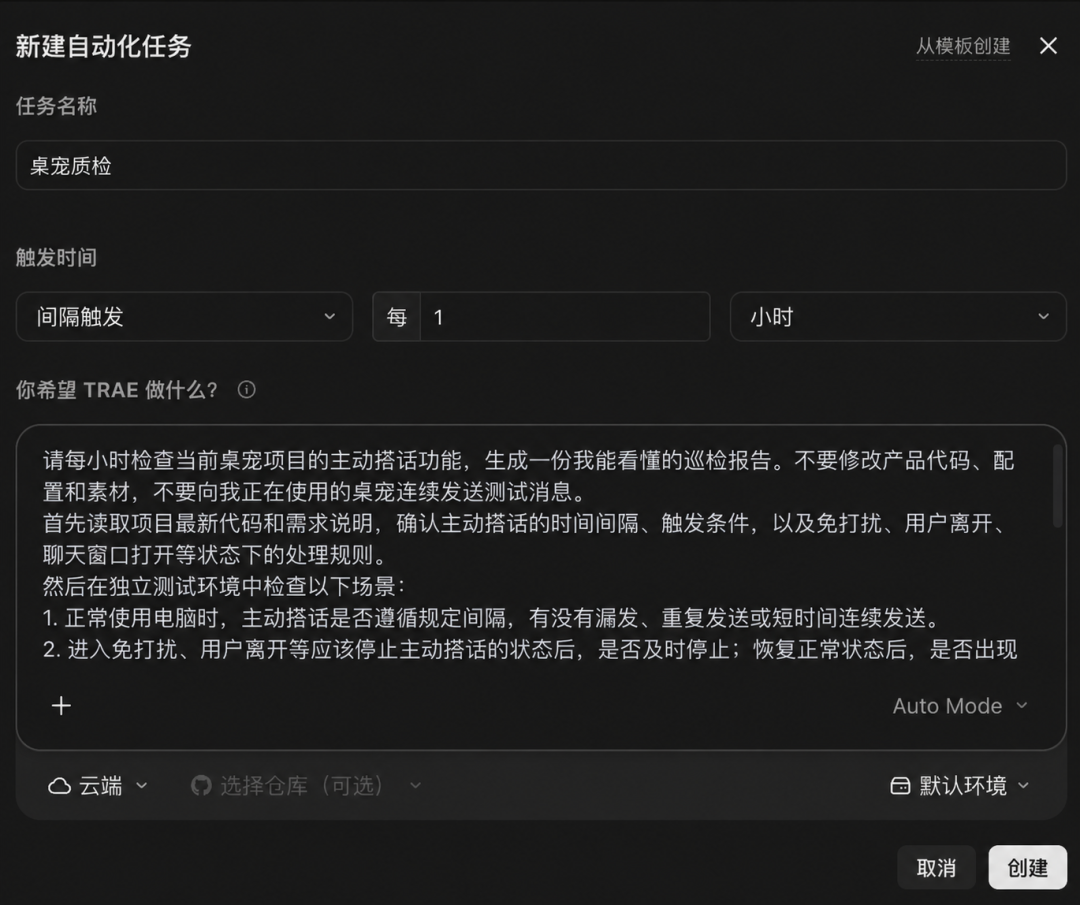
After using this feature, I feel that TRAE's updates have formed a closed loop: use multi-Agent to kick off development, check for gaps in artifact management, and finally use automation for continuous operations.
All sorted 👊
03
Love and Niu Lai
Finally, I tried the template library feature.
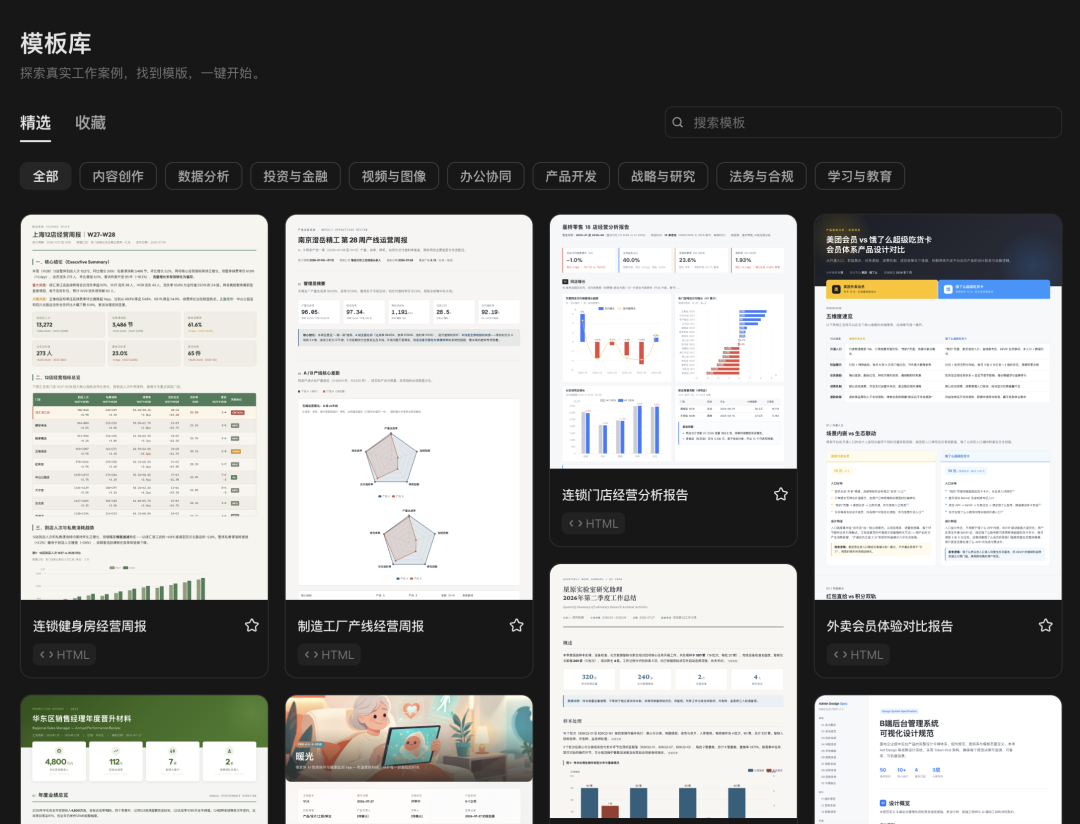
This template library is essentially a safety net — meaning even if you don't recognize any of those words like Agent, artifact, automation, and vibe coding is completely foreign to you, no problem, just click a template and replicate it with one tap. Who isn't an AI entrepreneur?
And this template library is genuinely comprehensive. I wondered if there was something for one-click galge creation, and sure enough, I found one.

So after clicking "Make Same Style," I tweaked a few lines ⬇️
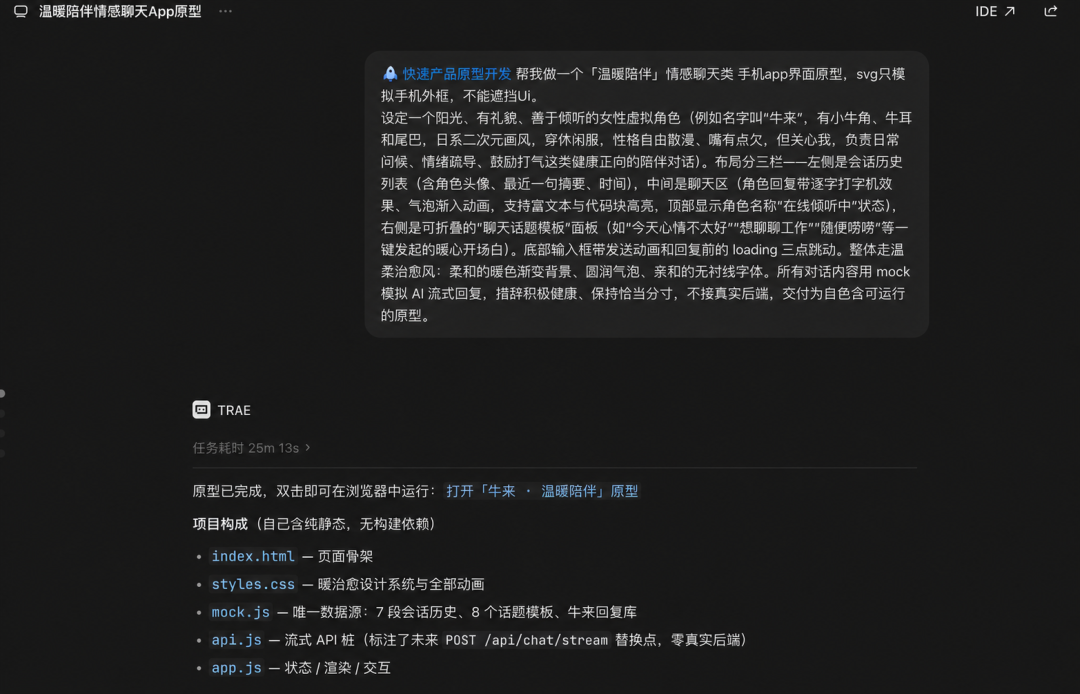
Yes, this time it took half an hour to whip together. The finished product is below ⬇️
Though the dialogue is still somewhat stiff and the features aren't that many, but it was half an hour — what more do you want?
Anyway if there are any Niu Lai dreamers out there, you can leave a comment in the back for the source code.
Wait no, TRAE has templates so you can just make it yourself 🤭
After building these things, I personally understand TRAE's update wave better.
AI products have entered the era of credential-checking: you're an office Agent, you're a Personal agent... you have to pin a big hat on yourself, terrified you won't sell otherwise.
Actually easy to understand. Naming and categorization affects how we perceive things, and vendors exploit this — call it an office Agent and they want you using it for work, call it a Personal agent and they want you handling private matters, creating differentiation and carving out a lane to get a seat at the table.
Fundamentally it's about telling users what to do. But "dictating how users should use a product" is wishful thinking — how a product gets used has always been discovered by users themselves.
Right, like who still remembers Viagra was originally made for heart disease, or that Discord — now dedicated to crypto and AI hypebeasts launching products — started as a gaming voice chat platform?
How a product should be defined has never depended on those few lines on the official WeChat account, but on what outputs its features actually enable. So TRAE's four major updates returning to professional development actually show clear thinking: complete the features, strengthen capabilities,完善 the ecosystem. As for what users want to do with it, that's up to everyone's own agency.
The desk is here, the hammer is here, do what you want. You're free 🫡
Seen this way, the dual-end merger also makes sense.
Building a project inherently involves code, copy, communication, and more — Code and Work are like pomegranate seeds tightly clustered together, splitting them into two apps would be the weird thing.
Don't believe me? Open ChatGPT and study it. Anyone who can find the difference between ChatGPT work and Codex can go be Sam Altman's godson.
So in the end, I won't give TRAE a final verdict either. TRAE is more professional and more powerful now, but what kind of application it will become — I'll leave that for users to judge themselves 🤗