Writing Like Programming

Programmatic Writing, Claude Code + K2

"Programmatic Writing"
I've recently made a major breakthrough in practice: using Claude Code to write like I program.
Before this, I'd been using Gemini 2.5 Pro because its context window is exceptionally long and its reasoning capabilities are excellent — it met almost all my writing needs.
The problem was that conversing directly with the LLM itself created serious version-control headaches.
Each generation could differ significantly from the last. I'd find myself trapped between several full-draft versions, cherry-picking the least objectionable passages from each to cobble together a final piece.
The direct consequence: 30 seconds to generate a full draft, an hour to splice and revise.
The traditional conversational approach to AI had hit a ceiling. I started thinking: what is the essence of writing, really?
So here's my next major theoretical breakthrough: writing, especially longer pieces, is fundamentally an engineering management problem.
Writing and programming are remarkably alike. Writing is programming in natural language; coding is programming in formal language. Traditional writing relies entirely on intuition, but intuition alone can't get AI to execute accurately.
Writing, like programming, requires architectural thinking, version control, and modularity.
I call it programmatic writing.
The core idea: use Claude Code as the project manager. I just provide context, explain my intentions clearly, and the AI breaks down the tasks and executes the steps.
Take the article The Great Abstraction I published a couple days ago — that was written with Claude Code + K2.
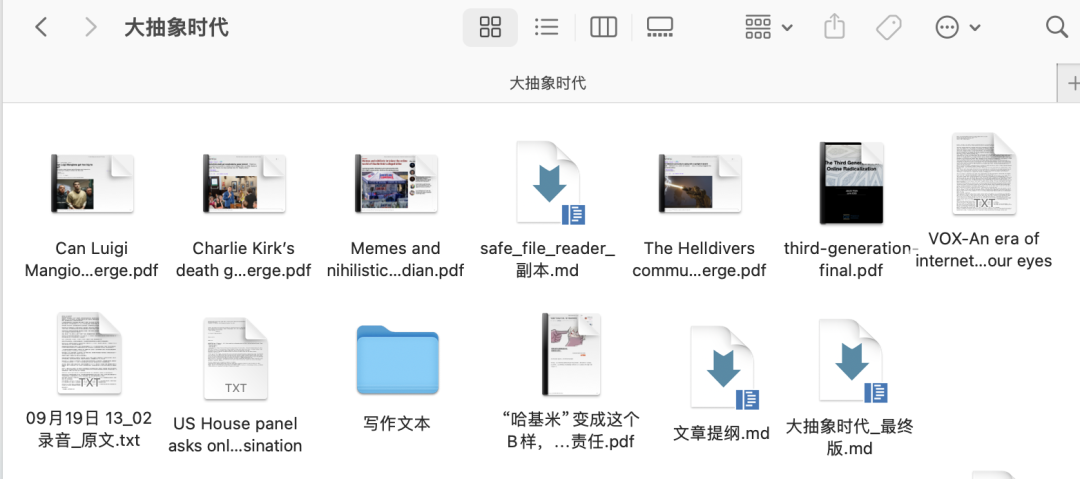
All I did was dump my verbalized thoughts (ten minutes of rambling into the Tongyi app), reference materials, and my past articles into a folder for Claude Code to access, then clearly articulate my writing intentions: which arguments to emphasize, which past pieces to emulate stylistically, target length...
Then came the genuine programming-agent shock.
Claude Code proactively creates a work plan, then executes methodically like a real project manager: studying materials, mimicking style, outputting an outline, and writing section by section.
The final article, The Great Abstraction, hewed closer to my original intent with higher overall completion. Using Gemini directly produces more fluid language, but only captures about 70% of my voice — still a hassle to revise.
This kind of programming agent that can autonomously decompose tasks and execute step-by-step completely transforms writing into a context engineering problem.
The user's most important job is choosing what context to feed it and articulating their intentions; the agent handles all remaining execution.
But here's the problem: Claude Code really hates China 😟
Anthropic explicitly lists China as a hostile country and even prohibits serving enterprises where Chinese companies hold over 50% ownership. Fucking Italians, how can they be this evil 😡
So I must use Claude Code critically. As everyone knows, I'm a patriotic blogger.
Thus, I switched Claude Code's backend model to Kimi K2 🤓
For the past week-plus, most of my articles have been written with the "Claude Code + K2" combo.
My other major practical finding: in the Claude Code writing workflow, K2 performs quite respectably.
K2's limitation is its 262K context length. On ultra-long, complex reasoning tasks, logical issues crop up. Its hallucination rate on summaries is very low, but in the full-draft-writing stage — a.k.a. creative writing, especially pieces exceeding 1,000 characters — hallucinations remain fairly noticeable.
But Claude Code's engineering capabilities compensate for the model's inherent weaknesses.
The key: Claude Code as project manager automatically breaks complex writing tasks into smaller components. Each segment runs only three to four hundred characters.
Under this task-planning mode, the model's capabilities are maximally focused. It doesn't need to process all context and logic at once — just write a few hundred characters of text.
And the most tangible benefit: K2 is cheap.
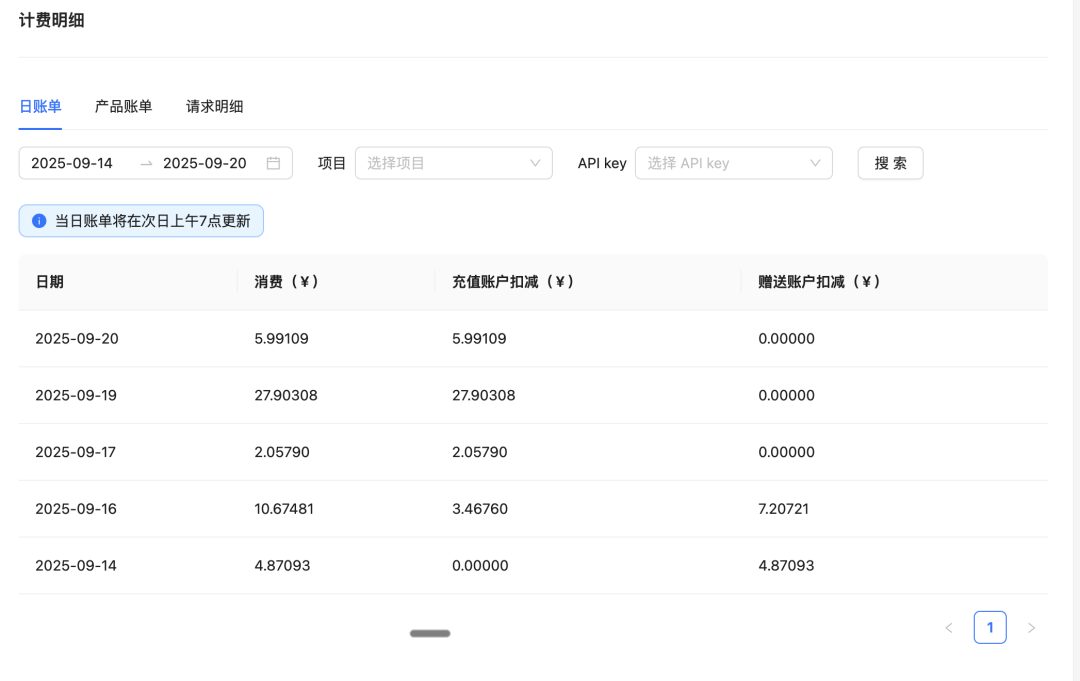
My first attempts with Claude Code cost $5 just to generate an outline. Now, writing a full article with K2 costs at most four or five RMB — several times cheaper.
On speed, K2's high-speed "turbo" version outputs decently at several dozen tokens per second. After several days of intensive use, I spend roughly 10 RMB per day. The standard version is half that again.
My heaviest day: four to five hours of continuous writing cost just 28 RMB. CC+K2's hourly wage is about five bucks — one-quarter of Shenzhen factory-floor wages 🤙
This is how AI goes: application scenarios can't be planned.
Since switching to the CC + K2 combo, I've felt something like the rush of first writing with Claude 3.5 Sonnet a year ago.
I've been feeding Claude Code everything from my rambling verbal transcripts to bizarre PDFs on my computer, just for kicks — I love watching AI scholars spin elaborate arguments from my offhand remarks.
The beauty of programmatic writing is that it solves the engineering-management problem in longform writing. No more step-by-step AI prompting, branching conversations, or agonizing between versions.
The "programmatic writing" method is simple: the core is providing the agent with abundant contextual materials. Then explain your intentions clearly, like a product manager writing requirements docs, and delegate execution entirely to Claude Code.
Specifically:
Step one: create a project folder.
It should contain three types of files: first, background materials on the topic — media coverage, research papers; second, your core arguments on the subject, which I usually dictate for ten-plus minutes and transcribe, though you could also include leadership directives or client briefs; third, several of your past pieces whose style you're satisfied with, as AI style-reference samples.
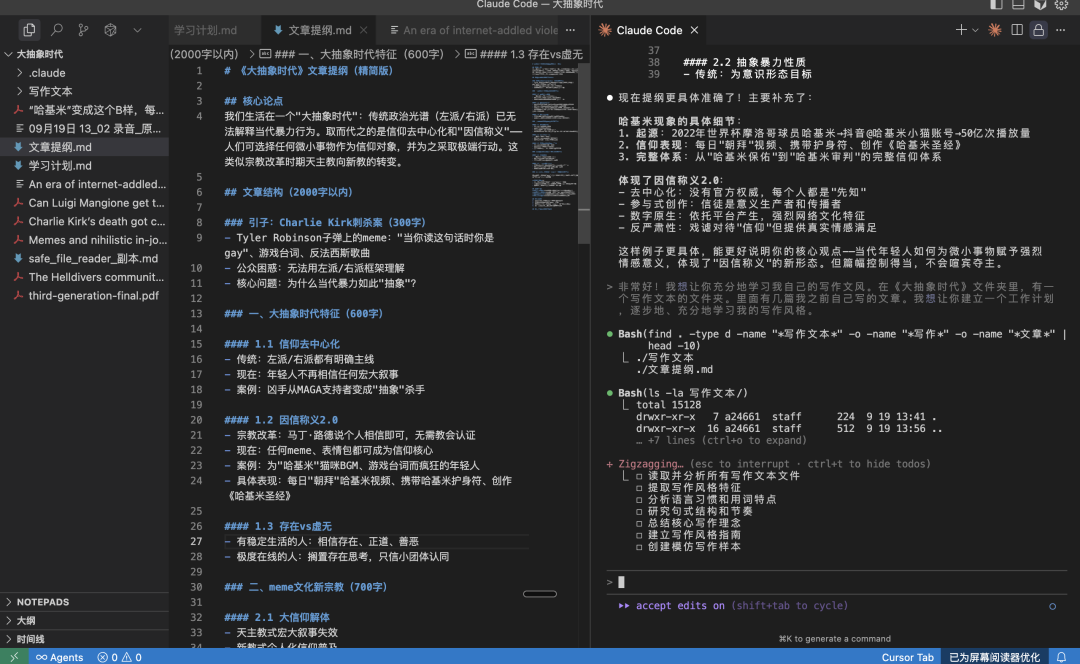
Then you're ready to direct Claude Code and K2.
Step two: explain your intentions thoroughly.
I highly recommend downloading Wisper Flow for Mac — summon it anytime for voice input to articulate your requirements fully and clearly.
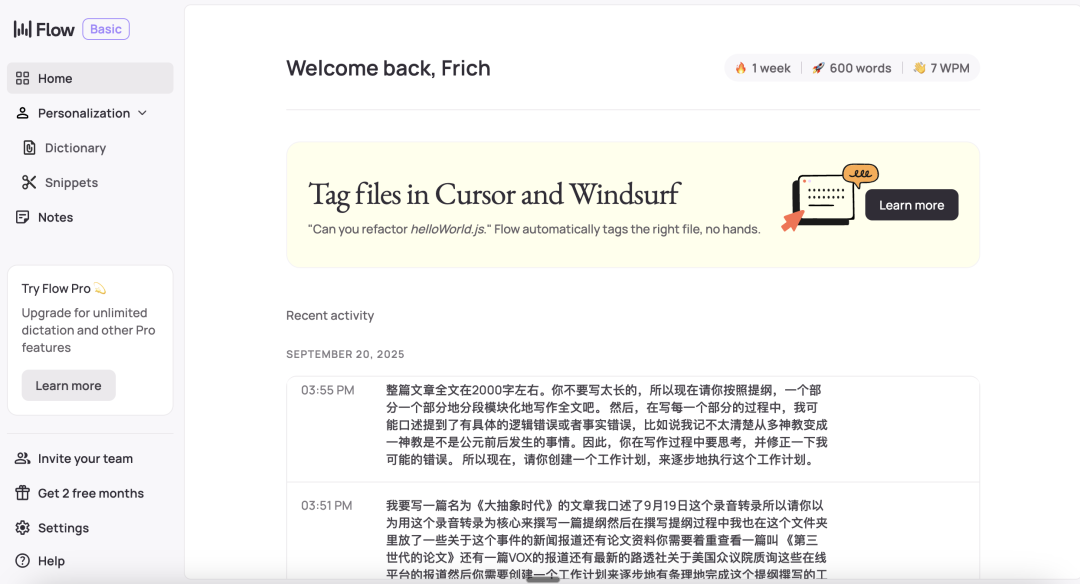
Explain what the article is about, desired length. Ask the AI to thoroughly study the folder materials, then based on your transcript or current input, referencing background materials and your past work, draft an outline.
Be as thorough as possible here, then have it create a work plan — a.k.a. a CLAUDE.md file — and execute according to that plan.
Step three: once the outline is confirmed, write the full text section by section. Have Claude Code write the complete piece part by part, following the outline and your past stylistic patterns.
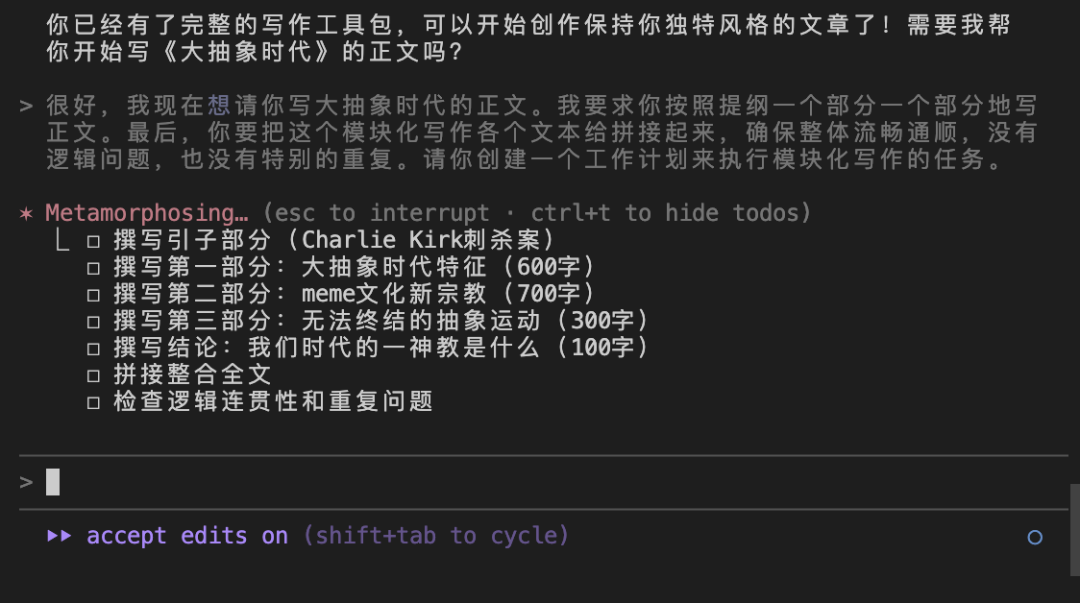
Very simple — the same logic as my previous AI Writing Guide. The difference is that calling LLMs directly for writing creates version-management problems; both the outlining and draft-writing stages can branch into multiple versions.
Using Claude Code + K2, you first clarify requirements, establish a work plan — a.k.a. project architecture — then the AI automatically executes step-by-step, modularly, finally synthesizing the components into a coherent article.
It's essentially applying fundamental software development thinking to writing. Ensuring the AI accurately understands intentions and stably executes tasks.
The rest: just try it yourself. Download the Claude Code terminal — free; call K2 for writing — ten-odd RMB a day.
One small trick: in Claude Code's input field, press shift+tab twice to activate its "planning mode." Then after entering complex instructions, CC will proactively create a work plan, making tasks less likely to interrupt.
Of course, programmatic writing has one adjustment period: it's easy to get distracted.
When Claude Code is executing outline or draft tasks, depending on context length, it may take anywhere from dozens of seconds to several minutes to ten minutes.
During that time, I easily wander off to do something else and forget it's still working.
(Article illustrations generated by ChatGPT, writing assisted by Claude Code.)