Code Engraved | World's First 3D Agent Debuts: Meshy Turns Imagination Into Reality

3D models could become an everyday form of expression, just like images and short videos.
At the recent "2026 MaHui Entrepreneurs' Annual Meeting," over 140 guests each took home a custom AI 3D figurine provided by MaHui member Meshy — not a templated replica, but a "second self" that captured their expression and essence. From photo to physical object in mere moments, a quiet sense of wonder rippled through the room as "thoughts were made tangible on the spot."
The capabilities behind that experience have now been pushed toward a new entry point: on June 5, Meshy released the world's first 3D creation AI Agent. An inflection point for 3D asset production may have arrived.
This article is republished from "Silicon Star Pro" and shared with you:
The hardware barrier for 3D printing is already low enough. Today, you can buy an entry-level 3D printer for around 1,000 yuan.
But the question remains: why hasn't the 3D printer exploded the way action cameras or Pocket devices have?
The real barrier isn't the machine — it's the models. You can buy a printer, but where do the models come from?
You download Blender, then uninstall it. You watch tutorials for three nights, and still only manage to cobble together a tiny airplane. You search model websites, scroll through thousands of results, and find nothing that actually fits your needs. You open Taobao to commission a custom model: 500 yuan, one-week turnaround, and the result may not even meet expectations.
On June 5, Meshy released Meshy 3D Agent: the world's first 3D creation AI Agent, completing the full workflow from concept exploration to model export through multi-turn conversation. (https://www.meshy.ai/)
This isn't a traditional "input text, output model" 3D AI tool. It's an Agent that can talk with you, understand your intent, actively organize your ideas, and produce a complete set of stylistically unified assets in one go.
A photo, a sketch, a description, even a direction you haven't fully thought through yet — any of these can be your starting point.
1
Meshy 3D Agent is Meshy's Self-Consolidation
Over the past few years, AI Agents have been rapidly rewriting human work.
Various Agents are entering more complex workflows: breaking down tasks, researching, calling tools, organizing information. They don't just answer questions — they complete entire processes on your behalf.
This is what Agent-ization means: AI is no longer just outputting a result, but taking over a chain of tasks.
But one domain has never been truly Agent-ized: 3D creation.
The reason is simple: there's simply too much a 3D Agent needs to learn.
A 3D model that "looks generated" doesn't mean it's actually usable. It needs to work in three-dimensional space, maintain stylistic consistency, have sound structure, and be deliverable to specific scenarios.
Take a single character: if it's for 3D printing, you need to consider structural integrity, export format. If it's going into a game engine, you need to think about poly count, topology, UVs, textures, and materials. If it needs animation, you need to consider pose, joints, and rigging space.
So the challenge of 3D Agent was never just "generation" — it's that AI needs to understand an entire body of 3D production commonsense.
This is also why general-purpose large model companies can produce leading images and 3D models, but a 3D Agent is a different matter entirely. It requires not just generation quality, but deep understanding of the entire creative chain "from idea to finished product."
Meshy was able to build the world's first 3D creation AI Agent not because it suddenly added a chat box, but because it has spent years refining the key capabilities in the AI 3D creation pipeline to maturity. Now it's simply concentrating those distributed capabilities into a single Agent.
Users don't need to know which tool to click first, nor understand the professional parameters behind each step. You just state your goal: want to make a pet figurine, want to generate a set of game assets, want to turn a sketch into a character, want a model suited for 3D printing.
The 3D Agent understands the requirement, breaks down the task, then calls upon the underlying image, modeling, texturing, UV, print-adaptation and other capabilities to advance a fuzzy idea step by step into a usable 3D asset.
In this sense, Meshy 3D Agent represents a self-consolidation of Meshy itself.
2
Hands-On with Meshy 3D Agent: Suitable for Both Novices and Experts
The entry point for Meshy 3D Agent is a simple dialog box — no complex menus like Blender or C4D, no traditional 3D AI options.
Scenario One: From Idea to 3D Print
Prompt: I want to make a winged kitten
Meshy 3D Agent's interface is split into two parts. On the left is the conversation flow, where users interact and co-create with the Agent. On the right is a canvas where generated images, models, and other assets are arranged.
After the user states their idea, Meshy doesn't immediately generate a model. Instead, it first presents concept proposals — angelic style, mechanical style, etc. If none satisfy, you can adjust through multiple rounds.
Once confirmed, Meshy generates a concept image and offers refinement suggestions. Of course, users can also reject the suggestions and generate the model directly.
Users can preview the model in solid and rendered states on the canvas.
Naturally, designing a model requires iteration. The canvas preserves concept images, models, textures, and other files. If you want to branch off from any asset for modification, just select it.
Take my flying kitten example: after generating the first version, I added a complex plant base. Meshy ran through the concept image → model workflow again.
Once the model is confirmed, you can tell Meshy to proceed to printing. Here's the key: Meshy doesn't just export the file. It first checks whether the model is printable. It found 28 holes in the model, prompted to fix them first, then after repair, converted the model to a print-ready format and transferred it to Bambu Lab's slicing software. It also offered suggestions on materials, layer height, and how to design supports.
This is the difference between a 3D Agent and a 3D AI tool: it doesn't just generate a model — it knows how that model will be used next.
After repair, you can directly select on the canvas model to send to the corresponding 3D printing software. Meshy has already adapted to multiple mainstream slicing/printing software, covering Bambu Studio, Creality Print, Elegoo Slicer, Snapmaker and other brands' own ecosystems, while also supporting Ultimaker Cura, OrcaSlicer, LycheeSlicer and other general-purpose and resin slicing software.
Novice users can also consult Meshy about different printers' considerations. For example: I want to print on both a Bambu Lab A1 and a Creality K2 Plus — what should I watch out for?
Next, transfer the model from Meshy to the printing software, make simple settings, and you can look forward to your exclusive model coming to life.
Scenario Two: Complete Game Asset Generation
For indie game developers, the hardest part beyond gameplay is building the game world.
To get a game prototype running, you don't just need a character model — you need an entire asset set: protagonist, NPCs, enemies, weapons, props, buildings, vegetation, terrain, decorations. Worse, everything must be stylistically unified. Otherwise the character looks Low Poly, the building looks photorealistic, the trees look cartoonish — the whole game becomes a "Franken-game."
In the past, small teams solved this by modeling themselves, scavenging asset websites, or outsourcing. Self-modeling takes time, asset websites lack consistency, and outsourcing is expensive.
Meshy 3D Agent can turn this workflow into a single conversation.
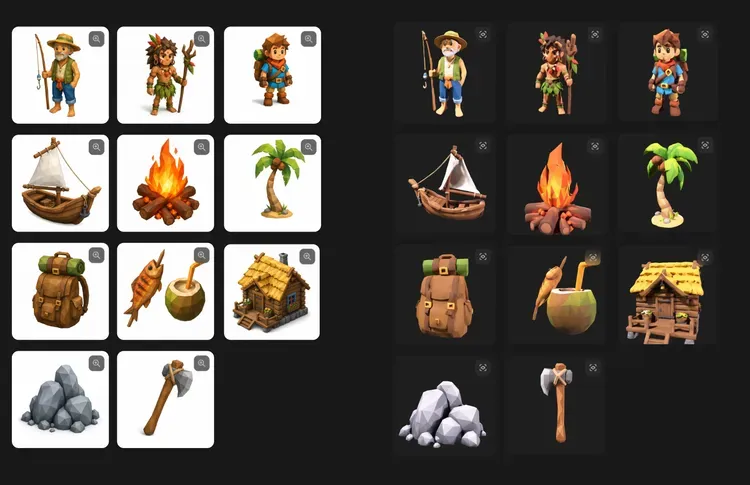
Prompt: I want to make a Low Poly style island survival game, overall bright with a bit of fairy-tale feel. Help me generate a basic asset set including protagonist, two NPCs, wooden hut, fishing boat, coconut tree, campfire, rock, axe, backpack, and food.
When a task involves multiple assets, the Agent first confirms the asset list and style direction with the user, ensuring every generation is purposeful.
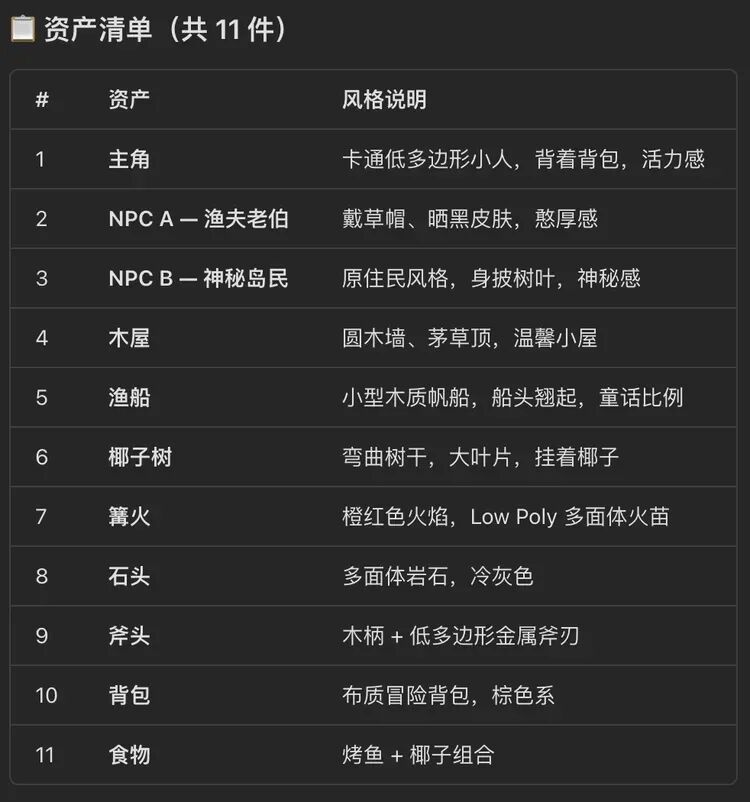
Meshy also self-checks the generated style to ensure consistency.
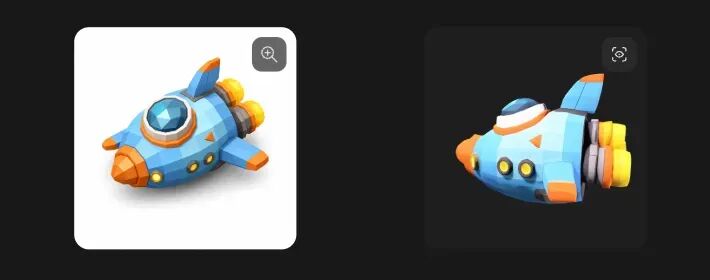
Once the digital assets for the game are complete, real work always brings surprises — say, the protagonist suddenly needs a spaceship. At that point, you just tell Meshy what to make, without worrying about matching the modeling style.
Assets that previously required designers or outsourcing are now completed through a few rounds of conversation with Meshy. Next, just import the assets into modeling software and start creating your content.
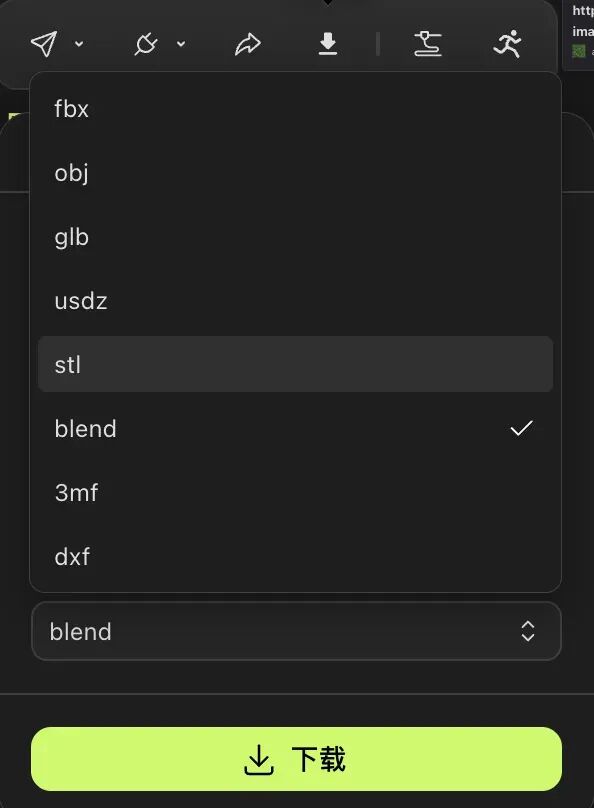
Meshy also supports numerous model formats. From FBX, OBJ, and GLB commonly used in game animation, to USDZ for AR display, to STL and 3MF standards for 3D printing, plus native Blender Blend and laser-cutting DXF. Eight mainstream export formats cover major use cases including game development, 3D printing, AR preview, and Blender workflows.
If you're satisfied with the model structure but feel the texture still needs adjustment, you can also download the base model or texture files separately for subsequent refinement and replacement.
Before Meshy, it was hard to believe any of this could be done in such a short time.
Of course, Meshy's capabilities don't stop here. If the game gets revamped for a futuristic setting, just tell it to change the model style and you'll get a completely new asset set.
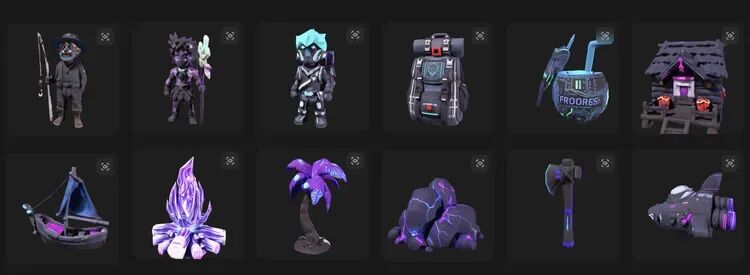
If you want to make characters move, just connect the model to Meshy's animation page. The 3D Agent is simply an entry point accessible to everyone — Meshy's website has more features for fine-tuning. (https://www.meshy.ai/zh)
3
When Everyone Can Make Their Own 3D Models
3D creation no longer starts with "can you model" but with "what do you want to make." This may be the greatest significance of Meshy 3D Agent.
You can make a fantasy-style figurine of your pet, turn your child's monster doodle into a desk ornament, build a set of characters and props for a game you're conceptualizing, or design a custom bracket for your room that you could never buy online.
They may not be perfect from the start, nor do they all need to be serious works. But they can finally advance from a sentence, an image, a vague idea — into something you can view, rotate, modify, even print.
And before this, most of these ideas could only stay in your head.
Not because you didn't want to make them, but because you couldn't.
3D has always been a professional domain. Even when ordinary people had ideas, they could rarely act on them immediately. Meshy 3D Agent lowers this barrier.
You don't need to understand the tools before you start creating. You can even just voice the seed of an idea, and the Agent will help you expand, complete, and advance it until it becomes a directly usable 3D asset. An entire suite of complex tools has been compressed into a single dialog box.
Images, video, and text already have sufficiently lightweight creation tools, so many people can shoot, edit, and write on a whim. When 3D also has such an entry point, it ceases to be a content form where "professionals produce, ordinary people consume."
In the future, 3D models may become as everyday and universally expressive as today's images and short videos.