126 Days Later, Coze Upgrades to 3.0: "Tag Once, Everyone's Here"

I connected Codex to Coze 3.0 and built a Shopify e-commerce Agent Team.
I Hooked Codex into Coze 3.0 and Built a Shopify E-commerce Agent Team
👦🏻 Author: GaKi
🥷 Editor: Koji
🧑🎨 Layout: NCon

Yesterday, Coze officially upgraded to 3.0.
The Crossing team ran first-hand tests immediately. This update packs quite a lot — Agent Team collaboration, local Agent support, and more, all launched simultaneously, with a full interface overhaul.
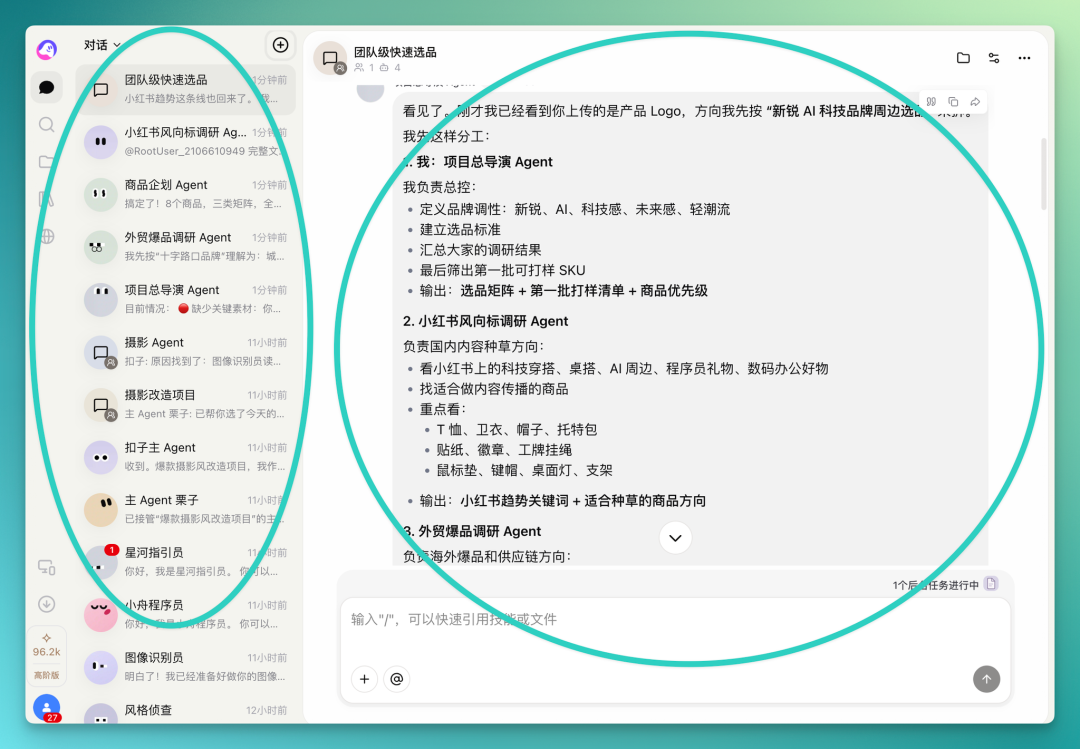
The official tagline has a vivid ring to it: in Coze 3.0, you can assemble an entire Agent Team, and with one @, everyone's in position. This is, by any measure, a major version update.
Before diving into the 3.0 details, Coze's update cadence over the past two-plus years deserves its own look.
On February 1, 2024, the domestic version of Coze went live, traffic exploded on day one, and servers briefly crashed. A year later, in April 2025, Coze Space launched, extending the product into personal work scenarios, with invite codes going viral.
Entering 2026, the pace noticeably accelerated. On January 19, 2.0 dropped, centered on making Agents that could "actually get things done," introducing long-term planning and skill encapsulation. On April 7, 2.5 followed quickly, equipping Agents with cloud computers and cloud phones so they could handle files and operate apps in real system environments. Then on May 25, 3.0 entered beta, aiming to make multi-Agent collaboration systems actually land.
Worth noting:
The gap between 2.0 and 2.5 was 78 days. From 2.5 to 3.0: just 48 days.
First make the Agent capable, then give it tools, then let multiple Agents coordinate — that's the through-line across these versions.
Ship the product first, calibrate continuously against real user feedback, don't wait around for some "perfect version."
This approach is very Coze.
🚥
Next, here's our full hands-on experience.
I hooked Codex into Coze 3.0 and built a Shopify e-commerce Agent Team. This update covers a lot of ground, so I ran a relatively complete workflow to test it, covering basically everything new.
This case was also a genuine work need for me. Many teams want to build their own merch stores but don't have dedicated sourcing, planning, or foreign trade teams in-house. I was curious whether a team of Agents could handle the whole pipeline from early research through to a Shopify store prototype.
The overall approach:
Assemble an Agent Team in Coze, upload Crossing's team positioning, have it first research daily trends on Xiaohongshu and identify relevant style elements, then move into foreign trade e-commerce product research, then output a merchandise plan, and finally use a locally connected Codex to rapidly build an independent site prototype based on that entire research report.
Overall, Coze 3.0 has restructured its interface. The workflow starting point has shifted from the previous chat format to a project-based model. The top-left corner lets you create a new project directly, or build out the Agents you'll need first.
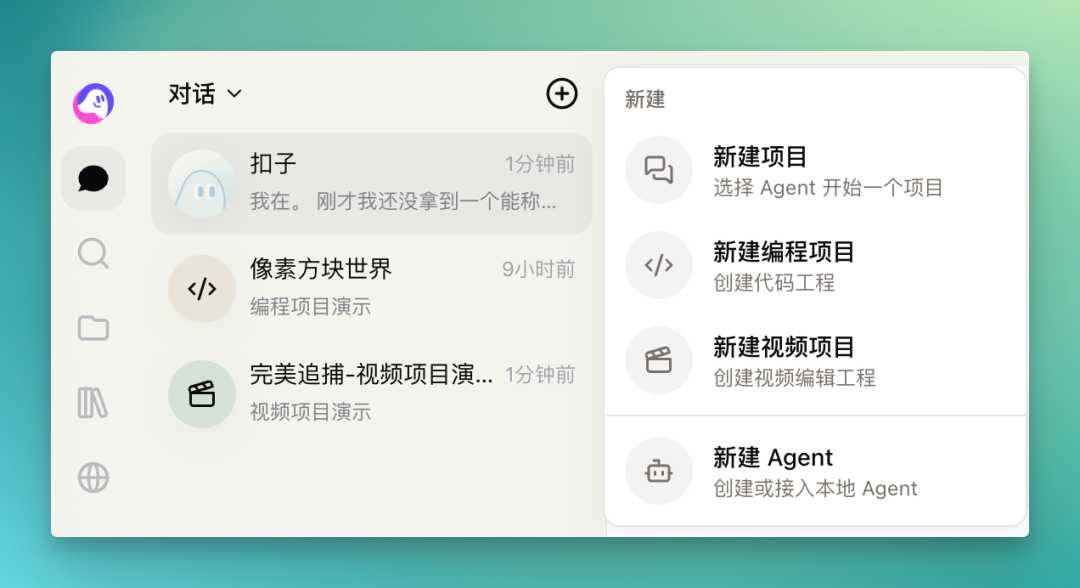
There are two paths for building Agents: create a cloud Agent, or connect local CLIs like Claude Code, Codex, or OpenClaw. Cloud Agent creation is straightforward — just give it a name.
For my workflow, I broke things down by node:
Xiaohongshu trend research Agent, foreign trade bestseller research Agent, merchandise planning Agent, plus a coding Agent built from Codex.
Above these sub-Agents, I set a main Agent to coordinate the entire Agent Team.
This structure basically makes the main Agent the project lead, with three sub-Agents each owning a slice, and the coding Agent handling rapid site prototype delivery.
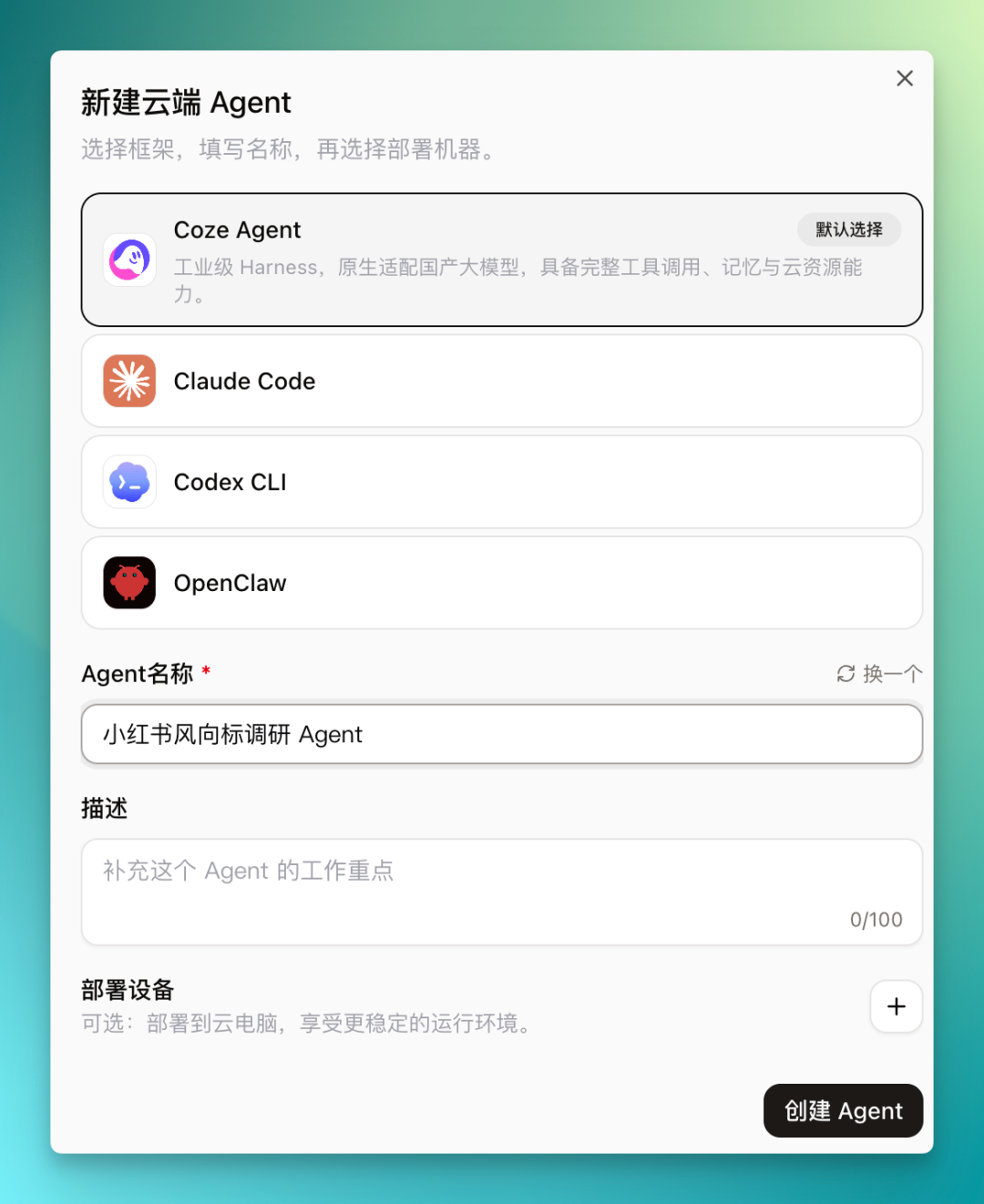
Each Agent comes with a default set of basic skills out of the box, with the option to add more. The model is customizable:
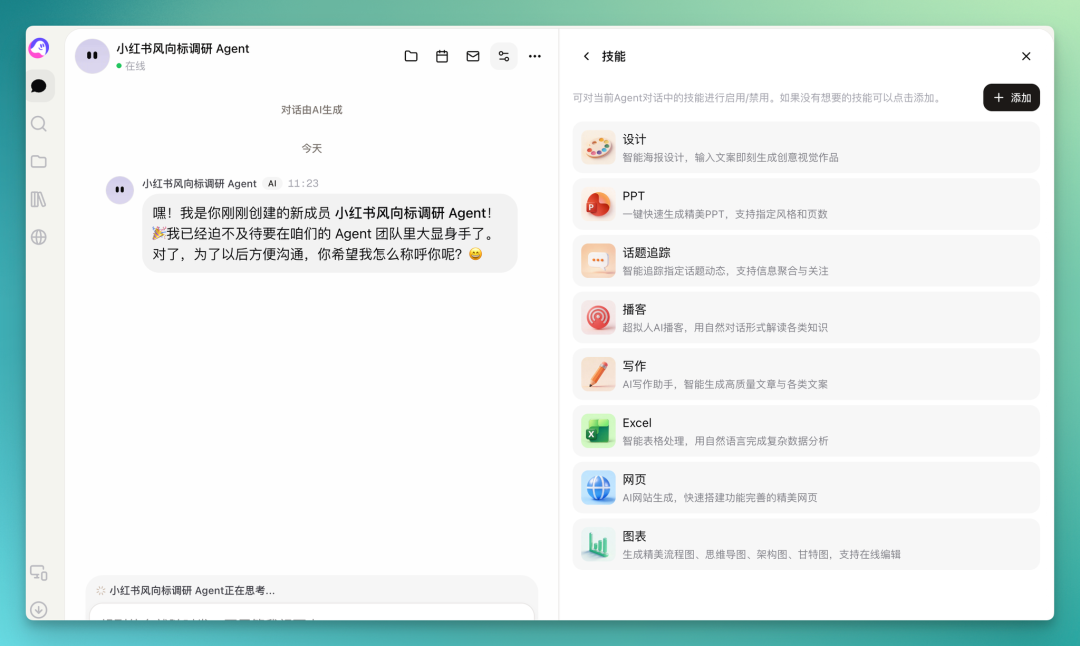
At the skill-adding step, you can see the Agent marketplace already has a solid number of pre-packaged skills:
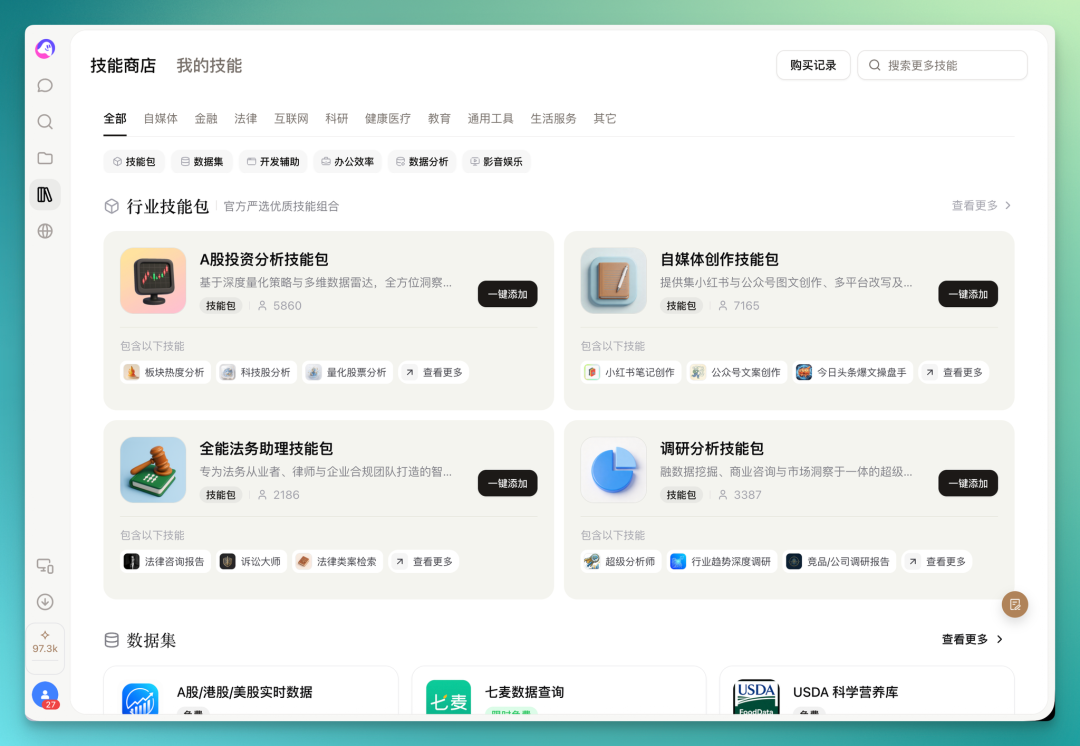
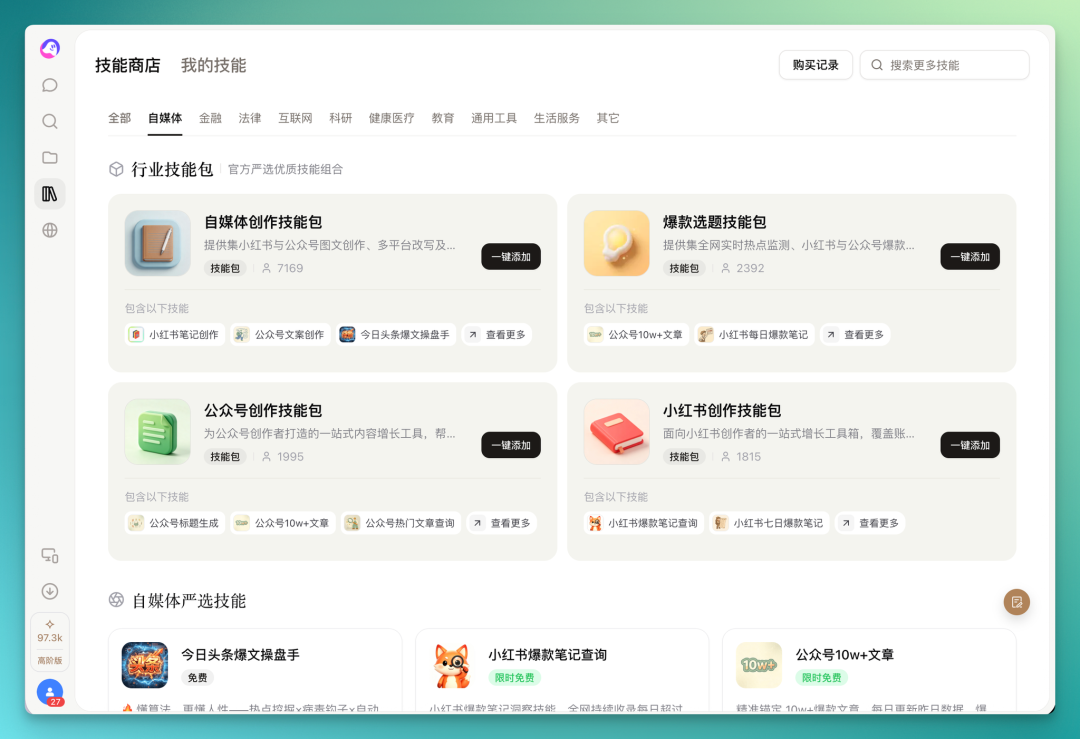
Add whatever you need with one click. For the Xiaohongshu trend research Agent line, I equipped it with trending account recommendations, viral notes, and daily viral note research.
The Agent layer is generally easy to configure. You need to map out your own workflow first, build Agents by node, then assemble them into a project. The new project interface is clean — just check off your built Agents to form an Agent Team.
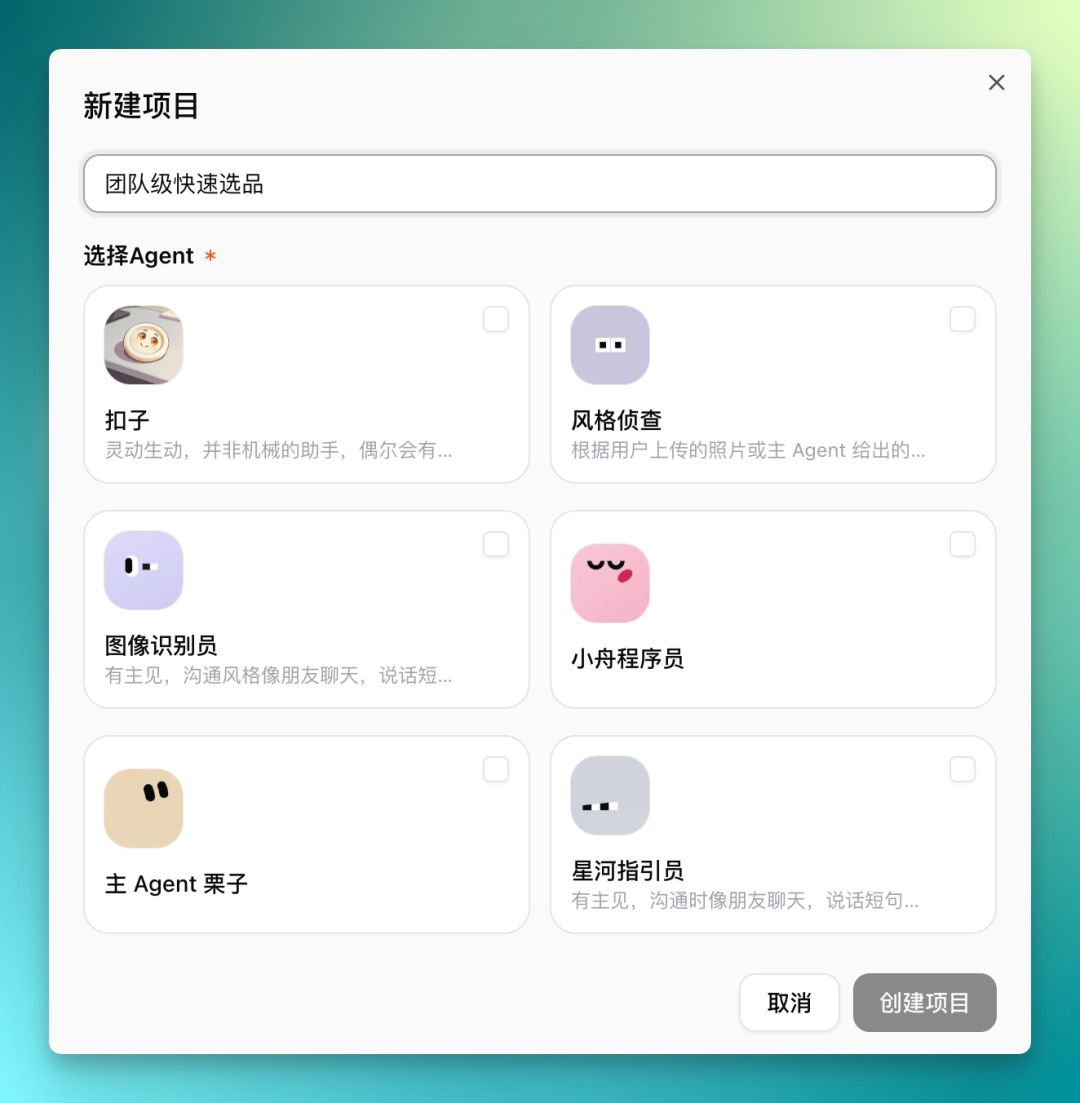
In my team-level rapid sourcing Agent Team, I set a project director as the main Agent, having it assign tasks to the sub-Agents below, dividing work scopes across foreign trade research, merchandise planning, and Xiaohongshu viral research.
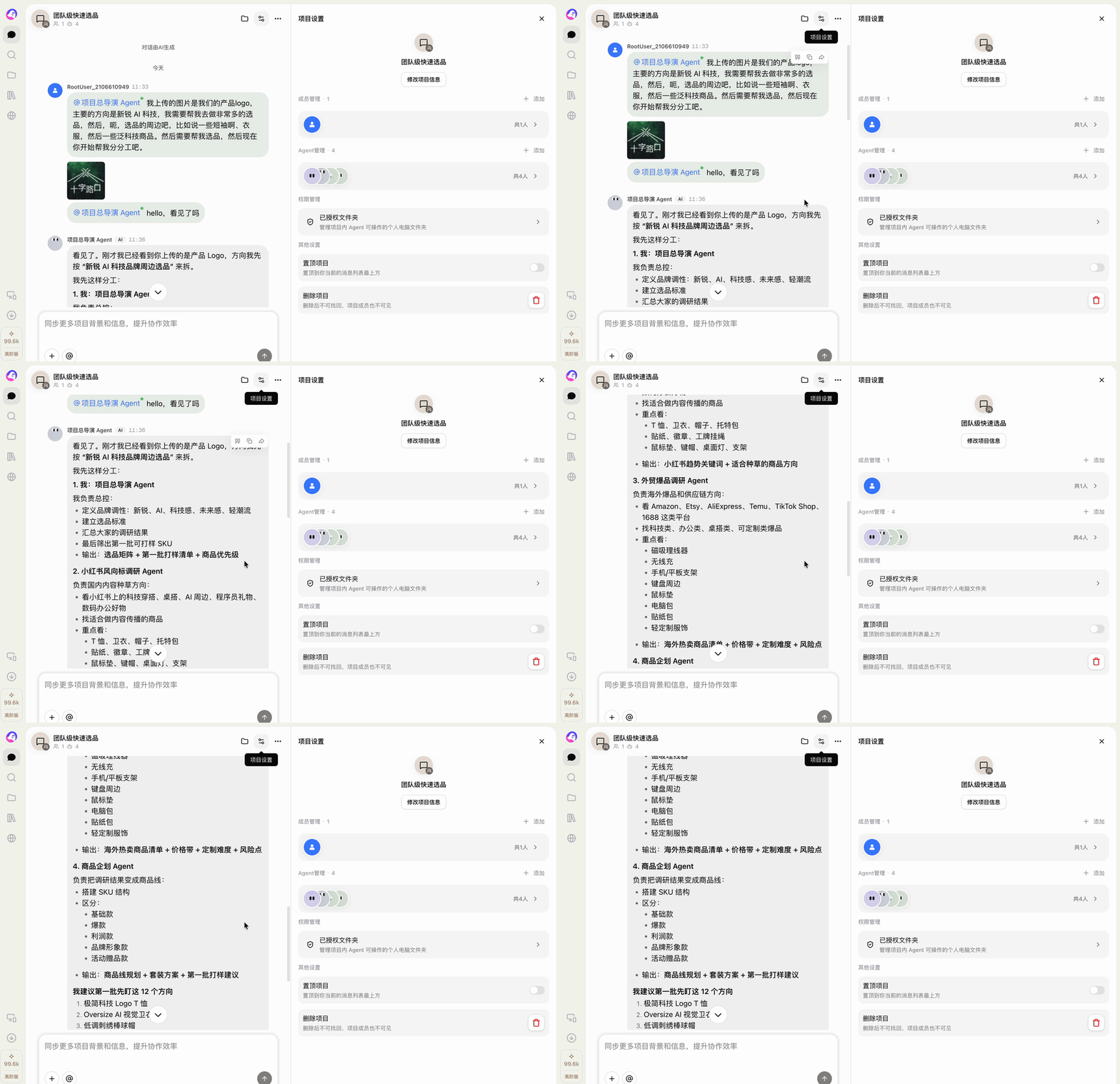
After dividing the work, the main Agent suggests all three sub-Agents start their research simultaneously, with itself handling the final synthesis.

After confirming this plan, the sub-Agents begin executing tasks in the background.
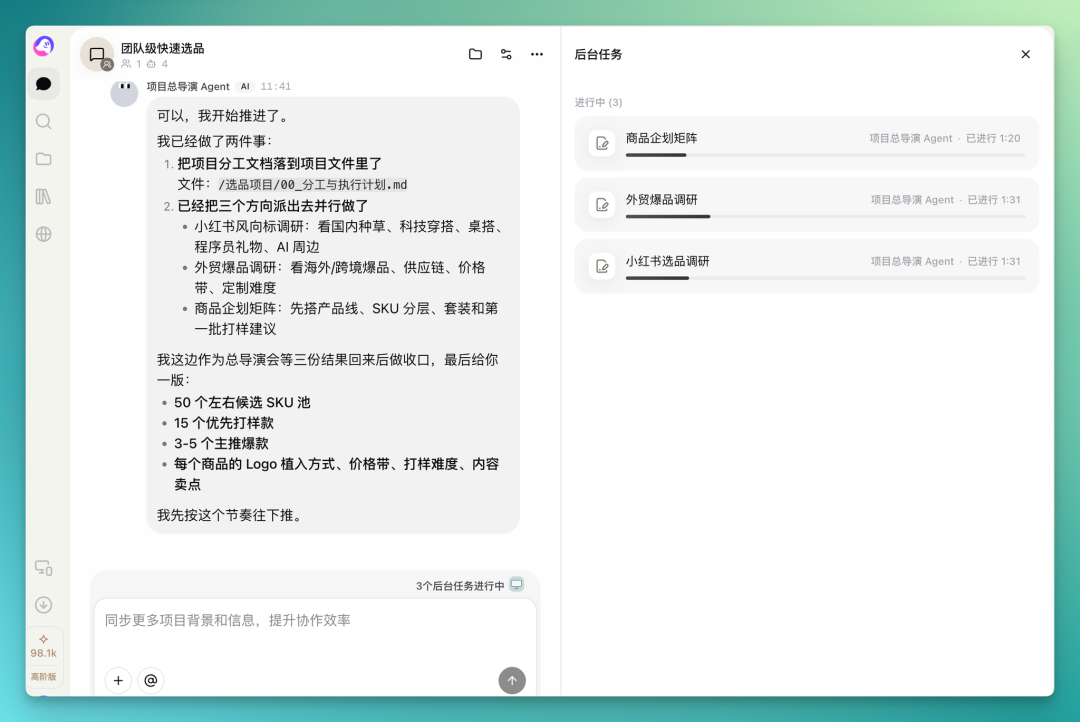
At each completed stage, the main Agent polls all sub-Agents on their progress. The merchandise planning line finished first, delivering a first-draft SKU framework with 5 product lines, multiple SKUs under each, totaling several dozen SKU candidates.
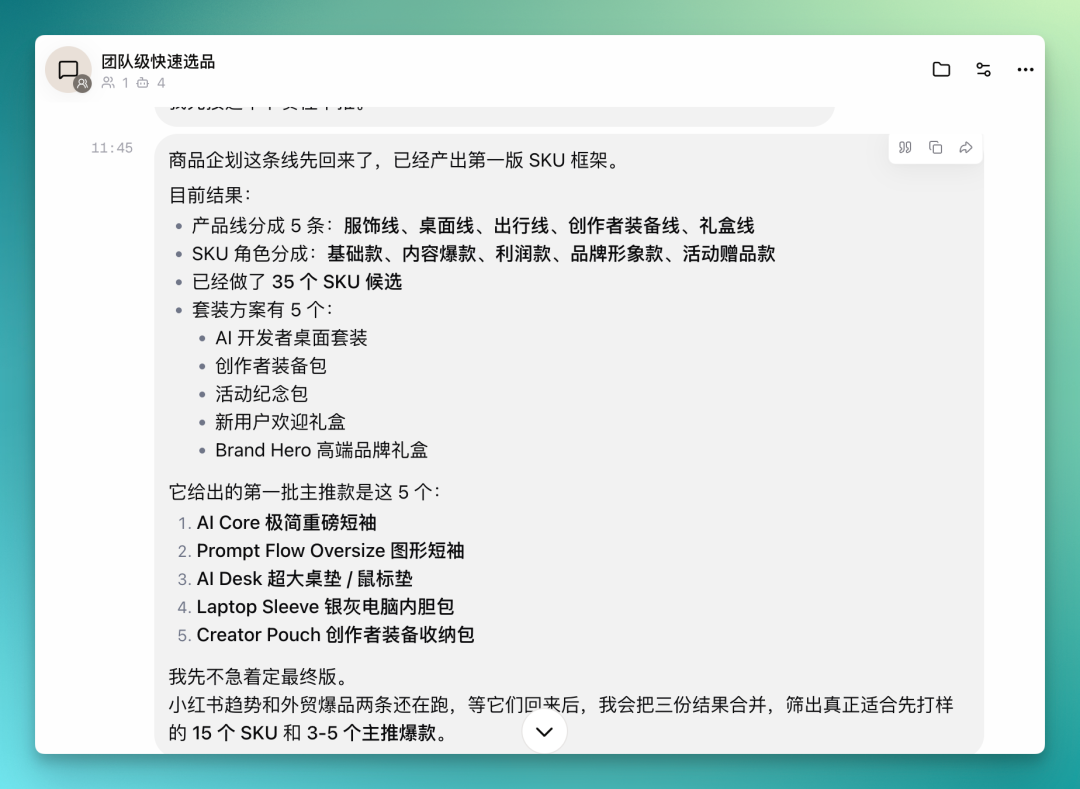
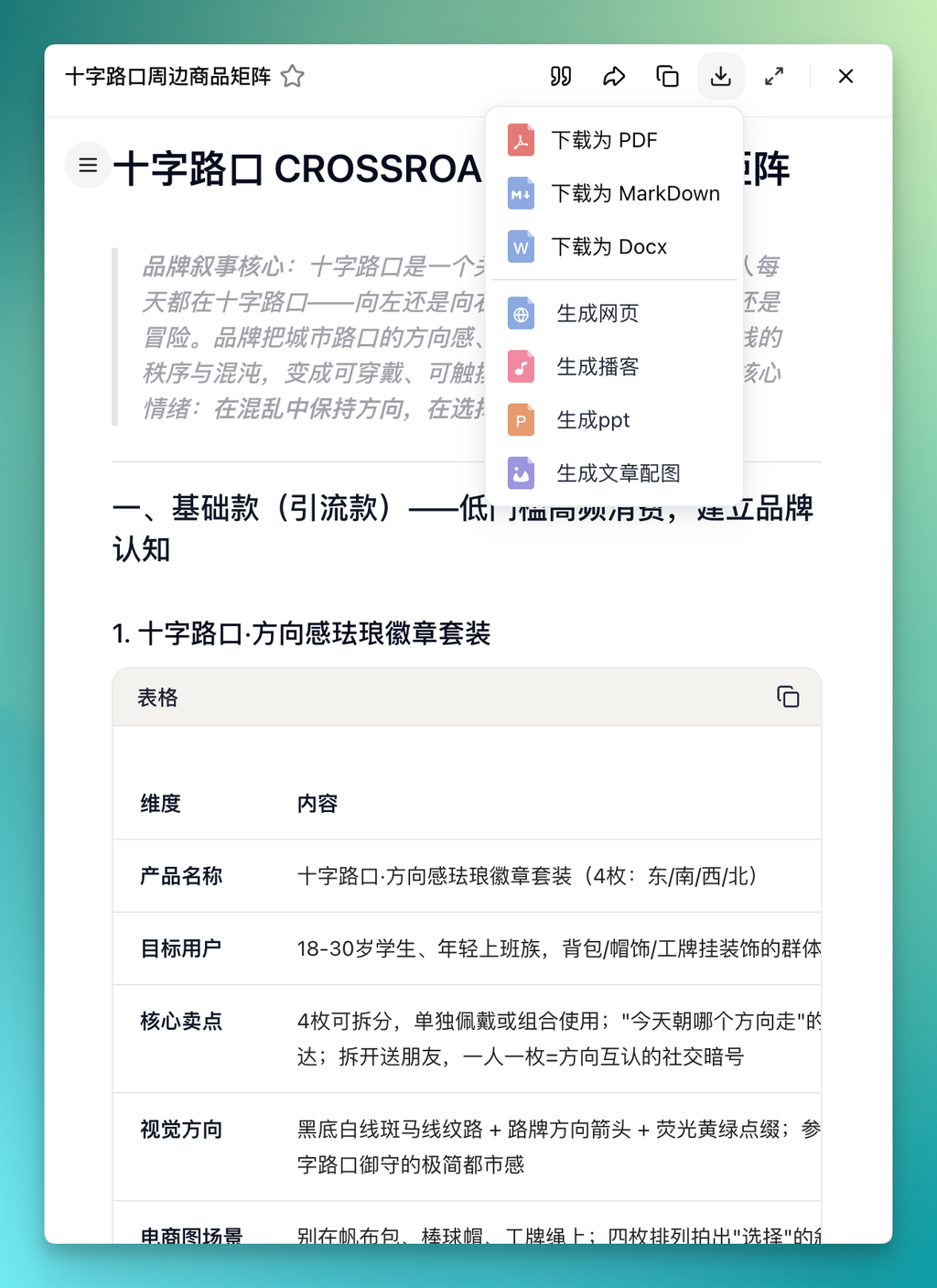
At this point, you can review each sub-Agent's output individually. The merchandise planning Agent delivered a "Crossing Merchandise Matrix" research report listing various styles — for example, under the traffic-driver line, a directional enamel pin set.
The report supports export to PDF, Markdown, doc, and can also convert to webpage, podcast, or PPT.
The product lines break into three tiers: basic, viral, and high-AOV. Each tier includes a reference price range with core pricing logic explained.
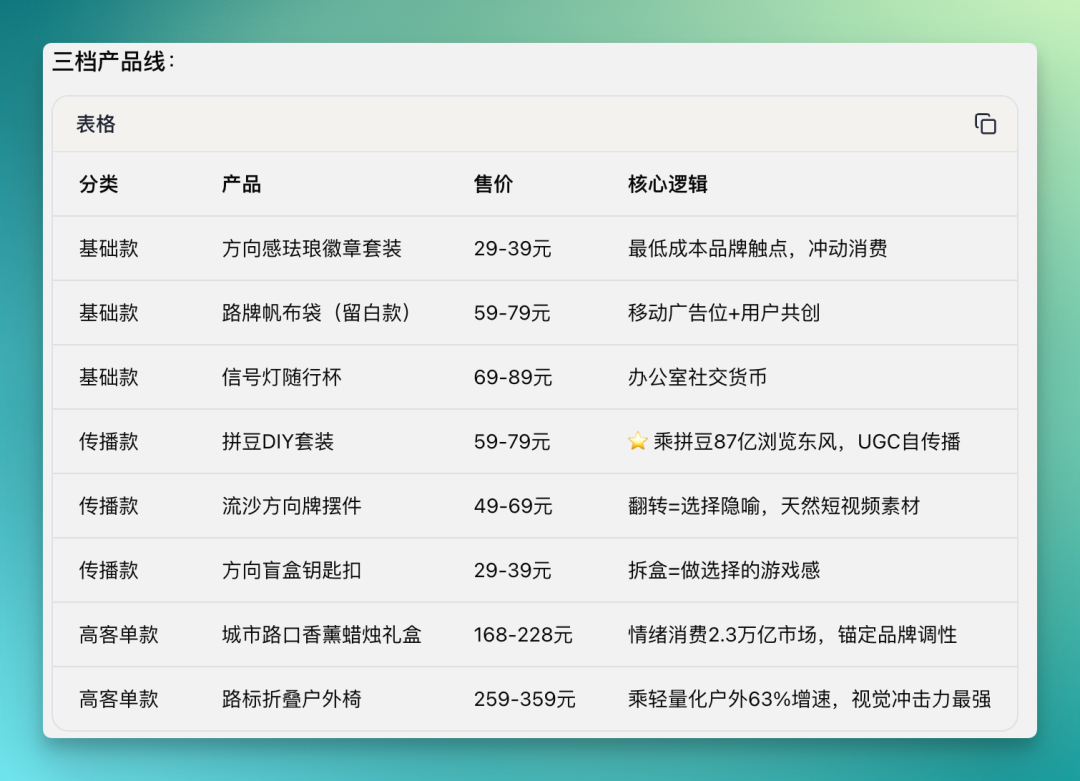
The overall merchandise matrix report has decent granularity, covering user research, product research, and AOV analysis.
On the Xiaohongshu viral notes research Agent side, the main Agent tasked it with reviewing viral notes on Xiaohongshu and compiling trend indicators for this direction.
It goes directly into Xiaohongshu to collect notes, then combines it with the team positioning I uploaded earlier to produce a Xiaohongshu merch trends and visual research report.
Since I'm making Crossing merch this time, it breaks out some fairly specific details. For example, high-frequency merch materials — acrylic, plush, stickers, matte paper boxes — each get their own breakdown.
These research outputs come from the skills attached to it. For the trending notes data analysis item, it pulls relevant notes by keyword set, with keywords covering brand merch, team gift boxes, employee gifts, and other high-frequency scenarios.
The foreign trade bestseller research Agent has a more specific task: research product directions around POD custom items, including dominant categories on Shopify and Amazon. When configuring this Agent, I gave it fairly extensive information gathering and analysis frameworks.
For example, it goes directly into Printful 2026 to look at relevant base products.
Then scores candidate products by heat, visual appeal, AOV, and customization difficulty, outputting a fairly granular set of product candidate types.
Finally it delivers directional recommendations: which platforms to prioritize, which styles not to lead with in the first batch, and what the first wave launch mix should look like:
After all three sub-Agents finish running, the main Agent synthesizes everything into consolidated direction recommendations and a full AI tech brand merch sampling shortlist.
The next section I want to pull out separately — this is one of 3.0's more critical updates: Coze now supports connecting local Agents, operable with just one command.
Copy the command into terminal, run it, and it shows "Pairing complete." This step essentially polls your locally configured CLI. I have three set up locally: Claude Code, Codex, and OpenClaw.
Back on the Coze 3.0 page, these local Agents now appear in the selectable list — just check to use.
Why call this out specifically: in production-grade workflows, everyone has their preferred Agent CLI. I've been using Codex more lately, and I'm fairly convinced by Codex's harness plus GPT-5.5 for programming tasks, so I leave the coding segment to local Codex rather than switching to some cloud Agent.
This kind of preference difference used to be hard to handle — either you could only use cloud Agent products, or you had to split the workflow in two, local and platform, with manual handoff in between. Now you just connect it directly, and local context can be scheduled by the main Agent too, eliminating window-switching and copy-paste.
After connecting, one direct use is rapid independent site prototyping. With all the earlier research lines synthesized, you can have Codex directly build a site prototype from that synthesis. Below is the AI Cockpit independent site prototype from this run, with product card slots reserved on the right.
The product list section can also continue along the same context. Because the entire project's context is connected end-to-end, from research to prototype, there's no need for another information handoff, making iteration smoother.
Overall, the independent site prototype came out with decent completeness.
Worth adding: this entire pipeline isn't just available on web — it's connected on mobile too, with a more compact interface:
After running on desktop, switch to mobile and open the Coze app — the full project chat history, each Agent's status, and task outputs all sync over. You can continue pushing prototype iteration on mobile, what people call Vibe Coding.
If something seems off, you can directly @ the main Agent on your phone — that project director Agent — and have it dispatch sub-Agents for another round of more granular logic iteration, like briefs for certain SKUs:
The clearest value of multi-Agent division of labor is that each task finds a more suitable handler.
Project-specific coding goes to Codex, real-time retrieval goes to Agents with skill packs attached, and the main Agent only handles coordination and synthesis. Separated out, each Agent hits around 85 on its own task. But give it all to one general-purpose Agent to handle everything, and each task might only hit 70. That gap feels very real in practice.
The local Agent connection design has genuinely practical impact.
With my preferred Codex connected, Coze now serves a different purpose for me: bring in tools I'm already using, manage them through Coze 3.0, without needing to build an "Agent system" from scratch — which itself isn't easy to do. What's already debugged locally doesn't need rebuilding, just connect it. For people with established tool habits, the migration cost is much lower.
How Coze 3.0 actually performs — I'd still recommend coming to try it yourself ~
Crossing is looking for freelance contributors to write AI product and model reviews.
If you've written articles like: "Hands-on: PixVerse C1", "Hands-on: LibTV", please contact zeo0811@gmail.com. Your email should include: ① personal introduction, ② AI review articles you've written.
We offer competitive rates. Looking forward to observing and documenting the AI era together 🎪