Behind the Developer Enthusiasm for the Lark CLI, We See These Key Points

"The ancient" CLI has become an anchor point in the AI era.
The "Ancient" CLI Has Become the Anchor of the AI Era.
👦🏻 Author: GaKi
🥷 Editor: Koji
🧑🎨 Layout: NCon

If you were to map out the most understated yet fascinating storyline in the AI world of 2026, it would trace a path something like this:
Nearly every major player is building their own CLI. From Anthropic's Claude Code to OpenAI's Codex CLI to Google's Gemini CLI — even Vercel, a company famous for making things "look good," saw CEO Guillermo Rauch post on X:
The CLI is the de facto MCP for Agents.
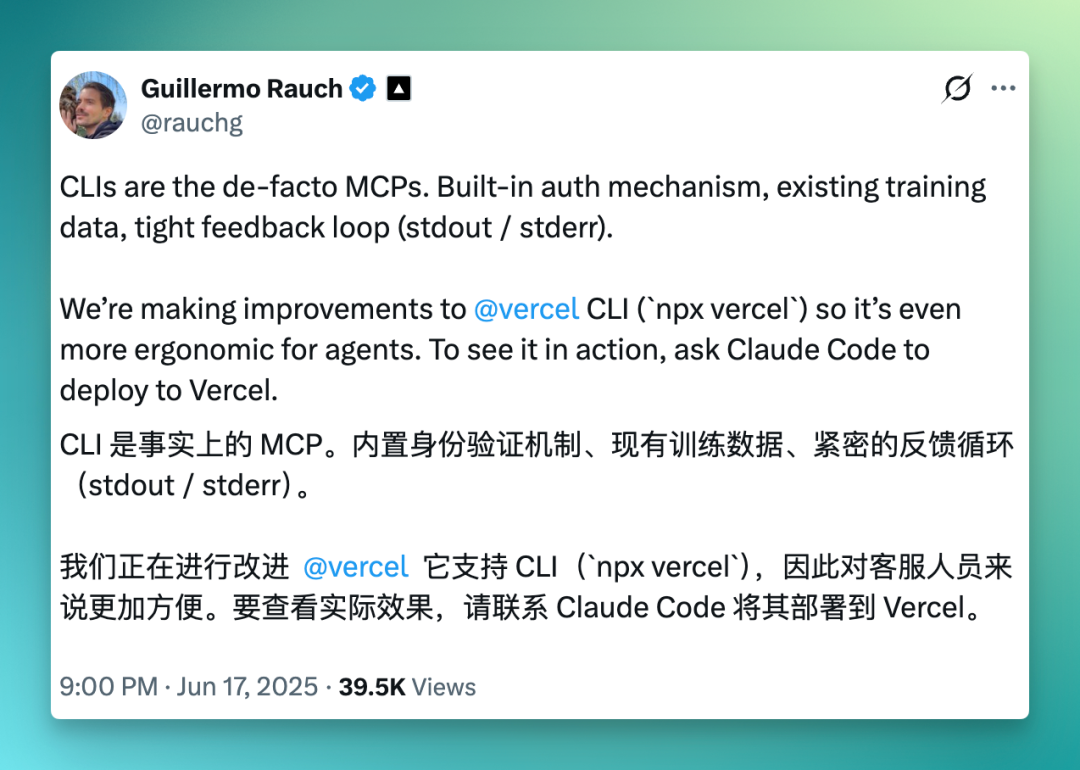
When this trend reached China's office collaboration tool space, people initially struggled to understand this "non-graphical" form — why would anyone reverse course and build something as "inscrutable" as a command line?
But as more people started using it, they discovered something: once office collaboration tools are CLI-ified, the capabilities hidden behind graphical interfaces get exposed completely, callably, and orchestratably.
One particularly telling case is the Lark CLI. Open-sourced on March 28, it hit 10,000 GitHub stars in less than two months — a notably fast growth rate and level of attention for a SaaS tool.
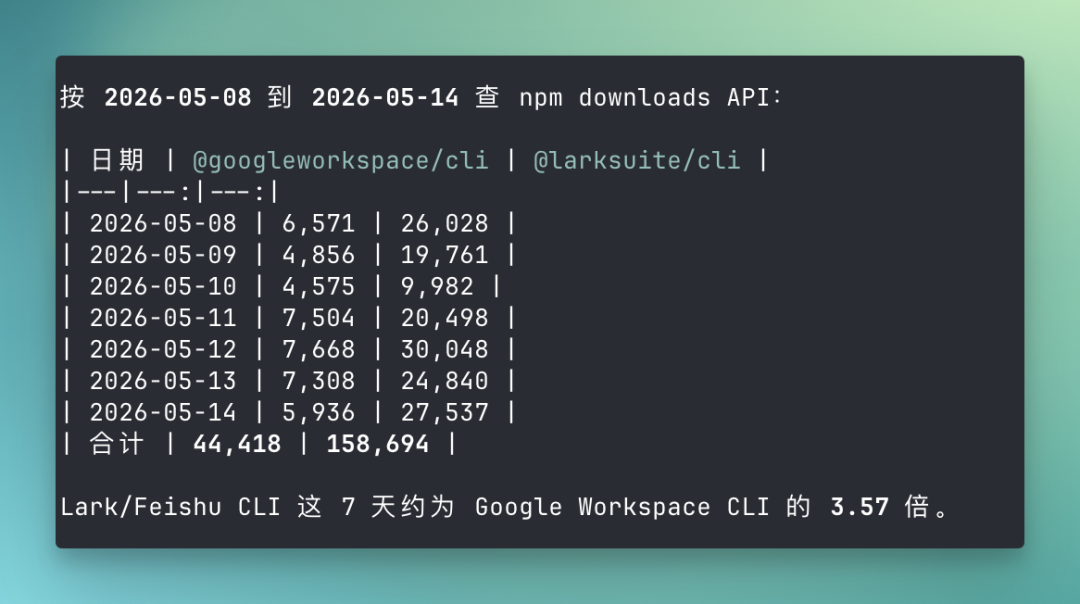
For comparison, Google Workspace CLI has reached 26,000 stars, but looking at npm download numbers for the week of May 8 alone, the Lark CLI actually edges higher according to the npm downloads API. The data speaks to considerable developer enthusiasm.
🚥
A domestic office SaaS command-line tool seeing this kind of growth in such a short time deserves a closer look.
Here's our full analysis.
What are entrepreneurs building with the Lark CLI?
Let's start with what frontier entrepreneurs are actually building with the Lark CLI post-open-source — this helps clarify Lark's role in the broader workflow.
From the open-source community and demo days, we found two representative cases that together illustrate what we might call "AI Native workflows."
What these cases share: they both use the Lark CLI as foundational AI infrastructure at the bottom of their work systems.
The first is Zhang Hao, who built a product called NoteLoom.
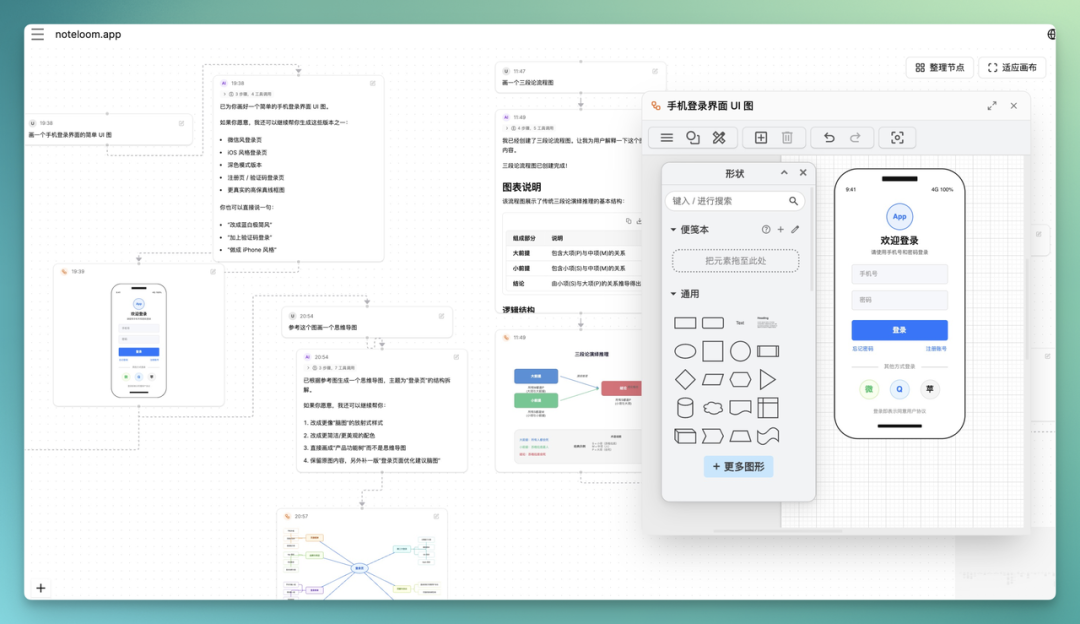
What's interesting about NoteLoom is that it's not "chatbox AI." The entire interface is a freeform canvas where users can organize multi-threaded, multi-origin knowledge workflows.
Lark serves as the data foundation. Users import Lark content into NoteLoom for processing, reorganization,推演, and refinement — then output results back into Lark.
From the user's workflow perspective, NoteLoom functions more like a "processing middleware" for Lark data, while the actual assets remain in the user's own Lark workspace.
When we reached out to Zhang Hao, his assessment was: What Agents really need is a "source of truth" that already carries an organization's real work — and documents, spreadsheets, meetings, tasks, calendars, and permission relationships are already in Lark.
The shift happened after integrating the Lark CLI.
Zhang explained that previously, Agents processed materials users fed them — users had to copy meeting notes, research docs, and spreadsheet data into the tool. Now Agents can directly read documents, query Lark databases, and check calendars within authorized workspaces, then generate conclusions onto NoteLoom's canvas from multiple directions.
Before, Agents couldn't access real enterprise data; users had to dig through Lark, copy-paste into AI products, then have AI process it.
After integrating the Lark CLI, Agents can work directly where the data lives, without waiting for users to copy-paste. This is what AI Native work actually looks like.
The second is Daniel, who built an open-source project called Pokoclaw.
Pokoclaw is a personal AI assistant system designed for real work, with Lark as its sole current interaction entry point.
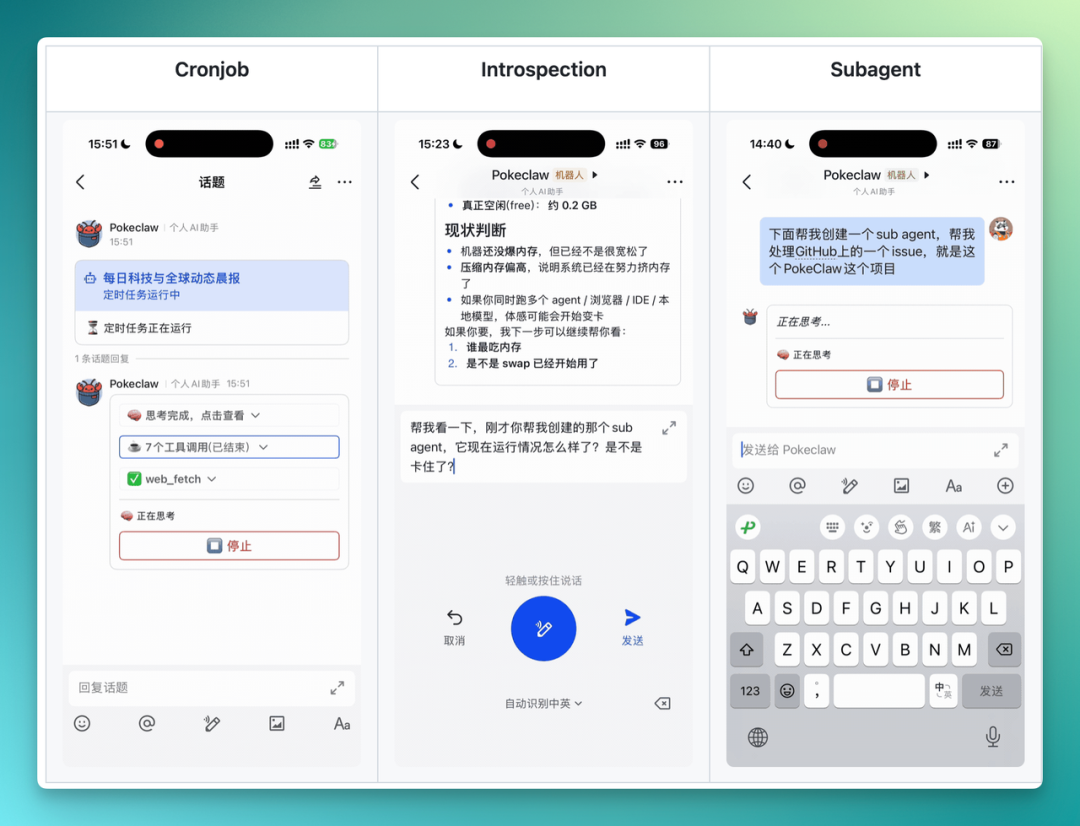
Daniel defined it with five keywords: executable, observable, controllable, capable of long-term collaboration, and self-improving.
Each word maps to a concrete criterion.
The precondition for this system working is that Lark provides the "workspace" where the Agent "goes to work."
In our interview, Daniel himself said the Lark CLI gives Agents a clear, stable, automated way to use Lark's capabilities — this is very AI Native.
And even without the CLI, Lark itself is well-suited to hosting AI Agents. It's not just a chat window — it has cards, buttons, callbacks, group chats, threads, pins, documents — so AI-human collaboration can feel natural.
Summarizing these two people's takes on the Lark CLI and Lark's AI Native workflow, it's easy to see that while "AI Native" has been talked to death over the past year, most of the time it just meant a chat box added to the UI.
True AI Native means the tool chain itself is designed for Agent use: structured output, least privilege, debuggable, composable.
And right now, the Lark CLI layered on top of Lark's existing cards, callbacks, group chats, threads, and other non-chat interaction capabilities offers a preliminary answer for AI Native workflows.
Why is the Lark CLI so popular with developers?
Returning to the Lark CLI itself, after using it for a while, I've identified three fairly concrete reasons behind its reception.
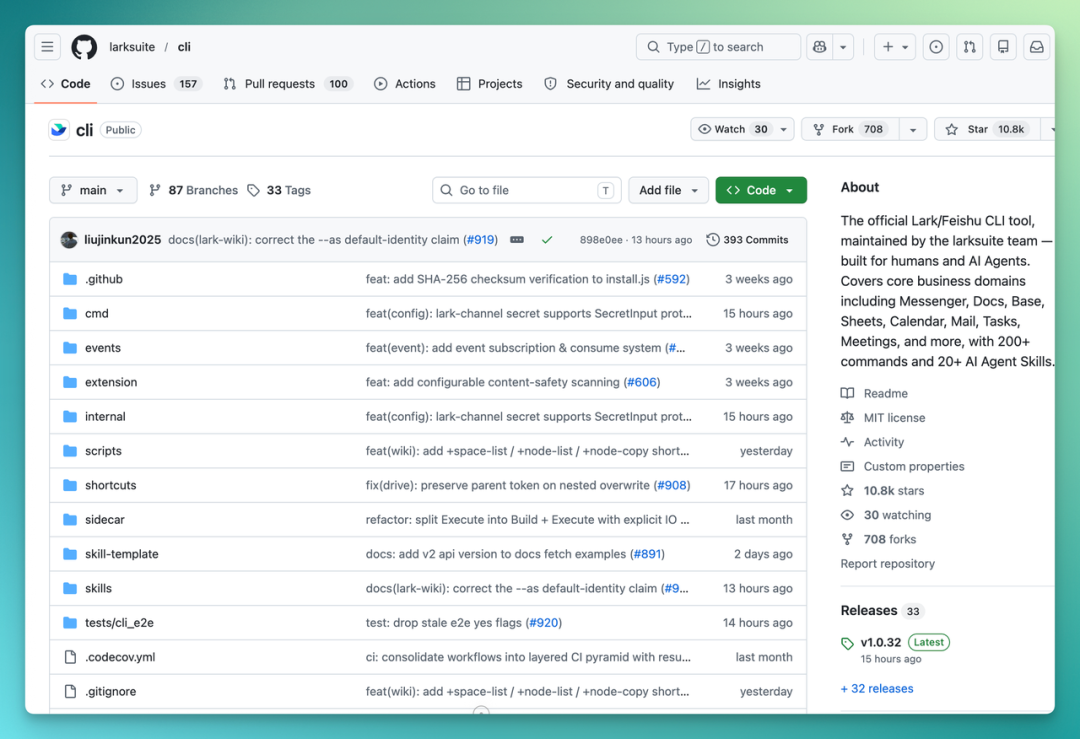
[1] The foundation is large enough.
Lark isn't just an IM tool, nor just a document tool. It's a unified platform combining messaging, documents, Lark databases, calendars, video conferencing, tasks, OKRs, approvals, knowledge bases, and contacts.
Every module represents a very real, callable capability for an Agent.
In my actual usage, I found three needs that are strongly felt and that the Lark CLI handles well.
The first is natural interaction — you can use natural language in the command line, and the Lark app itself needs no introduction, already deeply familiar.
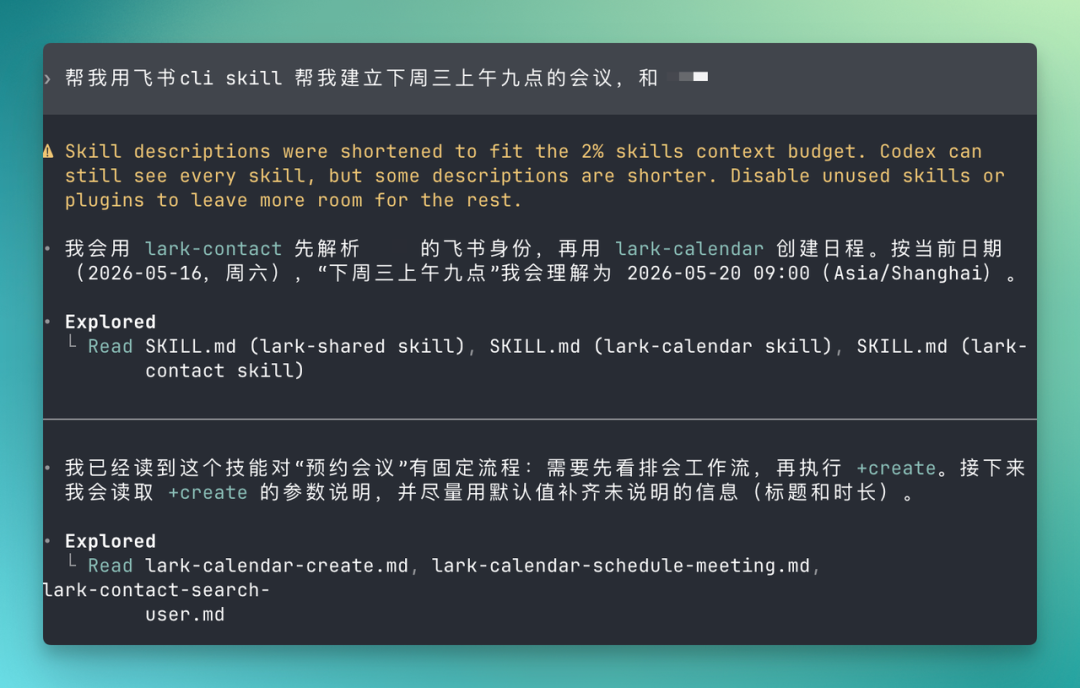
The second is a complete business runtime environment. For an Agent to actually do things for me, it needs to run the full chain: query data, generate analysis, draft proposals, notify relevant people.
These modules are interconnected in Lark. An Agent grabs your schedule through the CLI, can then see the meeting notes from that session, the client mentioned in those notes, and directly pull up contacts, send messages, create tasks, and initiate approvals.
The third is context. Lark holds years of my work context — messages, documents, schedules, spreadsheets, recordings — which is the best possible information source for an Agent.
For example, I can directly in Codex, through my custom Lark CLI Skill, poll "documents I edited in Cloud Space in the past month":
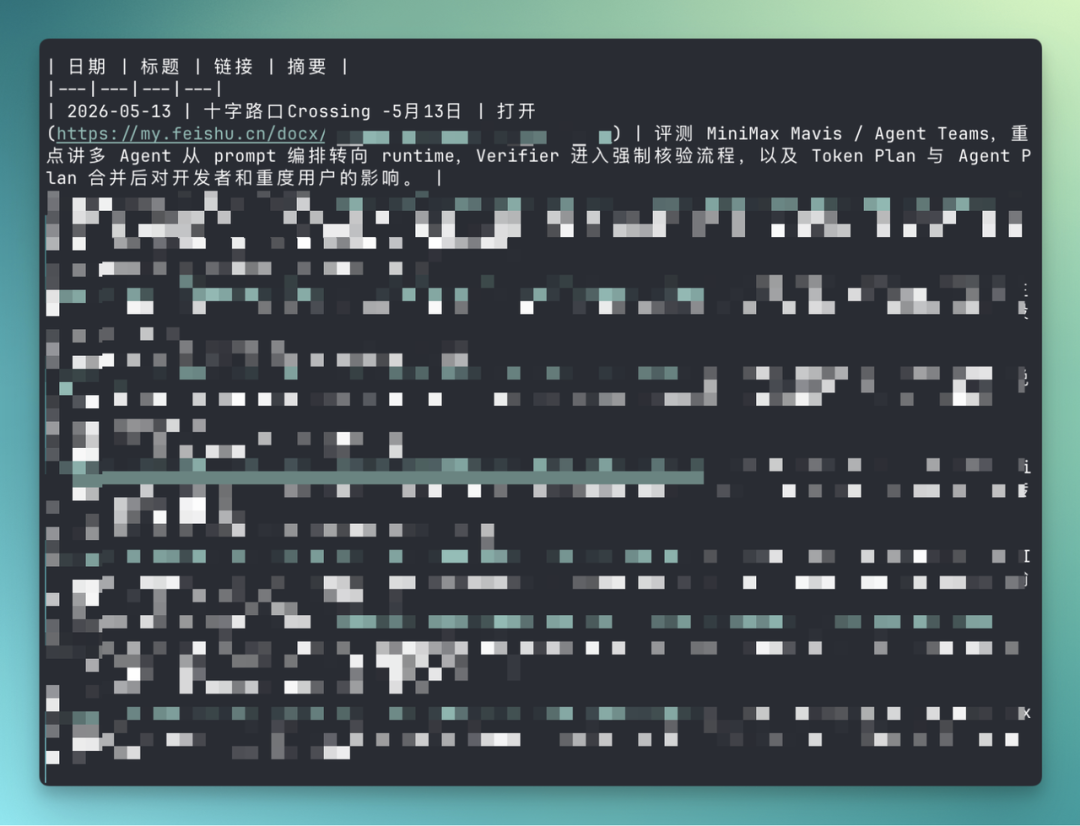
This is Lark's real moat in the AI era. Tools can be copied, but years of accumulated business context creates serious stickiness.
These three capabilities come from Lark enabling the CLI, not the CLI enabling Lark.
[2] Updates are fast enough.
CLI as a product form has a unique property: developers use it daily, so feedback is immediate and visceral with every command.
So whether a CLI works well depends heavily on whether it can adjust based on real developer feedback — tweak things weekly — which maps directly to GitHub Issue and PR processing speed.
In 40+ days since open-sourcing, the Lark CLI iterated over 100 new capabilities across 32 releases — roughly one release every day and a half. And the team built a "capability wishlist" where developers request features and see corresponding commands appear quickly.
But it's not just the Lark team writing code — that could never keep pace with user experience demands.
Among 50+ community contributors, 10 external developers had code merged into mainline. Digging through the details, we found a backend intern from Henan University of Science and Technology, an engineer from Turkish e-commerce company Hepsiburada, an independent developer from Vietnam, and Hangzhou Rehui engineer Chen Jiaming who had two fixes merged in one week.
A domestic office platform's CLI, in its first month of open-sourcing, already shows the beginnings of global developer co-creation.
[3] What does "Agent-friendly" actually look like?
In practical use, I have Claude Code and Codex memorize all Lark CLI capabilities, study the technical documentation, and turn the Lark CLI into a Skill for easy future invocation.
In this setup, the Lark CLI is roughly structured in three layers that make this Skill more usable:
The top layer is Shortcuts — quick commands shared by humans and AI, letting common tasks be completed very rapidly.
The middle layer is API Commands, mapped to Lark OpenAPI.
The bottom layer is Raw API Calls — meaning even if the CLI version is dated, as long as new APIs are available on the开放平台, Agents can call them directly through Raw API.
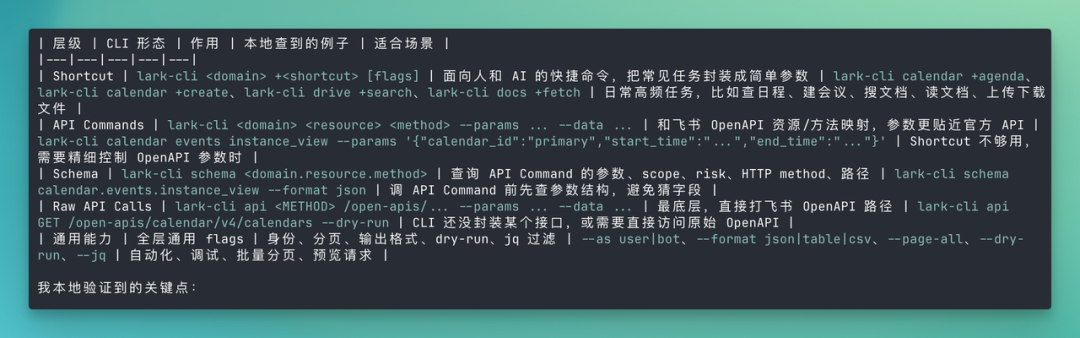
Above these three layers sit Skills, which solidify best practices for typical scenarios — Agents can directly use the experience Lark has already distilled.
From my rough survey, there's a total of 200+ commands + 2,500+ Raw APIs + a layer of Skills. This lays the groundwork for practical usage.
Overall, the benefit of open-source iteration is speed of convergence toward correctness.
In AI-era product iteration, the worst thing is building in the wrong direction. The open-source-plus-CLI combination happens to let the product get corrected by real scenarios daily.
For an office platform trying to become an Agent workspace, this speed is a massive advantage.
So why did this CLI trend take off specifically in 2026?
Having seen what frontier entrepreneurs are building with the Lark CLI and what resources and capabilities Lark itself provides, a natural question arises: why did the CLI become the trend? Why did the CLI "go retro" in 2026?
From late 2025 to early 2026, the entire AI industry collectively changed its answer to "how should Agents use tools."
The previous answer was MCP, a standard protocol Anthropic introduced in late 2024 that defined a universal tool interface for Agents.
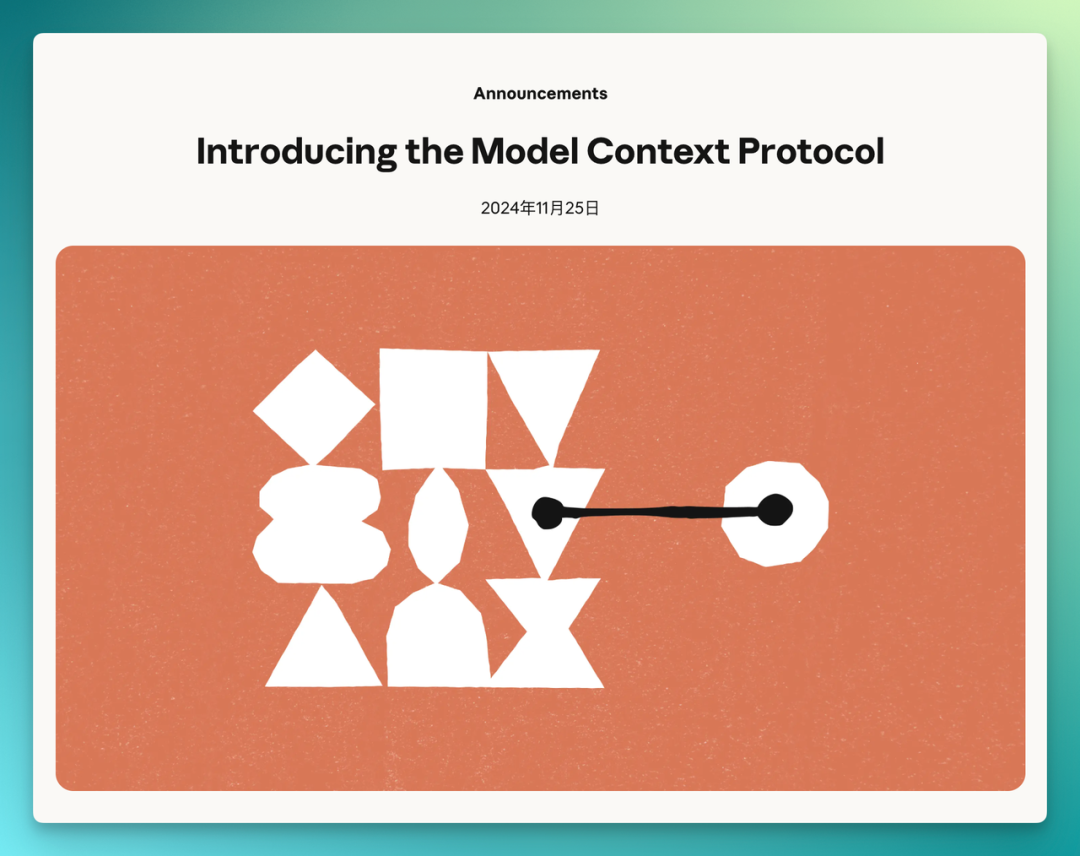
At the time it looked near-perfect in design: all tools plug in via unified specifications, Agents master one protocol and work with everything.
But by 2026, as people used Agents for long-horizon tasks, problems gradually emerged.
ScaleKit published a community benchmark in March 2026, MCP vs CLI: Benchmarking AI Agent Cost & Reliability:
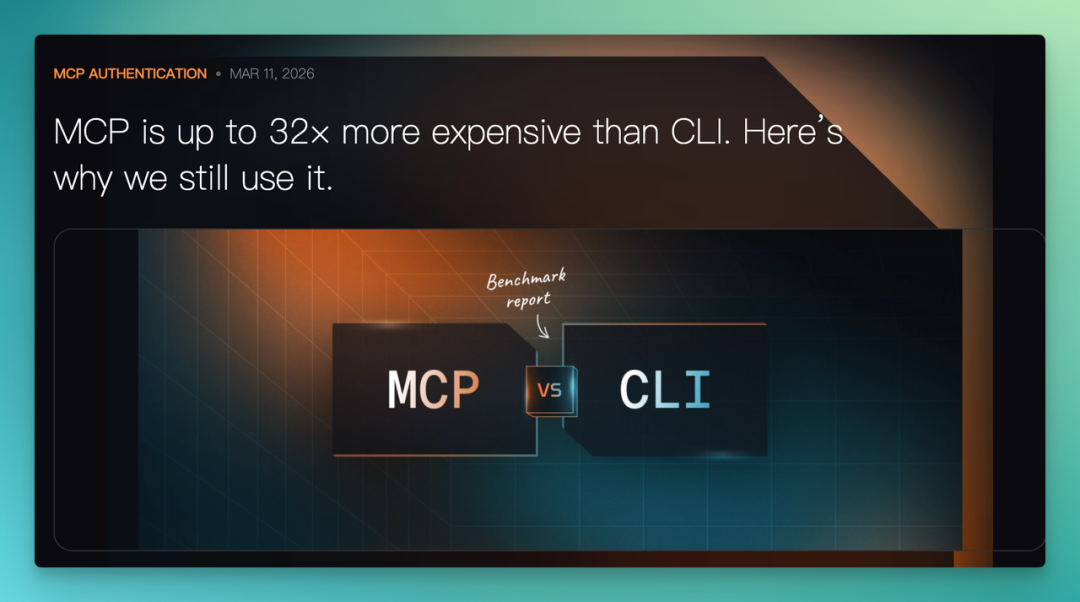
They found that running the same batch of tasks through CLI versus MCP, MCP's token costs were 10–32× higher than CLI's, with a 72% first-attempt success rate versus CLI's 100%.
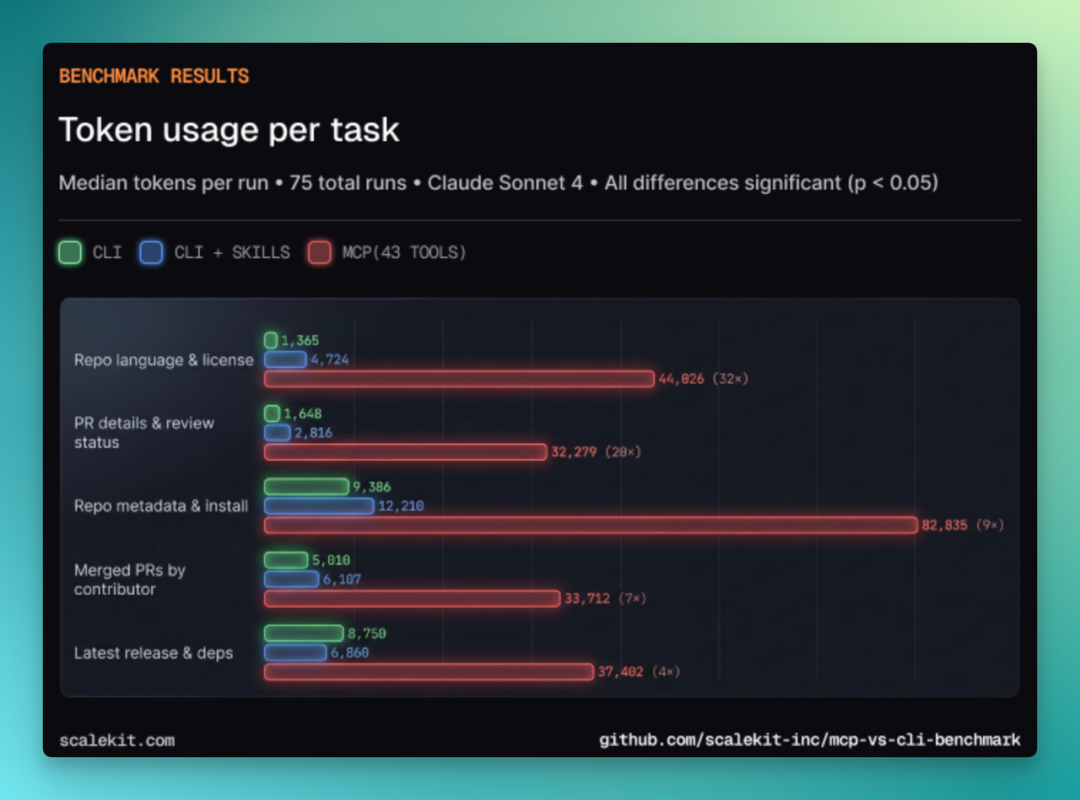
A standard GitHub MCP Server session consumes 55,000 tokens just loading tool schemas — carving out a quarter of Claude's 200K context before any actual work begins.
So by spring 2026, the post "MCP is dead, long live CLI" hit Hacker News's front page.
Perplexity CTO Denis Yarats announced at Ask 2026 that Perplexity was switching from MCP back to API plus CLI. Y Combinator founder Garry Tan and Vercel CEO Rauch publicly backed the CLI camp around the same time.
For Agents, the CLI may be the language they already have internalized at birth.
This explains why Claude Code reached 4% of GitHub commits in under a year, and why Anthropic's Q1 API call volume rose nearly 70× year-over-year — driven primarily by Claude Code running in terminals.
Following this logic further, you can understand why office collaboration tool vendors collectively entered the CLI space in early 2026.
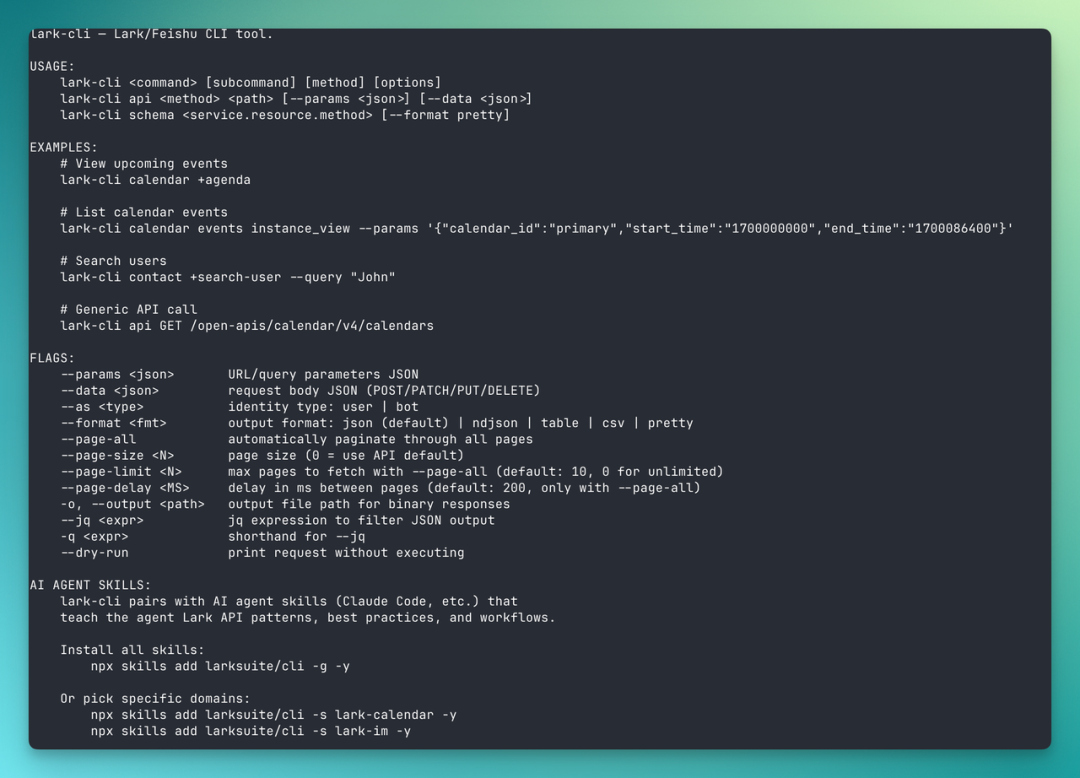
For office platforms, the CLI is currently one of the cheapest, most compatible, and most Agent-accessible harnesses available.
No need to write separate plugins for every AI tool, no need to maintain MCP Servers — just expose your capabilities as commands and let Agents call them.
Once an office platform's capabilities are opened via CLI, Agents finally step out of the chatbox and into real workspaces.
They can directly help you read meeting notes, send messages, create documents, check schedules, edit spreadsheets, and process approvals. The actions, tasks, executions, and operations that previously belonged exclusively to humans in the graphical interface of office software become things Agents can do following the same rules.
The "Ancient" CLI Has Become the Anchor of the AI Era
Going deeper: this "oldest" interface became a trendy "middleware layer" in 2026.
For two decades, the software industry worked to make interfaces more "human-friendly" — buttons, menus, drag-and-drop, low-code, no-code. Graphical interfaces grew more complex while barriers to entry dropped.
But when Agents arrived, things reversed. The hardest thing for a model talking to software is figuring out where the "button" is, how many "menu" clicks to get somewhere, and which "step" of the process we're on.
The more human-friendly a graphical interface becomes, the less friendly it likely is for models — today's Agent CLIs instead have to inefficiently deconstruct graphical interfaces through visual use.
The CLI sits at the opposite end. It's the least common denominator that humans, models, and systems can all understand. When a user types in the command line:
lark-cli calendar +agenda:
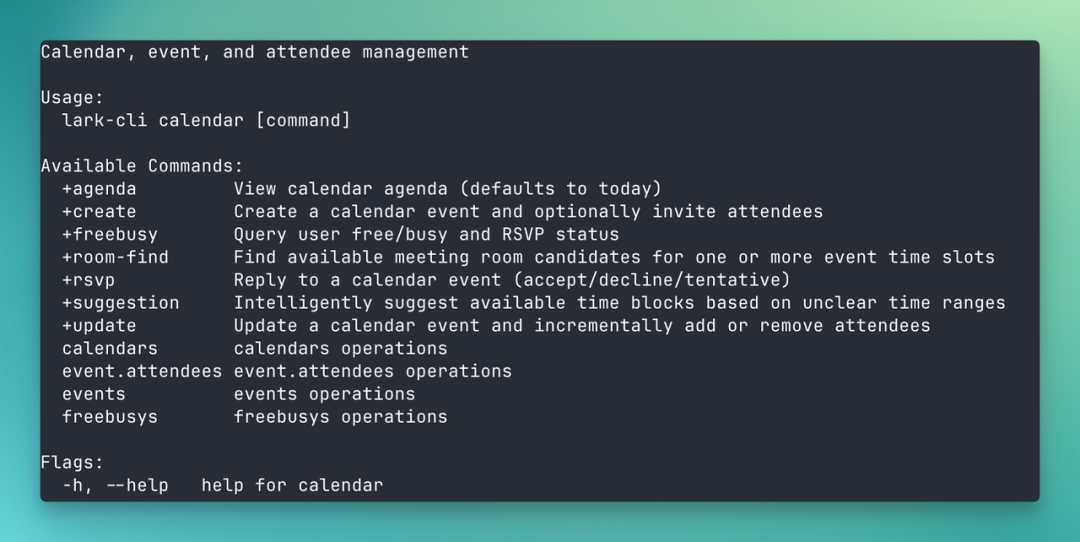
The human understands they're checking their schedule, the model sees a function call, and the system sees a structured API request.
All three parties share one language, with no translation cost.
In retrospect, the Lark CLI's 10,000 stars look like a small coordinate marking the inflection point in 2026 where AI's relationship with traditional graphical software shifted — the possibility of AI Native in collaborative office products is growing.
The CLI-ification of office collaboration tools initially seemed to have no "merit," but with use, a sense of "beauty and smoothness" emerged, becoming today's "Fashion."
Because for the first time, Agents have a place where they can work long-term, concretely, and visibly.
Crossing is seeking independent contributors to write AI product and model reviews.
If you've written similar articles: Hands-on: PixVerse C1, Hands-on: LibTV, please contact zeo0811@gmail.com. Your email should include: ① personal introduction, ② AI review articles you've written.
We offer competitive compensation. Looking forward to observing and documenting the AI era together 🎪