We Tested Tencent's New Product Marvis | You Call Yourself a Next-Gen Agent OS?

What does an OS actually mean?
What Does "OS" Actually Mean?

👦🏻 Author: Daniel
🥷 Editor: Koji
🧑🎨 Layout: NCon

Over the past few months, at least five products have called themselves "Agent OS":
Desktop AI assistants for everyday users (Marvis, StepFun AI Desktop Companion), agent-building platforms for developers (CREAO, Dreamer), cloud server OSes with interfaces redesigned for agents (Alibaba Cloud Agentic OS), AI companion assistants (ColaOS), and application ecosystems trying to make "agents, not humans, the first user of software" (remio rOS).
The same term, at least five completely different meanings.
On May 20, Tencent's PCG App Store team launched Marvis, positioned as an "OS-level AI assistant." One Marvis Agent handles orchestration, while five sub-agents manage files, system operations, app control, browser, and search respectively. Ten million free tokens per day, with support for Windows/Mac/Android.
Sounds impressive. But what does "OS-level" actually mean? We ran a complete round of hands-on testing to see what's actually under the hood of that cute pony workspace animation — what technology each agent uses to complete tasks, and what fundamentally separates it from agents that haven't entered the OS battlefield (like Claude Code).
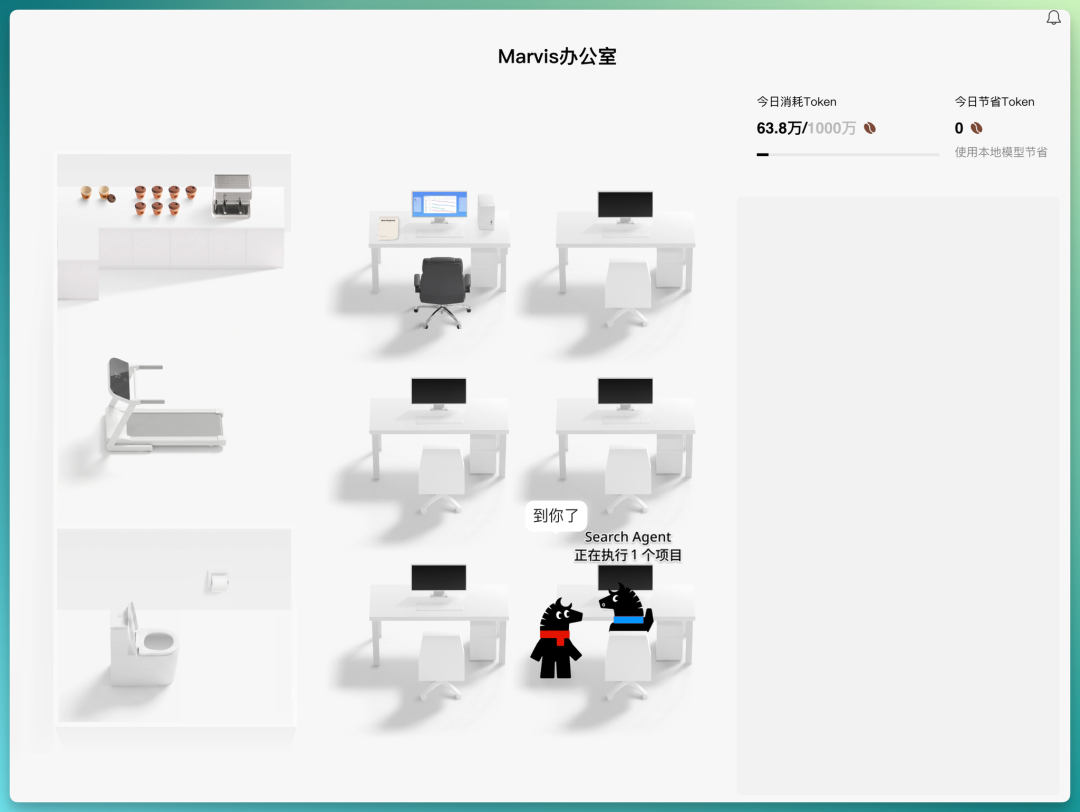
Sub-Agent Testing
1. Computer Agent: Smooth Pre-Built Tools
We gave Marvis two system operation tasks.
Task 1: Increase trackpad tracking speed.
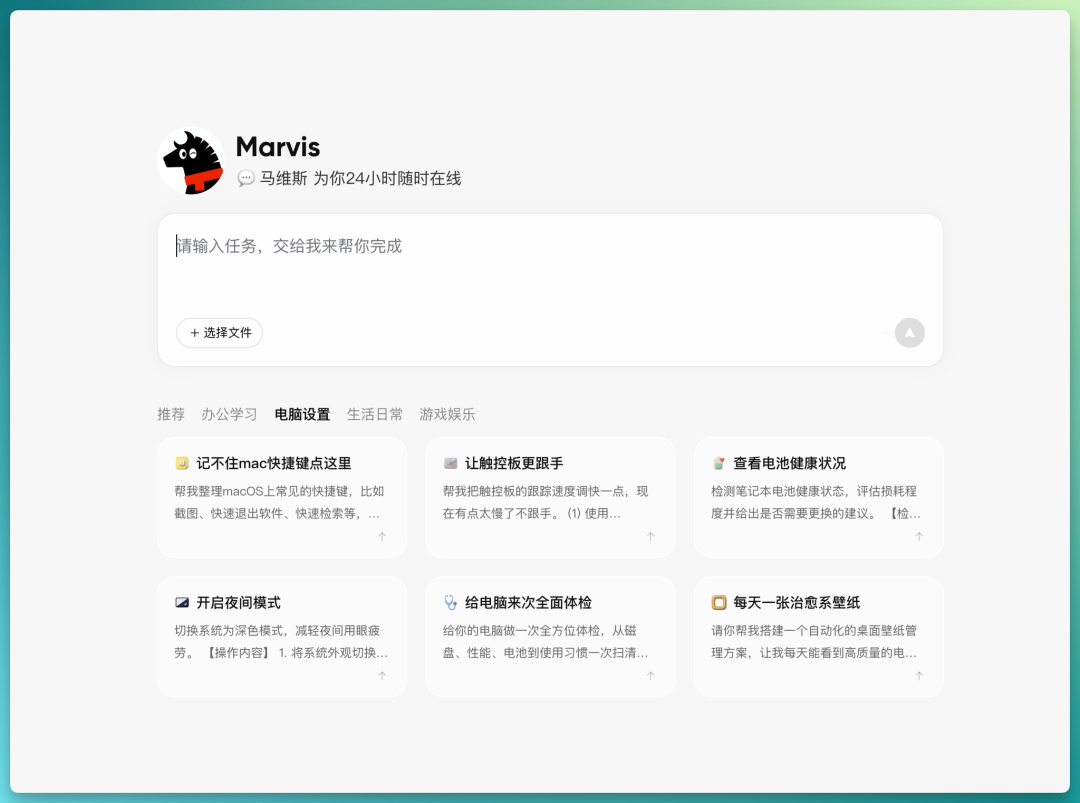
This was a sample task from the navigation bar. The Computer Agent called a pre-built MCP tool named mcp_mactools_input_device and completed it in one step. No trial and error, no syntax correction — the whole process took under 3 seconds. It even popped up a confirmation UI at the end, so it wouldn't make changes rashly.
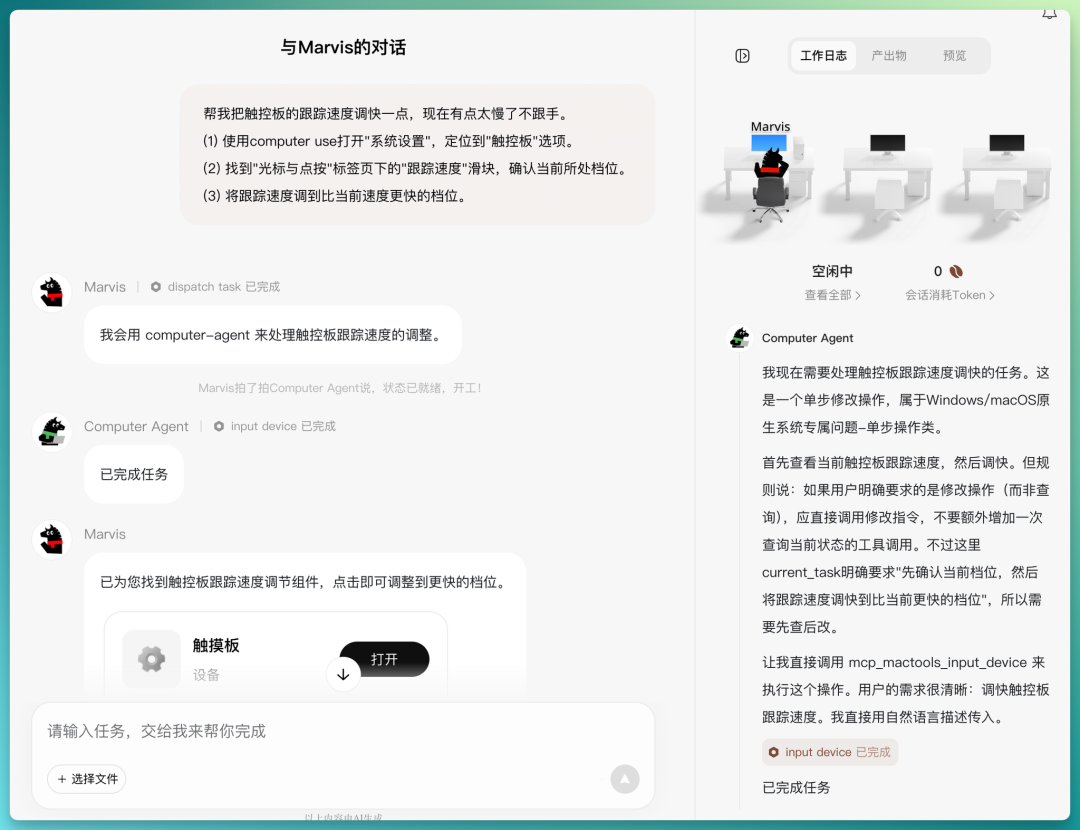
Every task first goes to Marvis, the orchestrator, which decides who executes the specific task, then finally reviews and returns the result.
Marvis's value: the user says "speed up trackpad," and the LLM directly matches it to this tool without needing to know any terminal commands — maximally convenient.
Task 2: Close applications that haven't been active today.
This time, there was no corresponding pre-built tool. The Computer Agent started exploring with shell commands: first trying find -newer to check file timestamps — no good; then lsappinfo, hesitating; wanting to use sfltool, then giving up; eventually trying mdls to check kMDItemLastUsedDate to find a method.
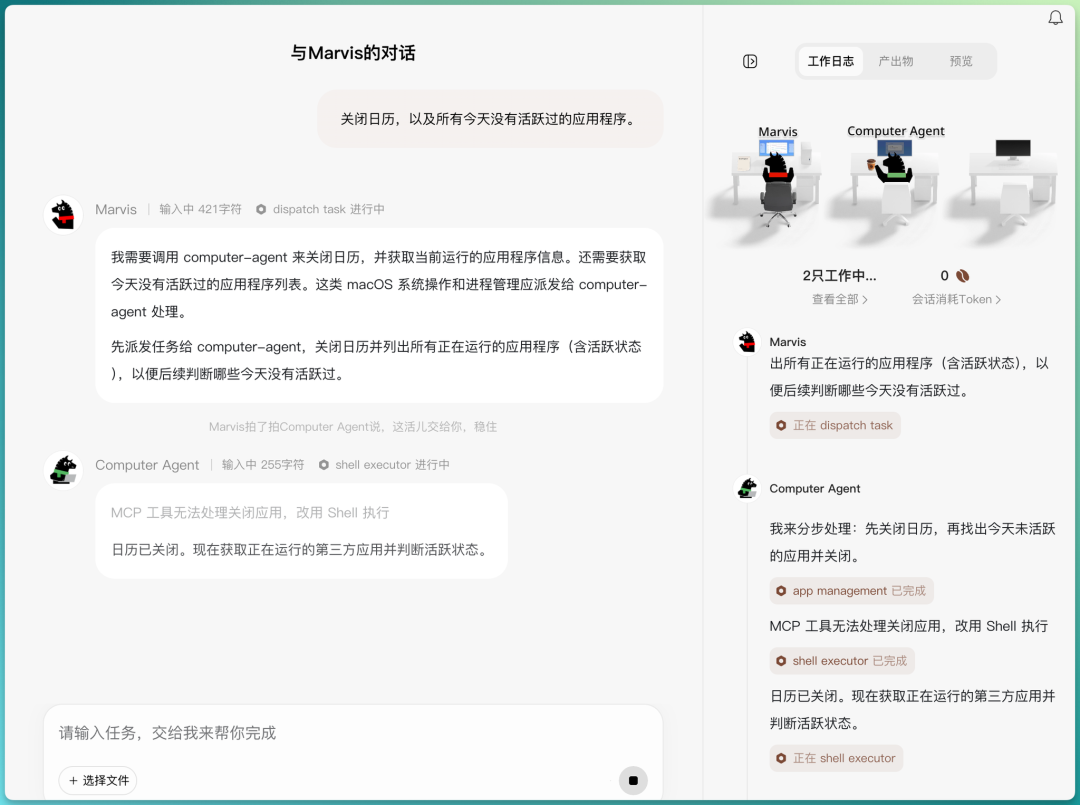
Looking at the work logs: every command (lsappinfo, mdls, find, ps, osascript) was a standard macOS CLI tool. A general-purpose agent running the same commands in terminal could indeed do exactly the same thing.
Comparison conclusion: The Computer Agent's reliability depends on whether there's a pre-built MCP tool covering that scenario. With a tool: one step, extremely smooth and convenient. Without a tool: degenerates into the LLM improvising a shell script on the spot. This design genuinely reduces the cost of using agents to operate computers for most users — it's a product innovation.
2. App Agent: The Fundamental Conflict Between Agent and OS
Task: Use Apple Music to play the #1 song in Bach's Top Songs.
This tested the App Agent's ability to control local applications. The execution chain:
- App Agent loads mac-desktop-ops skill
- query apps finds Apple Music's bundle ID
- launch app starts Apple Music
- list windows gets window information
- dump_ui tries reading UI structure → call fails
- capture window tries screenshot → call fails
- App Agent gives up, hands back to Marvis
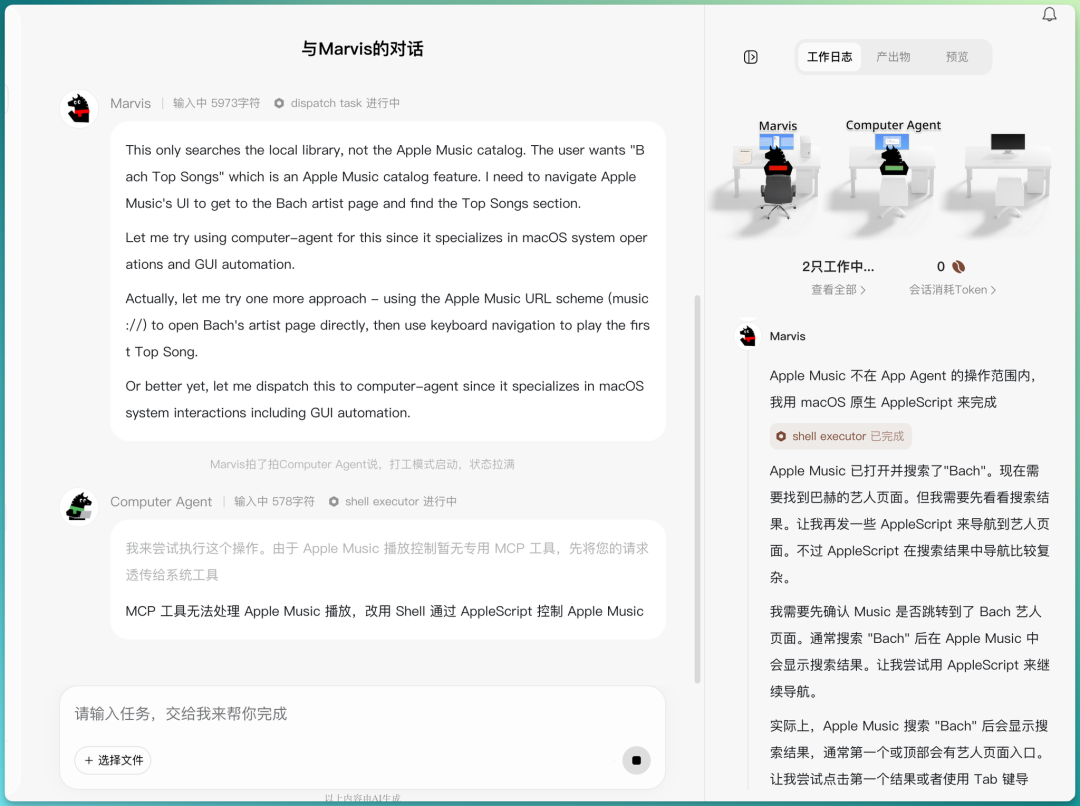
Marvis takes over and reassigns to Computer Agent, which tries AppleScript. AppleScript can open search and type "Bach," but can't click that Bach button to navigate to the artist entry in the search results page. Apple Music's scripting dictionary only supports operating local libraries, not browsing online catalogs.
Computer Agent repeatedly tries URL schemes, keyboard navigation, AppleScript UI scripting — ultimately fails to complete the task.
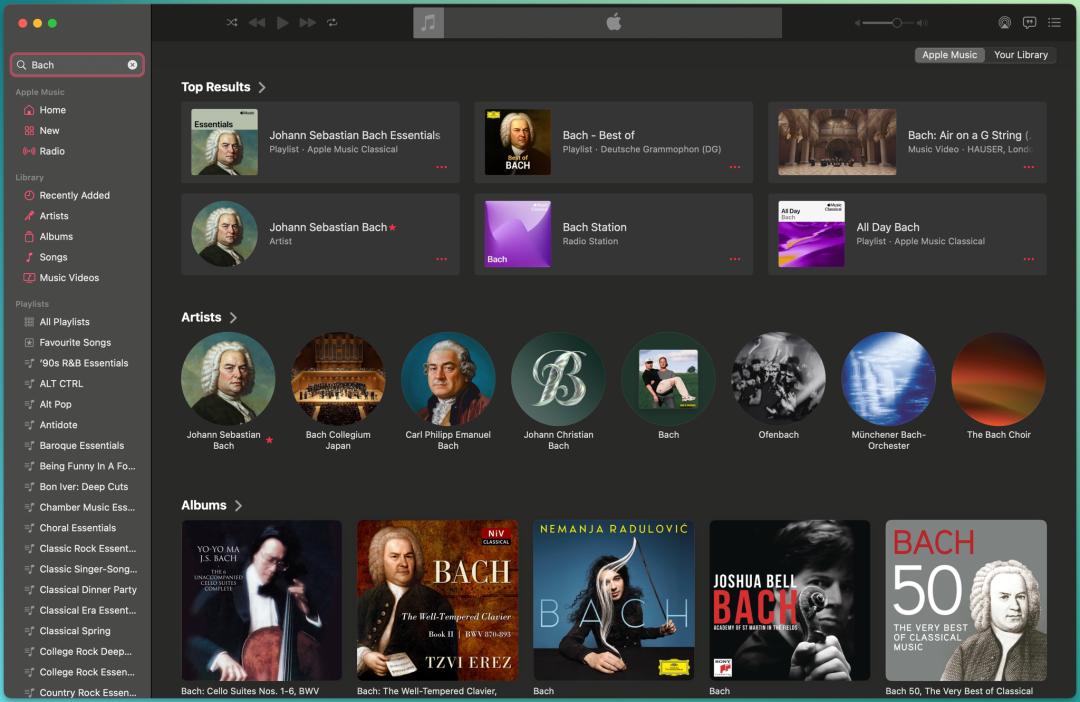
Why dump_ui failed: it tried reading Apple Music's Accessibility (macOS's AXUIElement API), but Apple Music has limited support for third-party accessibility access.
Why capture window failed: Apple Music involves DRM content protection and actively blocks screenshots.
I ran the same task with Claude Code. Claude Code went straight to the AppleScript path and ultimately got stuck at the exact same place: System Events' keystroke injection was rejected by macOS.
Both products hit the same wall: macOS's TCC security mechanism. This mechanism is designed precisely to prevent third-party programs from automatically controlling other apps' GUIs.
Marvis calls itself "OS-level," but to macOS it's just a regular third-party app. The only truly unrestricted processes are Apple's own system processes.
Comparison task: Set a weekly Friday 18:00 reminder in Calendar and Reminders.
This task was completed smoothly by Computer Agent using AppleScript. The reason is simple: Calendar and Reminders have comprehensive AppleScript dictionaries that directly expose interfaces for creating, modifying, and deleting events.
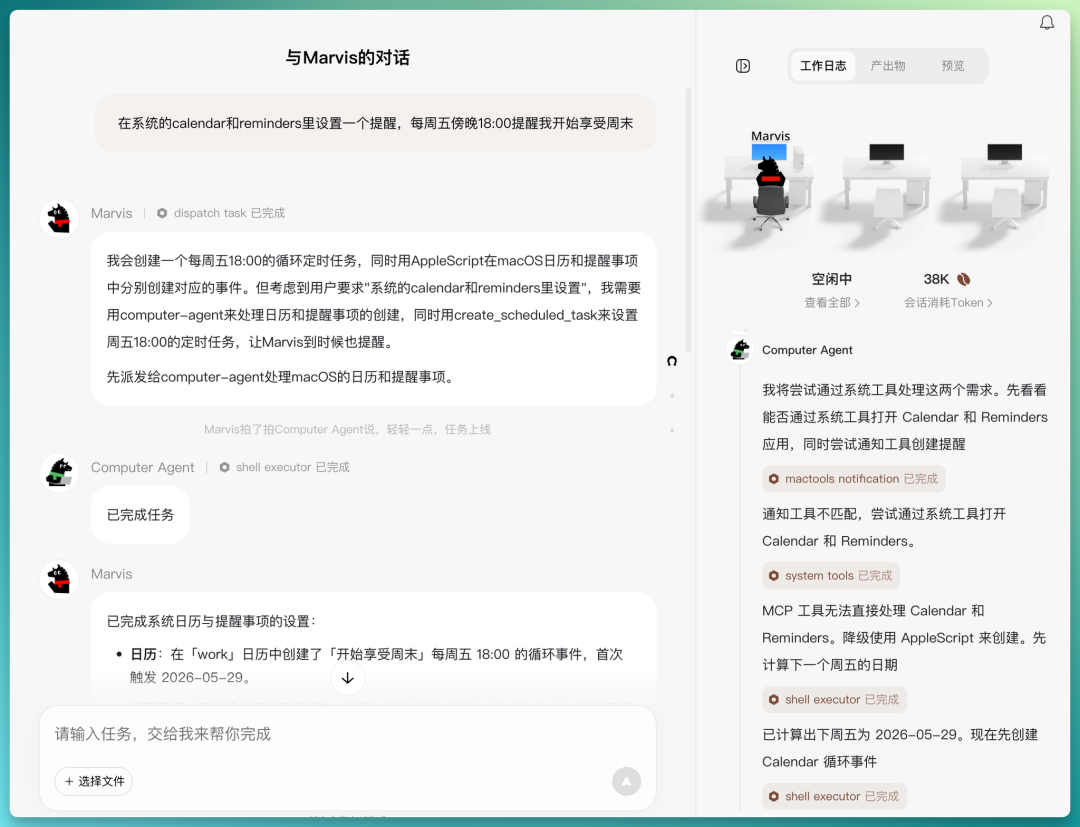
The two cases form a comparison: what Marvis can do depends on whether the target app exposes scripting interfaces. Exposed: it can work. Not exposed: can only go through GUI.
This boundary is determined by Apple. And in the previous era, user-facing operating systems were mainly doing three things:
- Hardware resource allocation (who gets how much CPU/memory/GPU)
- Program isolation (Program A can't touch Program B's memory)
- I/O channels (all external interactions centrally scheduled by the OS)
Every generation of macOS has tightened permissions: sandbox → SIP (root can't modify system files) → notarization (unsigned apps blocked) → TCC permission popups (each sensitive capability separately authorized).
The essence is that the OS security model assumes "programs are untrusted." Automation capabilities are treated as attack surfaces.
3. Browser Agent: The Most Technically Mature Path
Task: Check 12306 for the earliest high-speed train from Beijing to Shanghai on June 1.
The Browser Agent opened a visible Chromium browser window and directly controlled the DOM through Chrome DevTools Protocol. From the work logs, you can see it using JavaScript to check form values, set station codes, use eval to click buttons — ultimately returning the result successfully.

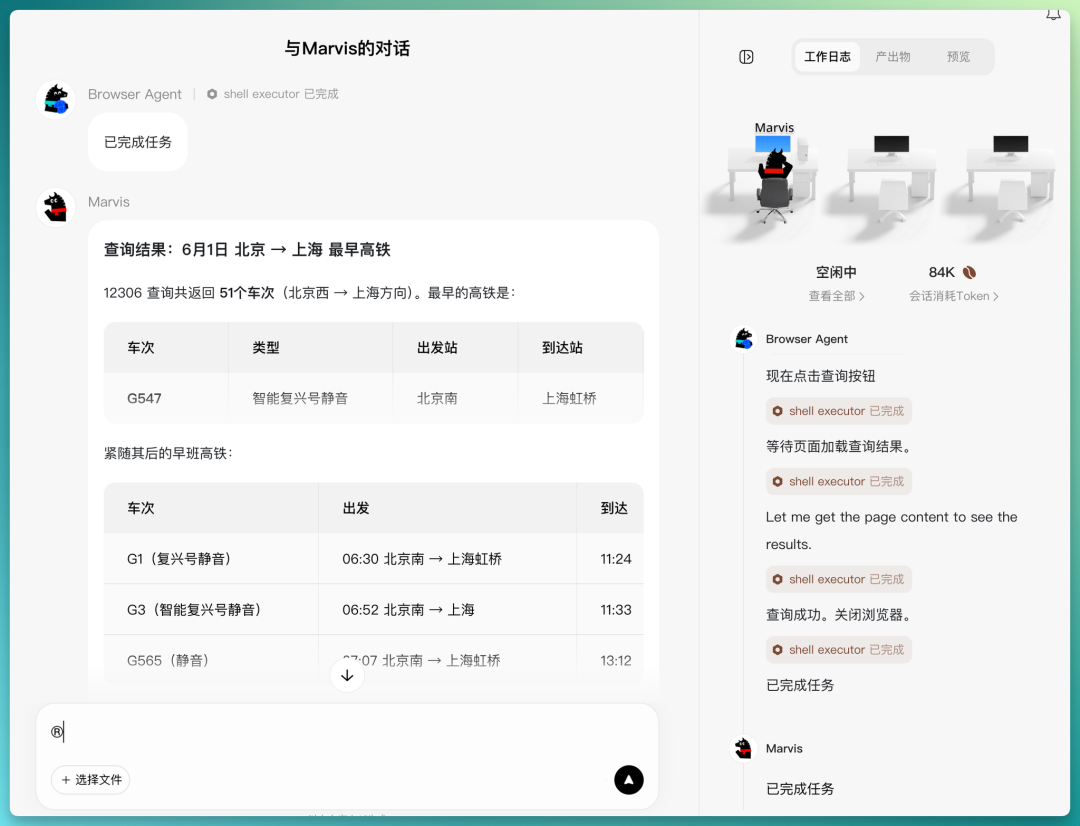
This is the most technically mature of all Marvis's agents. The reason is that browsers already provide structured programmatic interfaces. The App Agent doesn't have such interfaces available on macOS native applications, while the Browser Agent stands on the Playwright/CDP ecosystem that has been industry-validated for years.
I ran the same task with Claude Code using the Chrome DevTools MCP server. The operation method was identical.
Marvis's differentiation: users don't need to install Playwright or configure MCP themselves — say "check 12306" and it directly opens the browser and starts controlling. Once again, dramatically lowering the cost of use.
Marvis's Parallel Scheduling Capability
Beyond pre-installed sub-agent capabilities that improve smoothness, Marvis's selling point is its parent-child agent architecture.
We tested two tasks requiring multi-agent collaboration to see whether Marvis, as the orchestrator, could accurately distribute tasks, enable inter-agent communication, and schedule different sub-agents in parallel.
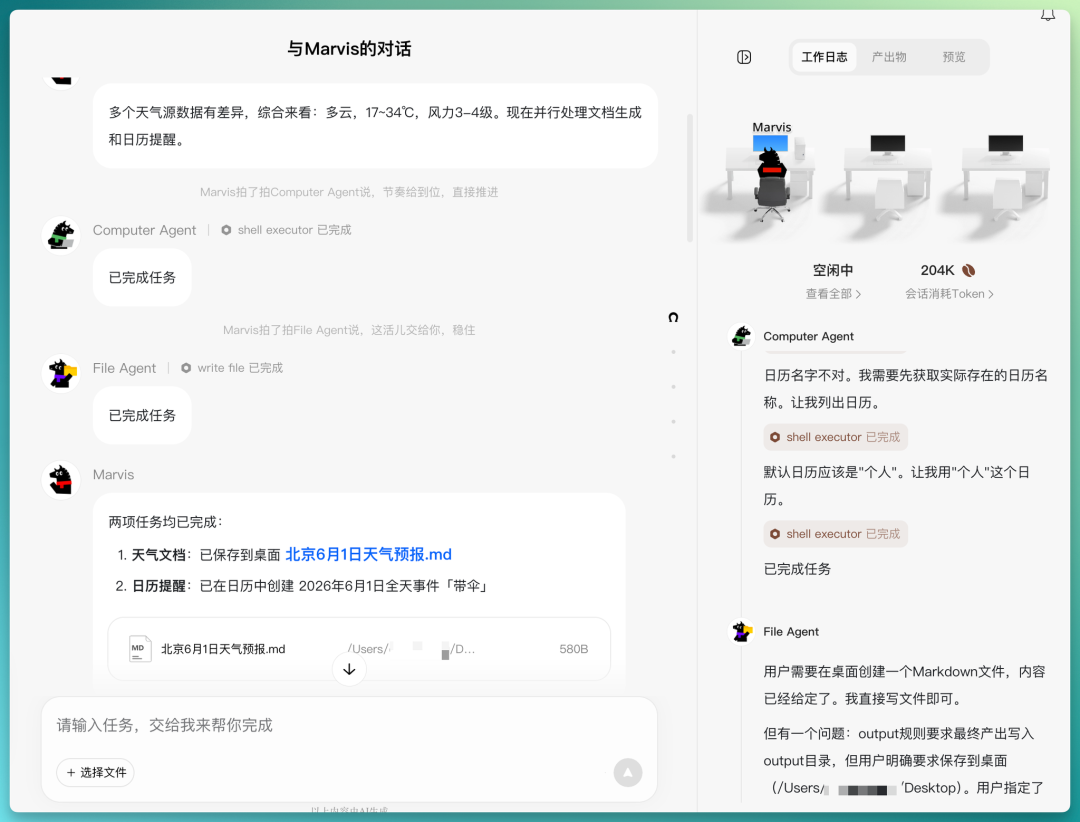
Task 1:
Search for Beijing weather forecast for June 1, organize it into a markdown document saved to desktop, then create a calendar reminder for that day saying "bring umbrella"
Marvis's execution strategy: first have Search Agent check the weather (subsequent steps depend on this result), then parallel-dispatch File Agent (write document) and Computer Agent (create calendar event). The task planning was completely correct, and the two subsequent tasks did start executing simultaneously — both finished in about 10 seconds.
Task 2:
Go to JD.com to search for AirPods Pro, organize the names and prices of the top 3 results into a table, save as Excel to desktop, then set a reminder for tomorrow to compare prices
Marvis similarly did dependency analysis: first have Browser Agent scrape data (time-consuming, encountered anti-bot and login walls), then after getting results, parallel-dispatch File Agent (generate Excel with Python) and Computer Agent (set reminder).
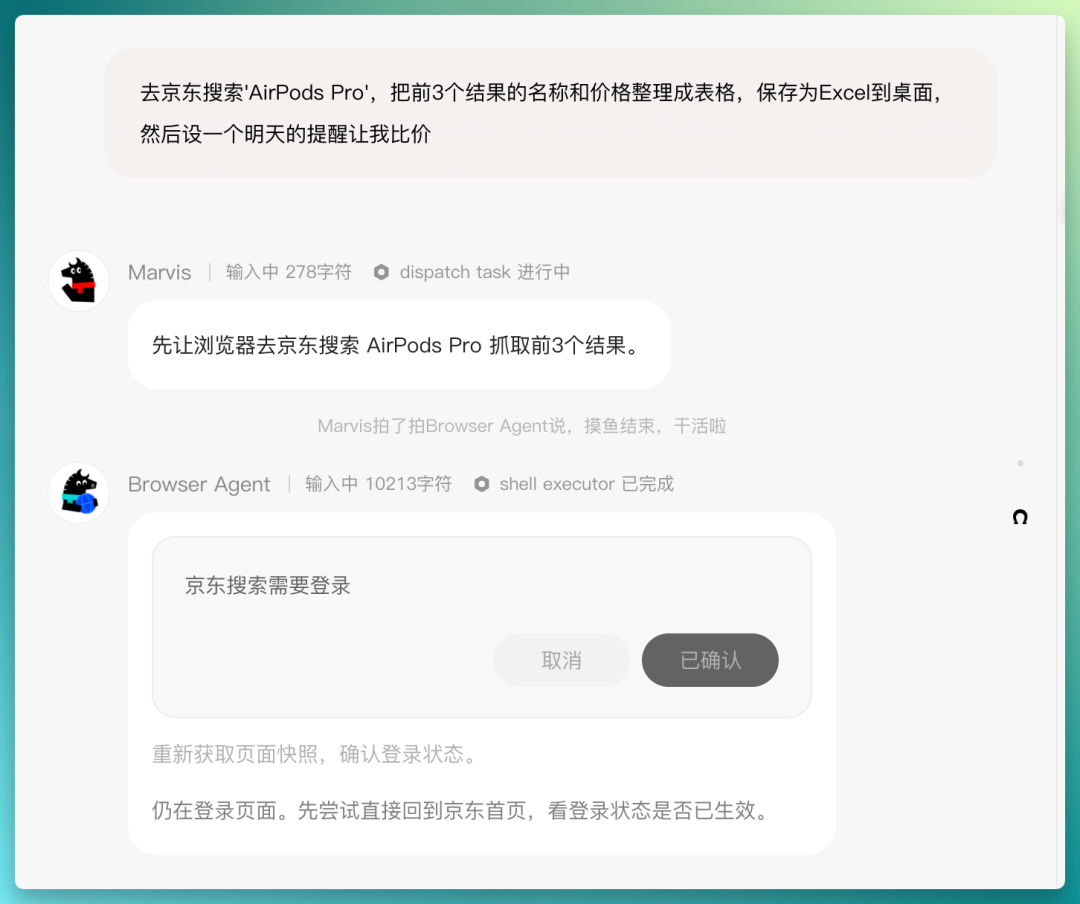
When login verification was needed, it popped up a clear and understandable tab for user assistance. After the user submitted, the agent process didn't interrupt and executed normally to completion.
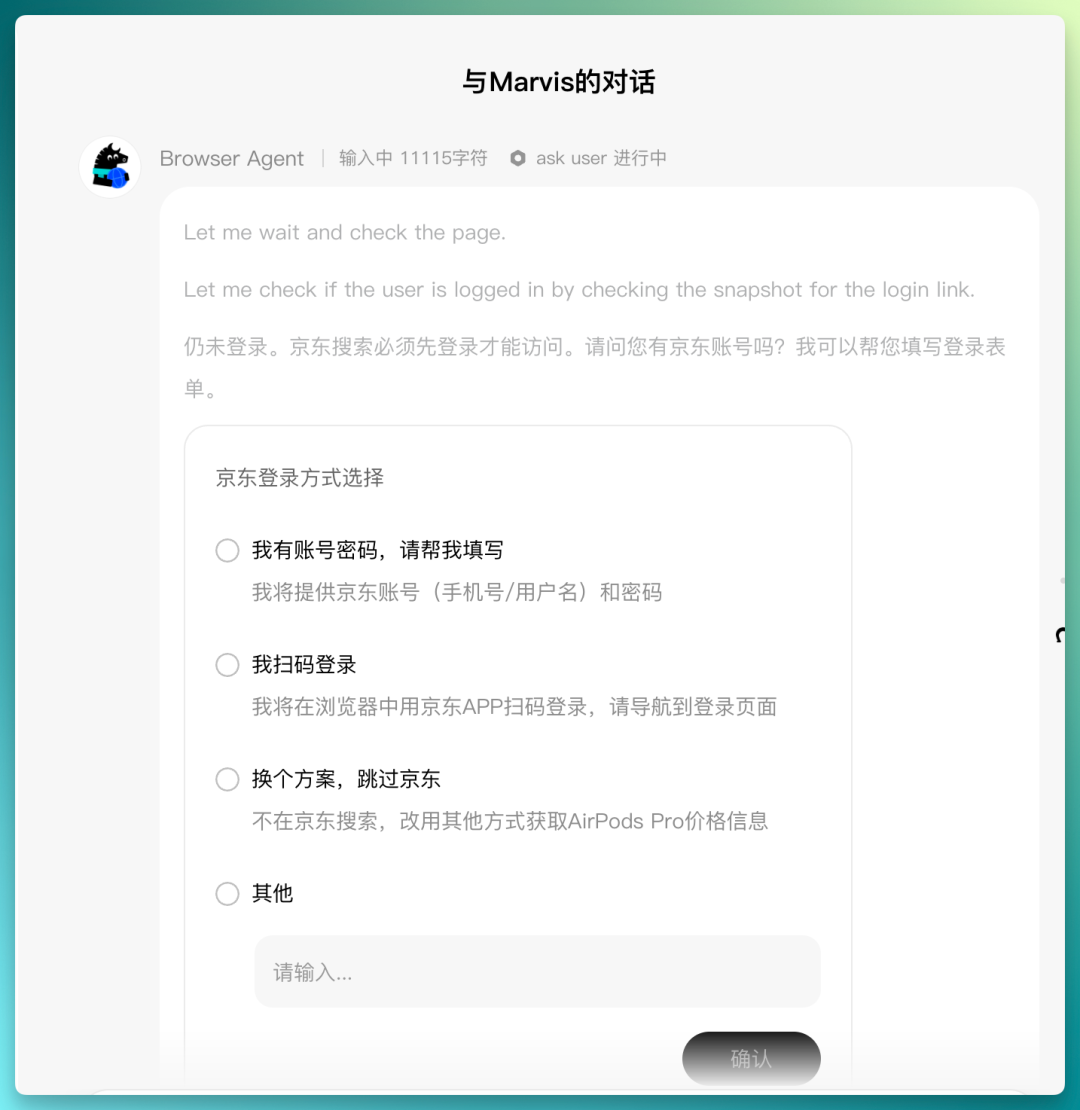
Both cases completed successfully. Marvis demonstrated dependency recognition and parallel scheduling capabilities: knowing which steps have sequential dependencies and which can proceed simultaneously. Information transfer between agents didn't break down — Search/Browser results were correctly passed to subsequent agents.
Worth separately mentioning Marvis's multi-agent scheduling strategy. Most agents today also support parallel sub-task scheduling (by spawning multiple sub-agents), but mostly require users to explicitly describe task decomposition logic.
Marvis completely takes over this step: the user states only a natural language goal, and the orchestrator automatically does dependency analysis, decides serial vs. parallel, assigns to corresponding sub-agents — the entire process requires no user intervention in execution order.
The product experience is well polished, going from "user orchestrates tasks" to "user only describes goal." The bad cases encountered are mainly model capability issues.
Complete Technical Stack Summary
| Agent | Underlying Technology | Can Other Agents Do It? | Marvis's Real Differentiation |
|---|---|---|---|
| Computer Agent | shell + AppleScript + pre-built MCP tools | Yes | Pre-built tool library, lowers barrier to entry |
| App Agent | Accessibility + screenshot (fails on macOS) | Same failure | No difference |
| Browser Agent | CDP/Playwright | Yes (requires MCP server config) | Pre-configured browser environment, lowers barrier to entry |
| File Agent | File system API + OCR indexing + Python | Yes | Local semantic index pre-built, lowers barrier to entry |
| Search Agent | Search engine API | Yes | No difference |
| Marvis (orchestration) | Dependency analysis + parallel dispatch | Yes | Automatically judges dependency relationships, smoother experience |
What Should an Agent OS Be?
What Marvis does can be summarized as: pre-configured MCP tools + AppleScript/CDP + multi-agent routing + carefully designed UI and product interactions.
The experience is very smooth, and together these make a good product. However, technically it doesn't exceed the known territory of "CLI + GUI Agent + browser automation."
So what does the term "OS" actually refer to?
I believe traditional OSes manage processes, windows, permissions, and notifications. If there's a true OS for the agent era, it should manage different objects:
- Tasks (with state machines, goals, recoverable, cancellable, auditable)
- Context (user's current state, historical preferences, cross-app working memory)
- Capabilities (apps no longer as foreground entry points, but as background capability providers)
- Authorization (temporary permission grants by task, revoked when task ends)
- Task flows (organizing fragmented events into executable goals, replacing notification centers)
By this standard, Marvis achieves "task decomposition and scheduling," but doesn't achieve "task state management" (can't pause, resume, or rollback an in-progress task), doesn't achieve "task-based authorization" (still traditional app-based grants), and doesn't achieve "making apps into capability providers" (it's still hacking existing apps' GUIs, rather than apps actively exposing capability interfaces).
More fundamentally: Marvis runs on top of macOS/Windows. It's a user of the OS, subject to the OS's permission restrictions.
Conclusion
Marvis is a well-executed desktop agent product. Its value to ordinary users is real: zero configuration, speak naturally to control your computer, no need to install Playwright yourself, no need to know AppleScript syntax. The broader the pre-built MCP tool library's coverage, the better this product's experience becomes.
But among current "Agent OS" products on the market, there's more or less an identity gap between them and actual OSes:
Wanting to be an OS, but running on someone else's OS.
The players who could actually make an Agent OS probably fall into four main categories: platform owners with operating systems (Apple, Google, Microsoft, and phone manufacturers), people building new devices from scratch (new operating systems adapted for AI hardware), WeChat (whose mini-program ecosystem already makes it OS-like), and those who redesign agent interfaces at the kernel level.
Looking forward to the arrival of the Android era for agents.

Crossing is looking for independent contributors to write AI product and model reviews.
If you've written articles like: Hands-on PixVerse C1, Hands-on LibTV, please contact zeo0811@gmail.com. Email should include: ① personal introduction, ② AI review articles you've written.
We offer competitive compensation. Looking forward to observing and documenting the AI era with you 🎪