When AI Leaves the Conference Room: Why DingTalk Was First to Capture "the Majority's Scenarios"

DingTalk's "Fern Philosophy": AI Meeting Notes Gets a Quiet Update, Now with Image-Annotated Highlights
DingTalk's "Fern Philosophy": AI Transcription Gets a Quiet Update, Now with Visual Summaries
Author: Jingshan
Editor: Koji
Layout: NCon
At its tenth anniversary in August, DingTalk introduced a concept centered on the "fern":
AI should be like a fern — quiet and unassuming, yet tenaciously spreading into every corner with remarkable vitality.
Over the past few months, it seems to be living up to that idea.
Compared to the noise surrounding AI, DingTalk's iterations have barely made a sound. But if you scroll through its changelog, you'll notice something interesting: since version 8.0, it has maintained an upgrade cadence of roughly once every three weeks.
In our previous piece "Tenth Anniversary: DingTalk Sets Its Sights on AI Hardware," we went hands-on with its AI hardware. But what you only discover through daily use is that software-side iterations are coming even faster and harder than hardware.
Today, DingTalk rolled out another major upgrade to AI Transcription, introducing "visual summaries" and other new features. It's stuffing AI capabilities into everyone's work and life at remarkable speed.
Why do we care so much about AI Transcription, a seemingly narrow product?
Because it happens to illustrate a broader observation we've been developing:
Why AI Shouldn't Stay Trapped in Conference Rooms
Lately, the tech giants seem to have found a new battleground: AI meetings and AI spreadsheets.
From DingTalk and Lark to Zoom, every platform is competing on voice-to-text, meeting summaries, and smart form-filling. On the newer end, products like Granola, Fireflies, and Cluely keep one-upping each other on usability.
But when everyone crowds into the conference room competing on features, a much larger market is being ignored.
These tools are used, directly or indirectly, within the confines of the company — still primarily serving "the workplace."
Yet AI's real potential lies precisely in stepping outside that conference room.
As AI capabilities keep improving, high-value scenarios for audio transcription extend far beyond large meetings and C-suite executives. It's now serving teachers, students, salespeople, content creators, individual learners — a much broader swath of "ordinary people."
This means user expectations are leveling up too. When AI can skip redundant audio and hand you the "next step" directly, it graduates from a "speech-to-text tool" and truly enters daily life.
Vendors still stuck in "meeting recording → transcript" mode risk missing this wave of democratization.
Put simply: AI-enhanced individuals all carry the potential to become "super-solos," and they need capable tools at hand.
DingTalk's latest changes are a microcosm of this trend — from an essential "buddy" for office workers in meetings, to an "AI buddy that ordinary people use too."
So in this piece, we'll cover DingTalk AI Transcription's new features on one hand, and on the other, explore how it's weaving into diverse scenarios.
A Small but Genuine Evolution
In the latest version 8.1.5, DingTalk AI Transcription added a "visual summary" feature. Whether you're in meetings, client visits, interviews, or study sessions, AI can now "draw" out key points for you, auto-generating illustrated summary graphics.
The feature itself isn't revolutionary, nor is it industry-first. What DingTalk brings is "lowered barriers to entry."
In an office collaboration platform with massive user scale, DingTalk has streamlined the AI Transcription workflow.
Previously, users typically had to first transcribe audio to text, then feed it into another AI tool with prompts, and finally generate a visual illustrated summary (a step that often required AI vibe-coding lottery pulls).
Now, DingTalk only asks you to upload an audio or video file, and Transcription automatically converts it into a clean, intuitive visual summary — almost zero extra steps required.
For example, last week a colleague's child had an English home visit with a teacher. He coordinated with the teacher in advance and casually recorded the whole thing with DingTalk AI Transcription.
After the visit, the parent needed to review and reinforce the conversation content — after all, he had to "revisit" it with the child. But as anyone knows, in a scenario like this, it's nearly impossible to read transcript lines aloud to your kid and have them digest the key points.
As it happened, he discovered the updated visual summary feature and turned the entire conversation into visualized highlights. Honestly, he was the one who first tipped me off — I hadn't even realized DingTalk AI Transcription had shipped this.
For privacy and demonstration purposes, we're using a home visit recording found online here. Personally, I find the smoothest workflow is using AI Transcription directly, which is built right into DingTalk:
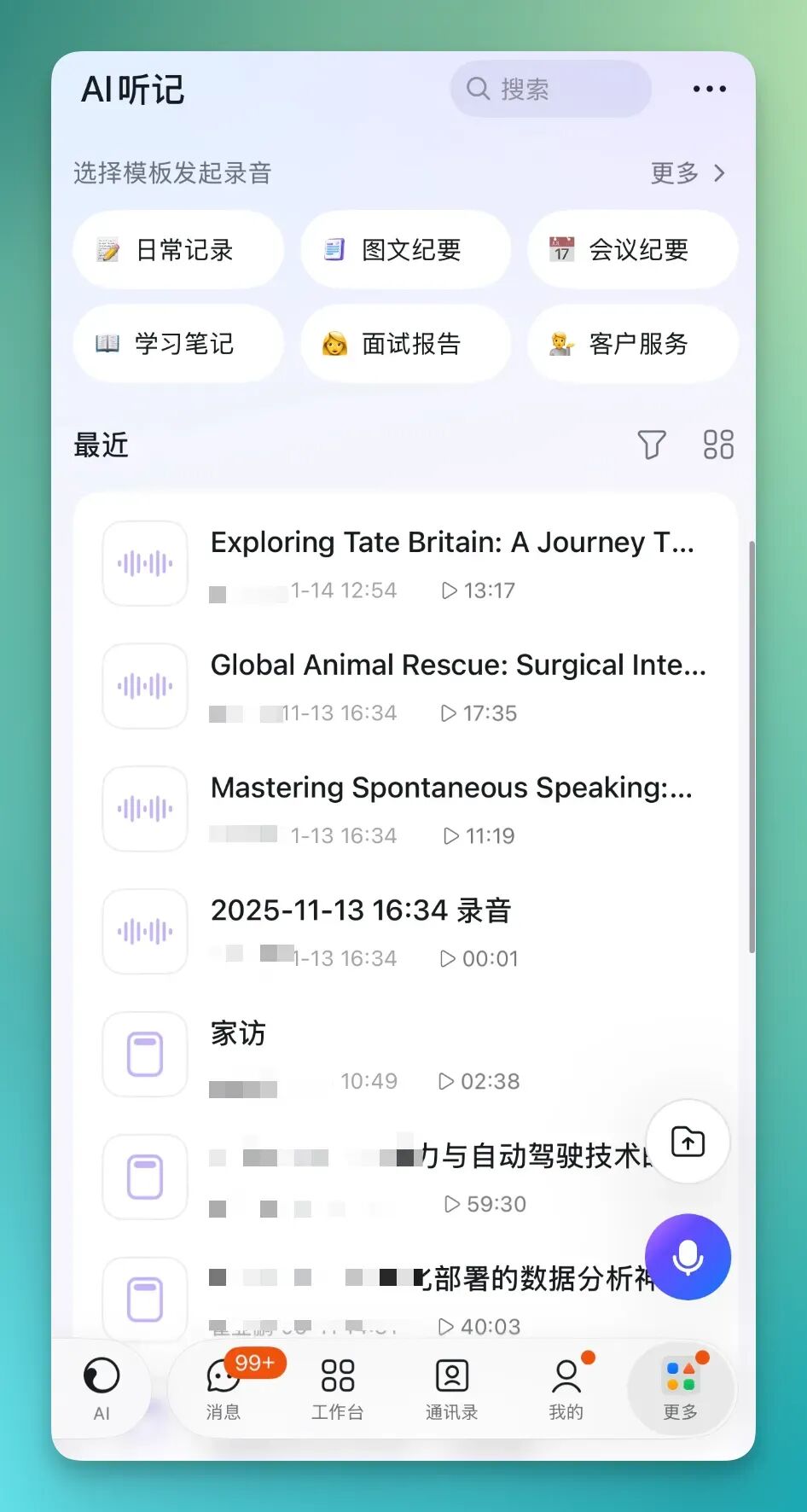
Then simply select "visual summary" — the flow is remarkably seamless:
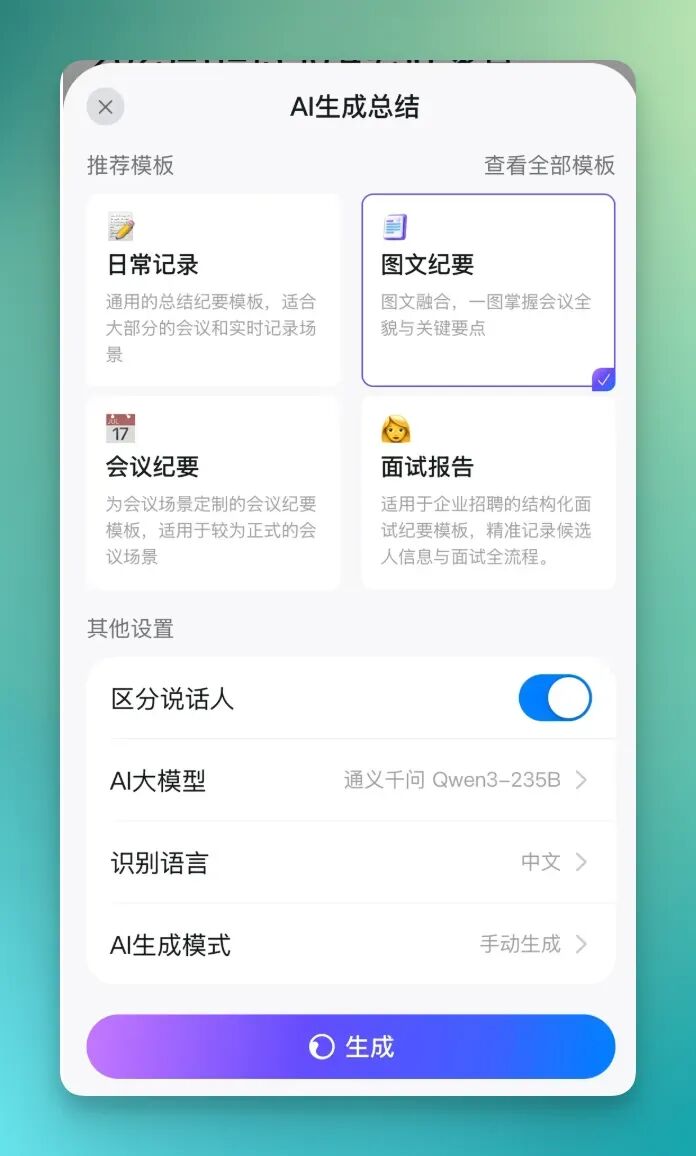
AI Transcription can export this kind of illustrated summary:
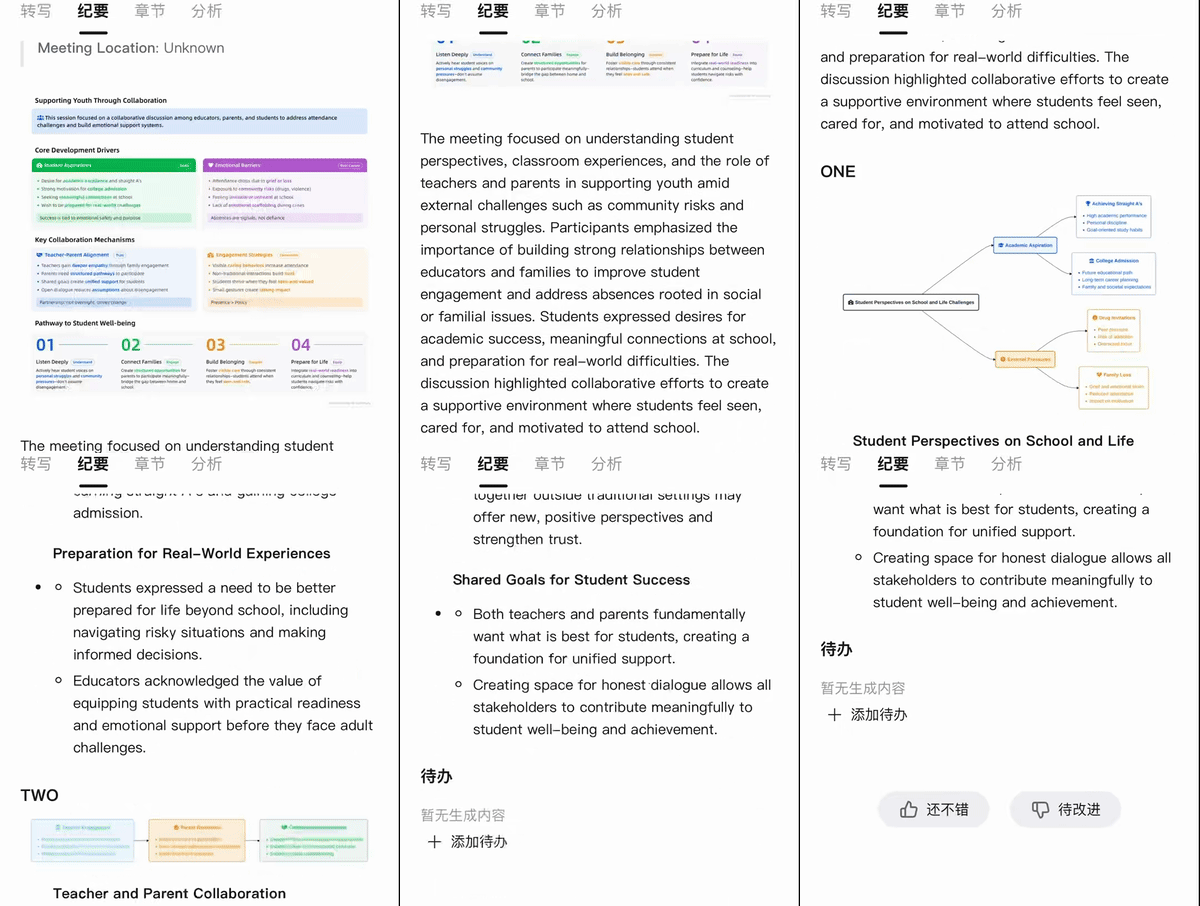
Let's look more carefully at what AI Transcription's visuals actually look like (P.S. each illustrated table inside can be downloaded).
First, AI Transcription can summarize discussion points into clear visual form, meticulously dividing content into different sections with fairly precise categorization and minimal AI hallucination.
In this home visit example, AI Transcription broke content into topics like emotional barriers, student welfare, and more — each section highlighting different discussion focuses to help users quickly grasp the core of every topic.
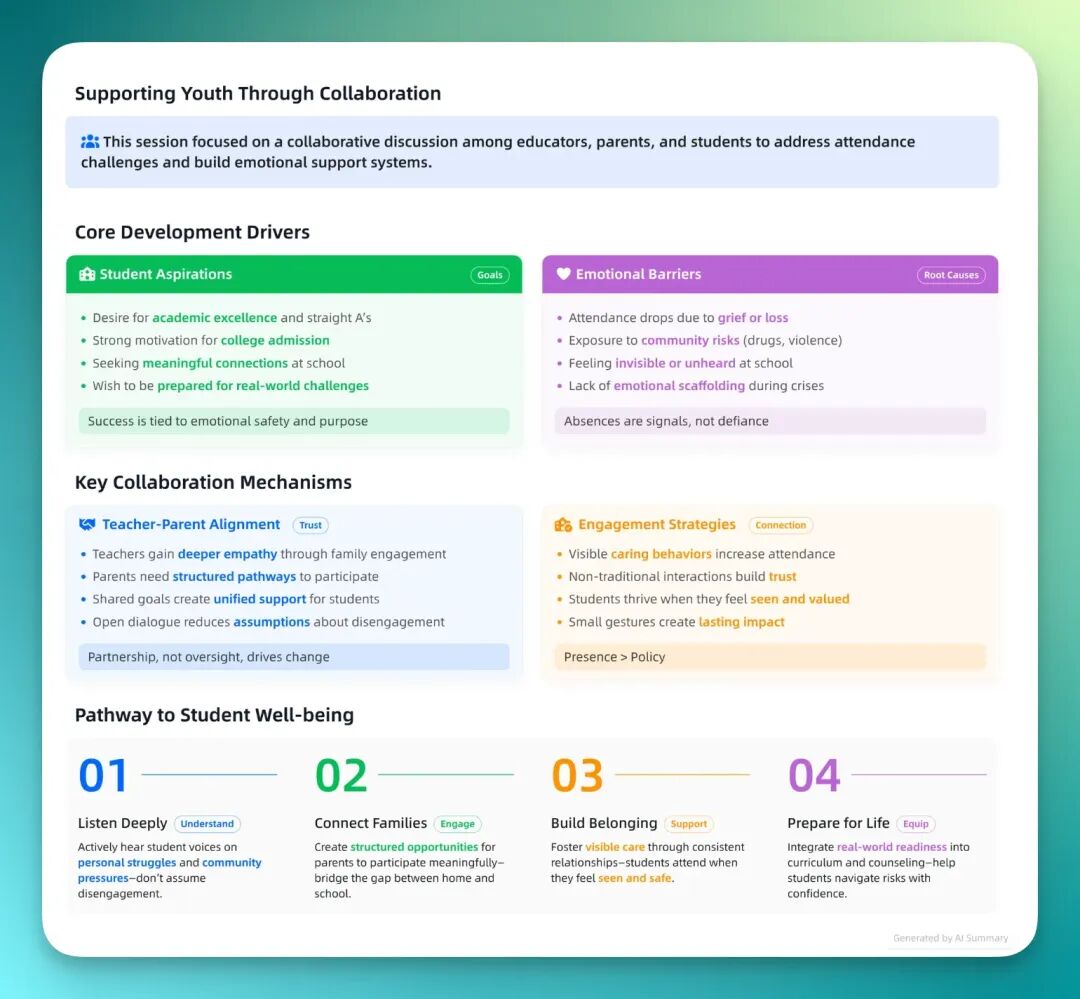
The summary also uses colors and icons to organize information, emphasizing key points and making content more intuitive and easier to understand. This visual treatment genuinely helps us catch critical points faster in complex discussions.
It also creates mind-map-style tables that clearly separate different themes and categories with strong hierarchy and at-a-glance clarity.
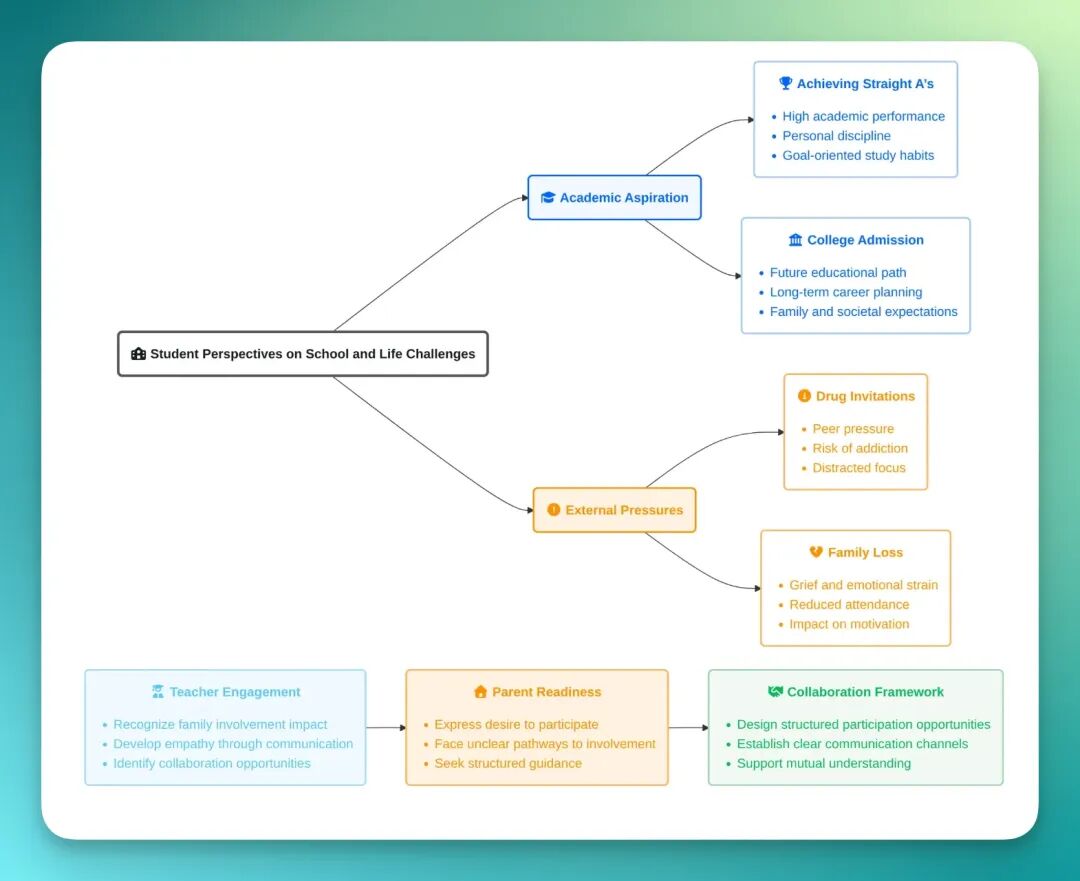
These "one-picture summaries" aren't generated from templates — they're structures auto-extracted by AI based on genuine comprehension of the content and context.
Titles, columns, and priority ordering all shift depending on the recording's content; each output is independent and personalized. What powers this is large models' content recognition and understanding capability, not "here's a pile of templates, pick one."
To put it more directly: in the AI era, the template mindset is no longer the optimal solution.
After learning about this feature, I immediately recommended it to interns on our team.
Most are still in grad school or PhD programs, with classes, interviews, and papers to manage. The feedback was surprisingly consistent: saves effort, intuitive, high information density — way faster than manually processing audio and extracting key points themselves.
So let's test a student scenario. Think Fast, Talk Smart: Communication Techniques is a Stanford open course I've always liked:
As you can see, AI Transcription proves especially effective for learning scenarios, rapidly converting an entire open course into structured, visualized information:
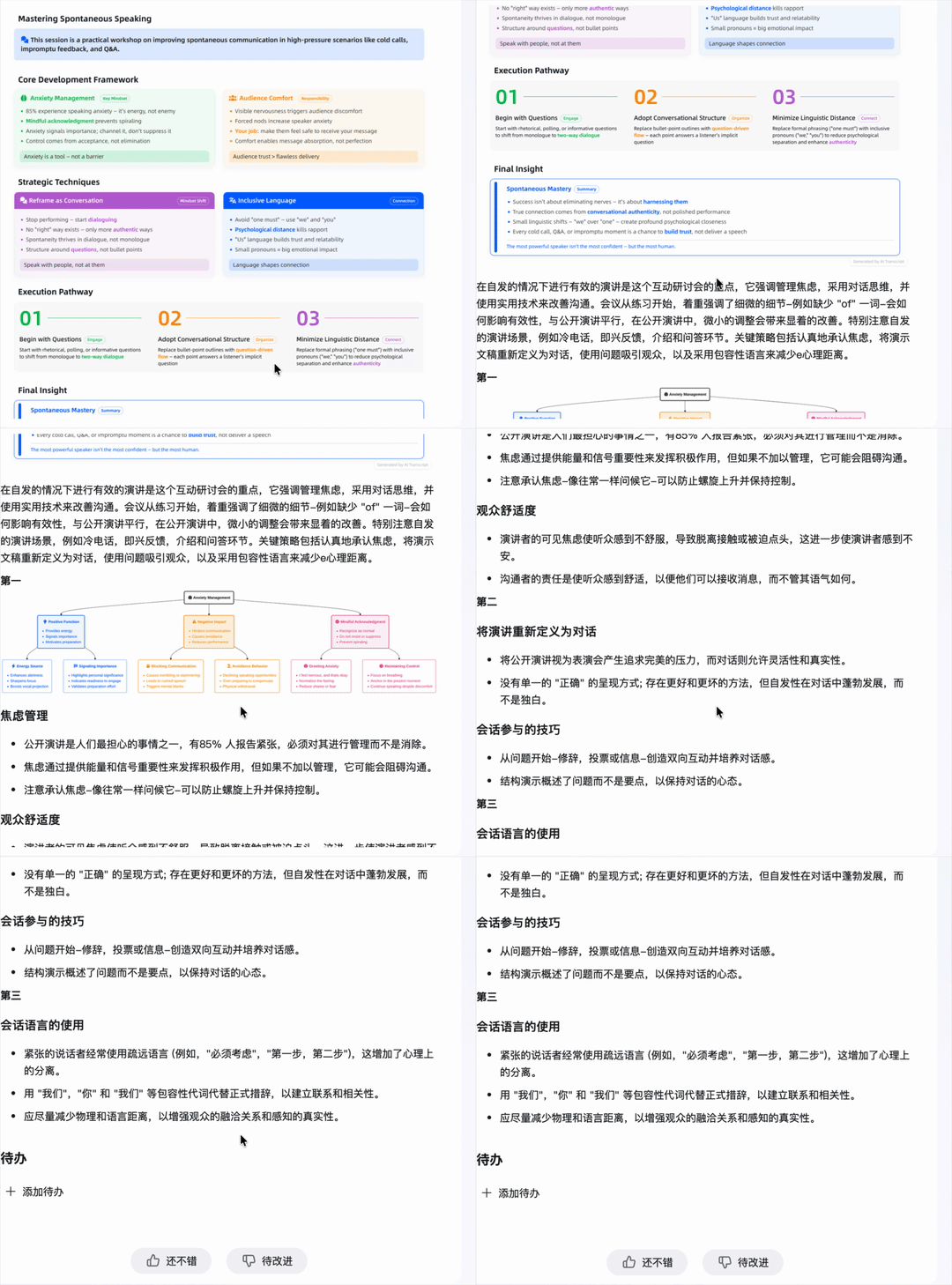
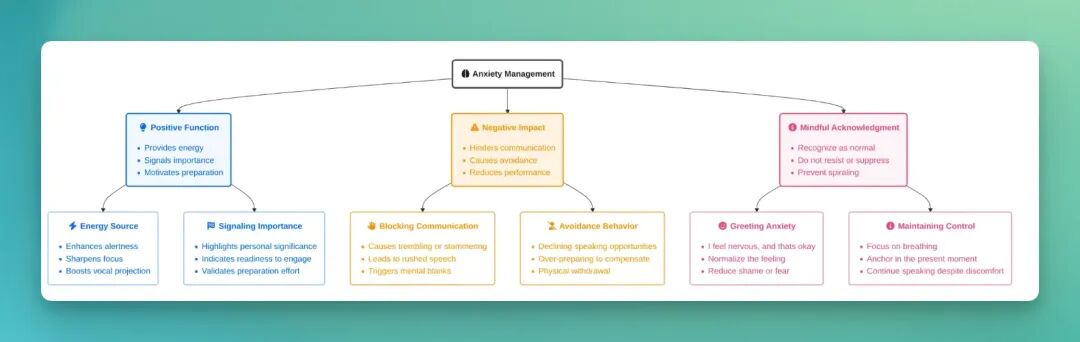
This chart directly overviews the course content: a framework for anxiety management, divided into positive functions, negative impacts, and strategies for coping with anxiety.
If classrooms and home visits represent internal knowledge digestion, then another strong use case for AI Transcription is external content deconstruction.
For many content creators, breaking down others' video pacing actually matters — after all, when starting out you often need to benchmark against quality accounts to see what they're actually saying.
Here I'll use a MrBeast video script as an example.

As you can see, AI Transcription listed all the key points of this MrBeast episode in chronological sequence:
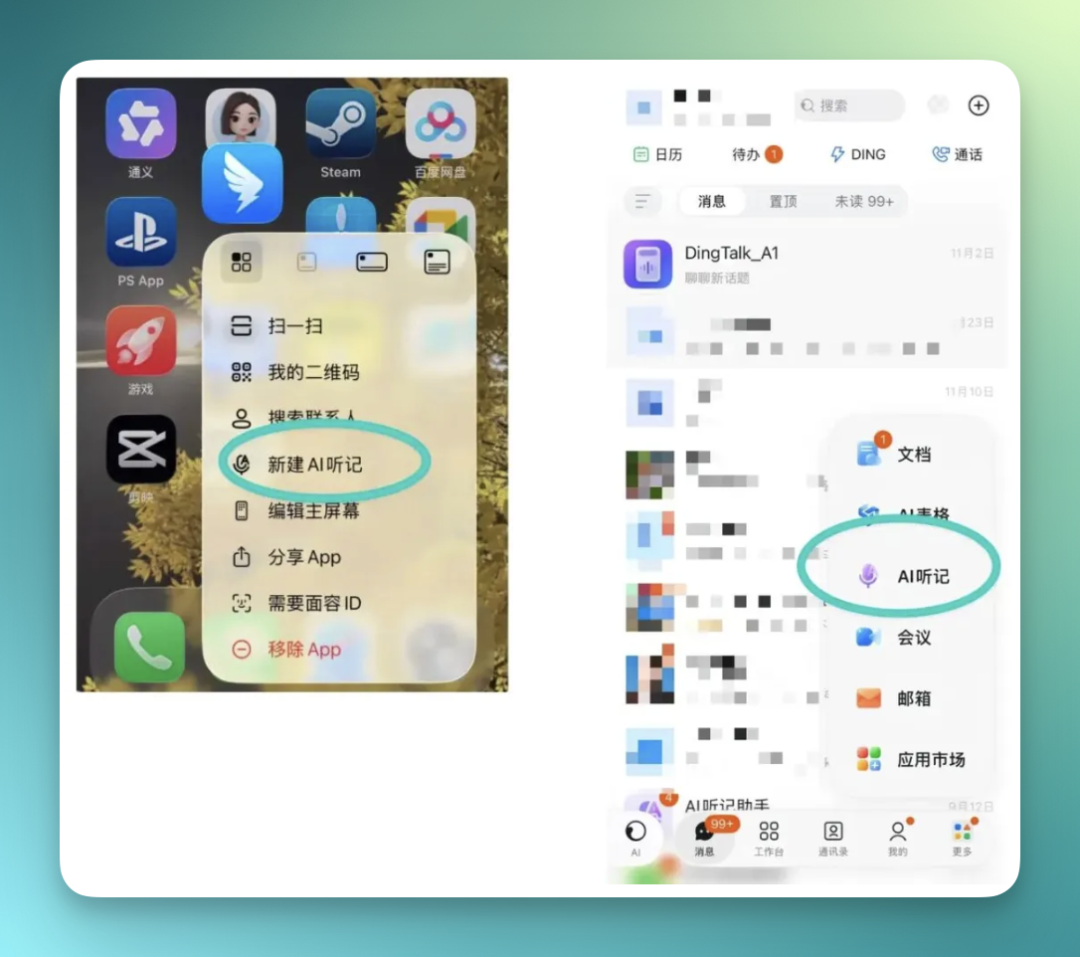
What's interesting is that I found DingTalk AI Transcription has now added more entry points, making it easier to capture those high-frequency, immediate, even informal offline conversations.
You can invoke it directly from the phone home screen — long-press the DingTalk icon and it opens right up; inside the DingTalk app there are multiple ways to access it. The desktop端 maintains consistent convenience; additionally, DingTalk's A1 hardware also provides an entry point:
Beyond processing this kind of online content, I also discovered a remarkably apt everyday scenario: listening to museum audio guides.
To test this, I found a Tate Britain audio guide and threw it in.
The results were decent. The summary AI Transcription generated — from curatorial logic, representative works, visitor experience to final wrap-up — followed a very structured overall logic, letting you quickly grasp the entire curatorial approach.
And each section came with precise visual tags (like Narrative Design, Pop Icon, Sensory Rich, etc.).
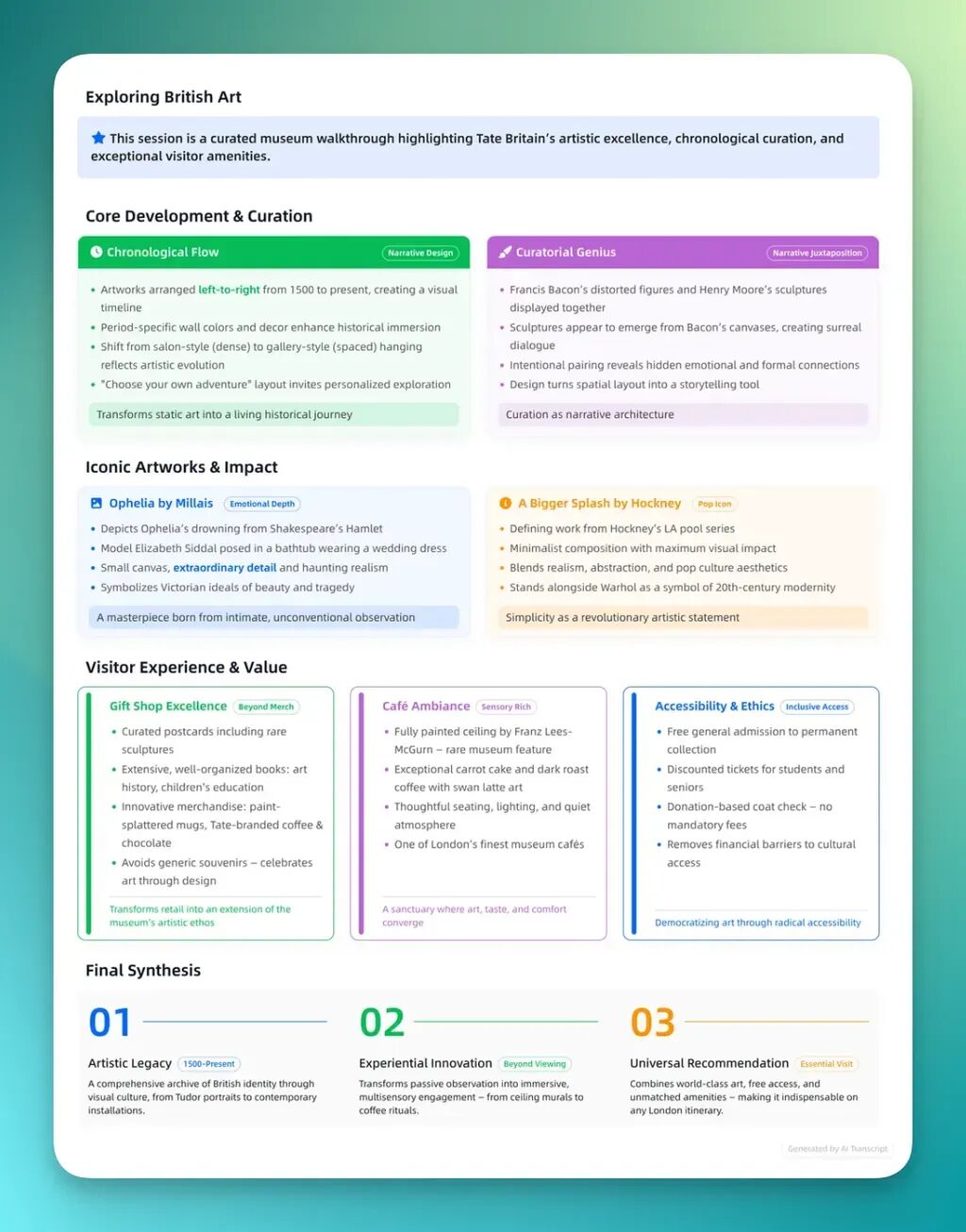
You could say this content is no longer just an introduction to Tate Britain — it's more like a small-scale, professional curatorial analysis report.
Of course, currently AI Transcription's visual summaries are entirely in English. But apparently future versions will support one-click Chinese translation, which would be even more convenient.
This "available anywhere" convenience actually reflects shifting user demands.
In the past, when we used AI dictation tools, it was mostly "transcription" — turning speech from meetings, lectures, or interviews into text. That recorded information, but didn't achieve "essence extraction."
Later, we saw another possibility for audio with products like Plaud and DingTalk's A1 hardware.
As information volume grows, simple transcription no longer satisfies users. People don't just want to record information — they want to extract key points from it, understand and organize it.
Speaking of which, DingTalk isn't the only company doing this. In fact, this path is well-trodden overseas. Products like Otter.ai, Notta, and the newer Turbo AI focus on "audio/video/PDF → notes, flashcards, quizzes."
It can:
Turn any content into editable notes, flashcards, and quizzes. Supports recording lectures, uploading videos, organizing documents, and generating charts, flowcharts, chat interactions, and more.

Turbo AI, founded by two 20-year-old college dropouts, has already accumulated over 5 million users with eight-figure ARR.
Originally, Turbo was just a small tool the founder shared with friends — but it quickly blew up in student groups at Duke and Northwestern, then spread to Harvard, MIT, and beyond within months.
It was originally called Turbolearn, a study app, before rebranding to Turbo AI as an AI note-taking and learning assistant.
The founders say its users are long since not just students — consultants, lawyers, doctors, even analysts at Goldman Sachs and McKinsey & Company throw reports in to have Turbo generate summaries, or convert them into commute-friendly podcasts.
The business model is simple: $20 per month for students. But the team also recognizes students are price-sensitive, so they've been running pricing experiments and A/B tests to find the right price point.
What they're trying to solve is a problem every college student understands: you can't fully focus when you're taking notes and listening at the same time.
What they're doing is helping users extract genuinely valuable content from information, elevating traditional "audio transcription" to deep analysis and intelligent summarization.
These platforms, like DingTalk, are all heading the same direction: not just meeting summaries, but applying this technology to broader daily and personal scenarios.
Whether organizing class notes, museum audio guides, podcast content review, or even deconstructing creator videos, they're gradually entering everyone's daily life.
However, truly "entering" these varied personal scenarios is far harder than serving the single "meeting" comfort zone.
This isn't something you can nail with one launch — it requires products to adapt, experiment, and iterate at extremely high frequency. This spread from B2B to consumer scenarios is forcing all vendors to change their "metabolic rate."
Which brings us to a new rule of the AI era:
AI Vendors Have to Learn "Daily/Weekly Updates" Too
Many AI products peak at launch, with feeble updates afterward.
Take DingTalk: from the basket of products at the 8.0 AI launch, to the recent AI spreadsheet capability iteration, to the latest AI Transcription update — maintaining a "one version every 3 weeks" AI product momentum.
This "small steps, fast runs, rapid iteration" model means the product has a "real-time co-creation" feel with users, with AI capabilities solving real user pain points at higher efficiency.
In the AI era, we've found everything moves fast — not just users' endless demands for AI products, but the pressure this反过来 exerts on AI vendors. Understanding this demand, embracing this demand, responding to this demand — that may be the key to advancing in this DAU battle.
Meanwhile, this high-frequency update rhythm is also reshaping how product teams work.
We always heard about creators doing "daily/weekly updates," and now AI-era vendors are picking up this "good habit" too.
Traditional software development emphasized stability and control; AI products emphasize rapid experimentation and self-correction. The more mature the model, the shorter the feedback loop. DingTalk's three-week rhythm is, in a sense, an experiment: can a B2B office product sustain consumer-app-level agility to continuously adapt to users?
And this密集 series of updates ultimately converges on one specific载体: AI Transcription. It has become DingTalk's "window" for observing users, collecting demands, and validating model performance.
The cruelty of the AI era is this: speed is no longer a choice, but a mode of survival. Models can train slowly, but users won't wait.
Understanding demand, embracing demand, responding quickly to demand — that's the key to advancing in this "daily-update-level" competition.
🚥
What AI currently demonstrates about "integration" capability lies in how thoroughly it can extend into diverse scenarios.
Many viral overseas AI products have echoes on DingTalk — more accessible, lower barrier.
In this regard, DingTalk provides a decent sample.
What AI vendors want is seamless integration into our highest-frequency scenarios, rapid iteration, and expanded usage boundaries, letting workflows reach "instant closed loops."
The "full-scenario route" and "AI iteration speed" DingTalk is walking may be among the most noteworthy answers in AI's second half.